
It’s been a while since I blogged about something, so when I almost finished the script, I thought to post the same.
It’s quite long (about 3000 lines+ and counting) and I know what I think when I see long script, DO NOT RUN it since it’s hard to understand what it’s doing. But DO NOT GET OEVRWHELMED in this case as I have kept the code clean and modular. All tasks are being done by smaller functions, most of which should not be even 30 lines long and hence easier to understand.
The output as tested in a production environment been around 1Mb+ with two dozens domain controllers similar number of sites etc. The script is aims to be swiss army knife for AD Admins
The script performs READ operations only (except one place) even though it does need domain admin credentials and Enterprise admin credentials if you looking to get info from entire forest. The only WRITE operation it performs is in running secedit.exe and generating a file after reading security settings so that it can collect the data from that. The file gets stored in temp and gets deleted as well during script run. I will keep on looking for ways to do without that but thought to add the disclaimer.
As the script was long, I tried to make use of Balloon notifications as well to keep the user informed about what’s happening keeping a balance between excessive notifications and non-responsive period. I have also added logging (variable defined on the top of the script, default is on desktop), which would tell, which major step completed at what exact time.
Use of PS jobs managed to reduce the execution time substantially from 5hrs in big environment to under 40 mins.
Not only for the purpose of current task, the script may serve a reference for people looking to learn Powershell advance functions and how to make use of PS jobs.
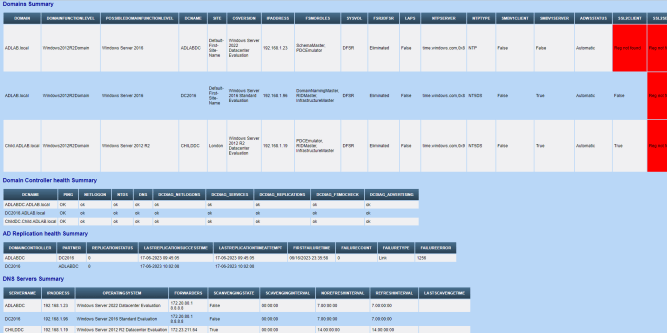
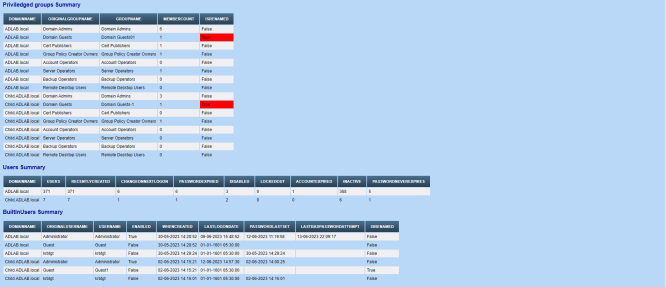
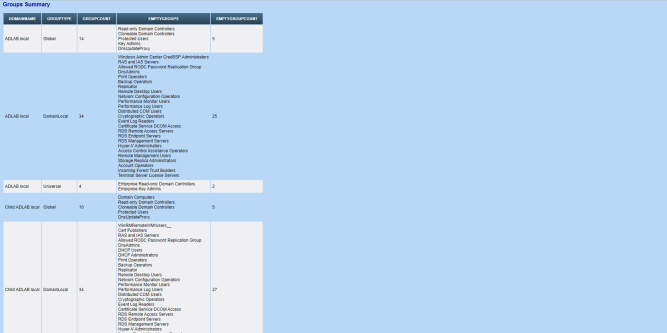
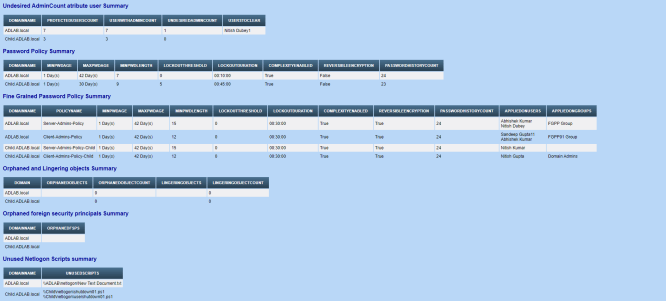
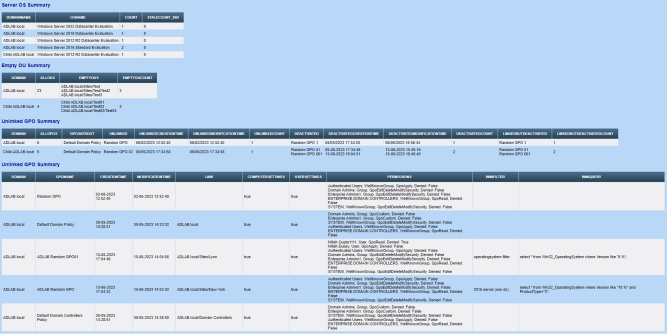
Here goes some screenshots from a sample report from my home Lab setup but actual output ofcourse would vary as per your environment. Small environments taking 6-10 mins while larger ones taking 30-40 mins. DFS inventory not there in screenshot but the same is also added




And here the complete script goes.
Any suggestions welcome
This file contains hidden or bidirectional Unicode text that may be interpreted or compiled differently than what appears below. To review, open the file in an editor that reveals hidden Unicode characters.
Learn more about bidirectional Unicode characters
| #Requires -Version 3.0 | |
| #Requires -Modules ActiveDirectory, GroupPolicy, DnsServer | |
| <# | |
| Author : Nitish Kumar | |
| Performs Active Directory Forest Assessment | |
| version 1.0 | 06/06/2023 Initial version | |
| version 1.1 | 15/06/2023 Covered most areas though error proofing and dependency over wsman still remains | |
| version 1.2 | 16/06/2023 Number of small fixes included wrong calulations on empty groups | |
| version 1.3 | 21/06/2023 PowerShell jobs for AD health checks and Domain Summary details, Also chosing least latency DC | |
| version 1.4 | 03/07/2023 PowerShell jobs for ADFS/ADSync search and DFS Inventory function added | |
| version 1.5 | 05/07/2023 Performance improvements in DFS inventory and added error details in DHCP inventory | |
| version 1.6 | 08/07/2023 Poential Service account inventory function added | |
| version 1.7 | 10/07/2023 PS jobs added for DNS related details | |
| The script is kept as much modular as possible so that functions can be modified or added without altering the entire script | |
| It should be run as administrator and preferably Enterprise Administrator to get complete data. Its advised to run in demonstration environment to be sure first | |
| Disclaimer: This script is designed to only read data from the domain and should not cause any problems or change configurations but author do not claim to be responsible for any issues. Do due dilligence before running in the production environment | |
| LIST OF FUNCTIONS | |
| 1. Write-Log # This function creates log entries for the major steps in the script. | |
| 2. Get-DFSInventory # This function creates DFS inventory for the given domain. | |
| 3. Get-ADTrustDetails # This function retrieves detailed information about trust relationships in the Active Directory domain, including trust type and direction. | |
| 4. Get-ADFSDetails # This function gathers information about Active Directory Federation Services (ADFS), including ADFS\ ADSync servers, certificates, and endpoints. | |
| 5. Get-PKIDetails # This function collects information about certificate authorities. | |
| 6. Get-ADDNSDetails # This function retrieves detailed information about the Active Directory DNS configuration. | |
| 7. Get-ADDNSZoneDetails # This function provides detailed information about Active Directory DNS zones, including zone properties, zone transfers, and DNS server settings. | |
| 8. Get-ADGroupMemberRecursive # This function recursively retrieves all members of an Active Directory group, including nested groups and their members. | |
| 9. Get-AdminCountDetails # This function identifies user accounts with the "AdminCount" attribute set, which can indicate privileged accounts and also which should not have admincount set. | |
| 10. Get-DHCPInventory # This function gathers information about DHCP servers in the Active Directory domain, including server configurations, scopes, and reservations. | |
| 11. Get-EmptyOUDetails # This function identifies empty Organizational Units (OUs) in the Active Directory domain. | |
| 12. Get-ADObjectsToClean # This function identifies Active Directory objects that can be cleaned up, such as orphaned and lingering objects from given domain. | |
| 13. Get-ADGPOSummary # This function summarizes Group Policy Objects (GPOs) in the Active Directory domain, including linked locations, and scope | |
| 14. Get-GPOInventory # This function provides an inventory of GPOs in the Active Directory domain, including their names, scope, wmi filters and applied locations. | |
| 15. Get-ADPasswordPolicy # This function retrieves the password policy settings configured in the Active Directory domain. | |
| 16. Get-FineGrainedPasswordPolicy # This function retrieves the settings of fine-grained password policies in the Active Directory domain. | |
| 17. Get-SMBv1Status # This function checks the status of SMBv1 (Server Message Block version 1) on the local or remote systems. | |
| 18. Get-ADDomainDetails # This function gathers detailed information about the Active Directory domain, including domain name, domain controllers, forest, and domain functional levels. | |
| 19. Get-ADSiteDetails # This function provides detailed information about Active Directory sites, including site names, subnet assignments, and site links. | |
| 20. Get-PrivGroupDetails # This function retrieves information about privileged groups in the Active Directory domain. | |
| 21. Get-ADGroupDetails # This function retrieves detailed information about Active Directory groups. | |
| 22. Get-ADUserDetails # This function gathers detailed information about Active Directory user accounts, including user properties and account status. | |
| 23. Get-BuiltInUserDetails # This function retrieves information about built-in user accounts in the Active Directory domain. | |
| 24. Get-OrphanedFSP # This function identifies Orphaned Foreign Security Principals for the given domain, be cautious as domain connectivity issues can flag false positive. | |
| 25. Get-DomainServerDetails # This function gathers detailed information about servers in the Active Directory domain, including computer properties, operating system details, and stale info. | |
| 26. Get-DomainClientDetails # This function gathers detailed information about client computers in the Active Directory domain, including computer properties, operating system details, and stale info. | |
| 27. Start-SecurityCheck # The function performs various checks and assessments to identify unsecured configurations, potential security risks, and other security-related aspects. | |
| 28. Get-UnusedNetlogonScripts # This function identifies unused Netlogon scripts in the Active Directory domain. | |
| 29. Get-PotentialSvcAccount # This function identifies potential service accounts in the given domain | |
| 30. Get-SysvolNetlogonPermissions # This function retrieves the permissions set on the SYSVOL and NETLOGON shares in the Active Directory domain. | |
| 31. Get-SystemInfo # This function collects detailed system information from client computers in the Active Directory domain, including hardware, software, and network configuration. | |
| 32. New-Email # This function generates an email message. | |
| 33. New-BaloonNotification # This function creates a balloon notification to display on client computers. | |
| 34. Test-ADHealth # This function performs a health check of the Active Directory environment, including checks for replication, DNS, AD trust, and other common issues. | |
| 35. Get-ADReplicationHealth # This function checks the replication health of domain controllers in the Active Directory domain. | |
| 36. Get-ADForestDetails # This function retrieves detailed information about the Active Directory forest using the earlier defined functions and generates the html report. | |
| #> | |
| <# | |
| .SYNOPSIS | |
| Start-ADAssessment.ps1 – Perform Active Directory assessment and generate a report. | |
| .DESCRIPTION | |
| This script performs an assessment of Active Directory (AD) environment and generates a report with information | |
| about domain controllers, replication status, DNS configuration, group policies, and more. | |
| .NOTES | |
| – This script requires elevated privileges and should be run as an administrator. | |
| – Ensure that the required PowerShell modules and dependencies are installed (e.g., RSAT tools). | |
| .EXAMPLE | |
| Running the script would present a menu and would pick current forest or domain accordingly. | |
| – Performs an assessment of the "example.com" domain and generates the report at the specified path. | |
| #> | |
| Import-Module ActiveDirectory | |
| Import-Module GroupPolicy | |
| Import-Module DnsServer | |
| if (Get-Module -ListAvailable -Name DHCPServer) { | |
| Import-Module DHCPServer | |
| $DHCPFlag = $true | |
| } | |
| else { | |
| $DHCPFlag = $false | |
| } | |
| if ((Get-Module -ListAvailable -Name DFSN) -AND (Get-Module -ListAvailable -Name DFSR)) { | |
| Import-Module DFSN | |
| Import-Module DFSR | |
| $DFSFlag = $true | |
| } | |
| else { | |
| $DFSFlag = $false | |
| } | |
| # Output formating options | |
| #$logopath = "https://camo.githubusercontent.com/239d9de795c471d44ad89783ec7dc03a76f5c0d60d00e457c181b6e95c6950b6/68747470733a2f2f6e69746973686b756d61722e66696c65732e776f726470726573732e636f6d2f323032322f31302f63726f707065642d696d675f32303232303732335f3039343534372d72656d6f766562672d707265766965772e706e67" | |
| $logopath = "" | |
| $ReportPath1 = "$env:USERPROFILE\desktop\ADReport_$(get-date -Uformat "%Y%m%d-%H%M%S").html" | |
| #$CopyRightInfo = " @Copyright Nitish Kumar <a href='https://github.com/laymanstake'>Visit nitishkumar.net</a>" | |
| $CopyRightInfo = "" | |
| [bool]$forestcheck = $false | |
| $logpath = "$env:USERPROFILE\desktop\ADReport_$(get-date -Uformat "%Y%m%d-%H%M%S").txt" | |
| # CSS codes to format the report | |
| $header = @" | |
| <style> | |
| body { background-color: #b9d7f7; } | |
| h1 { font-family: Arial, Helvetica, sans-serif; color: #e68a00; font-size: 28px; } | |
| h2 { font-family: Arial, Helvetica, sans-serif; color: #000099; font-size: 16px; } | |
| table { font-size: 12px; border: 1px; font-family: Arial, Helvetica, sans-serif; } | |
| td { padding: 4px; margin: 0px; border: 1; } | |
| th { background: #395870; background: linear-gradient(#49708f, #293f50); color: #fff; font-size: 11px; text-transform: uppercase; padding: 10px 15px; vertical-align: middle; } | |
| tbody tr:nth-child(even) { background: #f0f0f2; } | |
| CreationDate { font-family: Arial, Helvetica, sans-serif; color: #ff3300; font-size: 12px; } | |
| </style> | |
| "@ | |
| If ($logopath) { | |
| $header = $header + "<img src=$logopath alt='Company logo' width='150' height='150' align='right'>" | |
| } | |
| # Number of functions to get the details of the environment | |
| # This function creates log entries for the major steps in the script. | |
| function Write-Log { | |
| [CmdletBinding()] | |
| Param( | |
| [Parameter(ValueFromPipeline = $true, mandatory = $true)]$logtext, | |
| [Parameter(ValueFromPipeline = $true, mandatory = $true)]$logpath | |
| ) | |
| $Stamp = (Get-Date).toString("yyyy/MM/dd HH:mm:ss") | |
| $LogMessage = "$Stamp : $logtext" | |
| $isWritten = $false | |
| do { | |
| try { | |
| Add-content $logpath -value $LogMessage -Force -ErrorAction SilentlyContinue | |
| $isWritten = $true | |
| } | |
| catch { | |
| } | |
| } until ( $isWritten ) | |
| } | |
| # This function creates DFS inventory for the given domain. | |
| function Get-DFSInventory { | |
| param ( | |
| [Parameter(ValueFromPipeline = $true, mandatory = $true)]$DomainName, | |
| [Parameter(ValueFromPipeline = $true, mandatory = $true)][pscredential]$Credential | |
| ) | |
| $PDC = (Test-Connection -Computername (Get-ADDomainController -Filter * -Server $DomainName -Credential $Credential).Hostname -count 1 -AsJob | Get-Job | Receive-Job -Wait | Where-Object { $null -ne $_.Responsetime } | sort-object Responsetime | select-Object Address -first 1).Address | |
| $null = Get-Job | Remove-Job | |
| $ReplicatedFolders = Get-DfsReplicatedFolder -DomainName $DomainName -ErrorAction SilentlyContinue | Select-Object DFSNPath, GroupName -Unique | |
| $HoursReplicated = Get-DfsrGroupSchedule -DomainName $DomainName -ErrorAction SilentlyContinue | Select-Object GroupName, HoursReplicated | |
| $Members = Get-DfsrMembership -DomainName $Domainname -ErrorAction SilentlyContinue | Select-Object GroupName, ReadOnly, RemoveDeletedFiles, Enabled, State | |
| $infoObject = @() | |
| $DFSDetails = @() | |
| $maxParallelJobs = 50 | |
| $jobs = @() | |
| $Namespaces = Get-ADObject -Filter "Objectclass -eq 'msDFS-LinkV2'" -Server $PDC -Credential $Credential -Properties "msDFS-LinkPAthv2", CanonicalName | Select-Object @{l = "DFSNRoot"; e = { "\\" + ($_.CanonicalName.split("/\"))[0] + "\" + ($_.CanonicalName.split("/\"))[3] } }, @{l = "NameSpacePath"; e = { "\\" + ($_.CanonicalName.split("/\"))[0] + "\" + ($_.CanonicalName.split("/\"))[3] + $_.("MSDFS-LinkPATHV2").Replace("/", "\") } } | |
| Write-Log -logtext "$($Namespaces.count) DFS shares found in $DomainName. Looking into further details" -logpath $logpath | |
| if ($Namespaces) { | |
| $Namespaces | ForEach-Object { | |
| while ((Get-Job -State Running).Count -ge $maxParallelJobs) { | |
| Start-Sleep -Milliseconds 500 # Wait for 0.5 seconds before checking again | |
| } | |
| $ScriptBlock = { | |
| param($namespace, $DomainName, $ReplicatedFolders, $HoursReplicated, $Members) | |
| $namespacePath = $Namespace.Namespacepath | |
| try { | |
| $Shares = Get-DFSNFolderTarget -Path $namespacePath -ErrorAction SilentlyContinue | |
| } | |
| catch { | |
| $Shares = $null | |
| } | |
| If ($Shares) { | |
| $ShareNames = ($Shares | Select-Object TargetPath).TargetPath | |
| $ContentPath = @() | |
| $ContentPath += $ShareNames | ForEach-Object { | |
| $Share = $_ | |
| $ShareName = ($Share.Split('\\') | select-Object -Last 1) | |
| $ServerName = ($Share.split("\\")[2]) | |
| If (-Not($ServerName -match "[.]")) { | |
| $ServerName = $ServerName + "." + $DomainName | |
| } | |
| if (Test-Connection -ComputerName $ServerName -count 1 -Quiet ) { | |
| try { | |
| $Path = Get-WmiObject Win32_Share -filter "Name LIKE '$Sharename'" -ComputerName $ServerName -ErrorAction SilentlyContinue | |
| } | |
| catch { | |
| Write-Output $_.Exception.Message | |
| } | |
| } | |
| if ($Path) { | |
| "$($ServerName)::$($Path.Path)" | |
| } | |
| else { | |
| "$($ServerName) not reachable" | |
| } | |
| } | |
| $RGGroup = ($ReplicatedFolders | Where-Object { $_.DFSNPath -eq $namespacePath -AND $_.DFSNPath -ne "" }).Groupname | |
| if ($RGGroup) { | |
| $RGHoursReplicated = ($HoursReplicated | Where-Object { $_.GroupName -eq $RGGroup } | Select-Object HoursReplicated).HoursReplicated | |
| $RGMembers = $Members | Where-Object { $_.GroupName -eq $RGGroup } | Select-Object ReadOnly, RemoveDeletedFiles, Enabled, State | |
| } | |
| else { | |
| $RGGroup = "No replication group found" | |
| $RGHoursReplicated = "NA" | |
| $RGMembers = "NA" | |
| } | |
| $NamespaceDetails = [PSCustomObject]@{ | |
| DFSNRoot = $namespace.DFSNRoot | |
| NamespacePath = $NameSpacePath | |
| RGGroup = $RGGroup | |
| ShareNames = $ShareNames | |
| ContentPath = $ContentPath | |
| RGMembers = $RGMembers | |
| RGHoursReplicated = $RGHoursReplicated | |
| } | |
| Return $NamespaceDetails | |
| } | |
| } | |
| $jobs += Start-Job -ScriptBlock $scriptBlock -ArgumentList $_ , $DomainName, $ReplicatedFolders, $HoursReplicated, $Members | |
| } | |
| Write-Log -logtext "Powershell jobs submitted for looking into $($Namespaces.count) DFS shares details in $DomainName" -logpath $logpath | |
| $null = $jobs | Wait-Job | |
| $result = @() | |
| foreach ($job in $jobs) { | |
| $result += Receive-Job -Job $job | |
| } | |
| $null = Get-Job | remove-Job | |
| Write-Log -logtext "Powershell jobs completed for $($Namespaces.count) DFS shares details in $DomainName" -logpath $logpath | |
| ForEach ($res in $result) { | |
| $infoObject += [PSCustomObject]@{ | |
| DFSNRoot = $res.DFSNRoot | |
| NamespacePath = $res.NameSpacePath | |
| ReplicationGroupName = $res.RGGroup | |
| ShareNames = $res.ShareNames -join "`n" | |
| ContentPath = $res.ContentPath -join "`n" | |
| ReadOnly = $res.RGMembers.readOnly -join "`n" | |
| RemoveDeletedFiles = $res.RGMembers.RemoveDeletedFiles -join "`n" | |
| Enabled = $res.RGMembers.Enabled -join "`n" | |
| HoursReplicated = $res.RGHoursReplicated | |
| State = $res.RGMembers.State -join "`n" | |
| } | |
| } | |
| } | |
| $RGGroupDetails = Get-DfsrMembership -DomainName $DomainName | Select-Object GroupName, Computername, FolderName, ContentPath, ReadOnly, State | |
| $DFSDetails += [PSCustomObject]@{ | |
| NameSpace = $infoObject | |
| ReplicationGroup = $RGGroupDetails | |
| } | |
| Return $DFSDetails | |
| } | |
| # This function retrieves detailed information about trust relationships in the Active Directory domain, including trust type and direction. | |
| Function Get-ADTrustDetails { | |
| [CmdletBinding()] | |
| Param( | |
| [Parameter(ValueFromPipeline = $true, mandatory = $true)]$DomainName, | |
| [Parameter(ValueFromPipeline = $true, mandatory = $true)][pscredential]$Credential | |
| ) | |
| if ($Credential) { | |
| try { | |
| $trusts = Get-ADTrust -Filter * -Server $DomainName -Credential $Credential -Properties Created, Modified, ForestTransitive | Select-Object Name, Source, Target, Created, Modified, Direction, TrustType, Intraforest, ForestTransitive | |
| } | |
| catch { | |
| Write-Log -logtext "Could get trust details with credntials: $($_.Exception.Message)" -logpath $logpath | |
| } | |
| } | |
| else { | |
| try { | |
| $trusts = Get-ADTrust -Filter * -Server $DomainName -Properties Created, Modified, ForestTransitive | Select-Object Name, Source, Target, Created, Modified, Direction, TrustType, Intraforest, ForestTransitive | |
| } | |
| catch { | |
| Write-Log -logtext "Could get trust details without credentials: $($_.Exception.Message)" -logpath $logpath | |
| } | |
| } | |
| $TrustDetails = @() | |
| ForEach ($trust in $trusts) { | |
| $stale = $false | |
| if ($trust.TrustType -eq "External" -and $trust.Direction -eq "Bidirectional") { | |
| try { | |
| if ($Credential) { | |
| $null = Get-ADDomain -Identity $trust.Target -Server $trust.Target -Credential $Credential -ErrorAction SilentlyContinue | |
| } | |
| else { | |
| $null = Get-ADDomain -Identity $trust.Target -Server $trust.Target -ErrorAction SilentlyContinue | |
| } | |
| } | |
| catch { | |
| $stale = $true | |
| } | |
| } | |
| $TrustDetails += [PSCustomObject]@{ | |
| TrustName = $trust.Name | |
| CreationDate = $trust.Created | |
| ModificationDate = $trust.Modified | |
| TrustSource = $trust.Source | |
| TrustTarget = $trust.Target | |
| TrustDirection = $trust.Direction | |
| TrustType = $trust.TrustType | |
| Intraforest = $trust.Intraforest | |
| Foresttransitive = $trust.ForestTransitive | |
| Stale = $stale | |
| } | |
| } | |
| Return $TrustDetails | |
| } | |
| # This function gathers information about Active Directory Federation Services (ADFS), including ADFS\ ADSync servers, certificates, and endpoints. | |
| Function Get-ADFSDetails { | |
| [CmdletBinding()] | |
| Param( | |
| [Parameter(ValueFromPipeline = $true, mandatory = $true)]$DomainName, | |
| [Parameter(ValueFromPipeline = $true, mandatory = $true)][pscredential]$Credential | |
| ) | |
| $maxParallelJobs = 50 | |
| $adfsServers = @() | |
| $aadconnectServers = @() | |
| $ADFSServerDetails = @() | |
| $AADCServerDetails = @() | |
| $InstallPath = $null | |
| $PDC = (Test-Connection -Computername (Get-ADDomainController -Filter * -Server $DomainName -Credential $Credential).Hostname -count 1 -AsJob | Get-Job | Receive-Job -Wait | Where-Object { $null -ne $_.Responsetime } | sort-object Responsetime | select-Object Address -first 1).Address | |
| $null = Get-Job | Remove-Job | |
| $jobs = @() | |
| # Filtering out disabled computers or stale computers | |
| Get-ADComputer -Filter { Enabled -eq $True -and OperatingSystem -like "*Server*" } -Server $DomainName -Properties OperatingSystem, LastLogonDate | Where-Object { $_.LastLogonDate -gt (Get-Date).AddDays(-30) } | | |
| ForEach-Object { | |
| while ((Get-Job -State Running).Count -ge $maxParallelJobs) { | |
| Start-Sleep -Milliseconds 50 # Wait for 0.05 seconds before checking again | |
| } | |
| $ScriptBlock = { | |
| param($computer) | |
| try { | |
| $service = ((Get-Service -ComputerName $computer -Name adfssrv -ErrorAction SilentlyContinue).Name , (Get-Service -ComputerName $computer -Name adsync -ErrorAction SilentlyContinue).Name ) | |
| } | |
| catch { | |
| Write-Output "Could get Service details from $computer : $($_.Exception.Message)" | |
| } | |
| if ($service) { | |
| if ($service[0] -eq "adfssrv") { | |
| $adfs = $computer | |
| } | |
| if ($service[1] -eq "adsync" ) { | |
| $aad = $computer | |
| } | |
| } | |
| Return $adfs, $aad | |
| } | |
| if (Test-Connection -ComputerName $_.Name -count 1 -Quiet ) { | |
| $jobs += Start-Job -ScriptBlock $scriptBlock -ArgumentList $_.Name | |
| } | |
| } | |
| $null = Wait-Job -Job $jobs | |
| foreach ($job in $jobs) { | |
| $result = Receive-Job -Job $job | |
| $null = Remove-Job -Job $job | |
| if ($result[0]) { | |
| $adfsServers += $result[0] | |
| } | |
| if ($result[1]) { | |
| $aadconnectservers += $result[1] | |
| } | |
| } | |
| foreach ($server in $adfsServers) { | |
| try { | |
| if (Test-WSMan -ComputerName $server -ErrorAction SilentlyContinue) { | |
| $ADFSproperties = invoke-command -ComputerName $server -ScriptBlock { import-module ADFS; Get-ADFSSyncProperties; (Get-ADFSProperties).Identifier; (Get-AdfsCertificate | Select-Object @{l = "certificate"; e = { "$($_.certificateType), $($_.Certificate.NotAfter), $($_.thumbprint)" } }).certificate } -Credential $Credential | |
| } | |
| } | |
| catch { | |
| Write-Log -logtext "ADFS Server – PS remoting NOT supported on $server : $($_.Exception.Message)" -logpath $logpath | |
| } | |
| if ($ADFSproperties) { | |
| if (($ADFSproperties[0]).Role -eq "PrimaryComputer") { | |
| $isMaster = $true | |
| } | |
| else { | |
| $isMaster = $false | |
| } | |
| $serverInfo = [PSCustomObject]@{ | |
| ServerName = $server | |
| OperatingSystem = (Get-ADComputer $server -server $PDC -Credential $Credential -properties OperatingSystem).OperatingSystem | |
| IsMaster = $isMaster | |
| ADFSName = $ADFSproperties[1] | |
| Certificate = ($ADFSproperties[2], $ADFSproperties[3], $ADFSproperties[4]) -join "`n" | |
| } | |
| $ADFSServerDetails += $serverInfo | |
| } | |
| } | |
| foreach ($server in $aadconnectServers) { | |
| try { | |
| $InstallPath = ((([Microsoft.Win32.RegistryKey]::OpenRemoteBaseKey('LocalMachine', $server)).OpenSubKey('SOFTWARE\Microsoft\Azure AD Connect')).GetValue('Wizardpath')) -replace "\\", "\\" | |
| $null = ([Microsoft.Win32.RegistryKey]::OpenRemoteBaseKey('LocalMachine', $server)).Close(); | |
| } | |
| catch { | |
| Write-Log -logtext "ADSync Server – Could not open remote regitry on $server : $($_.Exception.Message)" -logpath $logpath | |
| } | |
| if ($InstallPath) { | |
| if (Test-WSMan -ComputerName $server -ErrorAction SilentlyContinue) { | |
| try { | |
| $ADSyncVersion = (Get-CimInstance -ClassName Cim_DataFile -ComputerName $server -Filter "Name='$InstallPath'" -ErrorAction SilentlyContinue).Version | |
| if (!$ADSyncVersion) { throw } | |
| } | |
| catch { | |
| Write-Log -logtext "ADSync Server – Could not read ADSync version on $server : $($_.Exception.Message)" -logpath $logpath | |
| } | |
| } | |
| else { | |
| $ADSyncVersion = "Access denied" | |
| Write-Log -logtext "ADSync Server – PS remoting NOT supported on $server : $($_.Exception.Message)" -logpath $logpath | |
| } | |
| Try { | |
| $ConnectorName = invoke-command -ComputerName $server -ScriptBlock { (Get-ADSyncConnector).Name[0] } -ErrorAction SilentlyContinue | |
| } | |
| catch { | |
| Write-Log -logtext "ADSync Server – Could not read ADSync Connector on $server : $($_.Exception.Message)" -logpath $logpath | |
| } | |
| $Info = [PSCustomObject]@{ | |
| ServerName = $server | |
| OperatingSystem = (Get-ADComputer $server -server $PDC -Credential $Credential -properties OperatingSystem).OperatingSystem | |
| ADSyncVersion = $ADSyncVersion | |
| Connection = $ConnectorName | |
| IsActive = (Get-Service -ComputerName $Server -Name ADSync -ErrorAction SilentlyContinue).Status -eq "Running" | |
| } | |
| $AADCServerDetails += $Info | |
| } | |
| else { | |
| $Info = [PSCustomObject]@{ | |
| ServerName = $server | |
| OperatingSystem = (Get-ADComputer $server -server $PDC -Credential $Credential -properties OperatingSystem).OperatingSystem | |
| ADSyncVersion = $ADSyncVersion | |
| Connection = $ConnectorName | |
| IsActive = (Get-Service -ComputerName $Server -Name ADSync -ErrorAction SilentlyContinue).Status -eq "Running" | |
| } | |
| } | |
| } | |
| return $AADCServerDetails, $ADFSServerDetails | |
| } | |
| # This function collects information about certificate authorities. | |
| Function Get-PKIDetails { | |
| [CmdletBinding()] | |
| Param( | |
| [Parameter(ValueFromPipeline = $true, mandatory = $true)]$ForestName, | |
| [Parameter(ValueFromPipeline = $true, mandatory = $true)][pscredential]$Credential | |
| ) | |
| $PKIDetails = New-Object psobject | |
| $PDC = (Test-Connection -Computername (Get-ADDomainController -Filter * -Server $ForestName -Credential $Credential).Hostname -count 1 -AsJob | Get-Job | Receive-Job -Wait | Where-Object { $null -ne $_.Responsetime } | sort-object Responsetime | select-Object Address -first 1).Address | |
| $null = Get-Job | Remove-Job | |
| $PKI = Get-ADObject -Filter { objectClass -eq "pKIEnrollmentService" } -Server $PDC -Credential $Credential -SearchBase "CN=Enrollment Services,CN=Public Key Services,CN=Services,$((Get-ADRootDSE).ConfigurationNamingContext)" -Properties DisplayName, DnsHostName | Select-Object DisplayName, DnsHostName, @{l = "OperatingSystem"; e = { (Get-ADComputer ($_.DNShostname -replace ".$ForestName") -Properties OperatingSystem -server $PDC -Credential $Credential).OperatingSystem } }, @{l = "IPv4Address"; e = { ([System.Net.Dns]::GetHostAddresses($_.DnsHostName) | Where-Object { $_.AddressFamily -eq "InterNetwork" }).IPAddressToString -join "`n" } } | |
| If ($PKI) { | |
| $PKIDetails = $PKI | |
| try { | |
| if ( Test-WSMan -ComputerName $PKI.DnsHostName -ErrorAction SilentlyContinue) { | |
| # Find the name of the CA on the domain joined enterprised CA | |
| $RemoteReg = [Microsoft.Win32.RegistryKey]::OpenRemoteBaseKey('LocalMachine', $PKI.DnsHostName) | |
| $key = $remotereg.OpenSubkey("SYSTEM\CurrentControlSet\Services\CertSvc\Configuration") | |
| $CertAuthorityName = $key.GetSubkeyNames() # Name of the CA, not hostname | |
| # Find the certificate of the particular CA authority name and then find out, who issued certificate and then ensure it's not some cert which has been renewed | |
| $CADetails = invoke-command -ComputerName $PKI.DnsHostName -Credential $Credential -ScriptBlock { | |
| $RootCa = ((Get-ChildItem -Path cert:\LocalMachine\CA | Where-Object { ($_.Subject -split "=" -split ",")[1] -eq $using:CertAuthorityName }).Issuer -split "=" -split "," )[1] | |
| $ActiveRootCACert = (Get-ChildItem -Path cert:\LocalMachine\CA | Where-Object { ($_.Issuer -split "=" -split ",")[1] -eq $RootCa -AND ($_.Subject -split "=" -split ",")[1] -eq $RootCa } ) | Where-Object { $_.Extensions.oid.friendlyName -notcontains "Previous ca certificate hash" } | Sort-Object -Unique | |
| $CertSummary = certutil -view -out "Issued Request ID,Requester Name,Request Type,Issued Common Name,Certificate Template,Public Key Length,Certificate Effective Date,Certificate Expiration Date" csv | ConvertFrom-Csv | |
| $rootCa | |
| $ActiveRootCACert.SignatureAlgorithm.Friendlyname -join "," | |
| ($CertSummary | Group-Object "Certificate Template" | Select-Object @{l = "TemplateSummary"; e = { "$($_.Name) – $($_.Count)" } }).TemplateSummary -join "`n" | |
| } | |
| Add-Member -inputObject $PKIDetails -memberType NoteProperty -name "SecureHashAlgo" -value $CADetails[1] | |
| Add-Member -inputObject $PKIDetails -memberType NoteProperty -name "StandAloneCA" -value $CADetails[0] | |
| Add-Member -inputObject $PKIDetails -memberType NoteProperty -name "IssedCertSummary" -value $CADetails[2] | |
| $null = $RemoteReg.close() | |
| } | |
| } | |
| catch { | |
| Write-Log -logtext "PKI Server – WinRM access denied, can't obtain SHA information from $server : $($_.Exception.Message)" -logpath $logpath | |
| Add-Member -inputObject $PKIDetails -memberType NoteProperty -name "SecureHashAlgo" -value "UNKNOWN" | |
| Add-Member -inputObject $PKIDetails -memberType NoteProperty -name "StandAloneCA" -value "UNKNOWN" | |
| } | |
| } | |
| Return $PKIDetails | |
| } | |
| # This function retrieves detailed information about the Active Directory DNS configuration. | |
| Function Get-ADDNSDetails { | |
| [CmdletBinding()] | |
| Param( | |
| [Parameter(ValueFromPipeline = $true, mandatory = $true)]$DomainName, | |
| [Parameter(ValueFromPipeline = $true, mandatory = $true)][pscredential]$Credential | |
| ) | |
| $DNSServerDetails = @() | |
| $jobs = @() | |
| $maxParallelJobs = 50 | |
| $scriptBlock1 = ${function:Write-log} | |
| $initScript = [scriptblock]::Create(@" | |
| function Write-log {$scriptBlock1} | |
| "@) | |
| $PDC = (Test-Connection -Computername (Get-ADDomainController -Filter * -Server $DomainName -Credential $Credential).Hostname -count 1 -AsJob | Get-Job | Receive-Job -Wait | Where-Object { $null -ne $_.Responsetime } | sort-object Responsetime | select-Object Address -first 1).Address | |
| $null = Get-Job | Remove-Job | |
| try { | |
| $DNSServers = Resolve-DnsName -Name $DomainName -Type NS -Server $PDC | Where-Object { $_.Type -eq "NS" } | Select-Object @{l = "Name"; e = { $_.Server } }, @{l = "IPv4Address"; e = { (Resolve-DnsName -Name $_.Server -Server $PDC).IPAddress } } | |
| } | |
| catch { | |
| Write-Log -logtext "Failed to get DNS servers list as one or more DC denied service details access : $($_.Exception.Message)" -logpath $logpath | |
| } | |
| ForEach ($DNSServer in $DNSServers) { | |
| while ((Get-Job -State Running).Count -ge $maxParallelJobs) { | |
| Start-Sleep -Milliseconds 50 # Wait for 0.05 seconds before checking again | |
| } | |
| $ScriptBlock = { | |
| param ($DNSServer, $PDC, $DomainName, [pscredential]$Credential, $logpath) | |
| try { | |
| $Scavenging = Get-DnsServerScavenging -ComputerName $DNSServer.Name -ErrorAction SilentlyContinue | |
| $LastScavengeTime = $Scavenging.LastScavengeTime | |
| if ($LastScavengeTime) { | |
| $ScanvengingState = $true # This is a workaround since for corner cases, scanvenging would not be enabled for server but specific zones only and tedius to show that in summary table | |
| } | |
| else { | |
| $ScanvengingState = $false | |
| $LastScavengeTime = "" | |
| } | |
| } | |
| catch { | |
| Write-Log -logtext "Could not get DNS Scanvenging information from DNS Server $($DNSServer.Name) : $($_.Exception.Message)" -logpath $logpath | |
| } | |
| try { | |
| $Forwarders = (Get-DnsServerForwarder -ComputerName $DNSServer.Name -ErrorAction SilentlyContinue).IPAddress | |
| } | |
| catch { | |
| Write-Log -logtext "Could not get DNS Forwarder info from DNS Server $($DNSServer.Name) : $($_.Exception.Message)" -logpath $logpath | |
| } | |
| try { | |
| $OS = (Get-ADComputer $DNSServer.Name.split(".")[0] -Properties OperatingSystem -Server $PDC -Credential $Credential).OperatingSystem | |
| } | |
| catch { | |
| $OS = "Access denied" | |
| Write-Log -logtext "Could not get Operating System info from DNS Server $($DNSServer.Name) : $($_.Exception.Message)" -logpath $logpath | |
| } | |
| $Info = [PSCustomObject]@{ | |
| DomainName = $DomainName | |
| ServerName = $DNSServer.Name | |
| IPAddress = $DNSServer.IPv4Address | |
| OperatingSystem = $OS | |
| Forwarders = $Forwarders -join "`n" | |
| ScanvengingState = $ScanvengingState | |
| LastScavengeTime = $LastScavengeTime | |
| } | |
| return $Info | |
| } | |
| $jobs += Start-Job -ScriptBlock $scriptBlock -ArgumentList $DNSServer, $PDC, $DomainName, $Credential, $logpath -InitializationScript $initscript | |
| } | |
| Write-Log -logtext "Powershell jobs submitted for looking into $($DNSServers.count) DNS Server details in $DomainName" -logpath $logpath | |
| $null = $jobs | Wait-Job | |
| foreach ($job in $jobs) { | |
| $DNSServerDetails += Receive-Job -Job $job | Select-Object DomainName, ServerName, IPAddress, OperatingSystem, Forwarders, ScanvengingState, LastScavengeTime | |
| } | |
| $null = Get-Job | remove-Job | |
| Write-Log -logtext "Powershell jobs completed for $($DNSServers.count) DNS Server details in $DomainName" -logpath $logpath | |
| return $DNSServerDetails | |
| } | |
| # This function provides detailed information about Active Directory DNS zones, including zone properties, zone transfers, and DNS server settings. | |
| Function Get-ADDNSZoneDetails { | |
| [CmdletBinding()] | |
| Param( | |
| [Parameter(ValueFromPipeline = $true, mandatory = $true)]$DomainName, | |
| [Parameter(ValueFromPipeline = $true, mandatory = $true)][pscredential]$Credential | |
| ) | |
| $DNSServerZoneDetails = @() | |
| $jobs = @() | |
| $maxParallelJobs = 50 | |
| $scriptBlock1 = ${function:Write-log} | |
| $initScript = [scriptblock]::Create(@" | |
| function Write-log {$scriptBlock1} | |
| "@) | |
| $PDC = (Test-Connection -Computername (Get-ADDomainController -Filter * -Server $DomainName -Credential $Credential).Hostname -count 1 -AsJob | Get-Job | Receive-Job -Wait | Where-Object { $null -ne $_.Responsetime } | sort-object Responsetime | select-Object Address -first 1).Address | |
| $null = Get-Job | Remove-Job | |
| $DNSZones = Get-DnsServerZone -ComputerName $PDC | Where-Object { -Not $_.IsReverseLookupZone } | Select-Object DistinguishedName, ZoneName, ZoneType, IsReadOnly, DynamicUpdate, IsSigned, IsWINSEnabled, ReplicationScope, MasterServers, SecureSecondaries, SecondaryServers | |
| ForEach ($DNSZone in $DNSZones) { | |
| while ((Get-Job -State Running).Count -ge $maxParallelJobs) { | |
| Start-Sleep -Milliseconds 50 # Wait for 0.05 seconds before checking again | |
| } | |
| $ScriptBlock = { | |
| param ($DNSZone, $PDC, $DomainName, [pscredential]$Credential, $logpath) | |
| If (($DNSZone.DistinguishedName) -AND $DNSZone.ZoneType -ne "Forwarder") { | |
| try { | |
| $Info = Get-ADObject -Identity $DNSZone.DistinguishedName -Server $PDC -Credential $Credential -Properties ProtectedFromAccidentalDeletion, Created | |
| $message = "Working on DNS zone $($DNSZone.ZoneName) details from $PDC for domain: $DomainName." | |
| Write-Log -logtext $message -logpath $logpath | |
| } | |
| catch { | |
| $message = "Could not get DNS zone $($DNSZone.ZoneName) details from $PDC for domain: $DomainName : $($_.Exception.Message)." | |
| Write-Log -logtext $message -logpath $logpath | |
| $Info = [PSCustomObject]@{ | |
| ProtectedFromAccidentalDeletion = $false | |
| Created = "" | |
| } | |
| } | |
| try { | |
| $Aging = Get-DnsServerZoneAging -ZoneName $DNSZone.ZoneName -ComputerName $PDC -ErrorAction SilentlyContinue | |
| $ScanvengingState = $Aging.AgingEnabled | |
| $RefreshInterval = $Aging.RefreshInterval | |
| $NoRefreshInterval = $Aging.NoRefreshInterval | |
| } | |
| catch { | |
| $ScanvengingState = "Unknown" | |
| $RefreshInterval = "Unknown" | |
| $NoRefreshInterval = "Unknown" | |
| Write-Log -logtext "DNS Zone $($DNSZone.ZoneName) aging info not completed from $PDC : $($_.Exception.Message)" -logpath $logpath | |
| } | |
| } | |
| Else { | |
| $Info = [PSCustomObject]@{ | |
| ProtectedFromAccidentalDeletion = $false | |
| Created = "" | |
| } | |
| $ScanvengingState = "" | |
| $RefreshInterval = "" | |
| $NoRefreshInterval = "" | |
| } | |
| $ZoneInfo = New-Object PSObject | |
| $ZoneInfo = $DNSZone | |
| Add-Member -inputObject $ZoneInfo -memberType NoteProperty -name DNSServer -value $PDC | |
| Add-Member -inputObject $ZoneInfo -memberType NoteProperty -name ProtectedFromDeletion -value $Info.ProtectedFromAccidentalDeletion | |
| Add-Member -inputObject $ZoneInfo -memberType NoteProperty -name Created -value $Info.Created | |
| Add-Member -inputObject $ZoneInfo -memberType NoteProperty -name ScanvengingState -value $ScanvengingState | |
| Add-Member -inputObject $ZoneInfo -memberType NoteProperty -name RefreshInterval -value $RefreshInterval | |
| Add-Member -inputObject $ZoneInfo -memberType NoteProperty -name NoRefreshInterval -value $NoRefreshInterval | |
| return $ZoneInfo | |
| } | |
| $jobs += Start-Job -ScriptBlock $scriptBlock -ArgumentList $DNSZone, $PDC, $DomainName, $Credential, $logpath -InitializationScript $initscript | |
| } | |
| Write-Log -logtext "Powershell jobs submitted for looking into $($DNSZones.count) DNS Zones details in $DomainName" -logpath $logpath | |
| $null = $jobs | Wait-Job | |
| foreach ($job in $jobs) { | |
| $DNSServerZoneDetails += Receive-Job -Job $job | |
| } | |
| $null = Get-Job | remove-Job | |
| $DNSServerZoneDetails = $DNSServerZoneDetails | Select-Object DNSServer, ZoneName, ProtectedFromDeletion, Created, ScanvengingState, RefreshInterval, NoRefreshInterval, ZoneType, IsReadOnly, DynamicUpdate, IsSigned, IsWINSEnabled, ReplicationScope, @{l = "MasterServers"; e = { $_.MasterServers -join "`n" } } , SecureSecondaries, @{l = "SecondaryServers"; e = { $_.SecondaryServers -join "`n" } } | |
| Write-Log -logtext "Powershell jobs completed for $($DNSZones.count) DNS Zones details in $DomainName" -logpath $logpath | |
| return $DNSServerZoneDetails | |
| } | |
| # This function recursively retrieves all members of an Active Directory group, including nested groups and their members. | |
| Function Get-ADGroupMemberRecursive { | |
| [CmdletBinding()] | |
| Param( | |
| [Parameter(ValueFromPipeline = $true, mandatory = $true)]$DomainName, | |
| [Parameter(ValueFromPipeline = $true, mandatory = $true)]$GroupName, | |
| [Parameter(ValueFromPipeline = $true, mandatory = $true)][pscredential]$Credential | |
| ) | |
| $Domain = (Get-ADDomain -Identity $DomainName -Credential $Credential) | |
| $PDC = (Test-Connection -Computername (Get-ADDomainController -Filter * -Server $DomainName -Credential $Credential).Hostname -count 1 -AsJob | Get-Job | Receive-Job -Wait | Where-Object { $null -ne $_.Responsetime } | sort-object Responsetime | select-Object Address -first 1).Address | |
| $null = Get-Job | Remove-Job | |
| try { | |
| $members = (Get-ADGroup -Identity $GroupName -Server $PDC -Credential $Credential -Properties Members).members | |
| } | |
| catch { | |
| Write-Log -logtext "Failed to get member details for the group $GroupName : $($_.Exception.Message)" -logpath $logpath | |
| } | |
| $membersRecursive = @() | |
| foreach ($member in $members) { | |
| If ($member.Substring($member.IndexOf("DC=")) -eq $Domain.DistinguishedName) { | |
| if ((Get-ADObject -identity $member -server $PDC -Credential $Credential).Objectclass -eq "group" ) { | |
| $membersRecursive += Get-ADGroupMemberRecursive -GroupName $member -DomainName $Domain.DNSRoot -Credential $Credential | |
| } | |
| else { | |
| try { | |
| $membersRecursive += Get-ADUser -identity $member -Server $PDC -Credential $Credential | Select-Object Name | |
| } | |
| catch { | |
| $message = "Failed to get details for $member in domain: $DomainName ." | |
| Write-Log -logtext $message -logpath $logpath | |
| } | |
| } | |
| } | |
| } | |
| return $membersRecursive | |
| } | |
| # This function identifies user accounts with the "AdminCount" attribute set, which can indicate privileged accounts and also which should not have admincount set. | |
| Function Get-AdminCountDetails { | |
| [CmdletBinding()] | |
| Param( | |
| [Parameter(ValueFromPipeline = $true, mandatory = $true)]$DomainName, | |
| [Parameter(ValueFromPipeline = $true, mandatory = $true)][pscredential]$Credential | |
| ) | |
| $PDC = (Test-Connection -Computername (Get-ADDomainController -Filter * -Server $DomainName -Credential $Credential).Hostname -count 1 -AsJob | Get-Job | Receive-Job -Wait | Where-Object { $null -ne $_.Responsetime } | sort-object Responsetime | select-Object Address -first 1).Address | |
| $null = Get-Job | Remove-Job | |
| $protectedGroups = (Get-ADGroup -LDAPFilter "(&(objectCategory=group)(adminCount=1))" -Server $PDC -Credential $Credential).Name | |
| $ProtectedUsers = ($protectedGroups | ForEach-Object { Get-ADGroupMemberRecursive -GroupName $_ -DomainName $DomainName -Credential $Credential } | Sort-Object Name -Unique).Name | |
| $UserWithAdminCount = (Get-ADuser -LDAPFilter "(&(objectCategory=user)(objectClass=user)(adminCount=1))" -Server $PDC -Credential $Credential -Properties AdminCount).Name | |
| $UndesiredAdminCount = (Compare-Object -ReferenceObject $UserWithAdminCount -DifferenceObject $ProtectedUsers | Where-Object { $_.SideIndicator -eq '<=' -AND $_.InputObject -ne "krbtgt" }).InputObject | |
| $AdminCountDetails = [PSCustomObject]@{ | |
| DomainName = $DomainName | |
| ProtectedUsersCount = $ProtectedUsers.Count | |
| UserWithAdminCount = $UserWithAdminCount.Count – 1 | |
| UndesiredAdminCount = $UndesiredAdminCount.Count | |
| UsersToClear = $UndesiredAdminCount -join "`n" | |
| } | |
| return $AdminCountDetails | |
| } | |
| # This function gathers information about DHCP servers in the Active Directory domain, including server configurations, scopes, and reservations. | |
| Function Get-DHCPInventory { | |
| # Variable declaration | |
| $jobs = @() | |
| $maxParallelJobs = 50 | |
| # Get all Authorized DCs from AD configuration | |
| $DHCPs = Get-DhcpServerInDC | |
| $scriptBlock1 = ${function:Write-log} | |
| $scriptBlock2 = ${function:New-BaloonNotification} | |
| $initScript = [scriptblock]::Create(@" | |
| function Write-log {$scriptBlock1} | |
| function New-BaloonNotification {$scriptBlock2} | |
| "@) | |
| foreach ($dhcp in $DHCPs) { | |
| while ((Get-Job -State Running).Count -ge $maxParallelJobs) { | |
| Start-Sleep -Milliseconds 50 # Wait for 0.05 seconds before checking again | |
| } | |
| $ScriptBlock = { | |
| param($dhcp, $logpath) | |
| $Report = @() | |
| $Reservations = @() | |
| $Summary = @() | |
| if ((Test-Connection -ComputerName $dhcp.DNSName -count 1 -Quiet ) -AND (Get-Service -Name DHCPServer -ComputerName $dhcp.DNSName -ErrorAction SilentlyContinue).Status -eq "Running") { | |
| $scopes = $null | |
| $scopes = (Get-DhcpServerv4Scope -ComputerName $dhcp.DNSName -ErrorAction SilentlyContinue) | |
| $message = "Working over DHCP Server $($dhcp.DNSName) related details." | |
| New-BaloonNotification -title "Information" -message $message | |
| Write-Log -logtext $message -logpath $logpath | |
| try { | |
| $OS = (Get-WmiObject win32_operatingSystem -ComputerName $dhcp.DNSName -Property Caption -ErrorAction SilentlyContinue).Caption | |
| } | |
| catch { | |
| $OS = "Access denied" | |
| Write-Log -logtext "Could not get operating system details for DHCP Server $($dhcp.DNSName) : $($_.Exception.Message)" -logpath $logpath | |
| } | |
| If ($scopes) { | |
| try { | |
| $GlobalOptions = Get-DhcpServerv4OptionValue -OptionId 6, 15 -ComputerName $dhcp.DNSName -ErrorAction SilentlyContinue | |
| $Option015 = [string]($Globaloptions | Where-Object { $_.optionID -eq 15 } ).Value | |
| $GlobalDNSList = ($Globaloptions | Where-Object { $_.optionID -eq 6 } ).Value | |
| if ($GlobalDNSList) { | |
| $GlobalDNS1 = $GlobalDNSList[0] | |
| $GlobalDNS2 = $GlobalDNSList[1] | |
| $GlobalDNS3 = $GlobalDNSList[2] | |
| } | |
| } | |
| catch { | |
| Write-Log -logtext "Could not get option values (6 or 15) from DHCP Server $($dhcp.DNSName) : $($_.Exception.Message)" -logpath $logpath | |
| } | |
| $NoLeaseScopes = @() | |
| foreach ($Scope in $scopes) { | |
| $Leases = Get-DhcpServerv4Lease -ComputerName $dhcp.DNSName -ScopeId $Scope.ScopeId -ErrorAction SilentlyContinue | |
| if ($Leases.Count -eq 0) { | |
| $NoLeaseScopes += $Scope.ScopeID | |
| } | |
| } | |
| $scopes | ForEach-Object { | |
| try { | |
| $ScopeOptions = Get-DhcpServerv4OptionValue -OptionId 3, 6, 15, 160, 234 -ScopeID $_.ScopeId -ComputerName $dhcp.DNSName -ErrorAction SilentlyContinue | |
| $gateways = ($ScopeOptions | Where-Object { $_.optionID -eq 3 } ).Value | |
| if ($gateways) { | |
| $gateway = $gateways[0] | |
| } | |
| $ScopeOption015 = [string]($ScopeOptions | Where-Object { $_.optionID -eq 15 } ).Value | |
| $ScopeOption160 = [string]($ScopeOptions | Where-Object { $_.optionID -eq 160 } ).Value | |
| $DoGroupId = [string]($ScopeOptions | Where-Object { $_.optionID -eq 234 } ).Value | |
| $ScopeDNSList = ($ScopeOptions | Where-Object { $_.optionID -eq 6 } ).Value | |
| if ($ScopeDNSList) { | |
| $ScopeDNS1 = $ScopeDNSList[0] | |
| $ScopeDNS2 = $ScopeDNSList[1] | |
| $ScopeDNS3 = $ScopeDNSList[2] | |
| } | |
| } | |
| catch { | |
| Write-Log -logtext "Could not get option values (3,15,160,234) for Scope $($_.Name) on DHCP Server $($dhcp.DNSName) : $($_.Exception.Message)" -logpath $logpath | |
| } | |
| Try { | |
| $ScopeExclusions = Get-DhcpServerv4ExclusionRange -ComputerName $dhcp.DNSName -ScopeID $_.ScopeId -ErrorAction SilentlyContinue | Select-Object @{l = "Exclusions"; e = { "$($_.StartRange.IPAddressToString) – $($_.EndRange.IPAddressToString)" } } | |
| } | |
| Catch { | |
| Write-Log -logtext "Issue in getting exclusio details for scope $($_.Name) from DHCP Server $($dhcp.DNSName) : $($_.Exception.Message)" -logpath $logpath | |
| } | |
| try { | |
| $ResValues = Get-DhcpServerv4Reservation -ComputerName $dhcp.DNSName -ScopeID $_.ScopeID -ErrorAction SilentlyContinue | Select-Object ScopeId, IPAddress, Name, Description, ClientID, AddressState | |
| $ResValues | ForEach-Object { | |
| $Reservation = [PSCustomObject]@{ | |
| ServerName = $dhcp.DNSName | |
| ScopeID = $_.ScopeId | |
| IPAddress = $_.IPAddress | |
| HostName = $_.Name | |
| Description = $_.Description | |
| ClientID = $_.ClientID | |
| AddressState = $_.AddressState | |
| } | |
| $Reservations += $Reservation | |
| } | |
| } | |
| catch { | |
| Write-Log -logtext "Could not get reservation details for scope $($_.ScopeID) on DHCP Server $($dhcp.DNSName) : $($_.Exception.Message)" -logpath $logpath | |
| } | |
| $ScopeDetail = [PSCustomObject]@{ | |
| DHCPName = $dhcp.DNSName | |
| DHCPAddress = $dhcp.IPAddress | |
| ScopeID = $_.ScopeID | |
| SubnetMask = $_.SubnetMask | |
| Gateway = $gateway | |
| ScopeName = $_.Name | |
| State = $_.State | |
| StartRange = $_.StartRange | |
| Endrange = $_.EndRange | |
| LeaseDuration = $_.LeaseDuration | |
| Description = $_.Description | |
| ScopeOption15 = $ScopeOption015 | |
| Exclusions = $ScopeExclusions.Exclusions -join "`n" | |
| GlobalOption15 = $Option015 | |
| DOGroupID = $DoGroupID | |
| Option160 = $ScopeOption160 | |
| ScopeDNS1 = $ScopeDNS1 | |
| ScopeDNS2 = $ScopeDNS2 | |
| ScopeDNS3 = $ScopeDNS3 | |
| GlobalDNS1 = $GlobalDNS1 | |
| GlobalDNS2 = $GlobalDNS2 | |
| GlobalDNS3 = $GlobalDNS3 | |
| } | |
| $Report += $ScopeDetail | |
| } | |
| $Summary += [PSCustomObject]@{ | |
| DHCPName = $dhcp.DNSName | |
| DHCPAddress = $dhcp.IPAddress | |
| OperatingSystem = $OS | |
| ScopeCount = $scopes.count | |
| InactiveScopeCount = @($scopes | Where-Object { $_.State -eq 'Inactive' }).count | |
| ScopeWithNoLease = $NoLeaseScopes -join "`n" | |
| NoLeaseScopeCount = $NoLeaseScopes.count | |
| } | |
| } | |
| else { | |
| $message = "No scopes found on the DHCP Server $($dhcp.DNSName)." | |
| New-BaloonNotification -title "Information" -message $message | |
| Write-Log -logtext $message -logpath $logpath | |
| $Summary += [PSCustomObject]@{ | |
| DHCPName = $dhcp.DNSName | |
| DHCPAddress = $dhcp.IPAddress | |
| OperatingSystem = $OS | |
| ScopeCount = 0 | |
| InactiveScopeCount = 0 | |
| ScopeWithNoLease = "" | |
| NoLeaseScopeCount = 0 | |
| } | |
| $ScopeDetail = [PSCustomObject]@{ | |
| DHCPName = $dhcp.DNSName | |
| DHCPAddress = $dhcp.IPAddress | |
| ScopeID = "No scopes" | |
| SubnetMask = "No scopes" | |
| Gateway = "No scopes" | |
| ScopeName = "No scopes" | |
| State = "No scopes" | |
| StartRange = "No scopes" | |
| Endrange = "No scopes" | |
| LeaseDuration = "No scopes" | |
| Description = "No scopes" | |
| ScopeDNS1 = "No scopes" | |
| ScopeDNS2 = "No scopes" | |
| ScopeDNS3 = "No scopes" | |
| ScopeOption15 = "No scopes" | |
| Exclusions = "No scopes" | |
| GlobalDNS1 = "No scopes" | |
| GlobalDNS2 = "No scopes" | |
| GlobalDNS3 = "No scopes" | |
| GlobalOption15 = "No scopes" | |
| DOGroupID = "No scopes" | |
| Option160 = "No scopes" | |
| } | |
| $Report += $ScopeDetail | |
| } | |
| } | |
| else { | |
| $message = "The DHCP Server $($dhcp.DNSName) not reachable or the service is stopped, would be skipped." | |
| New-BaloonNotification -title "Information" -message $message | |
| Write-Log -logtext $message -logpath $logpath | |
| $Summary += [PSCustomObject]@{ | |
| DHCPName = $dhcp.DNSName | |
| DHCPAddress = $dhcp.IPAddress | |
| OperatingSystem = "" | |
| ScopeCount = 0 | |
| InactiveScopeCount = 0 | |
| ScopeWithNoLease = "" | |
| NoLeaseScopeCount = 0 | |
| } | |
| $ScopeDetail = [PSCustomObject]@{ | |
| DHCPName = $dhcp.DNSName | |
| DHCPAddress = $dhcp.IPAddress | |
| ScopeID = "Not reachable" | |
| SubnetMask = "Not reachable" | |
| Gateway = "Not reachable" | |
| ScopeName = "Not reachable" | |
| State = "Not reachable" | |
| StartRange = "Not reachable" | |
| Endrange = "Not reachable" | |
| LeaseDuration = "Not reachable" | |
| Description = "Not reachable" | |
| ScopeDNS1 = "Not reachable" | |
| ScopeDNS2 = "Not reachable" | |
| ScopeDNS3 = "Not reachable" | |
| ScopeOption15 = "Not reachable" | |
| Exclusions = "Not reachable" | |
| GlobalDNS1 = "Not reachable" | |
| GlobalDNS2 = "Not reachable" | |
| GlobalDNS3 = "Not reachable" | |
| GlobalOption15 = "Not reachable" | |
| DOGroupID = "Not reachable" | |
| Option160 = "Not reachable" | |
| } | |
| $Report += $ScopeDetail | Select-Object DHCPName, DHCPAddress, ScopeName, Description, ScopeID, SubnetMask, StartRange, Endrange, LeaseDuration, State, Gateway, ScopeOption15, Exclusions, DOGroupID, Option160, GlobalOption15, ScopeDNS1, ScopeDNS2, ScopeDNS3, GlobalDNS1, GlobalDNS2, GlobalDNS3 | |
| } | |
| $Output = [PSCustomObject]@{ | |
| Report = $Report | |
| Reservation = $Reservations | |
| Summary = $Summary | |
| } | |
| return $Output | |
| } | |
| $jobs += Start-Job -ScriptBlock $scriptBlock -ArgumentList $dhcp, $logpath -InitializationScript $initscript | |
| } | |
| Write-Log -logtext "Powershell jobs submitted for looking into $($DHCPs.count) DHCP Server details" -logpath $logpath | |
| $null = $jobs | Wait-Job | |
| $result = @() | |
| foreach ($job in $jobs) { | |
| $result += Receive-Job -Job $job | |
| } | |
| $null = Get-Job | remove-Job | |
| Write-Log -logtext "Powershell jobs completed for $($DHCPs.count) DHCP Server details" -logpath $logpath | |
| $Details = [pscustomobject] @{ | |
| Inventory = $result.Report | |
| Reservation = $result.Reservation | |
| Summary = $result.Summary | |
| } | |
| Return $Details | |
| } | |
| # This function identifies empty Organizational Units (OUs) in the Active Directory domain. | |
| Function Get-EmptyOUDetails { | |
| [CmdletBinding()] | |
| Param( | |
| [Parameter(ValueFromPipeline = $true, mandatory = $true)]$DomainName, | |
| [Parameter(ValueFromPipeline = $true, mandatory = $true)][pscredential]$Credential | |
| ) | |
| $PDC = (Test-Connection -Computername (Get-ADDomainController -Filter * -Server $DomainName -Credential $Credential).Hostname -count 1 -AsJob | Get-Job | Receive-Job -Wait | Where-Object { $null -ne $_.Responsetime } | sort-object Responsetime | select-Object Address -first 1).Address | |
| $null = Get-Job | Remove-Job | |
| $AllOUs = Get-ADOrganizationalUnit -Filter * -Server $PDC -Credential $Credential -Properties CanonicalName | |
| $EmptyOUs = ($AllOUs | Where-Object { -not ( Get-ADObject -Filter * -SearchBase $_.Distinguishedname -SearchScope OneLevel -ResultSetSize 1 -Server $PDC -Credential $Credential) }).CanonicalName | |
| $EmptyOUDetails = [PSCustomObject]@{ | |
| Domain = $domainname | |
| AllOUs = $AllOUs.count | |
| EmptyOUs = $emptyOUs -join "`n" | |
| EmptyOUCount = $emptyOUs.count | |
| } | |
| return $EmptyOUDetails | |
| } | |
| # This function identifies Active Directory objects that can be cleaned up, such as orphaned and lingering objects from given domain. | |
| Function Get-ADObjectsToClean { | |
| [CmdletBinding()] | |
| Param( | |
| [Parameter(ValueFromPipeline = $true, mandatory = $true)]$DomainName, | |
| [Parameter(ValueFromPipeline = $true, mandatory = $true)][pscredential]$Credential | |
| ) | |
| $ObjectsToClean = @() | |
| $Domain = Get-ADDomain -Identity $DomainName -Credential $Credential | |
| $PDC = (Test-Connection -Computername (Get-ADDomainController -Filter * -Server $DomainName -Credential $Credential).Hostname -count 1 -AsJob | Get-Job | Receive-Job -Wait | Where-Object { $null -ne $_.Responsetime } | sort-object Responsetime | select-Object Address -first 1).Address | |
| $null = Get-Job | Remove-Job | |
| $orphanedObj = Get-ADObject -Filter * -SearchBase "cn=LostAndFound,$($Domain.DistinguishedName)" -SearchScope OneLevel -Server $PDC -Credential $Credential | |
| $lingConfReplObj = Get-ADObject -LDAPFilter "(cn=*\0ACNF:*)" -SearchBase $Domain.DistinguishedName -SearchScope SubTree -Server $PDC -Credential $Credential | |
| $ObjectsToClean = [PSCustomObject]@{ | |
| Domain = $domainname | |
| OrphanedObjects = $orphanedObj.DistinguishedName -join "`n" | |
| OrphanedObjectCount = $orphanedObj.Name.count | |
| LingeringObjects = $lingConfReplObj.DistinguishedName -join "`n" | |
| LingeringObjectCount = $lingConfReplObj.Name.count | |
| } | |
| return $ObjectsToClean | |
| } | |
| # This function summarizes Group Policy Objects (GPOs) in the Active Directory domain, including linked locations, and scope. | |
| Function Get-ADGPOSummary { | |
| [CmdletBinding()] | |
| Param( | |
| [Parameter(ValueFromPipeline = $true, mandatory = $true)]$DomainName, | |
| [Parameter(ValueFromPipeline = $true, mandatory = $true)][pscredential]$Credential | |
| ) | |
| $PDC = (Test-Connection -Computername (Get-ADDomainController -Filter * -Server $DomainName ).Hostname -count 1 -AsJob | Get-Job | Receive-Job -Wait | Where-Object { $null -ne $_.Responsetime } | sort-object Responsetime | select-Object Address -first 1).Address | |
| $null = Get-Job | Remove-Job -force | |
| $AllGPOs = Get-GPO -All -Domain $DomainName -Server $PDC | |
| $ROOTGPOS = (Get-ADDomain -Server $DomainName -Credential $Credential).LinkedGroupPolicyObjects | ForEach-Object { [regex]::Match($_, '{.*?}').Value.Trim('{}') } | |
| $OUGPOS = Get-ADOrganizationalUnit -LDAPFilter '(GPLink=*)' -server $PDC -Credential $Credential -Properties GPLink | Select-Object -ExpandProperty LinkedGroupPolicyObjects | ForEach-Object { ($_ -split ',')[0].Substring(3).Trim('{}') } | Select-Object -Unique | |
| $GPOsAtRootLevel = ($ROOTGPOS | ForEach-object { Get-GPO -Guid $_ -Domain $DomainName -Server $PDC }).Displayname | |
| $LinkedGPOs = ($OUGPOS + $ROOTGPOS) | select-Object -unique | ForEach-object { Get-GPO -guid $_ -Domain $DomainName -Server $PDC } | Select-Object DisplayName, CreationTime, ModificationTime | |
| $UnlinkedGPOs = @($AllGPOs | Where-Object { $_.DisplayName -NotIn $LinkedGPOs.DisplayName } | Select-Object DisplayName, CreationTime, ModificationTime ) | |
| $DeactivatedGPOs = @($AllGPOs | Where-Object { $_.GPOStatus -eq "AllSettingsDisabled" } | Select-Object DisplayName, CreationTime, ModificationTime ) | |
| $LinkedButDeactivatedGPOs = @() | |
| If ($LinkedGPOs.count -ge 1 -AND $DeactivatedGPOs.Count -ge 1) { | |
| $LinkedButDeactivatedGPOs = (Compare-Object -ReferenceObject $DeactivatedGPOs -DifferenceObject $LinkedGPOs -IncludeEqual | Where-Object { $_.SideIndicator -eq '==' } | Select-Object InputObject).InputObject | |
| } | |
| $UnlinkedGPODetails = [PSCustomObject]@{ | |
| Domain = $domainname | |
| AllGPOs = $AllGPOs.count | |
| GPOsAtRoot = $GPOsAtRootLevel -join "`n" | |
| Unlinked = @($UnlinkedGPOs).DisplayName -join "`n" | |
| UnlinkedCreationTime = @($UnlinkedGPOs).CreationTime -join "`n" | |
| UnlinkedModificationTime = @($UnlinkedGPOs).ModificationTime -join "`n" | |
| UnlinkedCount = @($UnlinkedGPOs).count | |
| Deactivated = @($DeactivatedGPOs).DisplayName -join "`n" | |
| DeactivatedCreationTime = @($DeactivatedGPOs).CreationTime -join "`n" | |
| DeactivatedModificationTime = @($DeactivatedGPOs).ModificationTime -join "`n" | |
| DeactivatedCount = @($DeactivatedGPOs).count | |
| LinkedButDeactivated = @($LinkedButDeactivatedGPOs).DisplayName -join "`n" | |
| LinkedButDeactivatedCount = @($LinkedButDeactivatedGPOs).Count | |
| } | |
| return $UnlinkedGPODetails | |
| } | |
| # This function provides an inventory of GPOs in the Active Directory domain, including their names, scope, wmi filters and applied locations. | |
| Function Get-GPOInventory { | |
| [CmdletBinding()] | |
| Param( | |
| [Parameter(ValueFromPipeline = $true, mandatory = $true)]$DomainName | |
| ) | |
| $GPOSummary = @() | |
| $PDC = (Test-Connection -Computername (Get-ADDomainController -Filter * -Server $DomainName).Hostname -count 1 -AsJob | Get-Job | Receive-Job -Wait | Where-Object { $null -ne $_.Responsetime } | sort-object Responsetime | select-Object Address -first 1).Address | |
| $null = Get-Job | Remove-Job | |
| $ADDomain = Get-ADDomain -Identity $DomainName | |
| $DNComponents = $ADDomain.DistinguishedName.Split(',') | |
| $PoliciesContainer = "CN=Policies" | |
| $SystemContainer = "CN=System" | |
| $SearchBase = "$PoliciesContainer,$SystemContainer" | |
| foreach ($component in $DNComponents) { | |
| $SearchBase += ",$component" | |
| } | |
| $GPOs = Get-GPO -All -Domain $DomainName -Server $PDC | |
| $ROOTGPOS = (Get-ADDomain -Server $DomainName -Credential $Credential).LinkedGroupPolicyObjects | ForEach-Object { [regex]::Match($_, '{.*?}').Value.Trim('{}') } | |
| $LinkedGPOs = foreach ($GPO in $GPOs) { | |
| $GPOLinks = Get-ADOrganizationalUnit -Filter "gpLink -like '*$($GPO.Id.ToString('B'))*'" -server $PDC | Select-Object -ExpandProperty DistinguishedName | |
| $GPO | Select-Object DisplayName, @{Name = 'Links'; Expression = { $GPOLinks } } | |
| } | |
| $GPOs | ForEach-Object { | |
| $GPO = $_ | |
| $Permissions = Get-GPPermission -Name $_.DisplayName -All -DomainName $DomainName -server $PDC | Select-Object @{l = "Permission"; e = { "$($_.Trustee.Name), $($_.Trustee.SIDType), $($_.permission), Denied: $($_.Denied)" } }, @{l = "GPOApply"; e = { "$(($_ | Where-Object { $_.permission -eq "GpoApply" }).Trustee.Name)" } } | |
| $Links = ($LinkedGPOs | Where-Object { $_.DisplayName -eq $GPO.DisplayName }).Links | |
| if ($GPO.ID -in $RootGPOs) { | |
| $Links += $ADDomain.DistinguishedName | |
| } | |
| try { | |
| $wmifilterid = ($_.WmiFilter.Path -split '"')[1] | |
| $wmiquery = ((Get-ADObject -Filter { objectClass -eq 'msWMI-Som' } -Server $PDC -Properties 'msWMI-Parm2' | where-object { $_.name -eq $wmifilterid })."msWMI-Parm2" -split "root\\CIMv2;")[1] | |
| } | |
| catch { | |
| Write-Log -logtext "Erorr in getting WmiFilter $_.WmiFilter.Name query : $($_.Exception.Message)" -logpath $logpath | |
| } | |
| $GPOSummary += [pscustomobject]@{ | |
| Domain = $DomainName | |
| GPOName = $_.DisplayName | |
| Creationtime = $_.CreationTime | |
| ModificationTime = $_.ModificationTime | |
| Link = $Links -join "`n" | |
| ComputerSettings = $_.Computer.Enabled | |
| UserSettings = $_.User.Enabled | |
| GPOApply = $Permissions.GPOApply -join "`n" | |
| Permissions = $Permissions.Permission -join "`n" | |
| WmiFilter = $_.WmiFilter.Name | |
| WmiQuery = $wmiquery | |
| } | |
| } | |
| return $GPOSummary | |
| } | |
| # This function retrieves the password policy settings configured in the Active Directory domain. | |
| Function Get-ADPasswordPolicy { | |
| [CmdletBinding()] | |
| Param( | |
| [Parameter(ValueFromPipeline = $true, mandatory = $true)]$DomainName, | |
| [Parameter(ValueFromPipeline = $true, mandatory = $true)][pscredential]$Credential | |
| ) | |
| $PDC = (Get-ADDomain -Identity $DomainName -Credential $Credential -Server $DomainName).PDCEmulator | |
| $PwdPolicy = Get-ADDefaultDomainPasswordPolicy -Server $PDC -Credential $Credential | |
| $DefaultPasswordPolicy = [PSCustomObject]@{ | |
| DomainName = $DomainName | |
| MinPwdAge = [string]($PwdPolicy.MinPasswordAge.days) + " Day(s)" | |
| MaxPwdAge = [string]($PwdPolicy.MaxPasswordAge.days) + " Day(s)" | |
| MinPwdLength = $PwdPolicy.MinPasswordLength | |
| LockoutThreshold = $PwdPolicy.LockoutThreshold | |
| LockoutDuration = $PwdPolicy.LockoutDuration | |
| ComplexityEnabled = $PwdPolicy.ComplexityEnabled | |
| ReversibleEncryption = $PwdPolicy.ReversibleEncryptionEnabled | |
| PasswordHistoryCount = $PwdPolicy.PasswordHistoryCount | |
| } | |
| return $DefaultPasswordPolicy | |
| } | |
| # This function retrieves the settings of fine-grained password policies in the Active Directory domain. | |
| Function Get-FineGrainedPasswordPolicy { | |
| [CmdletBinding()] | |
| Param( | |
| [Parameter(ValueFromPipeline = $true, mandatory = $true)]$DomainName, | |
| [Parameter(ValueFromPipeline = $true, mandatory = $true)][pscredential]$Credential | |
| ) | |
| $FGPwdPolicyDetails = @() | |
| $PDC = (Test-Connection -Computername (Get-ADDomainController -Filter * -Server $DomainName -Credential $Credential).Hostname -count 1 -AsJob | Get-Job | Receive-Job -Wait | Where-Object { $null -ne $_.Responsetime } | sort-object Responsetime | select-Object Address -first 1).Address | |
| $null = Get-Job | Remove-Job | |
| $DomainFL = (Get-ADDomain -Identity $DomainName -Credential $Credential).DomainMode | |
| if ( $DomainFL -in ("Windows2008Domain", "Windows2008R2Domain", "Windows2012Domain", "Windows2012R2Domain", "Windows2016Domain")) { | |
| $FGPwdPolicy = Get-ADFineGrainedPasswordPolicy -Filter * -Server $PDC -Credential $Credential | |
| ForEach ($FGPP in $FGPwdPolicy) { | |
| $Obj = $FGPP.AppliesTo | ForEach-Object { Get-ADObject $_ -Server $PDC -Credential $Credential | Select-Object DistinguishedName , Name, ObjectClass } | |
| $Users = $Obj | Where-Object { $_.ObjectClass -eq "User" } | |
| $UserList = $Users | ForEach-Object { Get-ADUser -Identity $_.DistinguishedName -Server $PDC -Credential $Credential } | |
| $Groups = $Obj | Where-Object { $_.ObjectClass -eq "Group" } | |
| $GroupList = $Groups | ForEach-Object { Get-ADGroup -Identity $_.DistinguishedName -Server $PDC -Credential $Credential } | |
| $FGPwdPolicyDetails += [PSCustomObject]@{ | |
| DomainName = $DomainName | |
| PolicyName = $FGPP.Name | |
| MinPwdAge = [string]($FGPP.MinPasswordAge.days) + " Day(s)" | |
| MaxPwdAge = [string]($FGPP.MaxPasswordAge.days) + " Day(s)" | |
| MinPwdLength = $FGPP.MinPasswordLength | |
| LockoutThreshold = $FGPP.LockoutThreshold | |
| LockoutDuration = $FGPP.LockoutDuration | |
| ComplexityEnabled = $FGPP.ComplexityEnabled | |
| ReversibleEncryption = $FGPP.ReversibleEncryptionEnabled | |
| PasswordHistoryCount = $FGPP.PasswordHistoryCount | |
| AppliedonUsers = $UserList.Name -join "`n" | |
| AppliedonGroups = $GroupList.Name -join "`n" | |
| } | |
| } | |
| } | |
| return $FGPwdPolicyDetails | |
| } | |
| # This function checks the status of SMBv1 (Server Message Block version 1) on the local or remote systems. | |
| function Get-SMBv1Status { | |
| [CmdletBinding()] | |
| Param( | |
| [Parameter(ValueFromPipeline = $true, mandatory = $true)]$computername, | |
| [Parameter(ValueFromPipeline = $true, mandatory = $true)][pscredential]$Credential | |
| ) | |
| $result = @() | |
| ForEach ($computer in $computername) { | |
| try { | |
| $smbv1ClientEnabled = $null | |
| $smbv1ServerEnabled = $null | |
| switch ((Get-WmiObject -Class Win32_OperatingSystem -ComputerName $Computer).Version) { | |
| { $_ -like "5*" } { $OSversion = "Windows Server 2003" } | |
| { $_ -like "6.0*" } { $OSversion = "Windows Server 2008" } | |
| { $_ -like "6.1*" } { $OSversion = "Windows Server 2008 R2" } | |
| { $_ -like "6.2*" } { $OSversion = "Windows Server 2012" } | |
| { $_ -like "6.3*" } { $OSversion = "Windows Server 2012 R2" } | |
| { $_ -like "10.0.14*" } { $OSversion = "Windows Server 2016" } | |
| { $_ -like "10.0.17*" } { $OSversion = "Windows Server 2019" } | |
| { $_ -like "10.0.19*" -OR $_ -like "10.0.2*" } { $OSversion = "Windows Server 2022" } | |
| default { $OSversion = "Windows Server 2003" } | |
| } | |
| $smbv1ClientEnabled = (Get-Service -Name lanmanworkstation -ComputerName $Computer -ErrorAction SilentlyContinue).DependentServices.name -contains "mrxsmb10" | |
| If ($OSversion -in ("Windows Server 2003", "Windows Server 2008")) { | |
| $ErrorActionPreference = "SilentlyContinue" | |
| try { | |
| $smbv1ServerEnabled = ([Microsoft.Win32.RegistryKey]::OpenRemoteBaseKey('LocalMachine', $computer)).OpenSubKey('SYSTEM\CurrentControlSet\Services\LanmanServer\Parameters').GetValue('EnableSMB') -eq 1 | |
| } | |
| Catch { | |
| $smbv1ServerEnabled = "Unknown" | |
| } | |
| $null = ([Microsoft.Win32.RegistryKey]::OpenRemoteBaseKey('LocalMachine', $computer)).Close(); | |
| } | |
| else { | |
| try { | |
| $smbv1ServerEnabled = Invoke-Command -ComputerName $Computer -ScriptBlock { (Get-SmbServerConfiguration).EnableSMB1Protocol } -Credential $credential | |
| } | |
| catch { | |
| $smbv1ServerEnabled = "Unknown" | |
| } | |
| if ($null -eq $smbv1ServerEnabled) { | |
| $smbv1ServerEnabled = "Unknown" | |
| } | |
| } | |
| $result += [PSCustomObject]@{ | |
| ComputerName = $Computer | |
| OperatingSystem = $OSversion | |
| SMBv1ClientEnabled = $smbv1ClientEnabled | |
| SMBv1ServerEnabled = $smbv1ServerEnabled | |
| } | |
| } | |
| catch { | |
| Write-Log -logtext "Could not get SMBv1 status for $computer : $($_.Exception.Message)" -logpath $logpath | |
| } | |
| } | |
| Return $result | |
| } | |
| # This function gathers detailed information about the Active Directory domain, including domain name, domain controllers, forest, and domain functional levels. | |
| Function Get-ADDomainDetails { | |
| [CmdletBinding()] | |
| Param( | |
| [Parameter(ValueFromPipeline = $true, mandatory = $true)] | |
| $DomainName, | |
| [Parameter(ValueFromPipeline = $true, mandatory = $false)] | |
| [pscredential] | |
| $Credential | |
| ) | |
| $DomainDetails = @() | |
| $UndesiredFeatures = ("ADFS-Federation", "DHCP", "Telnet-Client", "WDS", "Web-Server", "Web-Application-Proxy", "FS-DFS-Namespace", "FS-DFS-Replication") | |
| $dcs = Get-ADDomainController -Filter * -Server $DomainName -Credential $Credential | |
| $LowestOSversion = [version]::New(20, 0, 0) # Randomly picked unusually high version number | |
| ForEach ($dc in $dcs) { | |
| $version = $dc.OperatingSystemVersion -replace " ", "." -replace "\(", "" -replace "\)", "" -split "\." | |
| $major = [int]$version[0] | |
| $minor = [int]$version[1] | |
| $build = [int]$version[2] | |
| $osversion = [version]::New($major, $minor, $build) # Covert into a proper version | |
| If ($osversion -lt $LowestOSversion ) { | |
| $LowestOSversion = $osversion | |
| } | |
| } | |
| switch ($LowestOSversion.ToString()) { | |
| { $_ -like "6.0*" } { $possibleDFL += "Windows Server 2008" } | |
| { $_ -like "6.1*" } { $possibleDFL += "Windows Server 2008 R2" } | |
| { $_ -like "6.2*" } { $possibleDFL += "Windows Server 2012" } | |
| { $_ -like "6.3*" } { $possibleDFL += "Windows Server 2012 R2" } | |
| { $_ -like "10.0.14*" } { $possibleDFL += "Windows Server 2016" } | |
| { $_ -like "10.0.17*" } { $possibleDFL += "Windows Server 2019" } | |
| { $_ -like "10.0.19*" -OR $_ -like "10.0.2*" } { $possibleDFL += "Windows Server 2022" } | |
| default { $possibleDFL += "Windows Server 2003" } | |
| } | |
| $PDC = (Test-Connection -Computername (Get-ADDomainController -Filter * -Server $DomainName -Credential $Credential).Hostname -count 1 -AsJob | Get-Job | Receive-Job -Wait | Where-Object { $null -ne $_.Responsetime } | sort-object Responsetime | select-Object Address -first 1).Address | |
| $null = Get-Job | Remove-Job | |
| if ((Get-ADObject -Server $PDC -Filter { name -like "SYSVOL*" } -Properties replPropertyMetaData -Credential $Credential).ReplPropertyMetadata.count -gt 0) { | |
| $sysvolStatus = "DFSR" | |
| } | |
| else { | |
| $sysvolStatus = "FSR" | |
| } | |
| # It needs WinRM being enabled on PDC | |
| try { | |
| if (Test-WSMan -ComputerName $PDC -ErrorAction SilentlyContinue) { | |
| $FSR2DFSRStatus = invoke-command -ComputerName $PDC -ScriptBlock { ((dfsrmig.exe /GetGlobalState )[0].replace("'", "") -split ": ")[1] } -Credential $Credential | |
| } | |
| } | |
| catch { | |
| $FSR2DFSRStatus = "WinRM access denied on $PDC" | |
| Write-Log -logtext "FSR2DFSR status – WinRM access denied on $PDC : $($_.Exception.Message)" -logpath $logpath | |
| } | |
| $dcJobs = @() | |
| $scriptBlock1 = ${function:Write-log} | |
| $scriptBlock2 = ${function:Get-SMBv1Status} | |
| $initScript = [scriptblock]::Create(@" | |
| function Write-log {$scriptBlock1} | |
| function Get-SMBv1Status {$scriptBlock2} | |
| "@) | |
| foreach ($dc in $dcs) { | |
| $dcJobs += Start-Job -ScriptBlock { | |
| param($dc, [pscredential]$Credential, $DomainName, $PDC, $possibleDFL, $sysvolStatus, $FSR2DFSRStatus, $UndesiredFeatures, $logpath) | |
| $results = @() | |
| $NLParameters = $null | |
| $SSL2Client = $null | |
| $SSL2Server = $null | |
| $TLS10Client = $null | |
| $TLS10Server = $null | |
| $TLS11Client = $null | |
| $TLS11Server = $null | |
| $NTPServer = $null | |
| $NTPType = $null | |
| $InstalledFeatures = $null | |
| $SMBStatus = $null | |
| if (Test-Connection -ComputerName $DC -Count 1 -ErrorAction SilentlyContinue) { | |
| try { | |
| $remotereg = [Microsoft.Win32.RegistryKey]::OpenRemoteBaseKey('LocalMachine', $dc.HostName) | |
| } | |
| catch { | |
| Write-Log -logtext "Failed to open remote registry on domain controller $($dc.Hostname) : $($_.Exception.Message)" -logpath $logpath | |
| $remotereg = $null | |
| $Results = ($NLParameters, $SSL2Client, $SSL2Server, $TLS10Client, $TLS10Server, $TLS11Client, $TLS11Server, $NTPServer, $NTPType) | |
| } | |
| if ($remotereg) { | |
| try { | |
| $NLParameters = (($remotereg.OpenSubKey('SYSTEM\CurrentControlSet\Services\Netlogon\Parameters\')).GetValueNames() | ForEach-Object { [PSCustomObject]@{ Parameter = $_; Value = $remotereg.OpenSubKey('SYSTEM\CurrentControlSet\Services\Netlogon\Parameters\').GetValue($_) } } | ForEach-Object { "$($_.parameter), $($_.value)" }) -join "`n" | |
| } | |
| catch { | |
| $NLParameters = "Reg not found" | |
| Write-Log -logtext "Netlogon parameters not found on domain controller $($dc.Hostname) : $($_.Exception.Message)" -logpath $logpath | |
| } | |
| try { | |
| $SSL2Client = -Not ($remotereg.OpenSubKey('SYSTEM\CurrentControlSet\Control\SecurityProviders\SCHANNEL\Protocols\SSL 2.0\Client').GetValue('Enabled') -eq 0 -AND $remotereg.OpenSubKey('SYSTEM\CurrentControlSet\Control\SecurityProviders\SCHANNEL\Protocols\SSL 2.0\Client').GetValue('DisabledByDefault') -eq 1) | |
| } | |
| catch { | |
| $SSL2Client = "Reg not found" | |
| Write-Log -logtext "SSL 2.0 Client reg key not found on domain controller $($dc.Hostname) : $($_.Exception.Message)" -logpath $logpath | |
| } | |
| try { | |
| $SSL2Server = -Not ($remotereg.OpenSubKey('SYSTEM\CurrentControlSet\Control\SecurityProviders\SCHANNEL\Protocols\SSL 2.0\Server').GetValue('Enabled') -eq 0 -AND $remotereg.OpenSubKey('SYSTEM\CurrentControlSet\Control\SecurityProviders\SCHANNEL\Protocols\SSL 2.0\Server').GetValue('DisabledByDefault') -eq 1) | |
| } | |
| catch { | |
| $SSL2Server = "Reg not found" | |
| Write-Log -logtext "SSL 2.0 Server reg key not found on domain controller $($dc.Hostname) : $($_.Exception.Message)" -logpath $logpath | |
| } | |
| try { | |
| $TLS10Client = -Not ($remotereg.OpenSubKey('SYSTEM\CurrentControlSet\Control\SecurityProviders\SCHANNEL\Protocols\TLS 1.0\Client').GetValue('Enabled') -eq 0 -AND $remotereg.OpenSubKey('SYSTEM\CurrentControlSet\Control\SecurityProviders\SCHANNEL\Protocols\TLS 1.0\Client').GetValue('DisabledByDefault') -eq 1) | |
| } | |
| catch { | |
| $TLS10Client = "Reg not found" | |
| Write-Log -logtext "TLS 1.0 Client reg key not found on domain controller $($dc.Hostname) : $($_.Exception.Message)" -logpath $logpath | |
| } | |
| try { | |
| $TLS10Server = -Not ($remotereg.OpenSubKey('SYSTEM\CurrentControlSet\Control\SecurityProviders\SCHANNEL\Protocols\TLS 1.0\Server').GetValue('Enabled') -eq 0 -AND $remotereg.OpenSubKey('SYSTEM\CurrentControlSet\Control\SecurityProviders\SCHANNEL\Protocols\TLS 1.0\Server').GetValue('DisabledByDefault') -eq 1) | |
| } | |
| catch { | |
| $TLS10Server = "Reg not found" | |
| Write-Log -logtext "TLS 1.0 Server reg key not found on domain controller $($dc.Hostname) : $($_.Exception.Message)" -logpath $logpath | |
| } | |
| try { | |
| $TLS11Client = -Not ($remotereg.OpenSubKey('SYSTEM\CurrentControlSet\Control\SecurityProviders\SCHANNEL\Protocols\TLS 1.1\Client').GetValue('Enabled') -eq 0 -AND $remotereg.OpenSubKey('SYSTEM\CurrentControlSet\Control\SecurityProviders\SCHANNEL\Protocols\TLS 1.1\Client').GetValue('DisabledByDefault') -eq 1) | |
| } | |
| catch { | |
| $TLS11Client = "Reg not found" | |
| Write-Log -logtext "TLS 1.1 Client reg key not found on domain controller $($dc.Hostname) : $($_.Exception.Message)" -logpath $logpath | |
| } | |
| try { | |
| $TLS11Server = -Not ($remotereg.OpenSubKey('SYSTEM\CurrentControlSet\Control\SecurityProviders\SCHANNEL\Protocols\TLS 1.1\Server').GetValue('Enabled') -eq 0 -AND $remotereg.OpenSubKey('SYSTEM\CurrentControlSet\Control\SecurityProviders\SCHANNEL\Protocols\TLS 1.1\Server').GetValue('DisabledByDefault') -eq 1) | |
| } | |
| catch { | |
| $TLS11Server = "Reg not found" | |
| Write-Log -logtext "TLS 1.1 Client reg key not found on domain controller $($dc.Hostname) : $($_.Exception.Message)" -logpath $logpath | |
| } | |
| try { | |
| $NTPServer = $remotereg.OpenSubKey('SYSTEM\CurrentControlSet\Services\W32Time\Parameters').GetValue('NTPServer') | |
| } | |
| catch { | |
| $NTPServer = "Reg not found" | |
| Write-Log -logtext "NTP Server reg key not found on domain controller $($dc.Hostname) : $($_.Exception.Message)" -logpath $logpath | |
| } | |
| try { | |
| $NTPType = $remotereg.OpenSubKey('SYSTEM\CurrentControlSet\Services\W32Time\Parameters').GetValue('Type') | |
| } | |
| catch { | |
| $NTPType = "Reg not found" | |
| Write-Log -logtext "NTP Server Type reg key not found on domain controller $($dc.Hostname) : $($_.Exception.Message)" -logpath $logpath | |
| } | |
| $null = $remotereg.Close() | |
| } | |
| $Results = ($NLParameters, $SSL2Client, $SSL2Server, $TLS10Client, $TLS10Server, $TLS11Client, $TLS11Server, $NTPServer, $NTPType) | |
| try { | |
| $InstalledFeatures = ((Get-WindowsFeature -ComputerName $dc.Hostname) | Where-Object { $_.Installed -eq 'True' }).Name | |
| } | |
| catch { | |
| $InstalledFeatures = "Error" | |
| Write-Log -logtext "Error retrieving installed features on domain controller $($dc.Hostname) : $($_.Exception.Message)" -logpath $logpath | |
| } | |
| try { | |
| $SMBStatus = Get-SMBv1Status -computername $dc.Hostname -Credential $Credential | |
| } | |
| catch { | |
| $SMBStatus = "Error" | |
| } | |
| } | |
| if ($InstalledFeatures -ne "Error" -AND $null -ne $InstalledFeatures) { | |
| $UndesiredFeature = (Compare-Object -ReferenceObject $UndesiredFeatures -DifferenceObject $InstalledFeatures -IncludeEqual | Where-Object { $_.SideIndicator -eq '==' } | Select-Object -ExpandProperty InputObject) | |
| } | |
| [PSCustomObject]@{ | |
| Domain = $DomainName | |
| DomainFunctionLevel = (Get-ADDomain -Identity $DomainName -Credential $Credential).DomainMode | |
| PossibleDomainFunctionLevel = $possibleDFL | |
| DCName = $dc.Hostname | |
| Site = $dc.site | |
| OSVersion = $dc.OperatingSystem | |
| IPAddress = $dc.IPv4Address | |
| GlobalCatalog = $dc.IsGlobalCatalog | |
| FSMORoles = (Get-ADDomainController -Identity $dc.hostname -Server $PDC -Credential $Credential | Select-Object @{l = "FSMORoles"; e = { $_.OperationMasterRoles -join ", " } }).FSMORoles | |
| Sysvol = $sysvolStatus | |
| FSR2DFSR = $FSR2DFSRStatus | |
| LAPS = $null -ne (Get-ADObject -LDAPFilter "(name=ms-Mcs-AdmPwd)" -Server $PDC -Credential $Credential) | |
| NTPServer = ($Results[7] | Select-Object -Unique) -join "`n" | |
| NTPType = $Results[8] | |
| SMBv1Client = $SMBStatus.SMBv1ClientEnabled | |
| SMBv1Server = $SMBStatus.SMBv1ServerEnabled | |
| ADWSStatus = (Get-Service ADWS -computername $dc.hostName -ErrorAction SilentlyContinue ).StartType | |
| SSL2Client = $Results[1] | |
| SSL2Server = $Results[2] | |
| TLS1Client = $Results[3] | |
| TLS1Server = $Results[4] | |
| TLS11Client = $Results[5] | |
| TLS11Server = $Results[6] | |
| Firewall = (Get-Service -name MpsSvc -ComputerName $dc.hostname -ErrorAction SilentlyContinue).Status | |
| NetlogonParameter = $Results[0] | |
| ReadOnly = $dc.IsReadOnly | |
| UndesiredFeatures = $UndesiredFeature -join "`n" | |
| } | |
| } -ArgumentList $dc, $Credential, $DomainName, $PDC, $possibleDFL, $sysvolStatus, $FSR2DFSRStatus, $UndesiredFeatures, $logpath -InitializationScript $initscript | |
| $message = "Working over domain: $DomainName domain controller $($dc.hostName) details." | |
| New-BaloonNotification -title "Information" -message $message | |
| Write-Log -logtext $message -logpath $logpath | |
| } | |
| $output = $dcJobs | Wait-Job | Receive-Job | |
| foreach ($result in $output) { | |
| $DomainDetails += $result | |
| } | |
| $DomainDetails = $DomainDetails | Sort-Object -Property Domain, DCName | Select-Object Domain, DomainFunctionLevel, PossibleDomainFunctionLevel, DCName, Site, OSVersion, IPAddress, GlobalCatalog, FSMORoles, Sysvol, FSR2DFSR, LAPS, NTPServer, NTPType, SMBv1Client, SMBv1Server, ADWSStatus, SSL2Client, SSL2Server, TLS1Client, TLS1Server, TLS11Client, TLS11Server, Firewall, NetlogonParameter, ReadOnly, UndesiredFeatures | |
| # Return the domain details | |
| return $DomainDetails | |
| } | |
| # This function provides detailed information about Active Directory sites, including site names, subnet assignments, and site links. | |
| Function Get-ADSiteDetails { | |
| [CmdletBinding()] | |
| Param( | |
| [Parameter(ValueFromPipeline = $true, mandatory = $true)]$DomainName, | |
| [Parameter(ValueFromPipeline = $true, mandatory = $true)][pscredential]$Credential | |
| ) | |
| $SiteDetails = @() | |
| $PDC = (Test-Connection -Computername (Get-ADDomainController -Filter * -Server $DomainName -Credential $Credential).Hostname -count 1 -AsJob | Get-Job | Receive-Job -Wait | Where-Object { $null -ne $_.Responsetime } | sort-object Responsetime | select-Object Address -first 1).Address | |
| $null = Get-Job | Remove-Job | |
| try { | |
| $sites = Get-ADReplicationSite -Filter * -Server $PDC -Credential $Credential -Properties WhenCreated, WhenChanged, ProtectedFromAccidentalDeletion, Subnets | |
| } | |
| catch { | |
| Write-Log -logtext "Failed to get replication sites : $($_.Exception.Message)" -logpath $logpath | |
| } | |
| foreach ($site in $sites) { | |
| $dcs = @(Get-ADDomainController -Filter { Site -eq $site.Name } -Server $PDC -Credential $Credential) | |
| if ($dcs.Count -eq 0) { | |
| try { | |
| $links = Get-ADReplicationSiteLink -Filter * -Server $PDC -Credential $Credential -Properties InterSiteTransportProtocol, replInterval, ProtectedFromAccidentalDeletion | Where-Object { $_.sitesIncluded -contains $site.DistinguishedName } | |
| } | |
| catch { | |
| Write-Log -logtext "Failed to get replication site link from $PDC : $($_.Exception.Message)" -logpath $logpath | |
| } | |
| foreach ($link in $links) { | |
| $SiteDetails += [pscustomobject]@{ | |
| DomainName = $DomainName | |
| SiteName = $site.Name | |
| SiteCreated = $Site.WhenCreated | |
| SiteModified = $Site.WhenChanged | |
| Subnets = ($site.subnets | Get-ADReplicationSubnet -Server $PDC -Credential $Credential | Select-Object Name).Name -join "`n" | |
| DCinSite = "No DCs in site" | |
| SiteLink = $link.Name | |
| SiteLinkType = $link.InterSiteTransportProtocol | |
| SiteLinkCost = $link.Cost | |
| ReplicationInterval = $link.replInterval | |
| SiteProtectedFromAccidentalDeletion = $site.ProtectedFromAccidentalDeletion | |
| LinkProtectedFromAccidentalDeletion = $link.ProtectedFromAccidentalDeletion | |
| } | |
| } | |
| } | |
| else { | |
| foreach ($dc in $dcs) { | |
| try { | |
| $links = Get-ADReplicationSiteLink -Filter * -Server $PDC -Credential $Credential -Properties InterSiteTransportProtocol, replInterval, ProtectedFromAccidentalDeletion | Where-Object { $_.sitesIncluded -contains $site.DistinguishedName } | |
| } | |
| catch { | |
| Write-Log -logtext "Failed to get replication site link from $($DC.Name) : $($_.Exception.Message)" -logpath $logpath | |
| } | |
| foreach ($link in $links) { | |
| $SiteDetails += [pscustomobject]@{ | |
| DomainName = $DomainName | |
| SiteName = $site.Name | |
| SiteCreated = $Site.WhenCreated | |
| SiteModified = $Site.WhenChanged | |
| Subnets = ($site.subnets | Get-ADReplicationSubnet -Server $PDC -Credential $Credential | Select-Object Name).Name -join "`n" | |
| DCinSite = $dc.Name | |
| SiteLink = $link.Name | |
| SiteLinkType = $link.InterSiteTransportProtocol | |
| SiteLinkCost = $link.Cost | |
| ReplicationInterval = $link.replInterval | |
| SiteProtectedFromAccidentalDeletion = $site.ProtectedFromAccidentalDeletion | |
| LinkProtectedFromAccidentalDeletion = $link.ProtectedFromAccidentalDeletion | |
| } | |
| } | |
| } | |
| } | |
| $message = "Working over domain: $DomainName site $($site.Name) details." | |
| New-BaloonNotification -title "Information" -message $message | |
| Write-Log -logtext $message -logpath $logpath | |
| } | |
| $SiteDetails = $SiteDetails | Select-Object DomainName, SiteName, SiteCreated, SiteModified, Subnets, SiteProtectedFromAccidentalDeletion, DCinSite, SiteLink, SiteLinkType, SiteLinkCost, ReplicationInterval, LinkProtectedFromAccidentalDeletion | Sort-Object DomainName, SiteLink | |
| return $SiteDetails | |
| } | |
| # This function retrieves information about privileged groups in the Active Directory domain. | |
| Function Get-PrivGroupDetails { | |
| [CmdletBinding()] | |
| Param( | |
| [Parameter(ValueFromPipeline = $true, mandatory = $true)]$DomainName, | |
| [Parameter(ValueFromPipeline = $true, mandatory = $true)][pscredential]$Credential | |
| ) | |
| $PDC = (Test-Connection -Computername (Get-ADDomainController -Filter * -Server $DomainName -Credential $Credential).Hostname -count 1 -AsJob | Get-Job | Receive-Job -Wait | Where-Object { $null -ne $_.Responsetime } | sort-object Responsetime | select-Object Address -first 1).Address | |
| $null = Get-Job | Remove-Job | |
| $domainSID = (Get-ADDomain $DomainName -server $PDC -Credential $Credential -ErrorAction SilentlyContinue).domainSID.Value | |
| $PrivGroupSIDs = @(@("Domain Admins", ($domainSID + "-512")), | |
| @("Domain Guests", ($domainSID + "-514")), | |
| @("Cert Publishers", ($domainSID + "-517")), | |
| @("Group Policy Creator Owners", ($domainSID + "-520")), | |
| @("Account Operators", "S-1-5-32-548"), | |
| @("Server Operators", "S-1-5-32-549"), | |
| @("Backup Operators", "S-1-5-32-551"), | |
| @("Remote Desktop Users", "S-1-5-32-555")) | |
| $PrivGroups = @() | |
| ForEach ($groupSID in $PrivGroupSIDs ) { | |
| $PrivGroups += [PSCustomObject]@{ | |
| DomainName = $DomainName | |
| OriginalGroupName = $groupSID[0] | |
| GroupName = (Get-ADGroup -Server $PDC -Identity $GroupSID[1] -Credential $Credential).Name | |
| MemberCount = @(Get-ADGroupMember -Server $PDC -Credential $Credential -Identity $GroupSID[1] -Recursive ).count | |
| IsRenamed = $groupSID[0] -ne (Get-ADGroup -Server $PDC -Credential $Credential -Identity $GroupSID[1]).Name | |
| } | |
| } | |
| return $PrivGroups | |
| } | |
| # This function retrieves detailed information about Active Directory groups. | |
| Function Get-ADGroupDetails { | |
| [CmdletBinding()] | |
| Param( | |
| [Parameter(ValueFromPipeline = $true, mandatory = $true)]$DomainName, | |
| [Parameter(ValueFromPipeline = $true, mandatory = $true)][pscredential]$Credential | |
| ) | |
| $GroupDetails = @() | |
| $PDC = (Test-Connection -Computername (Get-ADDomainController -Filter * -Server $DomainName -Credential $Credential).Hostname -count 1 -AsJob | Get-Job | Receive-Job -Wait | Where-Object { $null -ne $_.Responsetime } | sort-object Responsetime | select-Object Address -first 1).Address | |
| $null = Get-Job | Remove-Job | |
| $domainSID = (Get-ADDomain $DomainName -server $PDC -Credential $Credential -ErrorAction SilentlyContinue).domainSID.Value | |
| $AllGroups = Get-ADGroup -Filter { GroupCategory -eq "Security" } -Properties GroupScope -Server $PDC -Credential $Credential | |
| # Primary groups fail the logic of finding empty groups so manually excluded | |
| $SIDsToExclude = (($DomainSID + "-513"), ($DomainSID + "-514"), ($DomainSID + "-515"), ($DomainSID + "-516"), ($DomainSID + "-521")) | |
| $Filter = "(&(objectCategory=Group)(!member=*)(!(objectSid=$($SIDsToExclude[0])))(!(objectSid=$($SIDsToExclude[1])))(!(objectSid=$($SIDsToExclude[2])))(!(objectSid=$($SIDsToExclude[3])))(!(objectSid=$($SIDsToExclude[4]))))" | |
| $EmptyGroups = Get-ADGroup -LDAPFilter $Filter -Server $PDC -Credential $Credential -Properties GroupScope | |
| $GroupDetails += [PSCustomObject]@{ | |
| DomainName = $DomainName | |
| GroupType = "Global" | |
| GroupCount = ($AllGroups | Where-Object { $_.GroupScope -eq "Global" }).count | |
| EmptyGroups = ($EmptyGroups | Where-Object { $_.GroupScope -eq "Global" }).Name -join "`n" | |
| EmptyGroupCount = ($EmptyGroups | Where-Object { $_.GroupScope -eq "Global" }).count | |
| } | |
| $GroupDetails += [PSCustomObject]@{ | |
| DomainName = $DomainName | |
| GroupType = "DomainLocal" | |
| GroupCount = ($AllGroups | Where-Object { $_.GroupScope -eq "DomainLocal" }).count | |
| EmptyGroups = ($EmptyGroups | Where-Object { $_.GroupScope -eq "DomainLocal" }).Name -join "`n" | |
| EmptyGroupCount = ($EmptyGroups | Where-Object { $_.GroupScope -eq "DomainLocal" }).count | |
| } | |
| $GroupDetails += [PSCustomObject]@{ | |
| DomainName = $DomainName | |
| GroupType = "Universal" | |
| GroupCount = ($AllGroups | Where-Object { $_.GroupScope -eq "Universal" }).count | |
| EmptyGroups = ($EmptyGroups | Where-Object { $_.GroupScope -eq "Universal" }).Name -join "`n" | |
| EmptyGroupCount = ($EmptyGroups | Where-Object { $_.GroupScope -eq "Universal" }).count | |
| } | |
| return $GroupDetails | |
| } | |
| # This function gathers detailed information about Active Directory user accounts, including user properties and account status. | |
| Function Get-ADUserDetails { | |
| [CmdletBinding()] | |
| Param( | |
| [Parameter(ValueFromPipeline = $true, mandatory = $true)]$DomainName, | |
| [Parameter(ValueFromPipeline = $true, mandatory = $true)][pscredential]$Credential | |
| ) | |
| $PDC = (Test-Connection -Computername (Get-ADDomainController -Filter * -Server $DomainName -Credential $Credential).Hostname -count 1 -AsJob | Get-Job | Receive-Job -Wait | Where-Object { $null -ne $_.Responsetime } | sort-object Responsetime | select-Object Address -first 1).Address | |
| $null = Get-Job | Remove-Job | |
| $AllUsers = Get-ADUser -Filter * -Server $PDC -Properties SamAccountName, Enabled, whenCreated, PasswordLastSet, PasswordExpired, PasswordNeverExpires, PasswordNotRequired, AccountExpirationDate, LastLogonTimestamp, LockedOut | Select-object SamAccountName, Enabled, whenCreated, PasswordLastSet, PasswordExpired, PasswordNeverExpires, PasswordNotRequired, AccountExpirationDate, @{l = "Lastlogon"; e = { [DateTime]::FromFileTime($_.LastLogonTimestamp) } }, LockedOut | |
| $UserDetails = [PSCustomObject]@{ | |
| DomainName = $DomainName | |
| Users = $AllUsers.count | |
| RecentlyCreated = @($AllUsers | Where-Object { $_.whenCreated -ge (Get-Date).AddDays(-30) }).count | |
| ChangeOnNextLogon = @($AllUsers | Where-Object { ($null -eq $_.PasswordLastSet) -and ($_.PasswordNotRequired -eq $false) }).count | |
| PasswordExpired = @($AllUsers | Where-Object { $_.PasswordExpired -eq $true }).count | |
| Disabled = @($AllUsers | Where-Object { $_.Enabled -eq $false }).count | |
| LockedOut = @($AllUsers | Where-Object { $_.LockedOut -eq $true }).count | |
| AccountExpired = @($AllUsers | Where-Object { $_.AccountExpirationDate -lt (Get-Date) -AND $null -ne $_.AccountExpirationDate }).count | |
| Inactive = @($AllUsers | Where-Object { $_.LastLogon -lt (Get-Date).AddDays(-30) -AND $null -ne $_.LastLogon }).count | |
| PasswordNeverExpires = @($AllUsers | Where-Object { $_.PasswordNeverExpires -eq $true }).count | |
| } | |
| return $UserDetails | |
| } | |
| # This function retrieves information about built-in user accounts in the Active Directory domain. | |
| Function Get-BuiltInUserDetails { | |
| [CmdletBinding()] | |
| Param( | |
| [Parameter(ValueFromPipeline = $true, mandatory = $true)]$DomainName, | |
| [Parameter(ValueFromPipeline = $true, mandatory = $true)][pscredential]$Credential | |
| ) | |
| $PDC = (Test-Connection -Computername (Get-ADDomainController -Filter * -Server $DomainName -Credential $Credential).Hostname -count 1 -AsJob | Get-Job | Receive-Job -Wait | Where-Object { $null -ne $_.Responsetime } | sort-object Responsetime | select-Object Address -first 1).Address | |
| $null = Get-Job | Remove-Job | |
| $domainSID = (Get-ADDomain $DomainName -server $PDC -Credential $Credential -ErrorAction SilentlyContinue).domainSID.Value | |
| $BuiltInUserSIDs = @(@("Administrator", ($domainSID + "-500")), @("Guest", ($domainSID + "-501")), @("krbtgt", ($domainSID + "-502"))) | |
| $BuiltInUsers = @() | |
| ForEach ($UserSID in $BuiltInUserSIDs ) { | |
| $User = Get-ADUser -Server $PDC -Credential $Credential -Identity $UserSID[1] -Properties SamAccountName, WhenCreated, LastLogonTimestamp, Enabled, LastBadPasswordAttempt, PasswordLastSet | select-Object SamAccountName, WhenCreated, @{l = "Lastlogon"; e = { [DateTime]::FromFileTime($_.LastLogonTimestamp) } }, Enabled, LastBadPasswordAttempt, PasswordLastSet | |
| $BuiltInUsers += [PSCustomObject]@{ | |
| DomainName = $DomainName | |
| OriginalUserName = $UserSID[0] | |
| UserName = $user.SamAccountName | |
| Enabled = $user.Enabled | |
| WhenCreated = $user.WhenCreated | |
| LastLogonDate = $User.LastLogon | |
| PasswordLastSet = $User.PasswordLastSet | |
| LastBadPasswordAttempt = $User.LastBadPasswordAttempt | |
| IsRenamed = $UserSID[0] -ne $user.SamAccountName | |
| } | |
| } | |
| return $BuiltInUsers | |
| } | |
| # This function identifies Orphaned Foreign Security Principals for the given domain, be cautious as domain connectivity issues can flag false positive. | |
| Function Get-OrphanedFSP { | |
| [CmdletBinding()] | |
| Param( | |
| [Parameter(ValueFromPipeline = $true, mandatory = $true)]$DomainName, | |
| [Parameter(ValueFromPipeline = $true, mandatory = $true)][pscredential]$Credential | |
| ) | |
| $orphanedFSPs = @() | |
| $Domain = Get-ADDomain -Identity $DomainName -Credential $Credential | |
| $PDC = (Test-Connection -Computername (Get-ADDomainController -Filter * -Server $DomainName -Credential $Credential).Hostname -count 1 -AsJob | Get-Job | Receive-Job -Wait | Where-Object { $null -ne $_.Responsetime } | sort-object Responsetime | select-Object Address -first 1).Address | |
| $null = Get-Job | Remove-Job | |
| $AllFSPs = Get-ADObject -Filter { ObjectClass -eq 'ForeignSecurityPrincipal' } -Server $PDC -Credential $Credential | |
| <# NT AUTHORITY\INTERACTIVE, NT AUTHORITY\Authenticated Users, NT AUTHORITY\IUSR, NT AUTHORITY\ENTERPRISE DOMAIN CONTROLLERS #> | |
| $KnownFSPs = (("CN=S-1-5-4,CN=ForeignSecurityPrincipals," + $Domain), ("CN=S-1-5-11,CN=ForeignSecurityPrincipals," + $Domain), ("CN=S-1-5-17,CN=ForeignSecurityPrincipals," + $Domain), ("CN=S-1-5-9,CN=ForeignSecurityPrincipals," + $Domain)) | |
| foreach ($FSP in $AllFSPs) { | |
| Try { | |
| $null = (New-Object System.Security.Principal.SecurityIdentifier($FSP.objectSid)).Translate([System.Security.Principal.NTAccount]) | |
| } | |
| Catch { | |
| If (-NOT($FSp.DistinguishedName -in $KnownFSPs)) { | |
| $OrphanedFSPs += $FSp.DistinguishedName | |
| } | |
| } | |
| } | |
| $OrphanedFSPDetails = [PSCustomObject]@{ | |
| DomainName = $DomainName | |
| OrphanedFSPs = $OrphanedFSPs -join "`n" | |
| } | |
| return $OrphanedFSPDetails | |
| } | |
| # This function gathers detailed information about servers in the Active Directory domain, including computer properties, operating system details, and stale info. | |
| Function Get-DomainServerDetails { | |
| [CmdletBinding()] | |
| Param( | |
| [Parameter(ValueFromPipeline = $true, mandatory = $true)]$DomainName, | |
| [Parameter(ValueFromPipeline = $true, mandatory = $true)][pscredential]$Credential | |
| ) | |
| $DomainServerDetails = @() | |
| $Today = Get-Date | |
| $InactivePeriod = 90 | |
| $PDC = (Test-Connection -Computername (Get-ADDomainController -Filter * -Server $DomainName -Credential $Credential).Hostname -count 1 -AsJob | Get-Job | Receive-Job -Wait | Where-Object { $null -ne $_.Responsetime } | sort-object Responsetime | select-Object Address -first 1).Address | |
| $null = Get-Job | Remove-Job | |
| $Servers = Get-ADComputer -Filter { OperatingSystem -Like "*Server*" } -Properties OperatingSystem, PasswordLastSet -Server $PDC -Credential $Credential | |
| $OSs = $Servers | Group-Object OperatingSystem | Select-Object Name, Count | |
| ForEach ($OS in $OSs) { | |
| $DomainServerDetails += [PSCustomObject]@{ | |
| DomainName = $DomainName | |
| OSName = $OS.Name | |
| Count = $OS.count | |
| StaleCount_90d = ($Servers | Where-Object { $_.OperatingSystem -eq $OS.Name -AND $_.PasswordLastSet -lt $Today.AddDays( – ($InactivePeriod)) }).Name.Count | |
| } | |
| } | |
| return $DomainServerDetails | |
| } | |
| # This function gathers detailed information about client computers in the Active Directory domain, including computer properties, operating system details, and stale info. | |
| Function Get-DomainClientDetails { | |
| [CmdletBinding()] | |
| Param( | |
| [Parameter(ValueFromPipeline = $true, mandatory = $true)]$DomainName, | |
| [Parameter(ValueFromPipeline = $true, mandatory = $true)][pscredential]$Credential | |
| ) | |
| $DomainClientDetails = @() | |
| $Today = Get-Date | |
| $InactivePeriod = 90 | |
| $PDC = (Test-Connection -Computername (Get-ADDomainController -Filter * -Server $DomainName -Credential $Credential).Hostname -count 1 -AsJob | Get-Job | Receive-Job -Wait | Where-Object { $null -ne $_.Responsetime } | sort-object Responsetime | select-Object Address -first 1).Address | |
| $null = Get-Job | Remove-Job | |
| $Workstations = Get-ADComputer -Filter { OperatingSystem -Notlike "*Server*" } -Properties OperatingSystem, PasswordLastSet -Server $PDC -Credential $Credential | |
| $OSs = $Workstations | Group-Object OperatingSystem | Select-Object Name, Count | |
| If ($OSs.count -gt 0) { | |
| ForEach ($OS in $OSs) { | |
| $DomainClientDetails += [PSCustomObject]@{ | |
| DomainName = $DomainName | |
| OSName = $OS.Name | |
| Count = $OS.count | |
| StaleCount_90d = ($Workstations | Where-Object { $_.OperatingSystem -eq $OS.Name -AND $_.PasswordLastSet -lt $Today.AddDays( – ($InactivePeriod)) }).Name.Count | |
| } | |
| } | |
| } | |
| return $DomainClientDetails | |
| } | |
| # The function performs various checks and assessments to identify unsecured configurations, potential security risks, and other security-related aspects. | |
| Function Start-SecurityCheck { | |
| [CmdletBinding()] | |
| Param( | |
| [Parameter(ValueFromPipeline = $true, mandatory = $true)]$DomainName, | |
| [Parameter(ValueFromPipeline = $true, mandatory = $true)][pscredential]$Credential | |
| ) | |
| $SecuritySettings = @() | |
| $DCs = (Get-ADDomainController -Filter * -Server $DomainName -Credential $Credential).hostname | |
| $PDC = (Test-Connection -Computername (Get-ADDomainController -Filter * -Server $DomainName -Credential $Credential).Hostname -count 1 -AsJob | Get-Job | Receive-Job -Wait | Where-Object { $null -ne $_.Responsetime } | sort-object Responsetime | select-Object Address -first 1).Address | |
| $results = ("", "", "", "", "", "") | |
| $null = Get-Job | Remove-Job | |
| ForEach ($DC in $DCs) { | |
| if (Test-Connection -ComputerName $Dc -Count 4 -Quiet) { | |
| try { | |
| $remotereg = ([Microsoft.Win32.RegistryKey]::OpenRemoteBaseKey('LocalMachine', $DC)) | |
| try { | |
| $results[0] = $remotereg.OpenSubKey('System\CurrentControlSet\Control\Lsa').GetValue('LmCompatibilityLevel') | |
| } | |
| catch { $results[0] = "" } | |
| try { | |
| $results[1] = $remotereg.OpenSubKey('System\CurrentControlSet\Control\Lsa').GetValue('NoLMHash') | |
| } | |
| catch { $results[1] = "" } | |
| try { | |
| $results[2] = $remotereg.OpenSubKey('System\CurrentControlSet\Control\Lsa').GetValue('RestrictAnonymous') | |
| } | |
| catch { $results[2] = "" } | |
| try { | |
| $results[3] = $remotereg.OpenSubKey('System\CurrentControlSet\Services\NTDS\Parameters').GetValue('LDAPServerIntegrity') | |
| } | |
| catch { $results[3] = "" } | |
| try { | |
| $results[4] = $remotereg.OpenSubKey('SOFTWARE\Microsoft\Windows\CurrentVersion\Policies\System').GetValue('InactivityTimeoutSecs') | |
| } | |
| catch { $results[4] = "" } | |
| try { | |
| $results[5] = $remotereg.OpenSubKey('SOFTWARE\Microsoft\Windows\NetworkProvider\HardenedPaths').GetValueNames() | |
| } | |
| catch { $results[5] = "" } | |
| $null = $remotereg.Close() | |
| } | |
| catch { | |
| Write-Log -logtext "Could not check for security related registry keys on domain controller $dc : $($_.Exception.Message)" -logpath $logpath | |
| } | |
| if ($results) { | |
| $NTLM = switch ($results[0]) { | |
| 5 { "Send NTLMv2 response only. Refuse LM & NTLM" } | |
| 4 { "Send NTLMv2 response only. Refuse LM" } | |
| 3 { "Send NTLMv2 response only" } | |
| 2 { "Send NTLM response only" } | |
| 1 { "Send LM & NTLM – use NTLMv2 session security if negotiated" } | |
| 0 { "Send LM & NTLM responses" } | |
| Default { | |
| switch ((Get-ADCOmputer ($dc).split(".")[0] -Properties operatingsystem -Server $PDC).operatingsystem ) { | |
| { $_ -like "*2022*" -OR $_ -like "*2019*" -OR $_ -like "*2016*" -OR $_ -like "*2012 R2*" } { "Send NTLMv2 response only. Refuse LM & NTLM" } | |
| Default { "Not configured, OS default assumed" } | |
| } | |
| } | |
| } | |
| $LMHash = switch ($results[1]) { | |
| 1 { "Enabled" } | |
| 0 { "Disabled" } | |
| Default { "Not configured" } | |
| } | |
| $RestrictAnnon = switch ($results[2]) { | |
| 0 { "Disabled" } | |
| 1 { "Enabled" } | |
| Default { "Not configured" } | |
| } | |
| $LDAPIntegrity = switch ($results[3]) { | |
| 0 { "Does not requires signing" } | |
| 1 { "Requires signing" } | |
| Default { "Not configured" } | |
| } | |
| $InactivityTimeout = switch ( $results[4] ) { | |
| { $_ -le 900 -AND $_ -ne 0 -AND $_ -ne $null } { "900 or fewer second(s), but not 0: $($_)" } | |
| { $_ -eq 0 } { "0 second" } | |
| { $_ -gt 900 } { "More than 900 seconds: $($_) seconds" } | |
| Default { | |
| switch ((Get-ADCOmputer ($dc).split(".")[0] -Properties operatingsystem -Server $PDC).operatingsystem ) { | |
| { $_ -like "*2022*" -OR $_ -like "*2019*" -OR $_ -like "*2016*" -OR $_ -like "*2012*" } { "OS default: 900 second" } | |
| Default { "Unlimited" } | |
| } | |
| } | |
| } | |
| $SYSVOLHardened = switch ($results[5] -like "*SYSVOL*") { | |
| $true { "True" } | |
| $false { "False" } | |
| Default { "False" } | |
| } | |
| $NetlogonHardened = switch ($results[5] -like "*Netlogon*") { | |
| $true { "True" } | |
| $false { "False" } | |
| Default { "False" } | |
| } | |
| $settings = ($NTLM, $LMHash, $RestrictAnnon, $LDAPIntegrity, $InactivityTimeout, $SYSVOLHardened, $NetlogonHardened) | |
| } | |
| else { | |
| $settings = ("Access denied", "Access denied", "Access denied", "Access denied", "Access denied", "Access denied", "Access denied") | |
| Write-Log -logtext "Could not check for security related security settings on domain controller $dc as regisitry not accessible : $($_.exception.message)" -logpath $logpath | |
| } | |
| if (Test-WSMan -ComputerName $DC -ErrorAction SilentlyContinue) { | |
| try { | |
| $settings += invoke-command -ComputerName $DC -Credential $Credential -ScriptBlock { | |
| $null = secedit.exe /export /areas USER_RIGHTS /cfg "$env:TEMP\secedit.cfg" | |
| $seceditContent = Get-Content "$env:TEMP\secedit.cfg" | |
| $LocalLogonSIDs = ((($seceditContent | Select-String "SeInteractiveLogonRight") -split "=")[1] -replace "\*", "" -replace " ", "") -split "," | |
| try { | |
| $LocalLogonUsers = $LocalLogonSIDs | Where-Object { $_ -ne "" } | ForEach-Object { | |
| if ($_ -like "S-1*") { | |
| $SID = New-Object System.Security.Principal.SecurityIdentifier($_) | |
| $User = $SID.Translate([System.Security.Principal.NTAccount]) | |
| $User.Value | |
| } | |
| else { $_ } } | |
| } | |
| catch {} | |
| $LocalLogonUsers -join "`n" | |
| $RemoteLogonSIDs = ((($seceditContent | Select-String "SeRemoteInteractiveLogonRight") -split "=")[1] -replace "\*", "" -replace " ", "") -split "," | |
| try { | |
| $RemoteLogonUsers = $RemoteLogonSIDs | Where-Object { $_ -ne "" } | ForEach-Object { | |
| if ($_ -like "S-1*") { | |
| $SID = New-Object System.Security.Principal.SecurityIdentifier($_) | |
| $User = $SID.Translate([System.Security.Principal.NTAccount]) | |
| $User.Value | |
| } | |
| else { $_ } } | |
| } | |
| catch {} | |
| $RemoteLogonUsers -join "`n" | |
| $DenyNetworkLogonSIDs = ((($seceditContent | Select-String "SeDenyNetworkLogonRight") -split "=")[1] -replace "\*", "" -replace " ", "") -split "," | |
| try { | |
| $DenyNetworkLogonUsers = $DenyNetworkLogonSIDs | Where-Object { $_ -ne "" } | ForEach-Object { | |
| if ($_ -like "S-1*") { | |
| $SID = New-Object System.Security.Principal.SecurityIdentifier($_) | |
| $User = $SID.Translate([System.Security.Principal.NTAccount]) | |
| $User.Value | |
| } | |
| else { $_ } } | |
| } | |
| catch {} | |
| $DenyNetworkLogonUsers -join "`n" | |
| $DenyServiceLogonSIDs = ((($seceditContent | Select-String "SeDenyServiceLogonRight") -split "=")[1] -replace "\*", "" -replace " ", "") -split "," | |
| try { | |
| $DenyServiceLogonUsers = $DenyServiceLogonSIDs | Where-Object { $_ -ne "" } | ForEach-Object { | |
| if ($_ -like "S-1*") { | |
| $SID = New-Object System.Security.Principal.SecurityIdentifier($_) | |
| $User = $SID.Translate([System.Security.Principal.NTAccount]) | |
| $User.Value | |
| } | |
| else { $_ } } | |
| } | |
| catch {} | |
| $DenyServiceLogonUsers -join "`n" | |
| $DenyBatchLogonSIDs = ((($seceditContent | Select-String "SeDenyBatchLogonRight") -split "=")[1] -replace "\*", "" -replace " ", "") -split "," | |
| try { | |
| $DenyBatchLogonUsers = $DenyBatchLogonSIDs | Where-Object { $_ -ne "" } | ForEach-Object { | |
| if ($_ -like "S-1*") { | |
| $SID = New-Object System.Security.Principal.SecurityIdentifier($_) | |
| $User = $SID.Translate([System.Security.Principal.NTAccount]) | |
| $User.Value | |
| } | |
| else { $_ } } | |
| } | |
| catch {} | |
| $DenyBatchLogonUsers -join "`n" | |
| $DenyInteractiveLogonSIDs = ((($seceditContent | Select-String "SeDenyInteractiveLogonRight") -split "=")[1] -replace "\*", "" -replace " ", "") -split "," | |
| try { | |
| $DenyInteractiveLogonUsers = $DenyInteractiveLogonSIDs | Where-Object { $_ -ne "" } | ForEach-Object { | |
| if ($_ -like "S-1*") { | |
| $SID = New-Object System.Security.Principal.SecurityIdentifier($_) | |
| $User = $SID.Translate([System.Security.Principal.NTAccount]) | |
| $User.Value | |
| } | |
| else { $_ } } | |
| } | |
| catch {} | |
| $DenyInteractiveLogonUsers -join "`n" | |
| $null = Remove-Item "$env:TEMP\secedit.cfg" | |
| } | |
| } | |
| catch { | |
| $settings += ("Access denied", "Access denied", "Access denied", "Access denied", "Access denied", "Access denied") | |
| Write-Log -logtext "Could not check for secedit related security settings on domain controller $dc : $($_.Exception.Message)" -logpath $logpath | |
| } | |
| } | |
| else { | |
| $settings += ("Access denied", "Access denied", "Access denied", "Access denied", "Access denied", "Access denied") | |
| Write-Log -logtext "Could not check for security related security settings on domain controller $dc as PS remoting not available : $($_.exception.message)" -logpath $logpath | |
| } | |
| $SecuritySettings += [PSCustomObject]@{ | |
| DomainName = $DomainName | |
| DCName = $DC | |
| "Network security: LAN Manager authentication level" = $settings[0] | |
| "Network security: Do not store LAN Manager hash value on next password change" = $settings[1] | |
| "Network access: Allow anonymous SID/Name translation" = $settings[2] | |
| "Domain controller: LDAP server signing requirements" = $settings[3] | |
| "Interactive logon: Machine inactivity limit" = $settings[4] | |
| "UNC Path SYSVOL hardened?" = $settings[5] | |
| "UNC Path NETLGON hardened?" = $settings[6] | |
| "Allow logon locally on domain controllers" = $settings[7] | |
| "Allow logon through Terminal Services on domain controllers" = $settings[8] | |
| "Deny access to this computer from the network" = $settings[9] | |
| "Deny log on as a service" = $settings[10] | |
| "Deny log on as a batch job" = $settings[11] | |
| "Deny Interactive logon" = $settings[12] | |
| } | |
| } | |
| else { | |
| $SecuritySettings += [PSCustomObject]@{ | |
| DomainName = $DomainName | |
| DCName = $DC | |
| "Network security: LAN Manager authentication level" = "DC is down" | |
| "Network security: Do not store LAN Manager hash value on next password change" = "DC is down" | |
| "Network access: Allow anonymous SID/Name translation" = "DC is down" | |
| "Domain controller: LDAP server signing requirements" = "DC is down" | |
| "Interactive logon: Machine inactivity limit" = "DC is down" | |
| "UNC Path SYSVOL hardened?" = "DC is down" | |
| "UNC Path NETLGON hardened?" = "DC is down" | |
| "Allow logon locally on domain controllers" = "DC is down" | |
| "Allow logon through Terminal Services on domain controllers" = "DC is down" | |
| "Deny access to this computer from the network" = "DC is down" | |
| "Deny log on as a service" = "DC is down" | |
| "Deny log on as a batch job" = "DC is down" | |
| "Deny Interactive logon" = "DC is down" | |
| } | |
| Write-Log -logtext "Could not check for security related security settings on domain controller $dc as DC is down." -logpath $logpath | |
| } | |
| $message = "Working over domain: $DomainName Domain Controller $DC security checks." | |
| New-BaloonNotification -title "Information" -message $message | |
| Write-Log -logtext $message -logpath $logpath | |
| } | |
| return $SecuritySettings | |
| } | |
| # This function identifies unused Netlogon scripts in the Active Directory domain. | |
| function Get-UnusedNetlogonScripts { | |
| [CmdletBinding()] | |
| Param( | |
| [Parameter(ValueFromPipeline = $true, Mandatory = $true)]$DomainName, | |
| [Parameter(ValueFromPipeline = $true, mandatory = $true)][pscredential]$Credential | |
| ) | |
| $unusedScripts = @() | |
| $referencedScripts = @() | |
| $PDC = (Test-Connection -Computername (Get-ADDomainController -Filter * -Server $DomainName -Credential $Credential).Hostname -count 1 -AsJob | Get-Job | Receive-Job -Wait | Where-Object { $null -ne $_.Responsetime } | sort-object Responsetime | select-Object Address -first 1).Address | |
| $null = Get-Job | Remove-Job | |
| $netlogonPath = "\\$DomainName\netlogon" | |
| try { | |
| $scriptFiles = Get-ChildItem -Path $netlogonPath -File -Recurse | Select-Object -ExpandProperty FullName | |
| } | |
| catch { | |
| Write-Log -logtext "Could not access Netlogon share to read script files : $($_.Exception.Message)" -logpath $logpath | |
| } | |
| $scriptFiles = $scriptfiles -replace $DomainName, $DomainName.Split(".")[0] | Where-Object { $_ -ne $null } | Sort-Object -Unique | |
| $Filter = "(&(objectCategory=User)(objectClass=User)(scriptPath=*))" | |
| $referencedScripts = (Get-ADUser -LDAPFilter $Filter -Server $PDC -Credential $Credential -Properties ScriptPath | Select-Object ScriptPath -Unique).ScriptPath | |
| if ($scriptFiles) { | |
| $gpos = Get-GPO -All -Domain $DomainName -Server $PDC | |
| foreach ($gpo in $gpos) { | |
| $gpoReport = Get-GPOReport -Name $gpo.DisplayName -ReportType Xml -Domain $DomainName -Server $PDC | |
| $gpoXml = [xml]$gpoReport | |
| $computerScripts = $gpoXml.GPO.Computer.ExtensionData.Extension.Script | Select-Object -ExpandProperty Command | |
| $userScripts = $gpoXml.GPO.User.ExtensionData.Extension.Script | Select-Object -ExpandProperty Command | |
| $referencedScripts += $computerScripts, $userScripts | |
| } | |
| $referencedScripts = $referencedScripts -replace $DomainName, $DomainName.Split(".")[0] | Where-Object { $_ -ne $null } | Sort-Object -Unique | |
| if ($null -ne $referencedScripts ) { | |
| $unused = Compare-Object -ReferenceObject $scriptFiles -DifferenceObject $referencedScripts | Where-Object { $_.SideIndicator -eq '<=' } | Select-Object -ExpandProperty InputObject | |
| } | |
| else { | |
| $unused = $scriptFiles | |
| } | |
| } | |
| $unused = $unused | Where-Object { $_ -ne $null } | Sort-Object -Unique | |
| $unusedScripts = [PSCustomObject]@{ | |
| DomainName = $DomainName | |
| UnusedScripts = $unused -join "`n" | |
| } | |
| return $unusedScripts | |
| } | |
| # This function find all Mmanaged service accounts and also the potential service accounts basis special password settings | |
| function Get-PotentialSvcAccount { | |
| [CmdletBinding()] | |
| Param( | |
| [Parameter(ValueFromPipeline = $true, Mandatory = $true)]$DomainName, | |
| [Parameter(ValueFromPipeline = $true, mandatory = $true)][pscredential]$Credential | |
| ) | |
| $PDC = (Test-Connection -Computername (Get-ADDomainController -Filter * -Server $DomainName -Credential $Credential).Hostname -count 1 -AsJob | Get-Job | Receive-Job -Wait | Where-Object { $null -ne $_.Responsetime } | sort-object Responsetime | select-Object Address -first 1).Address | |
| $null = Get-Job | Remove-Job | |
| $MSAs = Get-ADServiceAccount -Filter * -Server $PDC -Credential $Credential -Properties DNSHostName, WhenCreated, WhenChanged, PrincipalsAllowedToRetrieveManagedPassword, CanonicalName, ServicePrincipalNames, WhenCreated, WhenChanged, msDS-ManagedPasswordInterval, lastLogonTimestamp | Select-Object @{l = "Domain"; e = { $_.CanonicalName.split("/\")[0] } }, Name, Enabled, DNSHostName, @{l = "PrincipalsAllowedToRetrieveManagedPassword"; e = { $_.PrincipalsAllowedToRetrieveManagedPassword -join "," } } , @{l = "ServicePrincipalNames"; e = { $_.ServicePrincipalNames -join "," } } , WhenCreated, WhenChanged, msDS-ManagedPasswordInterval, @{l = "Lastlogon"; e = { ([DateTime]::FromFileTime($_.LastLogonTimestamp)).ToString("MM/dd/yyyy HH:mm:ss") } } | Sort-Object Lastlogon | |
| $UserswithFGP = Get-ADuser -ldapfilter "(&(objectCategory=user)(msDS-PSOApplied=*))" -Server $PDC -Credential $Credential -Properties CanonicalName, Displayname, CannotChangePassword, PasswordNeverExpires, PasswordNotRequired, LastLogonTimestamp, WhenCreated, WhenChanged, PasswordLastSet | Select-Object @{l = "Domain"; e = { $_.CanonicalName.split("/\")[0] } }, SamAccountName, Displayname, Enabled, CannotChangePassword, PasswordNeverExpires, PasswordNotRequired, @{l = "Lastlogon"; e = { ([DateTime]::FromFileTime($_.LastLogonTimestamp)).ToString("MM/dd/yyyy HH:mm:ss") } }, @{l = "FineGrainedPasswordPolicy"; e = { (Get-ADUserResultantPasswordPolicy $_.SamAccountName -Server $PDC -Credential $Credential ).Name } }, WhenCreated, WhenChanged, PasswordLastSet, @{l = "MemberOf"; e = { ($_.memberOf | Get-ADGroup).SamAccountName -join "`n" } } | Sort-Object Lastlogon | |
| $PotentialSvcUsers = Get-ADuser -filter { Enabled -eq $true } -Server $PDC -Credential $Credential -Properties CanonicalName, Displayname, CannotChangePassword, PasswordNeverExpires, PasswordNotRequired, LastLogonTimestamp, WhenCreated, WhenChanged, PasswordLastSet | Where-Object { $_.CannotChangePassword -OR $_.PasswordNeverExpires -OR $_.PasswordNotRequired -OR $_.SamAccountName -like "*svc*" } | Select-Object @{l = "Domain"; e = { $_.CanonicalName.split("/\")[0] } }, SamAccountName, Displayname, Enabled, CannotChangePassword, PasswordNeverExpires, PasswordNotRequired, @{l = "Lastlogon"; e = { ([DateTime]::FromFileTime($_.LastLogonTimestamp)).ToString("MM/dd/yyyy HH:mm:ss") } }, @{l = "FineGrainedPasswordPolicy"; e = { "NA" } }, WhenCreated, WhenChanged, PasswordLastSet, @{l = "MemberOf"; e = { ($_.memberOf | Get-ADGroup).SamAccountName -join "`n" } } | Sort-Object Lastlogon | |
| $PotentialSvcUsers = ($PotentialSvcUsers | Where-Object { $_.SamAccountName -notin $UserswithFGP.SamAccountNameP }) + $UserswithFGP | |
| $PotentialSvc = [PSCustomObject] @{ | |
| MSAs = $MSAs | |
| SvcUsers = $PotentialSvcUsers | |
| } | |
| return $PotentialSvc | |
| } | |
| # This function retrieves the permissions set on the SYSVOL and NETLOGON shares in the Active Directory domain. | |
| function Get-SysvolNetlogonPermissions { | |
| [CmdletBinding()] | |
| Param( | |
| [Parameter(ValueFromPipeline = $true, Mandatory = $true)]$DomainName, | |
| [Parameter(ValueFromPipeline = $true, mandatory = $true)][pscredential]$Credential | |
| ) | |
| $SYSVOLPermsummary = @() | |
| $NETLOGONPermsummary = @() | |
| $SysvolNetlogonPermissions = @() | |
| try { | |
| $SYSVOLACLs = Get-ACL "\\$DomainName\SYSVOL" | |
| } | |
| catch { | |
| Write-Log -logtext "Could not get SYSVOL share permissions : $($_.Exception.Message)" -logpath $logpath | |
| } | |
| try { | |
| $NETLOGONACLs = Get-ACL "\\$DomainName\NETLOGON" | |
| } | |
| catch { | |
| Write-Log -logtext "Could not get NETLOGON share permissions : $($_.Exception.Message)" -logpath $logpath | |
| } | |
| ForEach ($SYSVOLACL in $SYSVOLACLs.Access) { | |
| Switch ([long]$SYSVOLACL.FileSystemRights) { | |
| 2032127 { $AccessMask = "FullControl" } | |
| 1179785 { $AccessMask = "Read" } | |
| 1180063 { $AccessMask = "Read, Write" } | |
| 1179817 { $AccessMask = "ReadAndExecute" } | |
| { -1610612736 } { $AccessMask = "ReadAndExecuteExtended" } | |
| 1245631 { $AccessMask = "ReadAndExecute, Modify, Write" } | |
| 1180095 { $AccessMask = "ReadAndExecute, Write" } | |
| 268435456 { $AccessMask = "FullControl (Sub Only)" } | |
| { $_ -notmatch '^[0-9]+$' -AND -NOT($_ -in ("-536084480")) } { $AccessMask = $SYSVOLACL.FileSystemRights } | |
| default { $AccessMask = "SpecialPermissions" } | |
| } | |
| $IdentityReference = $SYSVOLACL.Identityreference.Value | |
| $AccessType = $AccessMask | |
| $AccessControlType = $SYSVOLACL.AccessControlType | |
| $SYSVOLPermsummary += ("$IdentityReference, $AccessType, $AccessControlType") | |
| } | |
| ForEach ($NETLOGONACL in $NETLOGONACLs.Access) { | |
| Switch ([long]$NETLOGONACL.FileSystemRights) { | |
| 2032127 { $AccessMask = "FullControl" } | |
| 1179785 { $AccessMask = "Read" } | |
| 1180063 { $AccessMask = "Read, Write" } | |
| 1179817 { $AccessMask = "ReadAndExecute" } | |
| { -1610612736 } { $AccessMask = "ReadAndExecuteExtended" } | |
| 1245631 { $AccessMask = "ReadAndExecute, Modify, Write" } | |
| 1180095 { $AccessMask = "ReadAndExecute, Write" } | |
| 268435456 { $AccessMask = "FullControl (Sub Only)" } | |
| { $_ -notmatch '^[0-9]+$' -AND -NOT($_ -in ("-536084480")) } { $AccessMask = $SYSVOLACL.FileSystemRights } | |
| default { $AccessMask = "SpecialPermissions" } | |
| } | |
| $IdentityReference = $NETLOGONACL.Identityreference.Value | |
| $AccessType = $AccessMask | |
| $AccessControlType = $NETLOGONACL.AccessControlType | |
| $NETLOGONPermsummary += ("$IdentityReference, $AccessType, $AccessControlType") | |
| } | |
| $SysvolNetlogonPermissions += [pscustomobject] @{ | |
| DomainName = $DomainName | |
| ShareName = "SYSVOL" | |
| Sharepermissions = $SYSVOLPermsummary -join "`n" | |
| IsInherited = -NOT($SYSVOLACLs.AreAccessRulesProtected) | |
| } | |
| $SysvolNetlogonPermissions += [pscustomobject] @{ | |
| DomainName = $DomainName | |
| ShareName = "NETLOGON" | |
| Sharepermissions = $NETLOGONPermsummary -join "`n" | |
| IsInherited = -NOT($NETLOGONACLs.AreAccessRulesProtected) | |
| } | |
| return $SysvolNetlogonPermissions | |
| } | |
| # This function collects detailed system information from client computers in the Active Directory domain, including hardware, software, and network configuration. | |
| Function Get-SystemInfo { | |
| [CmdletBinding()] | |
| Param( | |
| [Parameter(ValueFromPipeline = $true, Mandatory = $true)]$DomainName, | |
| [Parameter(ValueFromPipeline = $true, mandatory = $true)][pscredential]$Credential, | |
| [Parameter(ValueFromPipeline = $true, Mandatory = $true)]$Servers | |
| ) | |
| $PDC = (Test-Connection -Computername (Get-ADDomainController -Filter * -Server $DomainName -Credential $Credential).Hostname -count 1 -AsJob | Get-Job | Receive-Job -Wait | Where-Object { $null -ne $_.Responsetime } | sort-object Responsetime | select-Object Address -first 1).Address | |
| $null = Get-Job | Remove-Job | |
| $servers = $servers | ForEach-Object { Get-ADComputer -Identity $_.split(".")[0] -Server $PDC -properties Name, IPv4Address, OperatingSystem } | select-object Name, IPv4Address, OperatingSystem | |
| #Run the commands for each server in the list | |
| $infoObject = @() | |
| $jobs = @() | |
| $maxParallelJobs = 50 | |
| $scriptBlock1 = ${function:Write-log} | |
| $scriptBlock2 = ${function:New-BaloonNotification} | |
| $initScript = [scriptblock]::Create(@" | |
| function Write-log {$scriptBlock1} | |
| function New-BaloonNotification {$scriptBlock2} | |
| "@) | |
| Foreach ($s in $servers) { | |
| while ((Get-Job -State Running).Count -ge $maxParallelJobs) { | |
| Start-Sleep -Milliseconds 50 # Wait for 0.05 seconds before checking again | |
| } | |
| $ScriptBlock = { | |
| param ($s, $DomainName ) | |
| $infoObject = @() | |
| if ((Test-Connection -ComputerName $s.name -count 1 -Quiet -ErrorAction SilentlyContinue) -AND (Test-WSMan -ComputerName $s.Name -ErrorAction SilentlyContinue)) { | |
| try { | |
| $CPUInfo = Get-CimInstance Win32_Processor -ComputerName $s.Name | |
| $processor = $CPUInfo.Name -join "," | |
| $PhysicalCores = $CPUInfo.NumberOfCores -join "," | |
| $Logicalcores = $CPUInfo.NumberOfLogicalProcessors -join "," | |
| } | |
| catch { | |
| $processor = "" | |
| $PhysicalCores = "" | |
| $Logicalcores = "" | |
| } | |
| try { | |
| $PhysicalMemory = Get-CimInstance CIM_PhysicalMemory -ComputerName $s.Name | Measure-Object -Property capacity -Sum | ForEach-Object { [Math]::Round(($_.sum / 1GB), 2) } | |
| } | |
| Catch { $PhysicalMemory = "" } | |
| try { | |
| $NetworkInfo = Get-CimInstance Win32_networkadapter -ComputerName $s.Name | Where-Object { $_.MACAddress -AND $_.PhysicalAdapter -eq $true } | |
| $NIC_Count = ($NetworkInfo | Measure-object).Count | |
| $NIC_Name = ($NetworkInfo.NetConnectionID -join ",") | |
| $NIC_MAC = ($NetworkInfo.MACAddress -join ",") | |
| $NICSpeed = (($NetworkInfo.Speed | ForEach-Object { ([Math]::Round(($_ / 1GB), 2)) }) -Join " Gbps,") + " Gbps" | |
| } | |
| catch { | |
| $NIC_Count = "" | |
| $NIC_Name = "" | |
| $NIC_MAC = "" | |
| $NICSpeed = "" | |
| } | |
| try { | |
| $DiskInfo = Get-CimInstance Win32_LogicalDisk -ComputerName $s.Name | |
| $DiskSizes = (($DiskInfo.size | ForEach-Object { ([Math]::Round(($_ / 1GB), 2)) }) -join " GB,") + " GB" | |
| $DiskFreeSizes = (($DiskInfo.FreeSpace | ForEach-Object { ([Math]::Round(($_ / 1GB), 2)) }) -join " GB,") + " GB" | |
| $DriveLetter = $DiskInfo.DeviceID -join "," | |
| } | |
| catch { | |
| $DiskSizes = "" | |
| $DiskFreeSizes = "" | |
| $DriveLetter = "" | |
| } | |
| try { | |
| $SerialNumber = (Get-CimInstance Win32_BIOs -ComputerName $s.Name).SerialNumber | |
| } | |
| catch { | |
| $SerialNumber = "" | |
| } | |
| try { | |
| $MakeInfo = Get-CimInstance Win32_ComputerSystem -ComputerName $s.Name | |
| $Manufacturer = $MakeInfo.Manufacturer | |
| $Model = $MakeInfo.Model | |
| } | |
| catch { | |
| $Manufacturer = "" | |
| $Model = "" | |
| } | |
| try { | |
| $dnsSettings = Get-WmiObject -Class Win32_NetworkAdapterConfiguration -ComputerName $s.Name -Filter 'IPEnabled=true' | |
| $DNSDetails = $dnsSettings.DNSServerSearchOrder | |
| } | |
| catch { | |
| $DNSDetails = $null | |
| } | |
| $infoObject += [PSCustomObject]@{ | |
| Name = $s.Name | |
| IPAddress = $s.IPV4Address | |
| DNSDetails = $DNSDetails -join "`n" | |
| SerialNumber = $SerialNumber | |
| Manufacturer = $Manufacturer | |
| Model = $Model | |
| OperatingSystem = $s.OperatingSystem | |
| Processor = $Processor | |
| PhysicalCores = $PhysicalCores | |
| Logicalcores = $Logicalcores | |
| PhysicalMemory = $PhysicalMemory | |
| NIC_Count = $NIC_Count | |
| NIC_Name = $NIC_Name | |
| NIC_MAC = $NIC_MAC | |
| NIC_Speed = $NICSpeed | |
| DriveLetter = $DriveLetter | |
| DriveSize = $DiskSizes | |
| DriveFreeSpace = $DiskFreeSizes | |
| } | |
| } | |
| else { | |
| $infoObject += [PSCustomObject]@{ | |
| Name = $s.Name | |
| IPAddress = $s.IPV4Address | |
| DNSDetails = "" | |
| SerialNumber = "" | |
| Manufacturer = "" | |
| Model = "" | |
| OperatingSystem = $s.OperatingSystem | |
| Processor = "" | |
| PhysicalCores = "" | |
| Logicalcores = "" | |
| PhysicalMemory = "" | |
| NIC_Count = "" | |
| NIC_Name = "" | |
| NIC_MAC = "" | |
| NIC_Speed = "" | |
| DriveLetter = "" | |
| DriveSize = "" | |
| DriveFreeSpace = "" | |
| } | |
| } | |
| return $infoObject | |
| $message = "Working over domain: $DomainName Domain Controller $($s.Name) inventory details." | |
| New-BaloonNotification -title "Information" -message $message | |
| Write-Log -logtext $message -logpath $logpath | |
| } | |
| $jobs += Start-Job -ScriptBlock $scriptBlock -ArgumentList $s, $DomainName -InitializationScript $initscript | |
| } | |
| $output = $Jobs | Wait-Job | Receive-Job | |
| foreach ($result in $output) { | |
| $infoObject += $result | Select-Object Name, IPAddress, DNSDetails, SerialNumber, Manufacturer, Model, OperatingSystem, Processor, PhysicalCores, Logicalcores, PhysicalMemory, NIC_Count, NIC_Name, NIC_MAC, NIC_Speed, DriveLetter, DriveSize, DriveFreeSpace | |
| } | |
| Return $infoObject | |
| } | |
| # This function generates an email message. | |
| function New-Email { | |
| [CmdletBinding()] | |
| param( | |
| [parameter(mandatory = $true)]$RecipientAddressTo, | |
| [parameter(mandatory = $true)]$SenderAddress, | |
| [parameter(mandatory = $true)]$SMTPServer, | |
| [parameter(mandatory = $true)]$Subject, | |
| [parameter(mandatory = $true)]$Body, | |
| [parameter(mandatory = $false)]$SMTPServerPort = "25", | |
| [parameter(mandatory = $false)]$RecipientAddressCc, | |
| [parameter(mandatory = $true)][pscredential]$Credential | |
| ) | |
| if ($RecipientAddressCc) { | |
| try { | |
| $email = @{ | |
| From = $SenderAddress | |
| To = $RecipientAddressTo | |
| Cc = $RecipientAddressCc | |
| Subject = $Subject | |
| Body = $Body | |
| SmtpServer = $SMTPServer | |
| Port = $SMTPServerPort | |
| } | |
| Send-MailMessage @email -UseSsl -BodyAsHtml -Credential $credential | |
| } | |
| Catch { | |
| Throw $_.exception.message | |
| } | |
| } | |
| else { | |
| try { | |
| $email = @{ | |
| From = $SenderAddress | |
| To = $RecipientAddressTo | |
| Subject = $Subject | |
| Body = $Body | |
| SmtpServer = $SMTPServer | |
| Port = $SMTPServerPort | |
| } | |
| Send-MailMessage @email -UseSsl -BodyAsHtml -Credential $credential | |
| } | |
| Catch { | |
| Throw $_.exception.message | |
| } | |
| } | |
| } | |
| # This function creates a balloon notification to display on client computers. | |
| function New-BaloonNotification { | |
| Param( | |
| [Parameter(ValueFromPipeline = $true, mandatory = $true)][String]$title, | |
| [Parameter(ValueFromPipeline = $true, mandatory = $true)][String]$message, | |
| [Parameter(ValueFromPipeline = $true, mandatory = $false)][ValidateSet('None', 'Info', 'Warning', 'Error')][String]$icon = "Info", | |
| [Parameter(ValueFromPipeline = $true, mandatory = $false)][scriptblock]$Script | |
| ) | |
| Add-Type -AssemblyName System.Windows.Forms | |
| if ($null -eq $script:balloonToolTip) { $script:balloonToolTip = New-Object System.Windows.Forms.NotifyIcon } | |
| $tip = New-Object System.Windows.Forms.NotifyIcon | |
| $path = Get-Process -id $pid | Select-Object -ExpandProperty Path | |
| $tip.Icon = [System.Drawing.Icon]::ExtractAssociatedIcon($path) | |
| $tip.BalloonTipIcon = $Icon | |
| $tip.BalloonTipText = $message | |
| $tip.BalloonTipTitle = $title | |
| $tip.Visible = $true | |
| try { | |
| register-objectevent $tip BalloonTipClicked BalloonClicked_event -Action { $script.Invoke() } | Out-Null | |
| } | |
| catch {} | |
| $tip.ShowBalloonTip(10000) # Even if we set it for 1000 milliseconds, it usually follows OS minimum 10 seconds | |
| Start-Sleep -seconds 1 | |
| $tip.Dispose() # Important to dispose otherwise the icon stays in notifications till reboot | |
| Get-EventSubscriber -SourceIdentifier "BalloonClicked_event" -ErrorAction SilentlyContinue | Unregister-Event # In case if the Event Subscription is not disposed | |
| } | |
| # This function performs a health check of the Active Directory environment, including checks for replication, DNS, AD trust, and other common issues. | |
| function Test-ADHealth { | |
| [CmdletBinding()] | |
| Param( | |
| [Parameter(ValueFromPipeline = $true, mandatory = $true)]$DomainName, | |
| [Parameter(ValueFromPipeline = $true, mandatory = $true)][pscredential]$Credential | |
| ) | |
| $Report = @() | |
| $dcs = Get-ADDomainController -Filter * -Server $DomainName -Credential $Credential | |
| $jobs = foreach ($Dcserver in $dcs.HostName) { | |
| $Job = Start-Job -ScriptBlock { | |
| param($DC) | |
| $Result = [pscustomobject] @{ | |
| DCName = $DC | |
| Ping = $null | |
| Netlogon = $null | |
| NTDS = $null | |
| DNS = $null | |
| DCDIAG_Netlogons = $null | |
| DCDIAG_Services = $null | |
| DCDIAG_Replications = $null | |
| DCDIAG_FSMOCheck = $null | |
| DCDIAG_Advertising = $null | |
| } | |
| if (Test-Connection -ComputerName $DC -count 1 -Quiet) { | |
| $Result.Ping = "OK" | |
| $output = Get-Service -Name DNS, NTDS, Netlogon -ComputerName $DC -ErrorAction SilentlyContinue | Select-Object Name, Status | |
| # Netlogon Service Status | |
| $netlogonstatus = ($output | Where-Object { $_.Name -eq "Netlogon" } | Select-object Status).Status | |
| if ($netlogonstatus -eq "Running") { | |
| $Result.Netlogon = "OK" | |
| } | |
| else { | |
| $Result.Netlogon = $netlogonstatus | |
| } | |
| # NTDS Service Status | |
| $NTDSstatus = ($output | Where-Object { $_.Name -eq "NTDS" } | Select-object Status).Status | |
| if ($NTDSstatus -eq "Running") { | |
| $Result.NTDS = "OK" | |
| } | |
| else { | |
| $Result.NTDS = $NTDSstatus | |
| } | |
| # DNS Service Status | |
| $DNSstatus = ($output | Where-Object { $_.Name -eq "DNS" } | Select-object Status).Status | |
| if ($DNSstatus -eq "Running") { | |
| $Result.DNS = "OK" | |
| } | |
| else { | |
| $Result.DNS = $DNSstatus | |
| } | |
| # Dcdiag netlogons "Checking now" | |
| $dcdiagnetlogon = dcdiag /test:netlogons /s:$DC | |
| if ($dcdiagnetlogon -match "passed test NetLogons") { | |
| $Result.DCDIAG_Netlogons = "OK" | |
| } | |
| else { | |
| $Result.DCDIAG_Netlogons = (($dcdiagnetlogon | Select-String "Error", "warning" | ForEach-Object { $_.Line.Trim() }) -join "`n") + "`n`nRun dcdiag /test:netlogons /s:$DC" | |
| } | |
| # Dcdiag services check | |
| $dcdiagservices = dcdiag /test:services /s:$DC | |
| if ($dcdiagservices -match "passed test services") { | |
| $Result.DCDIAG_Services = "OK" | |
| } | |
| else { | |
| $Result.DCDIAG_Services = (($dcdiagservices | Select-String "Error", "warning" | ForEach-Object { $_.Line.Trim() }) -join "`n") + "`n`nRun dcdiag /test:services /s:$DC" | |
| } | |
| # Dcdiag Replication Check | |
| $dcdiagreplications = dcdiag /test:Replications /s:$DC | |
| if ($dcdiagreplications -match "passed test Replications") { | |
| $Result.DCDIAG_Replications = "OK" | |
| } | |
| else { | |
| $Result.DCDIAG_Replications = (($dcdiagreplications | Select-String "Error", "warning" | ForEach-Object { $_.Line.Trim() }) -join "`n") + "`n`nRun dcdiag /test:Replications /s:$DC" | |
| } | |
| # Dcdiag FSMOCheck Check | |
| $dcdiagFsmoCheck = dcdiag /test:FSMOCheck /s:$DC | |
| if ($dcdiagFsmoCheck -match "passed test FsmoCheck") { | |
| $Result.DCDIAG_FSMOCheck = "OK" | |
| } | |
| else { | |
| $Result.DCDIAG_FSMOCheck = (($dcdiagFsmoCheck | Select-String "Error", "warning" | ForEach-Object { $_.Line.Trim() }) -join "`n") + "`n`nRun dcdiag /test:FSMOCheck /s:$DC" | |
| } | |
| # Dcdiag Advertising Check | |
| $dcdiagAdvertising = dcdiag /test:Advertising /s:$DC | |
| if ($dcdiagAdvertising -match "passed test Advertising") { | |
| $Result.DCDIAG_Advertising = "OK" | |
| } | |
| else { | |
| $Result.DCDIAG_Advertising = (($dcdiagAdvertising | Select-String "Error", "warning" | ForEach-Object { $_.Line.Trim() }) -join "`n") + "`n`nRun dcdiag /test:Advertising /s:$DC" | |
| } | |
| } | |
| else { | |
| $Result.Ping = "DC is down" | |
| $Result.Netlogon = "DC is down" | |
| $Result.NTDS = "DC is down" | |
| $Result.DNS = "DC is down" | |
| $Result.DCDIAG_Netlogons = "DC is down" | |
| $Result.DCDIAG_Services = "DC is down" | |
| $Result.DCDIAG_Replications = "DC is down" | |
| $Result.DCDIAG_FSMOCheck = "DC is down" | |
| $Result.DCDIAG_Advertising = "DC is down" | |
| } | |
| $Result | Select-Object DCName, Ping, NTDS, Netlogon, DNS, DCDIAG_Netlogons, DCDIAG_Services, DCDIAG_FSMOCheck, DCDIAG_Replications, DCDIAG_Advertising | |
| } -ArgumentList $Dcserver | |
| $message = "Working over AD health check for domain controller $dcserver in domain: $DomainName" | |
| New-BaloonNotification -title "Information" -message $message | |
| Write-Log -logtext $message -logpath $logpath | |
| $Job | |
| } | |
| $null = Wait-Job -Job $jobs | |
| $Report = foreach ($Job in $jobs) { | |
| Receive-Job -Job $Job | |
| } | |
| Remove-Job -Job $jobs | |
| $message = "Finished performing basic AD health for domain: $DomainName , replication health would be checked now." | |
| New-BaloonNotification -title "Information" -message $message | |
| Write-Log -logtext $message -logpath $logpath | |
| $Report = $Report | Select-Object DCName, Ping, NTDS, Netlogon, DNS, DCDIAG_Netlogons, DCDIAG_Services, DCDIAG_FSMOCheck, DCDIAG_Replications, DCDIAG_Advertising | |
| return $Report | |
| } | |
| # This function checks the replication health of domain controllers in the Active Directory domain. | |
| function Get-ADReplicationHealth { | |
| [CmdletBinding()] | |
| Param( | |
| [Parameter(ValueFromPipeline = $true, mandatory = $true)]$DomainName, | |
| [Parameter(ValueFromPipeline = $true, mandatory = $true)][pscredential]$Credential | |
| ) | |
| $replicationData = @() | |
| $domainControllers = Get-ADDomainController -Filter * -Server $DomainName -Credential $Credential | |
| foreach ($dc in $domainControllers) { | |
| try { | |
| $dcName = $dc.Name | |
| $replicationInfo = Get-ADReplicationPartnerMetadata -Target $dcName -Credential $Credential -ErrorAction SilentlyContinue | |
| $replicationFailures = Get-ADReplicationFailure -Target $dcName -Credential $Credential -ErrorAction SilentlyContinue | |
| foreach ($partner in $replicationInfo) { | |
| $partnerData = Get-ADDomainController -Identity $partner.Partner -Server $DomainName -Credential $Credential | |
| $replicationStatus = $partner.LastReplicationResult | |
| $lastReplicationTime = $partner.LastReplicationSuccess | |
| $LastReplicationAttempt = $partner.LastReplicationAttempt | |
| $failure = $replicationFailures | Where-Object { $_.Partner -eq $partner.Partner } | |
| $replicationData += [PSCustomObject] @{ | |
| DomainController = $dcName | |
| Partner = $partnerData.Name | |
| ReplicationStatus = $replicationStatus | |
| LastReplicationSuccessTime = $lastReplicationTime | |
| LastReplicationTimeAttempt = $LastReplicationAttempt | |
| FirstFailureTime = $failure.FirstFailureTime -join "`n" | |
| FailureCount = $failure.FailureCount -join "`n" | |
| FailureType = $failure.FailureType -join "`n" | |
| FailureError = $failure.LastError -join "`n" | |
| } | |
| } | |
| } | |
| catch { | |
| Write-Log -logtext "Could not check $($dc.Name) for replication health : $($_.exception.message)" -logpath $logpath | |
| } | |
| } | |
| return $replicationData | |
| } | |
| # This function retrieves detailed information about the Active Directory forest and generates the html report. | |
| Function Get-ADForestDetails { | |
| [CmdletBinding()] | |
| Param( | |
| [Parameter(ValueFromPipeline = $true, mandatory = $false)]$Logo = $logopath, | |
| [Parameter(ValueFromPipeline = $true, mandatory = $false)]$ReportPath = $ReportPath1, | |
| [Parameter(ValueFromPipeline = $true, mandatory = $false)]$CSSHeader = $header, | |
| [Parameter(ValueFromPipeline = $true, mandatory = $true)][pscredential]$Credential, | |
| [Parameter(ValueFromPipeline = $true, mandatory = $false)]$ChildDomain, | |
| [Parameter(ValueFromPipeline = $true, mandatory = $false)][switch]$ADFS, | |
| [Parameter(ValueFromPipeline = $true, mandatory = $false)][switch]$DHCP, | |
| [Parameter(ValueFromPipeline = $true, mandatory = $false)][switch]$GPO, | |
| [Parameter(ValueFromPipeline = $true, mandatory = $false)][switch]$DFS | |
| ) | |
| # Collecting information about current Forest configuration | |
| $ForestInfo = Get-ADForest -Current LocalComputer -Credential $Credential | |
| $forest = $ForestInfo.RootDomain | |
| $message = "Collecting data about forest: $forest ." | |
| New-BaloonNotification -title "Information" -message $message | |
| Write-Log -logtext $message -logpath $logpath | |
| $allDomains = $ForestInfo.Domains | |
| $ForestGC = $ForestInfo.GlobalCatalogs | |
| $forestFL = $ForestInfo.ForestMode | |
| $FSMODomainNaming = $ForestInfo.DomainNamingMaster | |
| $FSMOSchema = $ForestInfo.SchemaMaster | |
| $forestDomainSID = (Get-ADDomain $forest -Server $forest -Credential $Credential).domainSID.Value | |
| $SchemaPartition = $ForestInfo.PartitionsContainer.Replace("CN=Partitions", "CN=Schema") | |
| $SchemaVersion = Get-ADObject -Server $forest -Identity $SchemaPartition -Credential $Credential -Properties * | Select-Object objectVersion | |
| $configPartition = $ForestInfo.PartitionsContainer.Replace("CN=Partitions,", "") | |
| # Check if AD Recycle Bin support is enabled | |
| if ( $forestFL -in ("Windows2008R2Forest", "Windows2012Forest", "Windows2012R2Forest", "Windows2016Forest")) { | |
| $ADR = (Get-ADOptionalFeature 'Recycle Bin Feature' -Server $forest -Credential $Credential).EnabledScopes.count | |
| if ( $ADR.Count -ne 0 ) { | |
| $ADRSupport = "Enabled" | |
| } | |
| else { | |
| $ADRSupport = "Disabled" | |
| } | |
| } | |
| switch ($SchemaVersion.objectVersion) { | |
| 13 { $ForestSchemaVersion = "Windows 2000 Server" } | |
| 30 { $ForestSchemaVersion = "Windows Server 2003" } | |
| 31 { $ForestSchemaVersion = "Windows Server 2003 R2" } | |
| 44 { $ForestSchemaVersion = "Windows Server 2008" } | |
| 47 { $ForestSchemaVersion = "Windows Server 2008 R2" } | |
| 51 { $ForestSchemaVersion = "Windows Server 8 Developers Preview" } | |
| 52 { $ForestSchemaVersion = "Windows Server 8 Beta" } | |
| 56 { $ForestSchemaVersion = "Windows Server 2012" } | |
| 69 { $ForestSchemaVersion = "Windows Server 2012 R2" } | |
| 87 { $ForestSchemaVersion = "Windows Server 2016" } | |
| 88 { $ForestSchemaVersion = "Windows Server 2019/2022" } | |
| default { $ForestSchemaVersion = "unknown forest schema version: ($SchemaVersion.objectVersion)" } | |
| } | |
| switch ($forestFL) { | |
| Windows2000Forest { $ForestFunctionalLevel = "Windows 2000" } | |
| Windows2003Forest { $ForestFunctionalLevel = "Windows Server 2003" } | |
| Windows2008Forest { $ForestFunctionalLevel = "Windows Server 2008" } | |
| Windows2008R2Forest { $ForestFunctionalLevel = "Windows Server 2008 R2" } | |
| Windows2012Forest { $ForestFunctionalLevel = "Windows Server 2012" } | |
| Windows2012R2Forest { $ForestFunctionalLevel = "Windows Server 2012 R2" } | |
| Windows2016Forest { $ForestFunctionalLevel = "Windows Server 2016" } | |
| default { $ForestFunctionalLevel = "Unknown Forest Functional Level: $forestFL" } | |
| } | |
| $UPNSuffix = @($forest) + (Get-ADForest).UPNSuffixes | |
| $tombstoneLifetime = (Get-ADobject -Server $forest -Identity "cn=Directory Service,cn=Windows NT,cn=Services,$configPartition" -Credential $Credential -Properties tombstoneLifetime).tombstoneLifetime | |
| if ($null -eq $tombstoneLifetime) { | |
| $tombstoneLifetime = 60 | |
| } | |
| $ForestDetails = [PSCustomObject]@{ | |
| ForestName = $forest | |
| ForestFunctionalLevel = $ForestFunctionalLevel | |
| ForestSchemaVersion = $ForestSchemaVersion | |
| DomainNamingMaster = $FSMODomainNaming | |
| SchemaMaster = $FSMOSchema | |
| GlobalCatalogs = $ForestGC.count | |
| DomainCount = $allDomains.count | |
| UPNSuffixes = $UPNSuffix -join "`n" | |
| RecycleBinSupport = $ADRSupport | |
| TombstoneLifeTime = $tombstoneLifetime | |
| } | |
| $ForestSummary = ($ForestDetails | ConvertTo-Html -As List -Property ForestName, ForestFunctionalLevel, ForestSchemaVersion, DomainNamingMaster, SchemaMaster, GlobalCatalogs, DomainCount, UPNSuffixes, RecycleBinSupport, TombstoneLifetime -Fragment -PreContent "<h2>Forest Summary: $forest</h2>") -replace "`n", "<br>" | |
| $entGroupID = $forestDomainSID + "-519" | |
| $enterpriseAdminsNo = @(Get-ADGroup -Server $forest -Identity $entGroupID -Credential $Credential | Get-ADGroupMember -Recursive).count | |
| $schemaGroupID = $forestDomainSID + "-518" | |
| $schmaAdminsNo = @(Get-ADGroup -Server $forest -Identity $schemaGroupID -Credential $Credential | Get-ADGroupMember -Recursive).count | |
| $ForestPrivGroups = [PSCustomObject]@{ | |
| ForestName = $forest | |
| EnterpriseAdminGroup = (Get-ADGroup -Server $forest -Identity $entGroupID -Credential $Credential).Name | |
| EntAdminMemberCount = $enterpriseAdminsNo | |
| SchemaAdminGroup = (Get-ADGroup -Server $forest -Identity $schemaGroupID -Credential $Credential).Name | |
| SchemaAdminMemberCount = $schmaAdminsNo | |
| } | |
| $ForestPrivGroupsSummary = ($ForestPrivGroups | ConvertTo-Html -As Table -Fragment -PreContent "<h2>Forest-wide Priviledged groups Summary</h2>") -replace "`n", "<br>" | |
| # PKI details to be picked from schema only if the script is being run from the forest level | |
| if ($forestcheck) { | |
| $PKIDetails = Get-PKIDetails -ForestName $forest -Credential $Credential | |
| } | |
| # Setting up variables, which would collect the information from all the domains | |
| $TrustDetails = @() | |
| $DomainDetails = @() | |
| $SiteDetails = @() | |
| $privGroupDetails = @() | |
| $UserDetails = @() | |
| $BuiltInUserDetails = @() | |
| $GroupDetails = @() | |
| $UndesiredAdminCount = @() | |
| $PasswordPolicyDetails = @() | |
| $FGPwdPolicyDetails = @() | |
| $ObjectsToClean = @() | |
| $OrphanedFSPDetails = @() | |
| $ServerOSDetails = @() | |
| $ClientOSDetails = @() | |
| $ADFSDetails = @() | |
| $ADSyncDetails = @() | |
| $DNSServerDetails = @() | |
| $DNSZoneDetails = @() | |
| $EmptyOUDetails = @() | |
| $GPOSummaryDetails = @() | |
| $GPODetails = @() | |
| $SecuritySettings = @() | |
| $unusedScripts = @() | |
| $SysvolNetlogonPermissions = @() | |
| $DCInventory = @() | |
| $ADHealth = @() | |
| $ReplicationHealth = @() | |
| $PotentialSvc = @() | |
| $DFSDetails = @() | |
| if (!($forestcheck)) { | |
| $allDomains = $ChildDomain | |
| } | |
| $message = "Summary details about forest: $forest done." | |
| New-BaloonNotification -title "Information" -message $message | |
| Write-Log -logtext $message -logpath $logpath | |
| # This section collects information from all domains | |
| ForEach ($domain in $allDomains) { | |
| $message = "Working over domain: $Domain related details." | |
| New-BaloonNotification -title "Information" -message $message | |
| Write-Log -logtext $message -logpath $logpath | |
| $TrustDetails += Get-ADTrustDetails -DomainName $domain -credential $Credential | |
| $DomainDetails += Get-ADDomainDetails -DomainName $domain -credential $Credential | |
| $message = "Working over domain: $Domain Health checks" | |
| New-BaloonNotification -title "Information" -message $message | |
| Write-Log -logtext $message -logpath $logpath | |
| $ADHealth += Test-ADHealth -DomainName $domain -Credential $Credential | |
| $ReplicationHealth += Get-ADReplicationHealth -DomainName $domain -Credential $Credential | |
| $message = "The domain: $Domain Health checks done" | |
| New-BaloonNotification -title "Information" -message $message | |
| Write-Log -logtext $message -logpath $logpath | |
| $message = "Working over domain: $Domain DC inventory related details." | |
| New-BaloonNotification -title "Information" -message $message | |
| Write-Log -logtext $message -logpath $logpath | |
| $DCInventory += Get-SystemInfo -DomainName $domain -Credential $Credential -servers ($DomainDetails | Where-Object { $_.Domain -eq $domain }).DCName | |
| $message = "The domain: $Domain DC inventory related details collected." | |
| New-BaloonNotification -title "Information" -message $message | |
| Write-Log -logtext $message -logpath $logpath | |
| $SiteDetails += Get-ADSiteDetails -DomainName $domain -credential $Credential | |
| $privGroupDetails += Get-PrivGroupDetails -DomainName $domain -credential $Credential | |
| $message = "Working over domain: $Domain user summary related details." | |
| New-BaloonNotification -title "Information" -message $message | |
| Write-Log -logtext $message -logpath $logpath | |
| $UserDetails += Get-ADUserDetails -DomainName $domain -credential $Credential | |
| $BuiltInUserDetails += Get-BuiltInUserDetails -DomainName $domain -credential $Credential | |
| $message = "Working over domain: $Domain Group summary related details." | |
| New-BaloonNotification -title "Information" -message $message | |
| Write-Log -logtext $message -logpath $logpath | |
| $GroupDetails += Get-ADGroupDetails -DomainName $domain -credential $Credential | |
| $message = "Working over domain: $Domain AdminCount enabled user related details." | |
| New-BaloonNotification -title "Information" -message $message | |
| Write-Log -logtext $message -logpath $logpath | |
| $UndesiredAdminCount += Get-AdminCountDetails -DomainName $domain -credential $Credential | |
| $message = "Working over domain: $Domain password policy related details." | |
| New-BaloonNotification -title "Information" -message $message | |
| Write-Log -logtext $message -logpath $logpath | |
| $PasswordPolicyDetails += Get-ADPasswordPolicy -DomainName $domain -credential $Credential | |
| $FGPwdPolicyDetails += Get-FineGrainedPasswordPolicy -DomainName $domain -credential $Credential | |
| $message = "Working over domain: $Domain orpahed/lingering objects related details." | |
| New-BaloonNotification -title "Information" -message $message | |
| Write-Log -logtext $message -logpath $logpath | |
| $ObjectsToClean += Get-ADObjectsToClean -DomainName $domain -credential $Credential | |
| $OrphanedFSPDetails += Get-OrphanedFSP -DomainName $domain -credential $Credential | |
| $message = "The orpahed/lingering objects related details from domain: $Domain done." | |
| New-BaloonNotification -title "Information" -message $message | |
| Write-Log -logtext $message -logpath $logpath | |
| $ServerOSDetails += Get-DomainServerDetails -DomainName $domain -credential $Credential | |
| $ClientOSDetails += Get-DomainClientDetails -DomainName $domain -credential $Credential | |
| if ($ADFS) { | |
| $message = "Looking for ADFS/ ADSync server in domain: $Domain. It might take long time" | |
| New-BaloonNotification -title "Caution" -message $message -icon Warning | |
| Write-Log -logtext $message -logpath $logpath | |
| $ADSyncDetail, $ADFSDetail = Get-ADFSDetails -DomainName $domain -credential $Credential | |
| $ADFSDetail = $ADFSDetail | Sort-Object * -Unique | |
| $ADFSDetails += $ADFSDetail | |
| $ADSyncDetail = $ADSyncDetail | Sort-Object * -Unique | |
| $ADSyncDetails += $ADSyncDetail | |
| $message = "Lookup for ADFS ($($ADFSDetail.SERVERNAME.count)) / ADSync ($($ADSyncDetail.SERVERNAME.count)) server in domain: $Domain done." | |
| New-BaloonNotification -title "Information" -message $message | |
| Write-Log -logtext $message -logpath $logpath | |
| } | |
| if ($DFS -AND $DFSFlag) { | |
| $message = "Looking for DFS and DFS replication group inventory in domain $($Domain). It may take long time to complete" | |
| New-BaloonNotification -title "Caution" -message $message -icon Warning | |
| Write-Log -logtext $message -logpath $logpath | |
| $DFSDetails += Get-DFSInventory -DomainName $domain -Credential $Credential | |
| $message = "Lookup for DFS inventory in $($Domain) done." | |
| New-BaloonNotification -title "Information" -message $message | |
| Write-Log -logtext $message -logpath $logpath | |
| } | |
| $message = "Working over domain: $Domain DNS related details." | |
| New-BaloonNotification -title "Information" -message $message | |
| Write-Log -logtext $message -logpath $logpath | |
| $DNSServerDetails += Get-ADDNSDetails -DomainName $domain -credential $Credential | |
| $DNSZoneDetails += Get-ADDNSZoneDetails -DomainName $domain -credential $Credential | |
| $message = "DNS relation detals collection from domain: $Domain done." | |
| New-BaloonNotification -title "Information" -message $message | |
| Write-Log -logtext $message -logpath $logpath | |
| $message = "Looking for empty OUs in domain: $Domain ." | |
| New-BaloonNotification -title "Information" -message $message | |
| Write-Log -logtext $message -logpath $logpath | |
| $EmptyOUDetails += Get-EmptyOUDetails -DomainName $domain -credential $Credential | |
| $message = "Check for empty OUs in domain: $Domain done." | |
| New-BaloonNotification -title "Information" -message $message | |
| Write-Log -logtext $message -logpath $logpath | |
| if ($GPO) { | |
| $GPOSummaryDetails += Get-ADGPOSummary -DomainName $domain -credential $Credential | |
| $message = "Working over domain: $Domain GPO ($(($GPOSummaryDetails | Where-Object {$_.Domain -eq $domain}).AllGPOs)) related details." | |
| New-BaloonNotification -title "Information" -message $message | |
| Write-Log -logtext $message -logpath $logpath | |
| $GPODetails += Get-GPOInventory -DomainName $domain | |
| $message = "GPO related details from domain: $Domain done." | |
| New-BaloonNotification -title "Information" -message $message | |
| Write-Log -logtext $message -logpath $logpath | |
| } | |
| $message = "Looking for potential service accounts in domain: $Domain." | |
| New-BaloonNotification -title "Information" -message $message | |
| Write-Log -logtext $message -logpath $logpath | |
| $PotentialSvc += Get-PotentialSvcAccount -DomainName $Domain -Credential $Credential | |
| $message = "Found $(($PotentialSvc.MSAs | Where-Object {$_.Domain -eq $Domain}).count + ($PotentialSvc.SvcUsers | Where-Object {$_.Domain -eq $Domain}).count) potential service accounts in: $Domain." | |
| New-BaloonNotification -title "Information" -message $message | |
| Write-Log -logtext $message -logpath $logpath | |
| $SysvolNetlogonPermissions += Get-SysvolNetlogonPermissions -DomainName $domain -Credential $Credential | |
| $message = "Working over domain: $Domain security setting." | |
| New-BaloonNotification -title "Information" -message $message | |
| Write-Log -logtext $message -logpath $logpath | |
| $SecuritySettings += Start-SecurityCheck -DomainName $domain -Credential $Credential | |
| $message = "Security setting details from domain: $Domain done." | |
| New-BaloonNotification -title "Information" -message $message | |
| Write-Log -logtext $message -logpath $logpath | |
| $message = "Checking for unused scripts in NETLOGON for domain: $Domain ." | |
| New-BaloonNotification -title "Information" -message $message | |
| Write-Log -logtext $message -logpath $logpath | |
| $unusedScripts += Get-UnusedNetlogonScripts -DomainName $domain -Credential $Credential | |
| $message = "Check for unused scripts in NETLOGON for domain: $Domain done." | |
| New-BaloonNotification -title "Information" -message $message | |
| Write-Log -logtext $message -logpath $logpath | |
| $message = "Work over domain: $Domain related details done." | |
| New-BaloonNotification -title "Information" -message $message | |
| Write-Log -logtext $message -logpath $logpath | |
| } | |
| # This scetion prepares HTML report | |
| If ($TrustDetails) { | |
| $TrustSummary = ($TrustDetails | ConvertTo-Html -As Table -Fragment -PreContent "<h2>AD Trust Summary</h2>") | |
| } | |
| If ($DHCPFlag -AND $DHCP) { | |
| $message = "Looking for all DHCP servesr in forest: $forest and their scope details. It might take long time" | |
| New-BaloonNotification -title "Caution" -message $message -icon Warning | |
| Write-Log -logtext $message -logpath $logpath | |
| $DHCPInventory = Get-DHCPInventory | |
| $DHCPDetails = $DHCPInventory.Summary | |
| $DHCPSummary = ($DHCPDetails | ConvertTo-Html -As Table -Fragment -PreContent "<h2>DHCP Server Summary</h2>") -replace "`n", "<br>" | |
| $DHCPInventorySummary = ($DHCPInventory.Inventory | ConvertTo-Html -As Table -Fragment -PreContent "<h2>DHCP Server Inventory</h2>") -replace "`n", "<br>" -replace '<td>Inactive</td>', '<td bgcolor="yellow">Inactive</td>' -replace '<td>Not reachable</td>', '<td bgcolor="red">Not reachable</td>' -replace '<td>No scopes</td>', '<td bgcolor="yellow">No scopes</td>' | |
| $DHCPResInventory = ($DHCPInventory.reservation | ConvertTo-Html -As Table -Fragment -PreContent "<h2>DHCP Server Reservation Inventory</h2>") -replace "`n", "<br>" | |
| $message = "DHCP Server information in forest: $forest collected" | |
| New-BaloonNotification -title "Information" -message $message | |
| Write-Log -logtext $message -logpath $logpath | |
| } | |
| $PKISummary = ($PKIDetails | ConvertTo-Html -As Table -Fragment -PreContent "<h2>Certificate servers Summary</h2>") -replace '<td>SHA1RSA</td>', '<td bgcolor="red">SHA1RSA</td>' -replace "`n", "<br>" | |
| If ($ADSyncDetails) { | |
| $ADSyncSummary = ($ADSyncDetails | ConvertTo-Html -As Table -Fragment -PreContent "<h2>ADSync servers Summary</h2>") -replace '<td>Access denied</td>', '<td bgcolor="red">Access denied</td>' | |
| } | |
| If ($ADFSDetails) { | |
| $ADFSSummary = ($ADFSDetails | ConvertTo-Html -As Table -Fragment -PreContent "<h2>ADFS servers Summary</h2>") -replace '<td>Access denied</td>', '<td bgcolor="red">Access denied</td>' -replace "`n", "<br>" | |
| } | |
| If ($ClientOSDetails) { | |
| $ClientOSSummary = $ClientOSDetails | ConvertTo-Html -As Table -Fragment -PreContent "<h2>Client OS Summary</h2>" | |
| } | |
| If ($FGPwdPolicyDetails) { | |
| $FGPwdPolicySummary = ($FGPwdPolicyDetails | ConvertTo-Html -As Table -Fragment -PreContent "<h2>Fine Grained Password Policy Summary</h2>") -replace "`n", "<br>" | |
| } | |
| If ($UndesiredAdminCount) { | |
| $UndesiredAdminCountSummary = ($UndesiredAdminCount | ConvertTo-Html -As Table -Fragment -PreContent "<h2> Undesired AdminCount atribute user Summary</h2>") -replace "`n", "<br>" | |
| } | |
| If ($ObjectsToClean) { | |
| $ObjectsToCleanSummary = ($ObjectsToClean | ConvertTo-Html -As Table -Fragment -PreContent "<h2> Orphaned and Lingering objects Summary</h2>") -replace "`n", "<br>" | |
| } | |
| If ($OrphanedFSPDetails) { | |
| $OrphanedFSPSummary = ($OrphanedFSPDetails | ConvertTo-Html -As Table -Fragment -PreContent "<h2> Orphaned foreign security principals Summary</h2>") -replace "`n", "<br>" | |
| } | |
| If ($unusedScripts) { | |
| $unusedScriptsSummary = ($unusedScripts | ConvertTo-Html -As Table -Fragment -PreContent "<h2> Unused Netlogon Scripts summary </h2>") -replace "`n", "<br>" | |
| } | |
| if ($GPO) { | |
| $GPOSummary = ($GPOSummaryDetails | ConvertTo-Html -As Table -Fragment -PreContent "<h2>GPO Summary</h2>") -replace "`n", "<br>" | |
| $GPOInventory = ($GPODetails | ConvertTo-Html -As Table -Fragment -PreContent "<h2>GPO Inventory</h2>") -replace "`n", "<br>" | |
| } | |
| $DomainSummary = ($DomainDetails | ConvertTo-Html -As Table -Fragment -PreContent "<h2>Domains Summary</h2>") -replace '<td>Reg not found</td>', '<td bgcolor="red">Reg not found</td>' -replace "`n", "<br>" | |
| $DomainHealthSumamry = ($ADHealth | ConvertTo-Html -As Table -Fragment -PreContent "<h2>Domain Controller health Summary</h2>") -replace "`n", "<br>" -replace '<td>DC is Down</td>', '<td bgcolor="red">DC is Down</td>' | |
| $ReplhealthSummary = ($ReplicationHealth | ConvertTo-Html -As Table -Fragment -PreContent "<h2>AD Replication health Summary</h2>") -replace "`n", "<br>" | |
| $DNSSummary = ($DNSServerDetails | ConvertTo-Html -As Table -Fragment -PreContent "<h2>DNS Servers Summary</h2>") -replace "`n", "<br>" | |
| $DNSZoneSummary = ($DNSZoneDetails | ConvertTo-Html -As Table -Fragment -PreContent "<h2>DNS Zones Summary</h2>") -replace "`n", "<br>" | |
| $SitesSummary = ($SiteDetails | ConvertTo-Html -As Table -Fragment -PreContent "<h2>AD Sites Summary</h2>" ) -replace "`n", "<br>" -replace '<td>No DCs in site</td>', '<td bgcolor="yellow">No DCs in site</td>' | |
| $BuiltInUserSummary = $BuiltInUserDetails | ConvertTo-Html -As Table -Fragment -PreContent "<h2>BuiltInUsers Summary</h2>" | |
| $UserSummary = $UserDetails | ConvertTo-Html -As Table -Fragment -PreContent "<h2>Users Summary</h2>" | |
| $GroupSummary = ($GroupDetails | ConvertTo-Html -As Table -Fragment -PreContent "<h2>Groups Summary</h2>") -replace "`n", "<br>" | |
| $PrivGroupSummary = ($privGroupDetails | ConvertTo-Html -As Table -Fragment -PreContent "<h2>Priviledged groups Summary</h2>") -replace '<td>True</td>', '<td bgcolor="red">True</td>' | |
| $PwdPolicySummary = $PasswordPolicyDetails | ConvertTo-Html -As Table -Fragment -PreContent "<h2>Password Policy Summary</h2>" | |
| $ServerOSSummary = $ServerOSDetails | ConvertTo-Html -As Table -Fragment -PreContent "<h2>Server OS Summary</h2>" | |
| $EmptyOUSummary = ($EmptyOUDetails | ConvertTo-Html -As Table -Fragment -PreContent "<h2>Empty OU Summary</h2>") -replace "`n", "<br>" | |
| $SysvolNetlogonPermSummary = ($SysvolNetlogonPermissions | ConvertTo-Html -As Table -Fragment -PreContent "<h2>Sysvol and Netlogon Permissions Summary</h2>") -replace "`n", "<br>" | |
| $SecuritySummary = ($SecuritySettings | ConvertTo-Html -As List -Fragment -PreContent "<h2>Domains Security Settings Summary</h2>") -replace "`n", "<br>" -replace '<td>Access denied</td>', '<td bgcolor="red">Access denied</td>' -replace '<td>DC is Down</td>', '<td bgcolor="red">DC is Down</td>' | |
| $MSASummary = ($PotentialSvc.MSAs | ConvertTo-Html -As Table -Fragment -PreContent "<h2>Managed Service Account Summary</h2>") -replace "`n", "<br>" | |
| $ServiceAccountSummary = ($PotentialSvc.SvcUsers | Sort-Object -Property Domain, FineGrainedPasswordPolicy | ConvertTo-Html -As Table -Fragment -PreContent "<h2>Potential Service Account Summary</h2>") -replace '<td>True</td>', '<td bgcolor="green">True</td>' | |
| $DCSummary = ($DCInventory | ConvertTo-Html -As Table -Fragment -PreContent "<h2>Domain Controllers Inventory</h2>") -replace "`n", "<br>" | |
| if ($DFS -AND $DFSFlag) { | |
| $DFSSummary = ($DFSDetails.NameSpace | ConvertTo-Html -As Table -Fragment -PreContent "<h2>DFS Namespace Inventory</h2>") -replace "`n", "<br>" | |
| $DFSRepGroupSummary = ($DFSDetails.ReplicationGroup | ConvertTo-Html -As Table -Fragment -PreContent "<h2>DFS Replication Group Inventory</h2>") -replace "`n", "<br>" | |
| } | |
| $message = "Forest $forest details collected now, preparing html report" | |
| New-BaloonNotification -title "Information" -message $message | |
| Write-Log -logtext $message -logpath $logpath | |
| $ReportRaw = ConvertTo-HTML -Body "$ForestSummary $ForestPrivGroupsSummary $TrustSummary $PKISummary $ADSyncSummary $ADFSSummary $DHCPSummary $DomainSummary $DomainHealthSumamry $ReplhealthSummary $DNSSummary $DNSZoneSummary $SitesSummary $PrivGroupSummary $UserSummary $BuiltInUserSummary $GroupSummary $UndesiredAdminCountSummary $PwdPolicySummary $FGPwdPolicySummary $ObjectsToCleanSummary $OrphanedFSPSummary $unusedScriptsSummary $ServerOSSummary $ClientOSSummary $EmptyOUSummary $GPOSummary $GPOInventory $SysvolNetlogonPermSummary $MSASummary $ServiceAccountSummary $SecuritySummary $DHCPInventorySummary $DHCPResInventory $DCSummary $DFSSummary $DFSRepGroupSummary" -Head $header -Title "Report on AD Forest: $forest" -PostContent "<p id='CreationDate'>Creation Date: $(Get-Date) $CopyRightInfo </p>" | |
| $ReportRaw | Out-File $ReportPath | |
| } | |
| # Menu | |
| Clear-Host | |
| Write-Output "Menu:" | |
| "Option 1: Run script over entire forest" | |
| "Option 2: Run script over single domain" | |
| "Option 3: Press any other key to Quit`n" | |
| $choice = Read-Host "Enter your choice: " | |
| Write-Output "`nDO NOT OPEN LOG FILE DURING RUN otherwise it would not record`n`n`n" | |
| switch ($choice) { | |
| '1' { | |
| Write-Output "Type Forest Enterprise Admin credentials:" | |
| $forestcheck = $true | |
| $Credential = (Get-Credential) | |
| try { | |
| $test = Get-ADForest -Current LocalComputer -Credential $Credential | |
| } | |
| catch { | |
| $test = $null | |
| } | |
| if ($test) { | |
| Get-ADForestDetails -Credential $Credential -ADFS -DHCP -GPO -DFS | |
| } | |
| else { | |
| Write-Host "Credentials not working" | |
| break | |
| } | |
| } | |
| '2' { | |
| $Response = Read-host "Type the domain name or just press ENTER to select current domain :" | |
| if ($Response) { | |
| $DomainName = $response.trim() | |
| } | |
| else { | |
| $DomainName = (Get-ADDomain -Current LocalComputer).DNSRoot | |
| } | |
| $forestcheck = $false | |
| Write-Output "Type Domain Admin credentials for $DomainName :" | |
| $DomainCred = (Get-Credential) | |
| try { | |
| $test = Get-ADDomain $DomainName -Credential $DomainCred | |
| } | |
| catch { | |
| $test = $null | |
| } | |
| if ($test) { | |
| Get-ADForestDetails -Credential $DomainCred -ChildDomain $DomainName -ADFS -DHCP -GPO -DFS | |
| } | |
| else { | |
| Write-Host "Credentials not working" | |
| break | |
| } | |
| } | |
| default { | |
| Write-Output "Incorrect reponse, script terminated" | |
| Start-Sleep -seconds 1 | |
| break | |
| } | |
| } | |
| $null = Get-Job | Remove-Job -Force # Removing all jobs which were ran during course of the script, if any pending | |
| <# $MailCredential = Get-Credential -Message "Enter the password for the email account: " -UserName "contactfor_nitish@hotmail.com" | |
| $body = Get-Content $ReportPath1 -Raw | |
| New-Email -RecipientAddressTo "nitish@nitishkumar.net" -SenderAddress "contactfor_nitish@hotmail.com" -SMTPServer "smtp.office365.com" -SMTPServerPort 587 -Subject "AD Assessment Report $(get-date -Uformat "%Y%m%d-%H%M%S")" -Body $body -credential $MailCredential #> |
I would prefer if you pick the code from the below link since this is most likely updated all the time. Chasing to make this script error proof been a wild goose chase as there are always some kind of custom configurations in one or another environment throwing the script off the track. It would still produce output but some entries (like DNS scanvenging, possible DFL level) might come erroneous so I am trying to fix them all the time.
Official script link at Github https://github.com/laymanstake/laymanstake/blob/master/Start-ADAssessment.ps1
 Nitish Kumar's Blog
One thought on “PS Script to perform complete AD environment Assessment”