Making Zabbix Monitoring Server from Scratch: The Dummies Manual

[tweetmeme source=”mrnitishkumar” only_single=”false”]

Update: Wrote this post long back.. just was meant to show that how easy it could be…many things needs to be Add to Google Buzzupdated in reference to new features and UI.. will update soon. Recently I received a book over Zabbix from Packt Publicing. Amazing book and probably the only available for the same. Worth buying….

“ How we system administrators work in case of any trouble? If something goes down or anything wrong would have happened and we get asked about how it happened? We just run into logs or try to guess what would have been happened, was it high CPU, low disk space or tremendous network traffic? Sometimes we get our answers, sometime not and we keep on saying ourselves that we can’t be everywhere to monitor each and everything all the time. But it’s the time to update yourself and get optimized. I went through a few of monitoring solutions and with their pros and cons, finally I got settled with the Open Source Solution developed by Zabbix SIA. ”


What is Zabbix? Before the configuration and installation part, I am starting with a little history.zabbix1_thumb Zabbix is a network management system application created by Alexei Vladishev in 1998 (public release in 2001) to monitor and track the status of various network services, servers, and other network hardware. Zabbix uses MySQL, PostgreSQL, SQLite or Oracle to store data. Its backend is written in C and the web frontend is written in PHP and javascript.

Zabbix offers several monitoring options. Simple checks can verify the availability and responsiveness of standard services such as SMTP or HTTP without installing any software on the monitored host. A Zabbix agent can also be installed on UNIX and Windows hosts to monitor statistics such as CPU load, network utilization, disk space, etc. As an alternative to installing an agent on hosts, Zabbix includes support for monitoring via SNMP, TCP and ICMP checks, IPMI and custom parameters. Zabbix supports a variety of real-time notification mechanisms, including XMPP.


Installation and Configuration to monitor Windows\ Linux Servers:

Although I tried and found it extremely efficient , but even then I didn’t went along with the wonderful easy install procedure made by Brendon Baumgartner, not due to some fault in that one, but due to inherent problems with I guess not stable yet latest version of zabbix. But I sure be waiting for BB to write other magic scripts in the same way to make things one Enter only.

Here comes the way, I followed to install zabbix in manual way over the servers.

Step by Step Implementations with details:

Base machine: As for most of Linux Development I choose, even here I am choosing CentOS as the base system to build the solution upon. One should go for at least CentOS 5.x as there are a few options not available with older CentOS 4.x. As per recommendation for CentOS, machine should have at least 512 MB RAM and decent processor, LAN card etc. and although not kind of requirement but the machine should has ample space in it to store logs for as many days.

As usually I do, installation was customized with 1GB swap, 200 MB of boot partition, all PHP/ MySQL related packages checked, all libraries checked, SendMail package checked. In next, as the installation will pull updates, packages from internet directly, so Ethernet configurations should be ready and internet should be working fine over the same machine. Also note that it would be around 27-28 mb download size in total while installation.

Pre-requisites for the installation:

First of all, we need to finish installation/ update of all required packages in reference with zabbix installation.

yum install httpd php mysql mysql-server mysql-devel php-gd php-mysql php-bcmath gcc net-snmp net-snmp-libs net-snmp-utils net-snmp-devel curl-devel

Once finished with this, one need to check whether the crucial components are configured to start with the system and are working well.

# service httpd start
# chkconfig –add httpd
# chkconfig httpd on
# service mysqld start
# chkconfig –add mysqld
# chkconfig mysqld on

Possible issues and resolutions first:

Need to check whether things are working fine.

# mysql –u root

This should leave one to MySQL prompt, if not then need to check. In next, need to check whether httpd is working fine (Apache is properly installed and configured). Type the IP Address of the target Zabbix Installation Server in browser from some other computer, if you are able to see Apache page, then its fine otherwise you will be needed to check things like SELINUX.

How to check selinux status?

Execute the following command:

# sestatus

If its showing it enabled, then could disable it by

# setenforce 0

To permanently disabled the same, we need to do some editing in configuration file, otherwise it will be back with the next boot

# vi /etc/selinux/config

The file must look like (after setting SELINUX=disabled)

# This file controls the state of SELinux on the system.
# SELINUX= can take one of these three values:
# enforcing – SELinux security policy is enforced.
# permissive – SELinux prints warnings instead of enforcing.
# disabled – SELinux is fully disabled.
SELINUX=disabled
# SELINUXTYPE= type of policy in use. Possible values are:
# targeted – Only targeted network daemons are protected.
# strict – Full SELinux protection.
SELINUXTYPE=targeted

Check if the browser started opening apache page after this, if yes, then we are done, otherwise should look down in /var/log/httpd/error.log for other possible reasons.

Installation and configuration steps:

Here I am assuming that you are using CentOS 5.x as base, otherwise the configurations might be altered.

# cd /usr/src
#wget
http://internap.dl.sourceforge.net/sourceforge/zabbix/zabbix-1.4.5.tar.gz
# tar zxf zabbix-1.4.5.tar.gz
# cd zabbix-1.4.5
# mysql -u root
# mysql> create database zabbix;
# mysql> quit
# cat create/schema/mysql.sql | mysql -u root zabbix
# cat create/data/data.sql | mysql -u root zabbix
# cat create/data/images_mysql.sql | mysql -u root zabbix
# ./configure –enable-server –enable-agent –with-mysql –with-net-snmp –with-libcurl
# make install
# mkdir /etc/zabbix
# cp misc/conf/* /etc/zabbix
# groupadd zabbix
# useradd -g zabbix zabbix
# chown zabbix:zabbix /usr/local/sbin/zabbix*
# cp misc/init.d/redhat/8.0/zabbix* /etc/init.d
# vi /etc/init.d/zabbix_agentd

change BASEDIR=/opt/zabbix to BASEDIR=/usr/local/sbin

change FULLPATH=$BASEDIR/bin/$BINARY_NAME to FULLPATH=$BASEDIR/$BINARY_NAME

# vi /etc/init.d/zabbix_server

Make the same changes as above.

# chkconfig –add zabbix_agentd
# chkconfig –add zabbix_server
# chkconfig –level 3 zabbix_server on
# chkconfig –level 3 zabbix_agentd on

Now, installing the web application….

# mkdir /var/www/html/zabbix
# cp -R frontends/php/* /var/www/html/zabbix
# chown apache:apache /var/www/html/zabbix/conf
# vi /etc/php.ini

Find resource limits section and change max_execution_time to 300

;;;;;;;;;;;;;;;;;;; ; Resource Limits ; ;;;;;;;;;;;;;;;;;;;

max_execution_time = 300 ; Maximum execution time of each script, in seconds

Also make changes for date.timezone entry, it should be commented, uncomment it and set it accordingly like in case of India ..

date.timezone=ASIA/CALCUTTA

At the end, start zabbix services

# service zabbix_server start
# service zabbix_agentd start

Add zabbix ports to be listened to the configuration of services.

# vi /etc/services

And put the following two lines at the very end of the file.

zabbix_agent 10050/tcp # Zabbix ports
zabbix_trap 10051/tcp

Zabbix Server console installation is ready to and web installation is ready to go from here.

After finishing all the above steps, now go to url http://IP_ADDRESS/zabbix (Here IP_ADDRESS is what you have given to the server Ethernet port)

It should ask for installation steps, if you have followed my steps exactly, then it must go like next, next only. After finishing all the steps, you will get a login prompt, user name will be admin here and password is blank. After login, go to profile link and change the password to whatever suits to you. Logout and login again. Click monitoring and then go to screens in second row. You should get five screens on the same page for the zabbix server itself. One screen must be having map only. Check that rest all showing you graphs or not. If yes, then server side work is done and you are ready to move towards adding clients.

Zabbix Agent Installation over Linux Clients:

First part is to download the appropriate zabbix agent package from the official page. I assume, your clients (Servers to monitor) are updated and have kernel at least 2.6.x (If not then choose the suitable package).

# yum install net-snmp net-snmp-libs net-snmp-utils net-snmp-devel curl-devel (Optional)
# groupadd zabbix
# useradd -g zabbix zabbix
# cd /usr/src
#wget
http://sourceforge.net/projects/zabbix/files/ZABBIX%20Latest%20Stable/1.8/zabbix-1.8.tar.gz/download
# tar zxvf zabbix-1.8.tar.gz
# cd zabbix-1.8
# chmod 7555 *
# ./configure -enable-agent -with-mysql -with-net-snmp -with-libcurl
# make install
# chown zabbix:zabbix /usr/local/sbin/zabbix*
# mkdir /etc/zabbix
# cp misc/conf/* /etc/zabbix
# cp misc/init.d/redhat/8.0/* /etc/init.d
# chmod +x /etc/init.d/zabbix_*

Now, Change the binary location to /usr/local/sbin

# vi /etc/init.d/zabbix_agentd

In next, make the zabbix agent point to your Zabbix Server by putting Server’s IP Address in configuration file of agent

# vi /etc/zabbix/zabbix_agentd.conf

And as final step on client side, set up the services

# chkconfig –add zabbix_agentd
# chkconfig –level 3 zabbix_agentd on
# service zabbix_agentd start

Getting the graphs from data coming from agents:

You will see that Zabbix Server itself added in the WebUI. In place of creating a new monitoring scenario, first it’s easier to copy the same entries to the newly added Linux Servers.

Go to Hosts, create a new host with the name of your agent (whatever name you choose), select group as Linux Server, then put the right IP Address and set the tab below to it on IP Address and save.

After this, go to Items, from combo box at right top, select zabbix server, it will show up items already configured for zabbix server, you need to select all the items and press copy selected items to button at the bottom and then when it will show the list of all templates and hosts configured, choose the one, you just created.

From here, you have setup items to fetch data from agent, now how to use it. Go to graphs, from right top select zabbix server and copy all the graphs to newly created server. Graphs are ready from here.

Finally, make a screen to monitor. Make a screen of 2×2 and give it the name as per your choice. Once screen created, click edit. Then configure CPU Loads, CPU Utilization, Disk Space and Network Utilization graphs for the agent, you setup and you are ready to monitor your Linux Server.

Zabbix Agent Installation over Windows Clients:

I find Windows Installation easier in first part and little bit complicated in second part. First need to download the windows agent from here

http://www.zabbix.com/downloads/1.8/zabbix_agents_1.8.win.zip

Then install it and it will ask for server IP Address, give zabbix server’s IP Address. Now, go to WebUI of Zabbix Server, Create host/items/graphs/screens in similar ways and you are ready to go.

There are many features that are there in Linux Agent but nowhere in Windows one. One workaround is to use data fetched from Windows Performance Monitor (permon.exe).

For example: Network Utilization

Go to cmd, type typeperf –qx |find “Network” >c:\network.txt

Now, check the network.txt file created in C: drive, it would be containing the exact network resource/ variable name for bytes sent and bytes received.

Now, how to call it?

Go to C:\program files\zabbix agent\zabbix_agentd.conf

Add something like following lines at the end…

PerfCounter= Server1NetIn,"\Network Interface(Intel Pro Server Adapter)\Bytes Received/sec",60
PerfCounter= Server1NetOut,"\Network Interface(Intel Pro Server Adapter)\Bytes Sent/sec",60

Note that the value placed in inverted commas is exactly the same, which you must have obtained from that network.txt file. Restart the Zabbix Service from services.msc. Now, go to Zabbix Server WebUI, create an item in target Windows Server area with any name for Network and put Server1NetIn or Server1NetOut as key. Save item and you are ready to use it in your graphs 🙂

Add to FacebookAdd to DiggAdd to Del.icio.usAdd to StumbleuponAdd to RedditAdd to BlinklistAdd to TwitterAdd to TechnoratiAdd to Yahoo BuzzAdd to Newsvine

A post after a while

“ You call it tough schedules or mark it as over-commitment to achieve some short term targets or consider as hurdles in changing to another flat in same area or smile on my obsession of Farmville, but yes, my blog really got a ‘long break’ considering momentum gained in last few weeks. So, today I thought to join back.”

Lots of things happened in this while, either it be personal,  professional front or like last night conversation with a new friend. Thought to spare some moments to spit out few paragraphs here.


Zabbix: Linux Based Monitoring Solution: At professional front, currently, I was working onzabbix1 designing of a basic Real Time Monitoring Solution targeting a raw and diverse infrastructure as a small step in the process of making a brand new and robust infrastructure of the next coming new year. The theme is to design a solution that I could access most of the basic aspects like CPU Utilization, Network Utilization, Disk Space for all the servers from a central point and then extending the limits slowly towards more complex features. After comparing for a while, I chosen zabbix over nagios due to its simplistic nature and convenience to pass through the knowledge structure to newbie team members of mine.

As about Linux Servers, it worked well, but many of important functions of this don’t seem to be supported with that of Windows Servers. Currently I am trying to obtain live graphs of Network Utilizations in most common terms with it, but facing the difficulty that most of the variables are not supported with the windows agent of zabbix. As of now, using Performance Monitor’s variables for workaround. Wiill come up shortly with detailed article, once finish the task, which has to be spread around a dozen domains in two offices.


Mdaemon: Email Gateway Solution: This is the other product, I was looking for exploring nowPageBanner_SecurityGateway days. The requirement was to find a low cost mail filtering solution, while we were running with third party mail provider. It was something like “I want Email id abc@example.com could send mails only to def@world.com and could receive mails only from xyz@star.com and all other things go restricted”. Having it as a purchased version would have been really nice experience, but currently running over 30 days trial versions. There is a free version as well, but will check that tomorrow, if could serve the purpose. I also tried zibra and other open source solution, but not getting the exact pitch I required. Any suggests will be a welcome.


Addiction of Farmville: Now about the other side of life, finally the last week dragged me infarmville addiction of Farmville and forced me to take visits of my Facebook account, which was literally idle since last many months. There was a kind of crazy early crowd of the same game in my office, in fact, once you start with the game in initial phase, you get tempted to talk about the same… obviously to add more and more neighbours in your farm. Funny part was to see some people being awake in nights for being ahead and so punctual about timing (even I am not exception). No wonder, farmville been the biggest reason too rise of Facebook in recent past.


Shifting to a new room: Your living place really matters a lot in life. After all that is the place, where you take a piece of rest. Even if for me like only their Computer Screen is the whole world, but still a nice room matters. Changed to the new room. Comfortable for me like lazy persons. 🙂

Although the shifting was not a tasty piece of cake, gone through some really weird hurdles around, but now more or less, things are fine. Lost one of my suit in this shifting though 😦


Interesting conversation with a new friend: It was an interesting late night conversation with Rajat, who was added in my gtalk and I was ashamed that why I am not able to remember that who is he. All of sudden, Rajat said that could he call me?

I was busy in dinner etc. and when later got engaged in call, then got to know many more things about him other than name like he is calling from UK, working for TCS, working over a telecom project of upgradation of 2G infrastructure to 3G and at last senior to me by 5 years 😉

He invited me to take a look over his group blog http://getsetgrow.org It was sure a good one and in fact I liked a few of articles like the one over BPO, Information Overload very much. On his invite, I was sure honored to be part of the group, if he wishes so.


My last experiences of joining to other blogs as co-author: My last experiences of being co-author for other blogs not been very pleasant. Although don’t remember them all, but one was some fontezer4, whose exact web address, I am unable to mention. I joined the same on their invitation to write for, but  after a few posts, I went busy for a while say for one or two months and for my greatest surprise, when I tried to login back then my account was deleted and my post were credited in name of one of those four authors. I was in real shock and decided not to join any other blog later on.

Although the decision was changed after I got requested by one blog over Indian Idol 4. As the owner was providing me Video Links of each episode in time and my job was to write articles episode by episode. It was an interesting experience as we got as high that were ranked as number 1 blog about Indian Idol on its official website and remained there for more than a week. Later on, the owner of blog suddenly gone missing. No reply over mails, no uploads of videos. I kept on write though, but later lost interest and moved back to my blog only.

Recent chance was interaction with Devilsworkshop group. Their condition was “exclusiveness”, which was obvious as they were offering full adsense value back to original author and even a price once in a month of around $150. I decided to keep identity of my blog more prior and gave up the idea.


It goes really harder to write for others as you don’t get enough time even for your own blog due to commitment toward professional and personal life. It asks for a level of awareness, one could comfortably afford only after being settled enough in his/her professional lives. I know some do very good job in balancing all these things for me job is a little tougher.

So, for now, only this much. Will be back


How Orkut could regain strength in front of Facebook

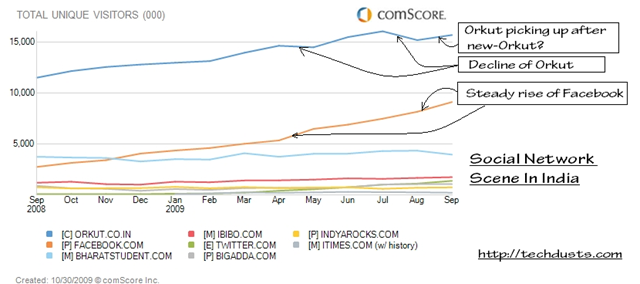
“ Some find it hard to believe, some find it obvious now; some says that it will regain the place back, some says its just international trend arrived at India now; some wants to see Orkut rising again and some finding ways to shift their profile/ photos etc from Orkut to Facebook. But its true Orkut is loosing the turf in India against the Facebook: Social Network Giant for rest part of the world since long. ”

socialnetworkingsitesinindiatraffic

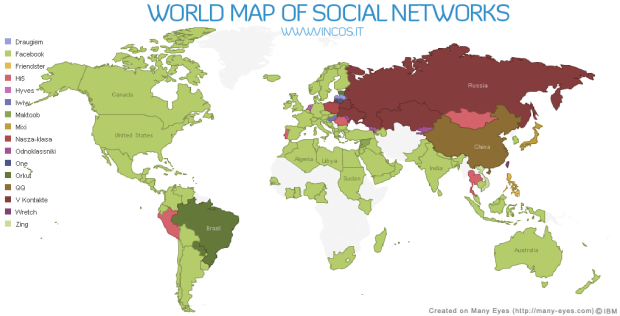
worldmap1

The news is not new and been floating around here on web since March 2009 that Facebook is getting a steady rise in India while growth of Orkut getting slower. I thought to write over it, n102452128776_1831when something attracted me to Facebook recently. It was addictive Farmwille application, which got kind-of-craze among my colleagues in recent days and when the craze finally got me, then I was surprised to see many of known faces on Facebook. I was also impressed with this particular application in the way its single handedly keeping users engaged in each hour and also luring more to join.


I had profiles on both of the social networks:

Orkut and Facebook, but Orkut always remained prime for me. In fact, I was logging into Facebook once in a while in month only, while Orkut was part of daily habits from Home, from Office, from Mobile. I kept on hearing about national/ international celebrity profiles on Facebook and getting search results showing Facebook profiles, but still it was not able to lure me as I didn’t thought that its offering me anything more than I getting from Orkut, specially after recent makeover of Orkut.

But after checking out techcrunch article, I thought to gather some info about the same topic and in the same way, I came across few interesting articles like 12 Best Reasons Why People Leave Orkut And Migrate To Facebook & 10 Ways Orkut Can Compete with Facebook and felt that I could come up with a few answers and suggestions of my own:


  1. Privacy: There is a lot of buzz about this and many people choosing Facebook over Orkut, because of this only. Initially, as per generic philosophy privacyof Google, it was to be open for all means one has to be shown as he is with all others. Scrapbook, photos, Friend Network and Profile info, everything was open to all. So, it was an open world, where you could contact and know about others in the way, they want to tell the world they are.

    In Facebook, by default only your friends can see your profile. The others can only see your name and thumbnail (reduced version of the profile picture). Nothing more. In addition, you can always configure the options for privacy as deemed appropriate.

    But many times it happens that you wanted to be open for some people and for some, you want to remain closed shell. Like celebrities or popular people, if everyone is allowed to write to them, then they wont be able to use these social networks coz of spam. So, later on, Orkut added some restrictions like only your friends could write in your scraps or could see your photos/ videos (in case of photos, restrictions could be categorized per person basis). Although somewhere I find these step more of caused by market demands than the original philosophy. More or less, people called it a welcome step, but still Orkut kept it more open than Facebook.

    As a step to answer demands, I think Orkut really needs to provide some more detailed Privacy configuration options. Like scrap book could be managed to open for people/ groups only we want, others could only read their scraps only or not even could write. Same for new feeds, photos, profiles and other features.

    Specially, where Orkut needs to look out is restriction over profile view. Even if I liked the larger profile pics, some might not and moreover, they might not be wishing to roll out their information for all. Although as being a technocrat, I understand the difficulties lying under such a big change as it will require to change the root way, Orkut stores information for users, which will not be a simple task.

  2. Publicity: We really find Orkut keeping itself low profile in comparison to Facebook, which although been a philosophy of Googlepublicity about all of its products. Google always  placed its products on top without too much going into media on the basis of its own unmatched set of features only. While this strategy worked for most of the services, might be reason of failure in case of Orkut. Facebook really has a strong media presence and in other part of world, we really could find many people, who might not even heard of Orkut.

    It’s really high time, Google should think about Media presence of Orkut even if Google doesn’t want it to be a Business Website. Although I also know the implications that it’ll also lead to brining more ads to Orkut in the way Facebook has coz no point in investing in media management, if you are not making high business use of the same. But still I am looking for Orkut to be heard in most part of the world.

  3. Applications: This is really becoming the bottleneck of the equations between Orkut and Facebook. Even if Facebook already been an orkut-appsestablished brand, now in India, its getting an high very much due to its diverse applications. Orkut also has few applications, but those are really few and none are kind of engaging in the way Facebook has some like Farmville and Mafia Wars.

    As I said this is bottleneck, so Orkut should really do something about it, not today, but now.

  4. Restricted Networking: In case of Facebook, if you wished to join Community of your Company Network,restricted then what you need a genuine corporate email id, otherwise, it wont  allow you to join, while in case of Orkut, its maximum level is moderator’s approval, whose task goes tough, if company is spread around world and moderator has no efficient and effective way to evaluate in real time.

    For some it might be, but as per my view, Orkut should not bother about such a feature. Orkut was not an Official Place sort for Corporate and communities were created by users only not from Corporate itself. It was not business world, but was an open and simpler world and I wish it remain open in the same way, coz this was the reason, Orkut was liked and grown even when MySpace and FaceBook were already giants in other parts of world.

  5. Design: Some find Orkut’s design as a benchmark, while some says same for Facebook. When I joined Orkut, then it was due to its decent and simple blue theme and even this was the tagline then. Although as per demands, it changed its way. I really dont know yet, if Facebook has something like scrapbook, where actual conversations flow and sometimes, you could get an idea about people by their scrapbooks, while Facebook kept it around newsfeeds, which might be many at a time as per size of your friend list.

    Though Facebook had an advantage earlier to keep most of the things limited to one page only, but new look of Orkut made it compete in that way as well.
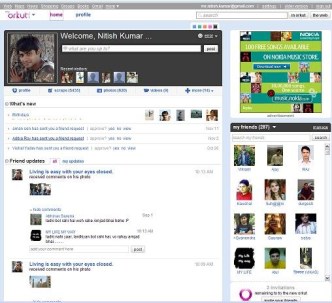
    facebook new look New-Orkut-SnapShot

    I really find nothing to change from the root about Orkut design right now. It should grow with its own learning curve as being done in past. 

  6. Photo Tagging: Although that was an area, where Facebook started, but Orkut got it more better with face recognition. In facebook, you find the face manually, photo-taggingwhile in Orkut  it does the same automatically and recent makeover of Photo updates make it scoring higher over Facebook.

    What I am really looking for as an addition to Orkut Photos system, is its integration with Picasa & Picasa web. I means you could sync your Orkut album with the one you own at your home and upload photos from Picasa to Orkut. I know Orkut could do this due to integration of its services and really looking for, when this change will happen.

  7. Status Updates/ News Feed/ Link Share: This was really an area, where I was looking for an improvement from Orkut orkut-status-updatesside, which Orkut recently heard, by providing Share on Orkut feature. I guess, now we could find Orkut Share buttons spreading among blogs like Facebook/ Twitters share buttons. Although still I am disappointed with its being JavaScript based as WordPress.com doesn’t support that or might be I am not able to find some work around.

    But still I find status updates/ news Feeds an area of improvement for Orkut as now. Status updates a.k.a. News Feeds are more configurable, innovative and richer in Facebook right now than Orkut. A must feature, I will be looking for the next improvement in Orkut.

  8. At the end, I really dont wanna see “Bad Bad Server, No Donuts for you” again.

Not finished Yet …. I really want readers to add up more and more suggestions for betterment of Orkut. Please do write.

How to make your Gmail account easy to recover if hacked

The very first step to take is the same as I discussed in last article.

Keep variations in your username/password over various sites: its of prime importance as how could you think that any random forum or newbie site could be as secure as your Yahoo/ Gmail/ Hotmail? If you use the same username/password combination in some smaller sites/ forum and that one got hacked, then a hacker could try to login with the same in other popular services as well and that could lead in getting your account hacked in a way, where no mistake was from Gmail/ Yahoo/ Hotmail side.


The other steps are for recovery of your email if hacked from Gmail as Amit suggested:

Use your old days pen & paper and note down the following somewhere:

  1. The month and year when your created your Gmail / Google Account.
  2. If you created a Gmail account by invitation, write the email address of the person who first sent you that invite for Gmail.
  3. The email addresses of your most frequently emailed contacts (the top 5).
  4. The names of any custom labels that you may have created in your Gmail account.
  5. The day/month/year when you started using various other Google services (like AdSense, Orkut, Blogger, etc.) that are associated with the Google account that you are trying to recover. If you’re not certain about some of the dates, provide your closest estimate.
  6. Run a Test! Log-out of all your Gmail / Google Accounts. Start the password recovery process. This guarantees that what you set up actually works. You want to be absolutely certain your SMS settings and secondary email addresses are configured correctly. (this is when you have associated your mobile in your Gmail account, do it for sure).
  7. Check your IP Address: From time to time check out the IP address in the footer of your Gmail Inbox. If you see an odd one, change your Google password immediately. Knowing IP addresses may seem too technical to some but it’s good information to know.

Thanks to Amit for listing out these tips.


At the end …

“ I don’t expect from everyone to be smart enough to remember these all minor but common details, but its about knowing your account more better than anyone else. Its like recognizing your bag, when recovered from police etc. You need to tell them that what’s inside it, which only you are expected to know. So, know your account better and keep it noted down in your diary or somewhere secured. ”

photo of Nitish KumarNitish Kumar

Hacking of Twitter leaves questions over Cloud again

Not much days passed when database of RockYou was compromised and the hacker also revealed in sample that what  database structure was and how passwords were stored in plain text, which were including not only RockYou, but of yahoo, MySpace, Friendster etc as well. The revelation was a shock to many people and a big setback for cloud computing in a way as it shown that how things could go wrong in incompetent hands.

rockyouTwitter-logo


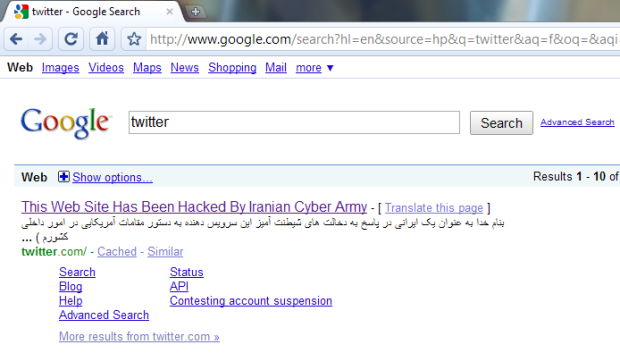
And last night, the world was encountered with greatest shock, when biggest micro-messaging giant Twitter, which stands as like some top 20 of largest web apps of now days, went down due to a hack attack by 22:00, Dec 17, 2009. Below are the related screenshots.

1. How twitter.com was showing the below message from some Iranian Cyber Army

Twitterhacked 

2. Even Google started showing the messages on searching for twitter

google-twitter

3. Find the related video


Although later on after around one and half hour, it was restored back with the official message from Twitter’s side.

“ As we tweeted a bit ago, Twitter’s DNS records were temporarily compromised tonight but have now been fixed. As some noticed, Twitter.com was redirected for a while but API and platform applications were working. We will update with more information and details once we’ve investigated more fully. ”


The chapter ended, but shaken a lot of faiths. First let us here discuss the layman terms and consequences of these incidences.

Compromised DNS records: Basically when you type some address in your browser, then various DNS Servers around the world redirect you to associated IP Address as actual machine communication happens on this IP address level only and readable address are just for human convenience. Later these requests reach to the site itself, which is if big enough, then maintain its own DNS server to keep other many servers behind it on same IP with required redundancy.

Now what happen, if somehow temper DNS recordings and this DNS starts redirecting you to some other IP rather than the official one i.e. to other server, which could be holding anything like this message this time. You will get the same site address in address bar, but now its going to some other server and some other application, which just happened with Twitter.

“ Think, what worse could have happened? If the hacking side might have tried their luck a little harder through phishing means presenting you exactly the same webpage like Twitter’s login page. Million of users were just giving their usernames and passwords so easily without knowing that this time, they were giving the same information away in wrong hands for nothing. ”


There are more lessons to learn from this RockYou and Twitter incidence. RockYou password revelation wasn’t a danger to RockYou itself, but it was containing passwords of many other accounts and so if one reaches there, then could take hold of all those millions of accounts and information within. Moreover, as the common practice is, people keep on using the same username and password at all the websites they know, which means if one try logging into gmail with same username/password combination retrieved from hacked RockYou, its not a hard luck that he will succeed to login.

So, the lessons here are:

  • Keep real good passwords.
  • Don’t trust completely over websites security as of now.
  • Avoid keeping your important info like bank account no. stored in your email ids.
  • Try to have different passwords for different sites at least, if can’t manage with different usernames.
  • As easiest way to hack some account usually involves the alternate email account you given, better give out your mobile no as it provides you SMS in many cases (if site doing so like Google) and in a way more securer than alternate email id case.

    and

  • Still we have to go a long way to have cloud computing working properly for us in light of such incidences.

Google Transliteration

“ Dec 17, 2009, Google launched it new and improved version of Transliteration, which will remain available via labs and on http://www.google.com/transliterate. In this new version, you can select from one of seventeen supported languages: Arabic,Bengali, Greek, Gujarati, Hindi, Kannada, Malayalam, Marathi, Nepali, Persian, Punjabi,Russian, Sanskrit, Serbian, Tamil, Telugu and Urdu. You can also compose richly formatted text and look up word definitions with our dictionary integration. If the default transliteration is not the word you wanted, you can highlight it to see a list of alternatives. For even finer-grained control, Google has provided a unicode character picker to allow character-by-character composition. ”


Google Transliteration was first introduced to me by one of my colleague Prashant Shukla few weeks back, while working over a regional requirement, then it was Google Labs feature in beta phase. For late joiners of this new technology, let me start with Introduction of Google Transliteration.

transliteration_logoIn daily life, everyone of us might have encountered with issues of regional typing as widely spread keyboards are roman script based only. Google and many other providers decided to tackle the same problem by making it very easy to type phonetically using Roman characters. Using Google Transliteration you can convert Roman characters to their phonetic equivalent in your language. Note that this is not the same as translation — it’s the sound of the words that are converted from one alphabet to the other. For example, typing "hamesha" transliterates into Hindi as: Hindi transliteration example, typing "salaam" transliterates into Persian as: Farsi transliteration exampleand typing "spasibo" transliterates into Russian as . Since the initial launch with Hindi only, Google have been hard at work on improving quality, adding more languages and new features.

“ You already seen this feature as part of your orkut or gmail experiences, if have noticed it. The same feature is just becoming full fledge and standalone now with a new effective and efficient interface. Google Transliteration is integrated into several Google properties and Google also have an API and bookmarklets to extend this capability to other websites. A solution initially built to solve a problem in India is now being used in many other parts of the world as well. “

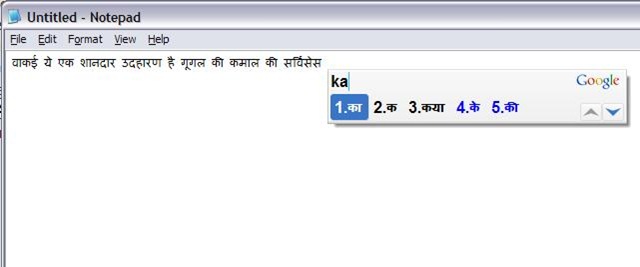
Google has also launched an amazing offline tool based on the same technology but without using internet at all, named Google Input Method: IME. I have used it and it works in really really cool way. Check out the following snapshot

transliterate

You just need to type phonetically and it will keep on translating it in Indian Language, you might have selected, just in way, you were using the same service online. Do you really think that regional typing will ever be burden again? 🙂

New Orkut for everyone without invite

“ Dec 17, 2009, from today Orkut has opened its new interface for everyone. Till now, it was available by invitation only basis, later they increased the number of invitations per users and now removing the need of invitations at all. ”

So, now no need for waiting for invitations, just click the button “Try New Orkut” on top of your profile and enjoy the new faster face of Orkut.

“Just wondering when the same going to be started for Google Voice and Google Wave :P”

photo of Nitish KumarNitish Kumar