Squid Proxy Server: Step by Step Dummies Manual

As promised to myself, I have updated Squid Proxy Server Implementation Manual with use cases and recommendations. Also, the related two articles has been removed and merged into the single link for avoiding ambiguity.

This also involves basic firewall and normal issues/ requirements like Outlook etc. I hope, it would be helpful for many people out there. Post your opinions and suggestions for sure.

Google Vs China, Strategy or Real Concerns?

It seems that like the last year went, Google still keeping itself well in news.

| Got to read one tweet @ claymillThe Google /China incident feels ominously profound; it’s an ending and a beginning but nobody knows exactly what ended or began.” |


logo_plain

Google; A name always found in support of Open Internet and even recently made a precise statement over definition of Open and has a philosophy that believe that “open systems win”. They lead to more innovation, value, and freedom of choice for consumers, and a vibrant, profitable, and competitive ecosystem for businesses. china

China; A nation, who leads in methods of censorship. Internet censorship in China is conducted under a wide variety of laws and administrative regulations. In accordance with these laws, more than sixty Internet regulations have been made by the People’s Republic of China (PRC) government, and censorship systems are vigorously implemented by provincial branches of state-owned ISPs, business companies, and organizations.


Internet Censorship and Google: The History

google-chinaFor the first time, Google found to have started to censor its search results in 2002 in compliance with United States’ DMCA legislation. Although even in that time, this move was taken in innovative ways as banned results were replaced by corresponding DMCA complaint. Later on the similar phenomenon was noticed with other countries like United Kingdom (Since September 2006), Germany & France (Since October 2002) and most importantly with China (Since December 2005) in adherence with their corresponding country policies.

With China, Google’s journey been with troubles since the beginning due to huge difference in philosophy. In fact, there was a time when popular search engines such as Altavista, Yahoo!, and Google were completely banned from use in China, although later the ban was lifted, but filtering remained continued.

Google officially announced its adherence with China’s policy in January 2006 and launched a Chinese-language service that will be stripped of content deemed offensive or subversive. Google somehow managed to devise an interesting solution (must read link) for this technically big problem. Later on other Internet giants including Yahoo and Microsoft’s MSN have also censored material "in exchange" for being allowed to tap a market comprising 110 million Internet users, the world’s second-largest market.


An Example of Censorship could be cited as below:

human-rights-china

human-rights-china-china


Amnesty International and Human Rights Watch strongly condemned Google’s compliance with China’s Golden Shield Project, calling it a form of self-censorship. According to Amnesty,

“ These forms of censorships seem to contradict the very principles that Google — whose unofficial motto is "don’t be evil" — was founded upon. Until January 2006, Google’s Support Center claimed that it "does not censor results for any search term", but removed this claim after reaching its deal with China. ”


By 12th January 2010, Google finally decided to stand against China’s Censorship

The sensational news was uncovered by Google itself by their blog post on 12th January 2010, in which they wrote that they faced a sophisticated attack in mid Dec 2009, where the hackers targeted Google’s corporate infrastructure originating from China that resulted in the theft of intellectual property from Google. Google claimed that a primary goal of the attackers was accessing the Gmail accounts of Chinese human rights activists.

Google said

We launched Google.cn in January 2006 in the belief that the benefits of increased access to information for people in China and a more open Internet outweighed our discomfort in agreeing to censor some results. At the time we made clear that "we will carefully monitor conditions in China, including new laws and other restrictions on our services. If we determine that we are unable to achieve the objectives outlined we will not hesitate to reconsider our approach to China."

These attacks and the surveillance they have uncovered–combined with the attempts over the past year to further limit free speech on the web–have led us to conclude that we should review the feasibility of our business operations in China. We have decided we are no longer willing to continue censoring our results on Google.cn, and so over the next few weeks we will be discussing with the Chinese government the basis on which we could operate an unfiltered search engine within the law, if at all. We recognize that this may well mean having to shut down Google.cn, and potentially our offices in China.


After attacks over RockYou and Twitter, this was a news which would have caused a stir among people for security concerns of cloud with headlines like “Now even Google got compromised”, like one tweet @vicsingh said “google has balls for potential china pullout, but the positive externality is that no one is talking about the vulnerability of their cloud”, but the matter went much more twisted and interesting as Google shared this information with the world saying …

“We have taken the unusual step of sharing information about these attacks with a broad audience not just because of the security and human rights implications of what we have unearthed, but also because this information goes to the heart of a much bigger global debate about freedom of speech.”

BoyThinking More interesting were their next two decisions;

  1. One was a somewhat not that noticed move by Google after around 6 hours of their blog post about attacks, where they made their Gmail and other services using https access by default.
  2. The other one came with the same blog post itself saying “We have decided we are no longer willing to continue censoring our results on Google.cn”


Why Google suddenly became ready to even leave China?

googlechina5-420x0

As per information revealed by Google itself, the attack was mere phishing attacks “These accounts have not been accessed through any security breach at Google, but most likely via phishing scams or malware placed on the users’ computers.

Now, the million dollars question to be asked is, such attacks been common to whole community of internet users and all leading companies since decades and Google itself said (if true) that only two of the accounts were compromised up to an extent (not even completely) then what became the reason of this huge decision, which could impact many things all around the globe in many ways?


questionIts true that for years, Google faced withering criticism for what activists and lawmakers said was a willingness to abandon social responsibility in return for greater wealth. Its true that Google co-founder Sergey Brin shared many of the critics’ concerns about Google’s presence in China (but he publicly maintained that even a censored version of the company’s search engine was better than none at all). Its also true that recent move invited world wide praises for Google.

But still it will be a question to ask that why now after four years? Is the biggest market (around 20% of whole world) became less lucrative suddenly for which many compromises were made? Is performance troubles due to excessive filtering seems to nail down Google’s cloud strategies?

Note that even now  Google is filtering its search results and its operation in China is under a review as per Google itself, not opted out. Google officials said that they will be discussing with the Chinese government the basis on which they could operate an unfiltered search engine within the law, if at all. So, wait and watch.


This link sites Testimony of Google Inc. about China from their blog post in 2006. Have a read. I would also like to invite you all to comment upon what you think about this news.

Zabbix Server: Some issues and some tips

In addition to the implementation details, I wrote few days back, I would like the add up some precautions and resolution to some issues, which would sure make life with Zabbix little easier for newbie .


Keep the date time configuration correct: I really faced much trouble over this one. Before installation of any new server, make sure that you have chosen correct Timezone settings. For most of the version of Linux, you need to type setup on console and then go to timezone configuration and set as per yours (e.g. Asia/Kolkata) and then make the same entry in /etc/php.ini for variable date.timezone as well (e.g. data.timezone=Asia/Kolkata).

This is really an irritating bug at Zabbix side as client and server both the sides should use Server Timezone entry. But its not resolved till now and might be reason for trouble to many.

Problem I faced with it: I went really a lot of trouble with time settings with one of my zabbix servers. While all others were working fine, one was not giving any data on graphs. Although resolution worked in some other way, but I would like to give a few basics —

1. Verify all the settings like agents are referencing the right server or not

2. Check that whether ports are open or not.

The Server listens on 10051 and client listens on 10050. Now, How to Check open Ports in Linux? Although there are many ways to do the same, but simpler is using netstat

# netstat –ntulp

It will show all open ports and also that which process is using them. You must find 10051 port opened on Server.

3. Check the latest data under monitoring tab (My case) This provides you info about clients that when you last moment received data from them and what data. In my case, I found that my clients received data in future time that’s why there was nothing on the graph as it was checking data in past time.

I struggled a lot, but found only one solution that was to delete all the clients from Zabbix and then import the same configuration again. When you delete one host, then it delete all the logs related to it and that’s why when you re-import the configuration then it will start-a-fresh. Thats why I insist on making a backup of all configuration once, coz after then for recreating whole thing, you need just an import and then recreating screens. 🙂


Increase the upload size in php.ini: For using the above feature, its a necessary step as  many times the size of xml file might exceed the default 2mb. Find the maximum_upload_size and increase to be at least 8mb from 2mb (default).


Copying Configuration is better in place of creating new: For Linux Servers, copy all the  configurations/ items/ graphs etc from the Linux Based Zabbix Server itself, while for Windows, you need to configure one first and then copying all the entry to other in similar manner as was in Linux Servers.


Replace CPU Utilization Screen with Memory Utilization: Although it depends on your requirements, but for me in general, its better to replace CPU Utilization screen with a custom made Memory Utilization screen made of items Total Memory and Free Memory as CPU Load data is sufficient to monitor CPU Health in most of the cases.


Make a configuration backup once you are done with adding your servers: This is the most important thing as it helps you out in quickly restoring the things, if want to migrate the whole thing to new server in case of any problem in original server. You need to use Export feature of existing server to export a xml file (might be >2 mb) and then import it once you done with installing a fresh server or existing server. Then you will be needed to change the Server IP in all client’s zabbix agent configurations (/etc/zabbix/zabbix_agentd.conf in Linux and c:\program files\zabbix agent\zabbix_agentd.conf in windows) and restarted their zabbix services.

Create a slideshow for all the servers: This is a feature, which makes it look more cool. Create a slideshow of all the screens, you create and it will keep it changing in specified time duration (default is 5 secs), which is quite better, comfortable and effective than changing the screens yourself to take a look. You could make very good use of a projector with this feature 😉


Making Zabbix Monitoring Server from Scratch: The Dummies Manual

[tweetmeme source=”mrnitishkumar” only_single=”false”]

Update: Wrote this post long back.. just was meant to show that how easy it could be…many things needs to be Add to Google Buzzupdated in reference to new features and UI.. will update soon. Recently I received a book over Zabbix from Packt Publicing. Amazing book and probably the only available for the same. Worth buying….

“ How we system administrators work in case of any trouble? If something goes down or anything wrong would have happened and we get asked about how it happened? We just run into logs or try to guess what would have been happened, was it high CPU, low disk space or tremendous network traffic? Sometimes we get our answers, sometime not and we keep on saying ourselves that we can’t be everywhere to monitor each and everything all the time. But it’s the time to update yourself and get optimized. I went through a few of monitoring solutions and with their pros and cons, finally I got settled with the Open Source Solution developed by Zabbix SIA. ”


What is Zabbix? Before the configuration and installation part, I am starting with a little history.zabbix1_thumb Zabbix is a network management system application created by Alexei Vladishev in 1998 (public release in 2001) to monitor and track the status of various network services, servers, and other network hardware. Zabbix uses MySQL, PostgreSQL, SQLite or Oracle to store data. Its backend is written in C and the web frontend is written in PHP and javascript.

Zabbix offers several monitoring options. Simple checks can verify the availability and responsiveness of standard services such as SMTP or HTTP without installing any software on the monitored host. A Zabbix agent can also be installed on UNIX and Windows hosts to monitor statistics such as CPU load, network utilization, disk space, etc. As an alternative to installing an agent on hosts, Zabbix includes support for monitoring via SNMP, TCP and ICMP checks, IPMI and custom parameters. Zabbix supports a variety of real-time notification mechanisms, including XMPP.


Installation and Configuration to monitor Windows\ Linux Servers:

Although I tried and found it extremely efficient , but even then I didn’t went along with the wonderful easy install procedure made by Brendon Baumgartner, not due to some fault in that one, but due to inherent problems with I guess not stable yet latest version of zabbix. But I sure be waiting for BB to write other magic scripts in the same way to make things one Enter only.

Here comes the way, I followed to install zabbix in manual way over the servers.

Step by Step Implementations with details:

Base machine: As for most of Linux Development I choose, even here I am choosing CentOS as the base system to build the solution upon. One should go for at least CentOS 5.x as there are a few options not available with older CentOS 4.x. As per recommendation for CentOS, machine should have at least 512 MB RAM and decent processor, LAN card etc. and although not kind of requirement but the machine should has ample space in it to store logs for as many days.

As usually I do, installation was customized with 1GB swap, 200 MB of boot partition, all PHP/ MySQL related packages checked, all libraries checked, SendMail package checked. In next, as the installation will pull updates, packages from internet directly, so Ethernet configurations should be ready and internet should be working fine over the same machine. Also note that it would be around 27-28 mb download size in total while installation.

Pre-requisites for the installation:

First of all, we need to finish installation/ update of all required packages in reference with zabbix installation.

yum install httpd php mysql mysql-server mysql-devel php-gd php-mysql php-bcmath gcc net-snmp net-snmp-libs net-snmp-utils net-snmp-devel curl-devel

Once finished with this, one need to check whether the crucial components are configured to start with the system and are working well.

# service httpd start
# chkconfig –add httpd
# chkconfig httpd on
# service mysqld start
# chkconfig –add mysqld
# chkconfig mysqld on

Possible issues and resolutions first:

Need to check whether things are working fine.

# mysql –u root

This should leave one to MySQL prompt, if not then need to check. In next, need to check whether httpd is working fine (Apache is properly installed and configured). Type the IP Address of the target Zabbix Installation Server in browser from some other computer, if you are able to see Apache page, then its fine otherwise you will be needed to check things like SELINUX.

How to check selinux status?

Execute the following command:

# sestatus

If its showing it enabled, then could disable it by

# setenforce 0

To permanently disabled the same, we need to do some editing in configuration file, otherwise it will be back with the next boot

# vi /etc/selinux/config

The file must look like (after setting SELINUX=disabled)

# This file controls the state of SELinux on the system.
# SELINUX= can take one of these three values:
# enforcing – SELinux security policy is enforced.
# permissive – SELinux prints warnings instead of enforcing.
# disabled – SELinux is fully disabled.
SELINUX=disabled
# SELINUXTYPE= type of policy in use. Possible values are:
# targeted – Only targeted network daemons are protected.
# strict – Full SELinux protection.
SELINUXTYPE=targeted

Check if the browser started opening apache page after this, if yes, then we are done, otherwise should look down in /var/log/httpd/error.log for other possible reasons.

Installation and configuration steps:

Here I am assuming that you are using CentOS 5.x as base, otherwise the configurations might be altered.

# cd /usr/src
#wget
http://internap.dl.sourceforge.net/sourceforge/zabbix/zabbix-1.4.5.tar.gz
# tar zxf zabbix-1.4.5.tar.gz
# cd zabbix-1.4.5
# mysql -u root
# mysql> create database zabbix;
# mysql> quit
# cat create/schema/mysql.sql | mysql -u root zabbix
# cat create/data/data.sql | mysql -u root zabbix
# cat create/data/images_mysql.sql | mysql -u root zabbix
# ./configure –enable-server –enable-agent –with-mysql –with-net-snmp –with-libcurl
# make install
# mkdir /etc/zabbix
# cp misc/conf/* /etc/zabbix
# groupadd zabbix
# useradd -g zabbix zabbix
# chown zabbix:zabbix /usr/local/sbin/zabbix*
# cp misc/init.d/redhat/8.0/zabbix* /etc/init.d
# vi /etc/init.d/zabbix_agentd

change BASEDIR=/opt/zabbix to BASEDIR=/usr/local/sbin

change FULLPATH=$BASEDIR/bin/$BINARY_NAME to FULLPATH=$BASEDIR/$BINARY_NAME

# vi /etc/init.d/zabbix_server

Make the same changes as above.

# chkconfig –add zabbix_agentd
# chkconfig –add zabbix_server
# chkconfig –level 3 zabbix_server on
# chkconfig –level 3 zabbix_agentd on

Now, installing the web application….

# mkdir /var/www/html/zabbix
# cp -R frontends/php/* /var/www/html/zabbix
# chown apache:apache /var/www/html/zabbix/conf
# vi /etc/php.ini

Find resource limits section and change max_execution_time to 300

;;;;;;;;;;;;;;;;;;; ; Resource Limits ; ;;;;;;;;;;;;;;;;;;;

max_execution_time = 300 ; Maximum execution time of each script, in seconds

Also make changes for date.timezone entry, it should be commented, uncomment it and set it accordingly like in case of India ..

date.timezone=ASIA/CALCUTTA

At the end, start zabbix services

# service zabbix_server start
# service zabbix_agentd start

Add zabbix ports to be listened to the configuration of services.

# vi /etc/services

And put the following two lines at the very end of the file.

zabbix_agent 10050/tcp # Zabbix ports
zabbix_trap 10051/tcp

Zabbix Server console installation is ready to and web installation is ready to go from here.

After finishing all the above steps, now go to url http://IP_ADDRESS/zabbix (Here IP_ADDRESS is what you have given to the server Ethernet port)

It should ask for installation steps, if you have followed my steps exactly, then it must go like next, next only. After finishing all the steps, you will get a login prompt, user name will be admin here and password is blank. After login, go to profile link and change the password to whatever suits to you. Logout and login again. Click monitoring and then go to screens in second row. You should get five screens on the same page for the zabbix server itself. One screen must be having map only. Check that rest all showing you graphs or not. If yes, then server side work is done and you are ready to move towards adding clients.

Zabbix Agent Installation over Linux Clients:

First part is to download the appropriate zabbix agent package from the official page. I assume, your clients (Servers to monitor) are updated and have kernel at least 2.6.x (If not then choose the suitable package).

# yum install net-snmp net-snmp-libs net-snmp-utils net-snmp-devel curl-devel (Optional)
# groupadd zabbix
# useradd -g zabbix zabbix
# cd /usr/src
#wget
http://sourceforge.net/projects/zabbix/files/ZABBIX%20Latest%20Stable/1.8/zabbix-1.8.tar.gz/download
# tar zxvf zabbix-1.8.tar.gz
# cd zabbix-1.8
# chmod 7555 *
# ./configure -enable-agent -with-mysql -with-net-snmp -with-libcurl
# make install
# chown zabbix:zabbix /usr/local/sbin/zabbix*
# mkdir /etc/zabbix
# cp misc/conf/* /etc/zabbix
# cp misc/init.d/redhat/8.0/* /etc/init.d
# chmod +x /etc/init.d/zabbix_*

Now, Change the binary location to /usr/local/sbin

# vi /etc/init.d/zabbix_agentd

In next, make the zabbix agent point to your Zabbix Server by putting Server’s IP Address in configuration file of agent

# vi /etc/zabbix/zabbix_agentd.conf

And as final step on client side, set up the services

# chkconfig –add zabbix_agentd
# chkconfig –level 3 zabbix_agentd on
# service zabbix_agentd start

Getting the graphs from data coming from agents:

You will see that Zabbix Server itself added in the WebUI. In place of creating a new monitoring scenario, first it’s easier to copy the same entries to the newly added Linux Servers.

Go to Hosts, create a new host with the name of your agent (whatever name you choose), select group as Linux Server, then put the right IP Address and set the tab below to it on IP Address and save.

After this, go to Items, from combo box at right top, select zabbix server, it will show up items already configured for zabbix server, you need to select all the items and press copy selected items to button at the bottom and then when it will show the list of all templates and hosts configured, choose the one, you just created.

From here, you have setup items to fetch data from agent, now how to use it. Go to graphs, from right top select zabbix server and copy all the graphs to newly created server. Graphs are ready from here.

Finally, make a screen to monitor. Make a screen of 2×2 and give it the name as per your choice. Once screen created, click edit. Then configure CPU Loads, CPU Utilization, Disk Space and Network Utilization graphs for the agent, you setup and you are ready to monitor your Linux Server.

Zabbix Agent Installation over Windows Clients:

I find Windows Installation easier in first part and little bit complicated in second part. First need to download the windows agent from here

http://www.zabbix.com/downloads/1.8/zabbix_agents_1.8.win.zip

Then install it and it will ask for server IP Address, give zabbix server’s IP Address. Now, go to WebUI of Zabbix Server, Create host/items/graphs/screens in similar ways and you are ready to go.

There are many features that are there in Linux Agent but nowhere in Windows one. One workaround is to use data fetched from Windows Performance Monitor (permon.exe).

For example: Network Utilization

Go to cmd, type typeperf –qx |find “Network” >c:\network.txt

Now, check the network.txt file created in C: drive, it would be containing the exact network resource/ variable name for bytes sent and bytes received.

Now, how to call it?

Go to C:\program files\zabbix agent\zabbix_agentd.conf

Add something like following lines at the end…

PerfCounter= Server1NetIn,"\Network Interface(Intel Pro Server Adapter)\Bytes Received/sec",60
PerfCounter= Server1NetOut,"\Network Interface(Intel Pro Server Adapter)\Bytes Sent/sec",60

Note that the value placed in inverted commas is exactly the same, which you must have obtained from that network.txt file. Restart the Zabbix Service from services.msc. Now, go to Zabbix Server WebUI, create an item in target Windows Server area with any name for Network and put Server1NetIn or Server1NetOut as key. Save item and you are ready to use it in your graphs 🙂

Add to FacebookAdd to DiggAdd to Del.icio.usAdd to StumbleuponAdd to RedditAdd to BlinklistAdd to TwitterAdd to TechnoratiAdd to Yahoo BuzzAdd to Newsvine

3 Idiots – reminds you those old lovely days

“Listening to heart and chasing dreams and ideas what matters you most, without caring enough for rules, but the life and people who matter …. Isn’t it what you wanna how the world should have been? Three Idiots lead by Rancho just try to take over the same goal once again.”

3idiots-2009-wallpaper-pics-01 (6)


Title: 3 Idiots
Release Date: December 25, 2009 (India), December 23, 2009 (USA)
Banner: Vinod Chopra Productions
Director: Rajkumar Hirani
Editor: Ranjeet Bahadur, Rajkumar Hirani
Producer: Vidhu Vinod Chopra
Music: Shantanu Moitra
Cinematography: C.K. Muraleedharan
Story: Vidhu Vinod Chopra , Rajkumar Hirani , Abhijit Joshi and Chetan Bhagat (Dont know why not mentioned)
Dialogue: Rajkumar Hirani, Abhijit Joshi
Lyrics : Swanand Kirkire
Action : Shyam Kaushal
Cast: Aamir Khan, Kareena Kapoor, Sharman Joshi, Boman Irani, R Madhavan, Akhil Mishra, Mona Singh, Javed Jaffrey, Rahul Kumar, Parikshat Sahni and others


Keeping my tradition of being late into trendy things, I was the one, who come to read Chtan Bhagat’s Best Seller “Five Point Someone” by year 2008, almost four year after its release and being the frank one, I would admit that it was the first english novel, I ever finished up to the end. It sure touched me like the way it touched others (after all, its been bestseller for straight five years) and obviously it should touch to all of us, who start running since they born without thinking that “is this race all they want?”

“After talking over child education system brilliantly, it was kind of only Amir’s right to take over this story made to make us re-think about our ‘top-notch’ professional education system and grading system. Keeping the brilliant script of Chetan aside, performances and fundas the movie consists of, were enough for making the movie as best entertainer for the last week and probably the first month of the new year Twenty Ten.”

This movie does not really adopt the whole storyline exactly as it was and as it was done in Hello (Adopted from another novel of Chetan named “One Night @ call center”, but Hirani and Vidhu have added their own elements in this movie. It was kind of necessary as well coz movie audience and novel audience are not the same. Chetan titled his novel as what not to do in IIT, while Hirani made it to say that how to, call it Hiranisation of Five Point Someone.


Three boys led by one extra-ordinary one “Rancho” challenge the system in their ways, learn a few things from education system, teach a few, show an insight to the people, who don’t know about our engineering and education system yet, fought with the rules, broken the rules, at the end; find in their ways that what they are meant for and here the story ends in filmic & dramatically happy ending.

Many feel surprised that how Amir still look younger and fresh like some twenty something, many respect Boman for brining its own kind of humor to Hindi Cinema, many claim that Chetan’s novels are inherently made for movies only, but this movie is a must watch for all of us.


The water tank, where the three idiots were used to go, reminds me tower of science faculty of Allahabad University and my days with it. Lots of memories, lots of flashes …. the way I studied, the way, I irritated my teachers 😉 The way, I challenged the rules in side the faculty, hostel, the way, my definitions were different than others, the way after many ups and downs the degree somehow ended, the way everyone of us made their places in this rat-racing world. Everything just seems so fresh, bringing a rare smile on my face.

“I really miss those days, those friends, where we had lots of problems, but life was true, we were innocent, we were standing for everyone even strangers, those pretty smiles ……. Thanks Amir, Thanks Hirani and Thanks Chetan for brining all the memories back together in twenty ten.”

Looking for the day, when someone will make movie on third remaining novel of Chetan “Three Mistake of my life” coz as per my view, its been most filmic novel wrote by Chetan and deserved to be big hit than other two, with due respect critically acclaimed “Five Point Someone”.

A post after a while

“ You call it tough schedules or mark it as over-commitment to achieve some short term targets or consider as hurdles in changing to another flat in same area or smile on my obsession of Farmville, but yes, my blog really got a ‘long break’ considering momentum gained in last few weeks. So, today I thought to join back.”

Lots of things happened in this while, either it be personal,  professional front or like last night conversation with a new friend. Thought to spare some moments to spit out few paragraphs here.


Zabbix: Linux Based Monitoring Solution: At professional front, currently, I was working onzabbix1 designing of a basic Real Time Monitoring Solution targeting a raw and diverse infrastructure as a small step in the process of making a brand new and robust infrastructure of the next coming new year. The theme is to design a solution that I could access most of the basic aspects like CPU Utilization, Network Utilization, Disk Space for all the servers from a central point and then extending the limits slowly towards more complex features. After comparing for a while, I chosen zabbix over nagios due to its simplistic nature and convenience to pass through the knowledge structure to newbie team members of mine.

As about Linux Servers, it worked well, but many of important functions of this don’t seem to be supported with that of Windows Servers. Currently I am trying to obtain live graphs of Network Utilizations in most common terms with it, but facing the difficulty that most of the variables are not supported with the windows agent of zabbix. As of now, using Performance Monitor’s variables for workaround. Wiill come up shortly with detailed article, once finish the task, which has to be spread around a dozen domains in two offices.


Mdaemon: Email Gateway Solution: This is the other product, I was looking for exploring nowPageBanner_SecurityGateway days. The requirement was to find a low cost mail filtering solution, while we were running with third party mail provider. It was something like “I want Email id abc@example.com could send mails only to def@world.com and could receive mails only from xyz@star.com and all other things go restricted”. Having it as a purchased version would have been really nice experience, but currently running over 30 days trial versions. There is a free version as well, but will check that tomorrow, if could serve the purpose. I also tried zibra and other open source solution, but not getting the exact pitch I required. Any suggests will be a welcome.


Addiction of Farmville: Now about the other side of life, finally the last week dragged me infarmville addiction of Farmville and forced me to take visits of my Facebook account, which was literally idle since last many months. There was a kind of crazy early crowd of the same game in my office, in fact, once you start with the game in initial phase, you get tempted to talk about the same… obviously to add more and more neighbours in your farm. Funny part was to see some people being awake in nights for being ahead and so punctual about timing (even I am not exception). No wonder, farmville been the biggest reason too rise of Facebook in recent past.


Shifting to a new room: Your living place really matters a lot in life. After all that is the place, where you take a piece of rest. Even if for me like only their Computer Screen is the whole world, but still a nice room matters. Changed to the new room. Comfortable for me like lazy persons. 🙂

Although the shifting was not a tasty piece of cake, gone through some really weird hurdles around, but now more or less, things are fine. Lost one of my suit in this shifting though 😦


Interesting conversation with a new friend: It was an interesting late night conversation with Rajat, who was added in my gtalk and I was ashamed that why I am not able to remember that who is he. All of sudden, Rajat said that could he call me?

I was busy in dinner etc. and when later got engaged in call, then got to know many more things about him other than name like he is calling from UK, working for TCS, working over a telecom project of upgradation of 2G infrastructure to 3G and at last senior to me by 5 years 😉

He invited me to take a look over his group blog http://getsetgrow.org It was sure a good one and in fact I liked a few of articles like the one over BPO, Information Overload very much. On his invite, I was sure honored to be part of the group, if he wishes so.


My last experiences of joining to other blogs as co-author: My last experiences of being co-author for other blogs not been very pleasant. Although don’t remember them all, but one was some fontezer4, whose exact web address, I am unable to mention. I joined the same on their invitation to write for, but  after a few posts, I went busy for a while say for one or two months and for my greatest surprise, when I tried to login back then my account was deleted and my post were credited in name of one of those four authors. I was in real shock and decided not to join any other blog later on.

Although the decision was changed after I got requested by one blog over Indian Idol 4. As the owner was providing me Video Links of each episode in time and my job was to write articles episode by episode. It was an interesting experience as we got as high that were ranked as number 1 blog about Indian Idol on its official website and remained there for more than a week. Later on, the owner of blog suddenly gone missing. No reply over mails, no uploads of videos. I kept on write though, but later lost interest and moved back to my blog only.

Recent chance was interaction with Devilsworkshop group. Their condition was “exclusiveness”, which was obvious as they were offering full adsense value back to original author and even a price once in a month of around $150. I decided to keep identity of my blog more prior and gave up the idea.


It goes really harder to write for others as you don’t get enough time even for your own blog due to commitment toward professional and personal life. It asks for a level of awareness, one could comfortably afford only after being settled enough in his/her professional lives. I know some do very good job in balancing all these things for me job is a little tougher.

So, for now, only this much. Will be back


How Orkut could regain strength in front of Facebook

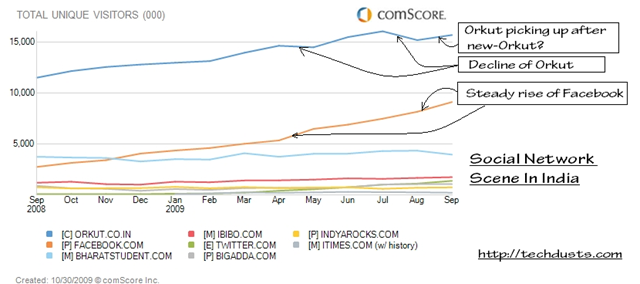
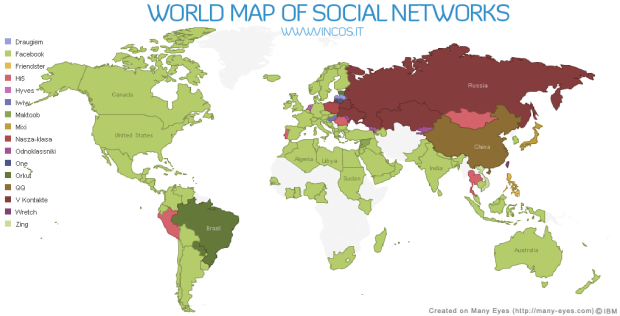
“ Some find it hard to believe, some find it obvious now; some says that it will regain the place back, some says its just international trend arrived at India now; some wants to see Orkut rising again and some finding ways to shift their profile/ photos etc from Orkut to Facebook. But its true Orkut is loosing the turf in India against the Facebook: Social Network Giant for rest part of the world since long. ”

socialnetworkingsitesinindiatraffic

worldmap1

The news is not new and been floating around here on web since March 2009 that Facebook is getting a steady rise in India while growth of Orkut getting slower. I thought to write over it, n102452128776_1831when something attracted me to Facebook recently. It was addictive Farmwille application, which got kind-of-craze among my colleagues in recent days and when the craze finally got me, then I was surprised to see many of known faces on Facebook. I was also impressed with this particular application in the way its single handedly keeping users engaged in each hour and also luring more to join.


I had profiles on both of the social networks:

Orkut and Facebook, but Orkut always remained prime for me. In fact, I was logging into Facebook once in a while in month only, while Orkut was part of daily habits from Home, from Office, from Mobile. I kept on hearing about national/ international celebrity profiles on Facebook and getting search results showing Facebook profiles, but still it was not able to lure me as I didn’t thought that its offering me anything more than I getting from Orkut, specially after recent makeover of Orkut.

But after checking out techcrunch article, I thought to gather some info about the same topic and in the same way, I came across few interesting articles like 12 Best Reasons Why People Leave Orkut And Migrate To Facebook & 10 Ways Orkut Can Compete with Facebook and felt that I could come up with a few answers and suggestions of my own:


  1. Privacy: There is a lot of buzz about this and many people choosing Facebook over Orkut, because of this only. Initially, as per generic philosophy privacyof Google, it was to be open for all means one has to be shown as he is with all others. Scrapbook, photos, Friend Network and Profile info, everything was open to all. So, it was an open world, where you could contact and know about others in the way, they want to tell the world they are.

    In Facebook, by default only your friends can see your profile. The others can only see your name and thumbnail (reduced version of the profile picture). Nothing more. In addition, you can always configure the options for privacy as deemed appropriate.

    But many times it happens that you wanted to be open for some people and for some, you want to remain closed shell. Like celebrities or popular people, if everyone is allowed to write to them, then they wont be able to use these social networks coz of spam. So, later on, Orkut added some restrictions like only your friends could write in your scraps or could see your photos/ videos (in case of photos, restrictions could be categorized per person basis). Although somewhere I find these step more of caused by market demands than the original philosophy. More or less, people called it a welcome step, but still Orkut kept it more open than Facebook.

    As a step to answer demands, I think Orkut really needs to provide some more detailed Privacy configuration options. Like scrap book could be managed to open for people/ groups only we want, others could only read their scraps only or not even could write. Same for new feeds, photos, profiles and other features.

    Specially, where Orkut needs to look out is restriction over profile view. Even if I liked the larger profile pics, some might not and moreover, they might not be wishing to roll out their information for all. Although as being a technocrat, I understand the difficulties lying under such a big change as it will require to change the root way, Orkut stores information for users, which will not be a simple task.

  2. Publicity: We really find Orkut keeping itself low profile in comparison to Facebook, which although been a philosophy of Googlepublicity about all of its products. Google always  placed its products on top without too much going into media on the basis of its own unmatched set of features only. While this strategy worked for most of the services, might be reason of failure in case of Orkut. Facebook really has a strong media presence and in other part of world, we really could find many people, who might not even heard of Orkut.

    It’s really high time, Google should think about Media presence of Orkut even if Google doesn’t want it to be a Business Website. Although I also know the implications that it’ll also lead to brining more ads to Orkut in the way Facebook has coz no point in investing in media management, if you are not making high business use of the same. But still I am looking for Orkut to be heard in most part of the world.

  3. Applications: This is really becoming the bottleneck of the equations between Orkut and Facebook. Even if Facebook already been an orkut-appsestablished brand, now in India, its getting an high very much due to its diverse applications. Orkut also has few applications, but those are really few and none are kind of engaging in the way Facebook has some like Farmville and Mafia Wars.

    As I said this is bottleneck, so Orkut should really do something about it, not today, but now.

  4. Restricted Networking: In case of Facebook, if you wished to join Community of your Company Network,restricted then what you need a genuine corporate email id, otherwise, it wont  allow you to join, while in case of Orkut, its maximum level is moderator’s approval, whose task goes tough, if company is spread around world and moderator has no efficient and effective way to evaluate in real time.

    For some it might be, but as per my view, Orkut should not bother about such a feature. Orkut was not an Official Place sort for Corporate and communities were created by users only not from Corporate itself. It was not business world, but was an open and simpler world and I wish it remain open in the same way, coz this was the reason, Orkut was liked and grown even when MySpace and FaceBook were already giants in other parts of world.

  5. Design: Some find Orkut’s design as a benchmark, while some says same for Facebook. When I joined Orkut, then it was due to its decent and simple blue theme and even this was the tagline then. Although as per demands, it changed its way. I really dont know yet, if Facebook has something like scrapbook, where actual conversations flow and sometimes, you could get an idea about people by their scrapbooks, while Facebook kept it around newsfeeds, which might be many at a time as per size of your friend list.

    Though Facebook had an advantage earlier to keep most of the things limited to one page only, but new look of Orkut made it compete in that way as well.
    facebook new look New-Orkut-SnapShot

    I really find nothing to change from the root about Orkut design right now. It should grow with its own learning curve as being done in past. 

  6. Photo Tagging: Although that was an area, where Facebook started, but Orkut got it more better with face recognition. In facebook, you find the face manually, photo-taggingwhile in Orkut  it does the same automatically and recent makeover of Photo updates make it scoring higher over Facebook.

    What I am really looking for as an addition to Orkut Photos system, is its integration with Picasa & Picasa web. I means you could sync your Orkut album with the one you own at your home and upload photos from Picasa to Orkut. I know Orkut could do this due to integration of its services and really looking for, when this change will happen.

  7. Status Updates/ News Feed/ Link Share: This was really an area, where I was looking for an improvement from Orkut orkut-status-updatesside, which Orkut recently heard, by providing Share on Orkut feature. I guess, now we could find Orkut Share buttons spreading among blogs like Facebook/ Twitters share buttons. Although still I am disappointed with its being JavaScript based as WordPress.com doesn’t support that or might be I am not able to find some work around.

    But still I find status updates/ news Feeds an area of improvement for Orkut as now. Status updates a.k.a. News Feeds are more configurable, innovative and richer in Facebook right now than Orkut. A must feature, I will be looking for the next improvement in Orkut.

  8. At the end, I really dont wanna see “Bad Bad Server, No Donuts for you” again.

Not finished Yet …. I really want readers to add up more and more suggestions for betterment of Orkut. Please do write.