Google Vs China, Strategy or Real Concerns?

It seems that like the last year went, Google still keeping itself well in news.

| Got to read one tweet @ claymillThe Google /China incident feels ominously profound; it’s an ending and a beginning but nobody knows exactly what ended or began.” |


logo_plain

Google; A name always found in support of Open Internet and even recently made a precise statement over definition of Open and has a philosophy that believe that “open systems win”. They lead to more innovation, value, and freedom of choice for consumers, and a vibrant, profitable, and competitive ecosystem for businesses. china

China; A nation, who leads in methods of censorship. Internet censorship in China is conducted under a wide variety of laws and administrative regulations. In accordance with these laws, more than sixty Internet regulations have been made by the People’s Republic of China (PRC) government, and censorship systems are vigorously implemented by provincial branches of state-owned ISPs, business companies, and organizations.


Internet Censorship and Google: The History

google-chinaFor the first time, Google found to have started to censor its search results in 2002 in compliance with United States’ DMCA legislation. Although even in that time, this move was taken in innovative ways as banned results were replaced by corresponding DMCA complaint. Later on the similar phenomenon was noticed with other countries like United Kingdom (Since September 2006), Germany & France (Since October 2002) and most importantly with China (Since December 2005) in adherence with their corresponding country policies.

With China, Google’s journey been with troubles since the beginning due to huge difference in philosophy. In fact, there was a time when popular search engines such as Altavista, Yahoo!, and Google were completely banned from use in China, although later the ban was lifted, but filtering remained continued.

Google officially announced its adherence with China’s policy in January 2006 and launched a Chinese-language service that will be stripped of content deemed offensive or subversive. Google somehow managed to devise an interesting solution (must read link) for this technically big problem. Later on other Internet giants including Yahoo and Microsoft’s MSN have also censored material "in exchange" for being allowed to tap a market comprising 110 million Internet users, the world’s second-largest market.


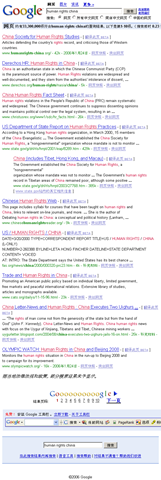
An Example of Censorship could be cited as below:
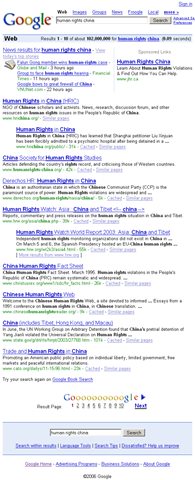
human-rights-china

human-rights-china-china


Amnesty International and Human Rights Watch strongly condemned Google’s compliance with China’s Golden Shield Project, calling it a form of self-censorship. According to Amnesty,

“ These forms of censorships seem to contradict the very principles that Google — whose unofficial motto is "don’t be evil" — was founded upon. Until January 2006, Google’s Support Center claimed that it "does not censor results for any search term", but removed this claim after reaching its deal with China. ”


By 12th January 2010, Google finally decided to stand against China’s Censorship

The sensational news was uncovered by Google itself by their blog post on 12th January 2010, in which they wrote that they faced a sophisticated attack in mid Dec 2009, where the hackers targeted Google’s corporate infrastructure originating from China that resulted in the theft of intellectual property from Google. Google claimed that a primary goal of the attackers was accessing the Gmail accounts of Chinese human rights activists.

Google said

We launched Google.cn in January 2006 in the belief that the benefits of increased access to information for people in China and a more open Internet outweighed our discomfort in agreeing to censor some results. At the time we made clear that "we will carefully monitor conditions in China, including new laws and other restrictions on our services. If we determine that we are unable to achieve the objectives outlined we will not hesitate to reconsider our approach to China."

These attacks and the surveillance they have uncovered–combined with the attempts over the past year to further limit free speech on the web–have led us to conclude that we should review the feasibility of our business operations in China. We have decided we are no longer willing to continue censoring our results on Google.cn, and so over the next few weeks we will be discussing with the Chinese government the basis on which we could operate an unfiltered search engine within the law, if at all. We recognize that this may well mean having to shut down Google.cn, and potentially our offices in China.


After attacks over RockYou and Twitter, this was a news which would have caused a stir among people for security concerns of cloud with headlines like “Now even Google got compromised”, like one tweet @vicsingh said “google has balls for potential china pullout, but the positive externality is that no one is talking about the vulnerability of their cloud”, but the matter went much more twisted and interesting as Google shared this information with the world saying …

“We have taken the unusual step of sharing information about these attacks with a broad audience not just because of the security and human rights implications of what we have unearthed, but also because this information goes to the heart of a much bigger global debate about freedom of speech.”

BoyThinking More interesting were their next two decisions;

  1. One was a somewhat not that noticed move by Google after around 6 hours of their blog post about attacks, where they made their Gmail and other services using https access by default.
  2. The other one came with the same blog post itself saying “We have decided we are no longer willing to continue censoring our results on Google.cn”


Why Google suddenly became ready to even leave China?

googlechina5-420x0

As per information revealed by Google itself, the attack was mere phishing attacks “These accounts have not been accessed through any security breach at Google, but most likely via phishing scams or malware placed on the users’ computers.

Now, the million dollars question to be asked is, such attacks been common to whole community of internet users and all leading companies since decades and Google itself said (if true) that only two of the accounts were compromised up to an extent (not even completely) then what became the reason of this huge decision, which could impact many things all around the globe in many ways?


questionIts true that for years, Google faced withering criticism for what activists and lawmakers said was a willingness to abandon social responsibility in return for greater wealth. Its true that Google co-founder Sergey Brin shared many of the critics’ concerns about Google’s presence in China (but he publicly maintained that even a censored version of the company’s search engine was better than none at all). Its also true that recent move invited world wide praises for Google.

But still it will be a question to ask that why now after four years? Is the biggest market (around 20% of whole world) became less lucrative suddenly for which many compromises were made? Is performance troubles due to excessive filtering seems to nail down Google’s cloud strategies?

Note that even now  Google is filtering its search results and its operation in China is under a review as per Google itself, not opted out. Google officials said that they will be discussing with the Chinese government the basis on which they could operate an unfiltered search engine within the law, if at all. So, wait and watch.


This link sites Testimony of Google Inc. about China from their blog post in 2006. Have a read. I would also like to invite you all to comment upon what you think about this news.

Zabbix Server: Some issues and some tips

In addition to the implementation details, I wrote few days back, I would like the add up some precautions and resolution to some issues, which would sure make life with Zabbix little easier for newbie .


Keep the date time configuration correct: I really faced much trouble over this one. Before installation of any new server, make sure that you have chosen correct Timezone settings. For most of the version of Linux, you need to type setup on console and then go to timezone configuration and set as per yours (e.g. Asia/Kolkata) and then make the same entry in /etc/php.ini for variable date.timezone as well (e.g. data.timezone=Asia/Kolkata).

This is really an irritating bug at Zabbix side as client and server both the sides should use Server Timezone entry. But its not resolved till now and might be reason for trouble to many.

Problem I faced with it: I went really a lot of trouble with time settings with one of my zabbix servers. While all others were working fine, one was not giving any data on graphs. Although resolution worked in some other way, but I would like to give a few basics —

1. Verify all the settings like agents are referencing the right server or not

2. Check that whether ports are open or not.

The Server listens on 10051 and client listens on 10050. Now, How to Check open Ports in Linux? Although there are many ways to do the same, but simpler is using netstat

# netstat –ntulp

It will show all open ports and also that which process is using them. You must find 10051 port opened on Server.

3. Check the latest data under monitoring tab (My case) This provides you info about clients that when you last moment received data from them and what data. In my case, I found that my clients received data in future time that’s why there was nothing on the graph as it was checking data in past time.

I struggled a lot, but found only one solution that was to delete all the clients from Zabbix and then import the same configuration again. When you delete one host, then it delete all the logs related to it and that’s why when you re-import the configuration then it will start-a-fresh. Thats why I insist on making a backup of all configuration once, coz after then for recreating whole thing, you need just an import and then recreating screens. 🙂


Increase the upload size in php.ini: For using the above feature, its a necessary step as  many times the size of xml file might exceed the default 2mb. Find the maximum_upload_size and increase to be at least 8mb from 2mb (default).


Copying Configuration is better in place of creating new: For Linux Servers, copy all the  configurations/ items/ graphs etc from the Linux Based Zabbix Server itself, while for Windows, you need to configure one first and then copying all the entry to other in similar manner as was in Linux Servers.


Replace CPU Utilization Screen with Memory Utilization: Although it depends on your requirements, but for me in general, its better to replace CPU Utilization screen with a custom made Memory Utilization screen made of items Total Memory and Free Memory as CPU Load data is sufficient to monitor CPU Health in most of the cases.


Make a configuration backup once you are done with adding your servers: This is the most important thing as it helps you out in quickly restoring the things, if want to migrate the whole thing to new server in case of any problem in original server. You need to use Export feature of existing server to export a xml file (might be >2 mb) and then import it once you done with installing a fresh server or existing server. Then you will be needed to change the Server IP in all client’s zabbix agent configurations (/etc/zabbix/zabbix_agentd.conf in Linux and c:\program files\zabbix agent\zabbix_agentd.conf in windows) and restarted their zabbix services.

Create a slideshow for all the servers: This is a feature, which makes it look more cool. Create a slideshow of all the screens, you create and it will keep it changing in specified time duration (default is 5 secs), which is quite better, comfortable and effective than changing the screens yourself to take a look. You could make very good use of a projector with this feature 😉


Hacking of Twitter leaves questions over Cloud again

Not much days passed when database of RockYou was compromised and the hacker also revealed in sample that what  database structure was and how passwords were stored in plain text, which were including not only RockYou, but of yahoo, MySpace, Friendster etc as well. The revelation was a shock to many people and a big setback for cloud computing in a way as it shown that how things could go wrong in incompetent hands.

rockyouTwitter-logo


And last night, the world was encountered with greatest shock, when biggest micro-messaging giant Twitter, which stands as like some top 20 of largest web apps of now days, went down due to a hack attack by 22:00, Dec 17, 2009. Below are the related screenshots.

1. How twitter.com was showing the below message from some Iranian Cyber Army

Twitterhacked 

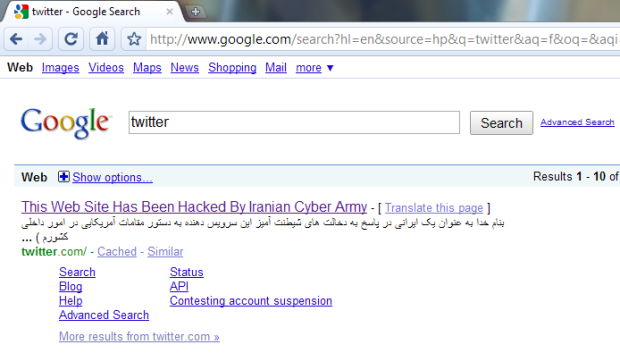
2. Even Google started showing the messages on searching for twitter

google-twitter

3. Find the related video


Although later on after around one and half hour, it was restored back with the official message from Twitter’s side.

“ As we tweeted a bit ago, Twitter’s DNS records were temporarily compromised tonight but have now been fixed. As some noticed, Twitter.com was redirected for a while but API and platform applications were working. We will update with more information and details once we’ve investigated more fully. ”


The chapter ended, but shaken a lot of faiths. First let us here discuss the layman terms and consequences of these incidences.

Compromised DNS records: Basically when you type some address in your browser, then various DNS Servers around the world redirect you to associated IP Address as actual machine communication happens on this IP address level only and readable address are just for human convenience. Later these requests reach to the site itself, which is if big enough, then maintain its own DNS server to keep other many servers behind it on same IP with required redundancy.

Now what happen, if somehow temper DNS recordings and this DNS starts redirecting you to some other IP rather than the official one i.e. to other server, which could be holding anything like this message this time. You will get the same site address in address bar, but now its going to some other server and some other application, which just happened with Twitter.

“ Think, what worse could have happened? If the hacking side might have tried their luck a little harder through phishing means presenting you exactly the same webpage like Twitter’s login page. Million of users were just giving their usernames and passwords so easily without knowing that this time, they were giving the same information away in wrong hands for nothing. ”


There are more lessons to learn from this RockYou and Twitter incidence. RockYou password revelation wasn’t a danger to RockYou itself, but it was containing passwords of many other accounts and so if one reaches there, then could take hold of all those millions of accounts and information within. Moreover, as the common practice is, people keep on using the same username and password at all the websites they know, which means if one try logging into gmail with same username/password combination retrieved from hacked RockYou, its not a hard luck that he will succeed to login.

So, the lessons here are:

  • Keep real good passwords.
  • Don’t trust completely over websites security as of now.
  • Avoid keeping your important info like bank account no. stored in your email ids.
  • Try to have different passwords for different sites at least, if can’t manage with different usernames.
  • As easiest way to hack some account usually involves the alternate email account you given, better give out your mobile no as it provides you SMS in many cases (if site doing so like Google) and in a way more securer than alternate email id case.

    and

  • Still we have to go a long way to have cloud computing working properly for us in light of such incidences.

Google Transliteration

“ Dec 17, 2009, Google launched it new and improved version of Transliteration, which will remain available via labs and on http://www.google.com/transliterate. In this new version, you can select from one of seventeen supported languages: Arabic,Bengali, Greek, Gujarati, Hindi, Kannada, Malayalam, Marathi, Nepali, Persian, Punjabi,Russian, Sanskrit, Serbian, Tamil, Telugu and Urdu. You can also compose richly formatted text and look up word definitions with our dictionary integration. If the default transliteration is not the word you wanted, you can highlight it to see a list of alternatives. For even finer-grained control, Google has provided a unicode character picker to allow character-by-character composition. ”


Google Transliteration was first introduced to me by one of my colleague Prashant Shukla few weeks back, while working over a regional requirement, then it was Google Labs feature in beta phase. For late joiners of this new technology, let me start with Introduction of Google Transliteration.

transliteration_logoIn daily life, everyone of us might have encountered with issues of regional typing as widely spread keyboards are roman script based only. Google and many other providers decided to tackle the same problem by making it very easy to type phonetically using Roman characters. Using Google Transliteration you can convert Roman characters to their phonetic equivalent in your language. Note that this is not the same as translation — it’s the sound of the words that are converted from one alphabet to the other. For example, typing "hamesha" transliterates into Hindi as: Hindi transliteration example, typing "salaam" transliterates into Persian as: Farsi transliteration exampleand typing "spasibo" transliterates into Russian as . Since the initial launch with Hindi only, Google have been hard at work on improving quality, adding more languages and new features.

“ You already seen this feature as part of your orkut or gmail experiences, if have noticed it. The same feature is just becoming full fledge and standalone now with a new effective and efficient interface. Google Transliteration is integrated into several Google properties and Google also have an API and bookmarklets to extend this capability to other websites. A solution initially built to solve a problem in India is now being used in many other parts of the world as well. “

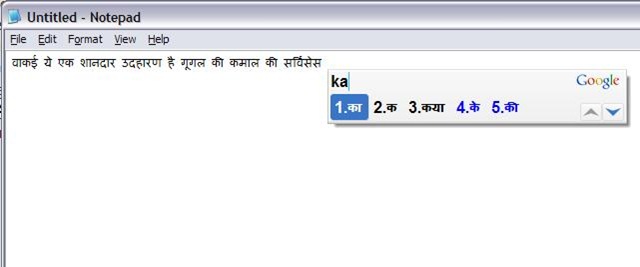
Google has also launched an amazing offline tool based on the same technology but without using internet at all, named Google Input Method: IME. I have used it and it works in really really cool way. Check out the following snapshot

transliterate

You just need to type phonetically and it will keep on translating it in Indian Language, you might have selected, just in way, you were using the same service online. Do you really think that regional typing will ever be burden again? 🙂

New Orkut for everyone without invite

“ Dec 17, 2009, from today Orkut has opened its new interface for everyone. Till now, it was available by invitation only basis, later they increased the number of invitations per users and now removing the need of invitations at all. ”

So, now no need for waiting for invitations, just click the button “Try New Orkut” on top of your profile and enjoy the new faster face of Orkut.

“Just wondering when the same going to be started for Google Voice and Google Wave :P”

photo of Nitish KumarNitish Kumar

Google Wave – need invites?

Look like I am again late about Google Wave. May be the reason is there are lesser known people inside and not many online on wave to talk to for the same reason. People like me might not be logging into their Google wave account just because they feel that they might get disappointed again by not getting more names in their friend list. After logging into it today, I found the situation been changed a little. Google wave has been opened up more.

wave_thumb

“ Since Dec 07, 2009, Google has not only given one more million Google Wave account to people requesting for them, but also has increased the number of invitations, one could send out for others. Although the exact count is not specified, but I think it must be 17 more invites added in your box, where it was 8 initially. ”


wave

Anyone, who is yet out of luck with Google Wave Account could get it from me by making a nice critic comment here on this post. Obviously, not everyone will get invites, but I have 24 invites in my bag to give out. May be your words get lucky.

Merge Duplicate contacts in Gmail

“ Dec 15, 2009, Gmail added a new feature to its contacts module, which lets one to remove every single duplicate contact entry at once from his Gmail contacts. I means to say that if you have many email ids saved against same person name and same email IDs saved more than once, then it consolidates them at once and so saves a lot of your tedious and time consuming manual work. ”

gmail logo


Managing a big address book can be a challenge, so it’s no surprise that the top request for Google contacts is a fast, easy way to merge duplicate contacts. So, here comes Gmail again with its unique innovations with your emailing experiences. Did you remember that when you started with Gmail, then what was special about contacts? They were being added automatically once you reply to any of their mail. Its been a nice feature. There were more related to contacts, like importing addresses from contacts of other email addresses, importing contacts from csv and many other means to make your contact list grew bigger and bigger.

You are sure not that worried from the bigger size of your contacts due to innovative and efficient auto-complete feature of Gmail, but for most of us, to avoid confusion, while mailing or for people, who like to keep them organized, this is a very very welcome idea of having a one-click-merge-button, otherwise it was a just one-by-one process. The implications are more real for those, who might have started syncing their phone contacts with their Gmail account.

Gmail-merge


The basics of how it works is quite simple. This new system runs  a simple scan on your contacts and the one button solution merge the information for each duplicate contacts. It’s a non-destructive method, so you are not going to loose any contacts, but if you have organized your Contacts in some certain way, then only you have to check whether the new system suiting to your method or not.

“ This feature is sure targeting users thinking to make use of Google Sync and will be sure handy for most of tech-savy people.What’s interesting is that why such a delay in announcing such a feature, when Yahoo and Hotmail have given similar long back in 2007 only?”

photo of Nitish KumarNitish Kumar