Blogging; Howto, Setup and working with the system

Sometimes, we write coz we are afraid of our empty selves.
Sometimes, we write coz we feel afraid that why we are not feeling like writing.
Sometimes, we write coz we just wanted to say something and don’t want to say the same.
Sometimes ….

There might be many reasons, why I am writing this time, there might be many reasons, why one writes or think about writing. Some times back, I wrote an article about writing blog with an obsession that may it inspire few more people to write blogs. May be it was for some, but today I wish to put a little more efforts.

Why to write a blog? I have already written over it and now I am going to re-write a few points and also that what are the tools and easy practices for the same. I will not forget to mention that one push for this article was an article from ProBlogger. I agree from the point made by the author that there are two types of bloggers;

First one, who get into writing due to free flow of thoughts and quick enough to sit down and type on before the thoughts may get mixed up in already messed up life’s little big things.

Second one, who think about writing first and then plan for the same with related materials, make a draft first, think about its salability, think about it marketability, think about theme around it and think about all other minor details, which right now, I don’t even know. 🙂 But the best part is, in all these things, this second category take just a very little time more than the first category.

Obviously, the results are favorable for the second category and the first category sometimes cries that why don’t their authentic thoughts get proper attention than the technical ones. Anyway, I still wish to be termed as one from the first category and even right now wish to write for the first category.

I have wrote earlier that what are the tools required for blogging, but let me summarize again more systematically and a little bit technically (of course few words from ProBlogger). Followings are somewhat necessary steps, which a newbie blogger should take on his mind:

  • Choosing a topic: I know this doesn’t go well with newbies as we want to write but we don’t know what our exact tastes are and at which topics we could attract more people. Note that in start choosing topics might be random, but sooner or later you will be needed to find some central topic for your blog, which will define the theme around your blog, so give a thought about the topic for sure. 
  • Choosing a platform and design: This is about choosing platforms, tools, attractive themes and contents. for a professional view, you could check the ProBlogger Article. But at my blog, thoughts and recommendations are my own and so I recommend WordPress, whole heartedly either you are writing over the free WordPress.com domain or setting up your own domain from the software provided by WordPress.org. The reason of recommendation is the level of comfort and available options you could configure, which is also certified by most of the public. After choosing the platform, you need to choose a theme as light as possible, which could loads as fast as possible coz you have only few seconds to impress the person visiting for your link and if most of these seconds will be taken by loading of pages, then you know the answer …. F*** Off.
  • Choosing a name/domain: If you are not planning invest anything in start and just wish to go for it for satisfying your passions of writing, then the second part is irrelevant, but the first part still matters a lot. Choosing the name; It will sure be a crucial step for your blog as its kind of identity, which will be hard to change later on. You need to be specific about naming the blog, so that it could strictly match up with your blog theme today and tomorrow. One more point is about ease of search and easy to market, so that better is if the name contains the central keyword, your blog is going to be all about.
  • A writing tool: Although there are many ways including Microsoft Word, Open Office etc from where you could post articles to your blog without thinking that blogging is something different than making docs in your computer, but when it comes to SEO and marketing things then you come to know that technically how much important it is to have as clean HTML code behind your post as much possible. So, better to use web editor and knowing some basics of HTML as well or if thinking about convenience then Using Windows Live Editor. For me the later option been a joy ride till now, due to availability of so many plugins, about which you could only dream of, if you are on your own with default web editor only.
  • Writing/creating a hundred posts (assuming an average of four posts a week): Although it was not serious thing to me in first sight, but I found it very true, when given some thoughts over it. Sure, habitual and regular writing is what could be foundation of a successful blogging, otherwise, you will come up with a random thought, an article will roar for few days and then you will come to see your own blog after around one month. If even you are not interested and serious about your blog, then who else will be. Be regular, be rich about content and put your efforts as earning first 1000 views is much harder than earning next 1000.
  • Subscribing to big blogs of similar tastes: I will recommend for every blogger to make full use of Google Reader etc to keep a collection of subscriptions and also keep on visiting the same as a daily habit as this provides food for your thoughts. As many things and thoughts you know, as much and as content you could write upon.
     
  • Registering with digg, stumbleupon, twitter, del.ico.us etc. : It might sound a joke, if someone come up to say that he/ she is not part of all these or don’t even know, but it might be. Why to register with these things? You just want to post some thoughts over web after all not the social networking. But these things are important for giving initial exposure towards your posts. Its better if you are connected to many in these way, so that if you wish to say something, many will be here to take attention.
  • Participating in forums: This requirement is due to the same the reason, PR exercise as I mentioned in earlier para. Moreover, it provides you quick comments and thoughts sometimes.
     
  • Leaving comments/back links on other blogs: Its like dropping your business card at places and writing names on walls filled with other advertisements, which make your name getting attention. Once, you are seriously in blogging word, you will come to know that how precious these back links are as these back links provide you a share of other’s hard work many times and sometimes, even this little share is too much for a starter.
  • Printing business cards with your blog address/ Telling friends about your blog: Its the basic advertising but it still has worth for everyone. Its like mouth to mouth publicity for your blog and very better if it results in developing a core of followers. Spreading the word on social networks (facebook, etc) is just part of the job. 
  • Understanding the trends and search terms about your posts: Its a very necessary part of the game to deploy webmaster tools from Google, Yahoo, Microsoft etc to know that how your posts are being reached. What are the search terms and what are the back links, so that you could work more and more in a systematic way. After all, its your learning curve, which makes you gain something over others. 
  • Keep targets about your reach: In early days, take it as a play to know hits over your blog every day. Early targets might be 50 per day, then 100 per day and then 1000 per week and so on. Once, you are involved in this game, you automatically get yourself involved in following the other steps to keep the number of hits steady up.

Anyway, leaving from here.. thought to write as was not feeling asleep, so thought to drop in some words about writing.

More about Google wave

Facts about Google wave continues ….

Do you know your Google Wave ID (like mine is contactfornitish@googlewave.com) is nothing sort of Email ID means no one could send an email over the same address and only waves could be sent over the same.

Do you know Wave uses your regular Google Account’s contact list means if any of your contacts are also using Wave, those people automatically show up in your Wave Contact List.

Do you know the best visible difference between a Wave conversation and Email conversation is that you can add contacts anytime later on and they could follow the conversation fro right there and could read the earlier lines etc. Means not needed to be CC from start if it was case of email.

Do you know even if you don’t have any contacts online in Google Wave, you can go for participating public waves anytime with typing the special query with:public and it will return a firehouse of constantly updating waves like the case of twitters. A better luck would be targeting your query over particular topic like with: public firefox, which will return wave related to firefox only.

Do you know A Wave can show more than one cursor working within a given wave as well, which means active waves with lots of participants could be a treat to watch with multi-colored names typing text before your eyes… live. I guess watching multiple people typing within the same document would be the most new and electrifying experience for most of the people. 🙂

Do you know although not available right now, but Wave will offer a feature that you could stop showing your typing (i.e. blips) means you could complete your typing and then press the button and your sentence; the blip will appear at once. This will be called as Draft Mode and is one of many features, which are not available in preview mode

Do you know Wave is not something completely browser independent. Wave uses recently developed web standards, such as HTML5, to perform a lot of its behind the scenes magic. So, for the richer experience from Wave, you need a browser having full support to HTML5 like Google Chrome, Firefox 3.5+ or Safari 4.

Do you know there are three ways to edit a wave

1. Reply below a Blip.
2. Reply inline within a Blip
3. Edit the existing content of a Blip.

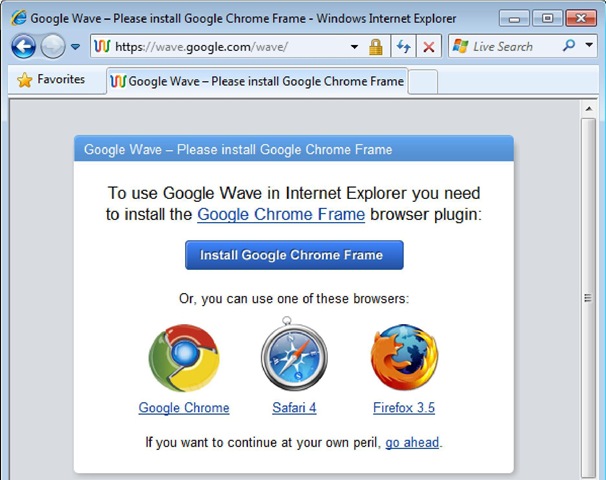
Do you know as of now, Internet Explorer can’t run Google Wave properly as it doesn’t have support to HTML5. Although Google has released an open source browser plugin for bridging the gap. Wave prompts Internet Explorer users to install the same plugin in following way.

GoogleWave for Dummies

Do you know As of in early stages of it, Google Wave is struggling about Mobile devices as most the mobile browsers are not fully supporting to it and one could get it only after avoiding the warning of browser not supported.

Do you know your Wave Contact List is a subset of your Google Account’s exisiting Contacts list and you can add people to your Wave Contacts List only if they already have a Wave Account.

Do you know as of now, there is no way to remove a contact from a wave once added with the exception of bots.

Do you know as in theory Google Profiles are the same as Wave profiles and so you could edit yours to have links, hobbies, photos for the same.

Do you know every time a wave updates, it moves to the top of your inbox and its subject line turns bold. Wave’s instant, real-time notifications are a double edged sword; wonderful when you’re waiting on important updates, terrible when new information you don’t care about distracts you. the achieve and mute buttons can help you clean out your inbox and silence chatty waves one by one.

In the similar ways like emails, waves could be marked read or unread and also could be arranged within folders and subfolders.

Do you know although was available as a privilege to blog posts only, now tags are part of waves as well and playing the same role as was in case of blog posts. Tags provide a more free-form way to file your waves. Unlike folders, you can add as many tags to waves and also unlike folders, anyone participating could see those tags.

Do you know as of now, Wave doesn’t recognize special search characters like square brackets, parentheses, currency symbols, the ampersand, the pound sign and the asterisks. It also doesn’t recognize partial or similar matches, so a search for “travel”  doesn’t find “travels”, “traveler” or “Travle”.

Do you know If your browser has the Google Gears plug-in installed, you can drag and drop files from your computer directly into your wave. (Gears comes with Google Chrome for Windows and its freely available to install on Firefox, Internet Explorer and Safari for Mac).

Do you know If your wave contains multiple images, then an Images button appears next to the Files button on the bottom of that wave. Click the Images button and Choose View as Slide Show to easily flip through the photos at their full size.

Do you know how can we can make a wave public? Here is the trick. Add the public@a.gwave.com wave ID to your contacts list the way you would any other contact (although you will get the warning that user doesn’t has any Google Wave Account but you need to continue anyway). Add the same ID as participant to any of your wave and your wave would be a public wave right then.

Now finally, do you know the keyboard shortcuts with Google wave. Here are some

Navigation Shortcuts
Up/Down Arrows Moves you up and down the blips in a wave.
Home Takes you to the first blip in a wave.
End Takes you to the last blip in a wave.
Space Takes you to the next unread blip in a wave.
Page Up/Page Down Scrolls a panel up and down a page at a time.
Ctrl+Space Marks all blips "read" when focus is on the Wave panel.

Wave Editing Shortcuts
Enter
Replies to a blip at the same level of indentation.
Shift+Enter (in view mode) Replies to a blip at the end of a wave. The new blip appears at the same
indentation level, at the very end of the wave.
Ctrl+E Edits a blip.
Shift+Enter (in edit mode) Ends your blip editing session (same as the Done button).
Ctrl+B Bolds/unbolds selected text.
Ctrl+I Italicizes/unitalicizes selected text.
Ctrl+U Underlines/removes underline from selected text.
Ctrl+G Adds color to text via "poor man’s rich text" pop-up, in which you can type a color name (like "blue" or "red") or enter the hexadecimal HTML color code.
Ctrl+K Adds a link.
Ctrl+[n] Makes the current line a heading, where [n] = 1 through 4 for different sized headings.
Ctrl+5 Adds bullets.
Ctrl+6 Removes formatting from text.
Ctrl+7 Left-aligns text.
Ctrl+8 Right-aligns text.

Navigate Image Slide Shows
Space+Right Moves to the next slide.
Shift+Space Moves to the previous slide.
Down / Page Down Moves to the next set of thumbnails.

Rest will come up as I learn more and more about Google Wave.

The Google Wave Book

Google Wave: Finally I am introduced with it

Google wave; the all big buzz and I was failing to reach it as I was lazy enough in the start, when it was first declared long back. Yes as per wiki, Google wave was first declared really long back in the Google I/O conference on May 28, 2009.

wave

I went after it, only when my brother Dewashish asked me for an invite to Google Wave. I tried to know the definition and my search ended over the wiki

It’s a communications protocol designed to merge e-mail, instant messaging, wikis, and social networking. It has a strong collaborative and real-time focus supported by extensions that can provide, for example, spelling/grammar checking, automated translation among 40 languages, and numerous other extensions. Initially released only to developers, a "preview release" of Google Wave was extended to nearly 1 million users beginning September 30, 2009, with the initial 100,000 users each allowed to invite from twenty to thirty additional users.

I tried to digg little bit more deeper and got one more line Google Wave is designed as a new Internet communications platform. It is written in Java using OpenJDK and its web interface uses the Google Web Toolkit. (Same GWT behind new interface of Orkut).

Ok! I am leaving all these lines from external sources and coming up from my own. For me, its something like Google’s implementation of Wiki. As Google says, its a hosted XML Document: the wave, which could be edited by any of the person involved in the conversation.

I would like to present my first Google Wave conversation with the person, from whom I got the invite. May be you all get some idea of my learning about this in raw….


Sachin: Hey, Nitish, So You got the invitation!

Let me know your experience.

Me: Yes I got it and trying to know exactly what this is?

The experience is nice till now and as much I got to know then its not an email tool, but could be said as Google’s implementation of Wiki. If you understand that what wiki is then you could understand that what Google wave is and what Google is trying to achieve with it.

Sachin: This is new email tool, cannot understand yet, once we get more and more people involved may be we will get to know the utilization. There are lots of things, We can use lots of social networking things. but definitely start ….

Me: hold it for a second, I want to object. Although Google’s definition says that it has something to do with Social Networking, I will strongly object. Its not another Orkut or facebook or MySpace. Its more like Wiki. Your conversations are an Open XML shared Document, which anyone involved could edit and the editing would be completely logged and visibly real time.

Wiki was a Document which anyone could edit, it was a concept which was earlier much opposed that such an information would not be reliable as anyone could edit in wrong ways, but later on over years, as Wiki got success it was proved that if one could edit it for wrong then more people could edit it for right ways as well and so Wiki worked and worked in such a tremendous ways that now they are kind of most reliable source of information for everyone.

I guess Google wave is something like that. A fully rich document (pictures, links, ppts, videos and all type of rich media you know), in which Google is making full use of Google Docs and its strength of real time communication. Now people join in .. have their documents online and these documents will be shared over the users participating the conversation and such document will move online to become some dynamic source of information

People knowing Team Softwares and Wiki will get a true idea about what Google wave.

Sachin: I am looking for more like corporate communication through google wave. What do you think?

Me: Yeah … you are heading in exactly right direction… first use will be sure Corporate communication, and specially software developers or project handlers as corporate is already using some of such things, and could relate this faster than others.

Main target is to create collaborative documents, which will hold dynamically changing information from more than one sources, which will be edited to suit with the facts more and more and will come up with an ultimate information source.

I would recommend all of you to go through the tech crunch article for the details. Wonderfully detailed article about Google wave.

I also came to know about a few books over the same topic Google Wave and the leading one, which is online for free is http://completewaveguide.com/

I gone through a few of the pages and found them short enough to keep the interest and info. Take a look.

The other books, which I am aggressively looking for, are books from O’reilly publication with the title Google Wave: Up and Running and Getting Started with Google Wave. Although till now, no luck in finding a free copy of the same.

I managed to find somehow a PDF calling itself as Google Wave for Dummies. I guess, its the same arranged PDF version of the Completewaveguide. Could take a look over the PDF Book for the best info available for my side.

updates: 6th December 2009 

After many days of receiving invite, now from 2:38 PM of today, I also got the power to invite 8 more and I have started using the same. 🙂

Google wave invite

del.icio.us Tags:


Other related links:

http://mashable.com/2009/11/14/google-wave-use-cases/

http://en.wikipedia.org/wiki/Google_Wave

Tech Crunch Article


Dravid‘s strong 177 against Sri Lanka, made Indians Comeback

Just few days back, we seen roars of Little Master against Australia and now Rahul Dravid holding the wall against Sri Lanka in first test cricket with a brilliant innings of 177, which crafted Indian’s second best test score in one day (Highest is just one run more 386). With more than 11,000 runs in tests, he is also the fifth highest run scorer as far as test cricket is concerned.

We really feel that how blessed and proud are we, when we were having the trio Sachin, Sourav and Dravid in full glory once.

Rahul Sharad Dravid, the most experienced test player of Indian: I really don’t know, how many times, media has been written off him, how many times, he might had faced the anger of cricket fans for slow cricket, but he still has kept his reputation as the Wall due to his ability to bat for long durations and we regard him for the same when we got struck by such a need like today’s game.

India was competely struggling with a poor score like 32/4, when the big names like Sachin, Sehwag, VVS Laxman and Gambhir were off the screen. But the wall was still in tact and so the hopes. First he taken heat over his shoulders along with Yuvi and finally the skipper moved in with him to turn the match towards Indian’s favour. As of now, Dhoni also has departed before the end of play for today and The wall is on crease with Harbhajan.

The Wall; we salute your experience and as a viewer said you are really making cricketing poetry in the ground. 🙂 I was really looking for his double century this time, but …. anyway, we got to see Test Cricket after a while and you really made it a treat for us.

Thanks The Wall!!!! Thanks Dravid!!!!


photo of Nitish KumarNitish Kumar

New Lighter and Faster Orkut

Have you got your invitation yet? Few days back, we were hearing the same about Google Wave and now we are hearing the same about New Orkut. Luckily getting to new version of orkut wasn’t that tougher as getting hands on Google Wave seems to be. In the ads, it was asked to join the community to get an invitation, although I didn’t liked the idea very much to join a community for sake of just getting an invitation, which in turns finally I didn’t got from.

Although the community started from 12th October 2009 to build up interest for New Version of Orkut, The Brand New Version of Orkut was officially launched by 28th October 2009.

As we can see that it’s completely rebuilt interface with heavy use of ajax everywhere and as their official blog says for building it they have make use of Google Web Toolkit (GWT) throughout. With what they been successful is bringing most of the things integrated on the first page itself, either its community handling, friends management, scraps, photos or anything else. I was very much impressed with Photos handling obviously, which is now at par with Facebook or other such sites. The interface to handle photos is very intuitive and blazing faster than the earlier version.

As other bloggers pointed out, here are some new features:

1. Added scroll bar for Communities & Friends List
2. Ajax color changer added for profile wrapper
3. Accepting members to the communities done with ajax, you can accept many people. at once
4. Accepting friends request done with ajax. you still have to accept individually.
5. Recent visitors and recent birthdays shown with profile picture. (Little anoying)
6. Icons changed for chat availability status.
7. Adding comments to status updates of friends.
8. Drop down CSS menu made for different tabs like profile, photos & videos.
9. More updates load below with ajax loader.
10. Link to other google services added on top.
11. Drop down menu added to orkut logo (useless)
12. Friends suggestions are in ajax ring like loading
13. Manage button added to friends & communities link.
14. Basic formatting options added to scraps with google chat smileys. (A warm new feature for all).

Although I still remember Orkut’s early days when the focus was to keep the interface simple and specially that blue throughout and I’m sure that many of us, will keep missing that simplest interface, which made us Orkut go higher places in comparison of Facebook or MySpace. But like technology is spreading and improving, changes are likely to touch the lives from every side and such an overhauling of Orkut interface was expected from long. So is this U-Turn from keep it simple and blue philosophy.

The new interface is sure useful in many senses for the users addicted to Orkut, but I also wish to point out that it might not be that easy or attractive for the new users coming into it. For new users, its just the same like MySpace or Facebook and I am not sure that you could win new users from there. Let’s see, how this new version proceeds.

Suppose you got the invitation for The New Orkut but after playing with the new interface for few hours, you want to go to the old version of Orkut then you can do it by following instructions.

“How To Get the Older Version Back in The New Orkut?”

You will switch back to the older version of the Orkut by going at the “older version” option in the top right corner of the new Orkut interface. Click on it and you will back into the old Orkut world. Simply click on the link “try the new Orkut”, in the top navigation bar, if you want to go into the New Orkut.


If we talk about users opinions, then not to mention only few bloggers, but I didn’t found much of a positive buzz about this around friends. Few of them commented about missing features and most of them commented that they were used to of earlier version and this new interface will take time to adjust with. I guess, its like shifting from Windows XP interface to Windows 7. We may feel it better, but find no reasons to change. 🙂 So tell me after your experience about which version of Orkut is better, the old one or the new one?

WDS Client Reboot Issue

Please refer to my detailed article. Most of the time, this issue will come due to insufficient RAM (less than 512 Mb) in WDS Client.

To all people starting with WDS, I really really want to warn in LOUD that please do care about RAM requirements as WDS could run if RAM is lesser in Server side, but it can’t if client is having less than 512 MB RAM. Now, after noticing this issue, I am finding that most of the issues, while implementation phase came for this single reason only.

Another thing, which I noticed is that any of the image, boot.vim or WinPE.vim could be used to capture or deploy, the objective of keep two images in the menu, make the two tasks seperate; One capturing image and second deploying image. With two images in menu, both the tasks may go together in production.

I also noticed that even if you might have created image for someone other HAL, sometimes it might work for other HAL (for me HP DX2280 image worked for IBM ThinkCenter), although drivers will still be missing. I thought one go around that collect RAW network drivers of all kind of machines you have (or as many network drivers, you can collect) in one folder and keep this folder in C:\ drive of every machine, you are going to image. It wont take many of Mbs, but will be handy, if you don’t have exact image, but a working image. At least you will easily get a network enabled, necessary software containing workstation, in which rest of the drivers could be filled.

Ajab Prem Ki Gazab Kahani Review

Ranbeer’s craze really seems to speeding up and he deserves as with his kind of movies, he is bringing innocent romantic comedy genre back into game. It was in the same way awaited movie, like Wake Up SID, Love Aaj Kal or 3 Idiots due to its fresh cast and looks. I was not expecting it to craft maturely like Love Aaj Kal, but it really given me much emotional moments like the earlier.

Title: Ajab Prem Ki Gajab Kahani
Release Date: 6th November 2009
Banner: Tips Music Films
Producer: Ramesh S Taurani
Director: Rajkumar Santoshi
Cast:.Ranbeer Kapoor, Katrina Kaif, Upen Patel, Salmaan Khan (Guest appearance)
Story Writer: Rajkumar Santoshi
Music Director: Pritam
Cinematography: Thiru
Edited By: Steven H. Bernard
The film was shot in Ooty, Mumbai, Pune, Goa and Turkey.

This movie received mixed reviews in its start, but business of 6.75 carores at friday, 7.75 carores at Satusday and finally more than 10 carores on Sunday, proved that where the movie is heading. Amazing to notice was,

“Ranbir is pairing with actresses very easily either it was Deepika, Sonam, Bipasha, Konkana or Katrina now. The On-Screen chemistry of Ranbir-Katrina is electrifying and they are looking extremely good together.”

The movie starts lightly and soon slips into serious romantic emotions. The first innocent nodes, where we fear to say her coz don’t know how will handle her answer. The fear to loose her, the inability to trust yourself that she will love you ever makes us hopelessly following God only. This all comes so smoothly like so natural in face and expressions of Prem (Ranbir Kapoor).

We feel the pain of endless waiting in face of Prem, when Jenny (Katrina) doesn’t show up after promise and he came to know that she is in Goa now. We find our sympathy moving towards the boy, who was always with Jenny without asking anything. Can’t she see? With falling of Prem over grass, we really knew that much has been fallen for him.

Why we love someone this much that not even let her know a little? Why when everyone could have seen the love in our eyes, why when everyone could have seen us changing for her, why can’t she? Why? I wish in real life people like Prem could have been really this much lucky to get their love back.:)

Another beautiful movie for the romantic boy!!! keep it up.