How to make your Gmail account easy to recover if hacked

The very first step to take is the same as I discussed in last article.

Keep variations in your username/password over various sites: its of prime importance as how could you think that any random forum or newbie site could be as secure as your Yahoo/ Gmail/ Hotmail? If you use the same username/password combination in some smaller sites/ forum and that one got hacked, then a hacker could try to login with the same in other popular services as well and that could lead in getting your account hacked in a way, where no mistake was from Gmail/ Yahoo/ Hotmail side.


The other steps are for recovery of your email if hacked from Gmail as Amit suggested:

Use your old days pen & paper and note down the following somewhere:

  1. The month and year when your created your Gmail / Google Account.
  2. If you created a Gmail account by invitation, write the email address of the person who first sent you that invite for Gmail.
  3. The email addresses of your most frequently emailed contacts (the top 5).
  4. The names of any custom labels that you may have created in your Gmail account.
  5. The day/month/year when you started using various other Google services (like AdSense, Orkut, Blogger, etc.) that are associated with the Google account that you are trying to recover. If you’re not certain about some of the dates, provide your closest estimate.
  6. Run a Test! Log-out of all your Gmail / Google Accounts. Start the password recovery process. This guarantees that what you set up actually works. You want to be absolutely certain your SMS settings and secondary email addresses are configured correctly. (this is when you have associated your mobile in your Gmail account, do it for sure).
  7. Check your IP Address: From time to time check out the IP address in the footer of your Gmail Inbox. If you see an odd one, change your Google password immediately. Knowing IP addresses may seem too technical to some but it’s good information to know.

Thanks to Amit for listing out these tips.


At the end …

“ I don’t expect from everyone to be smart enough to remember these all minor but common details, but its about knowing your account more better than anyone else. Its like recognizing your bag, when recovered from police etc. You need to tell them that what’s inside it, which only you are expected to know. So, know your account better and keep it noted down in your diary or somewhere secured. ”

photo of Nitish KumarNitish Kumar

Hacking of Twitter leaves questions over Cloud again

Not much days passed when database of RockYou was compromised and the hacker also revealed in sample that what  database structure was and how passwords were stored in plain text, which were including not only RockYou, but of yahoo, MySpace, Friendster etc as well. The revelation was a shock to many people and a big setback for cloud computing in a way as it shown that how things could go wrong in incompetent hands.

rockyouTwitter-logo


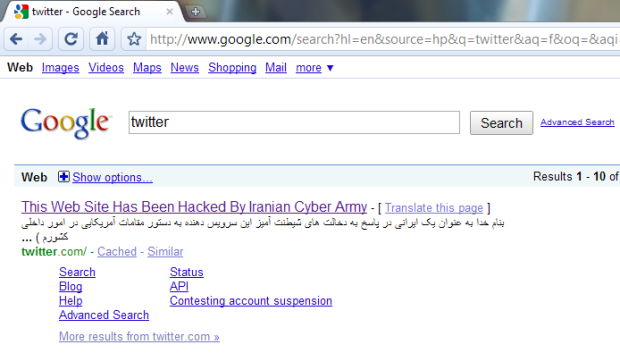
And last night, the world was encountered with greatest shock, when biggest micro-messaging giant Twitter, which stands as like some top 20 of largest web apps of now days, went down due to a hack attack by 22:00, Dec 17, 2009. Below are the related screenshots.

1. How twitter.com was showing the below message from some Iranian Cyber Army

Twitterhacked 

2. Even Google started showing the messages on searching for twitter

google-twitter

3. Find the related video


Although later on after around one and half hour, it was restored back with the official message from Twitter’s side.

“ As we tweeted a bit ago, Twitter’s DNS records were temporarily compromised tonight but have now been fixed. As some noticed, Twitter.com was redirected for a while but API and platform applications were working. We will update with more information and details once we’ve investigated more fully. ”


The chapter ended, but shaken a lot of faiths. First let us here discuss the layman terms and consequences of these incidences.

Compromised DNS records: Basically when you type some address in your browser, then various DNS Servers around the world redirect you to associated IP Address as actual machine communication happens on this IP address level only and readable address are just for human convenience. Later these requests reach to the site itself, which is if big enough, then maintain its own DNS server to keep other many servers behind it on same IP with required redundancy.

Now what happen, if somehow temper DNS recordings and this DNS starts redirecting you to some other IP rather than the official one i.e. to other server, which could be holding anything like this message this time. You will get the same site address in address bar, but now its going to some other server and some other application, which just happened with Twitter.

“ Think, what worse could have happened? If the hacking side might have tried their luck a little harder through phishing means presenting you exactly the same webpage like Twitter’s login page. Million of users were just giving their usernames and passwords so easily without knowing that this time, they were giving the same information away in wrong hands for nothing. ”


There are more lessons to learn from this RockYou and Twitter incidence. RockYou password revelation wasn’t a danger to RockYou itself, but it was containing passwords of many other accounts and so if one reaches there, then could take hold of all those millions of accounts and information within. Moreover, as the common practice is, people keep on using the same username and password at all the websites they know, which means if one try logging into gmail with same username/password combination retrieved from hacked RockYou, its not a hard luck that he will succeed to login.

So, the lessons here are:

  • Keep real good passwords.
  • Don’t trust completely over websites security as of now.
  • Avoid keeping your important info like bank account no. stored in your email ids.
  • Try to have different passwords for different sites at least, if can’t manage with different usernames.
  • As easiest way to hack some account usually involves the alternate email account you given, better give out your mobile no as it provides you SMS in many cases (if site doing so like Google) and in a way more securer than alternate email id case.

    and

  • Still we have to go a long way to have cloud computing working properly for us in light of such incidences.

Google Transliteration

“ Dec 17, 2009, Google launched it new and improved version of Transliteration, which will remain available via labs and on http://www.google.com/transliterate. In this new version, you can select from one of seventeen supported languages: Arabic,Bengali, Greek, Gujarati, Hindi, Kannada, Malayalam, Marathi, Nepali, Persian, Punjabi,Russian, Sanskrit, Serbian, Tamil, Telugu and Urdu. You can also compose richly formatted text and look up word definitions with our dictionary integration. If the default transliteration is not the word you wanted, you can highlight it to see a list of alternatives. For even finer-grained control, Google has provided a unicode character picker to allow character-by-character composition. ”


Google Transliteration was first introduced to me by one of my colleague Prashant Shukla few weeks back, while working over a regional requirement, then it was Google Labs feature in beta phase. For late joiners of this new technology, let me start with Introduction of Google Transliteration.

transliteration_logoIn daily life, everyone of us might have encountered with issues of regional typing as widely spread keyboards are roman script based only. Google and many other providers decided to tackle the same problem by making it very easy to type phonetically using Roman characters. Using Google Transliteration you can convert Roman characters to their phonetic equivalent in your language. Note that this is not the same as translation — it’s the sound of the words that are converted from one alphabet to the other. For example, typing "hamesha" transliterates into Hindi as: Hindi transliteration example, typing "salaam" transliterates into Persian as: Farsi transliteration exampleand typing "spasibo" transliterates into Russian as . Since the initial launch with Hindi only, Google have been hard at work on improving quality, adding more languages and new features.

“ You already seen this feature as part of your orkut or gmail experiences, if have noticed it. The same feature is just becoming full fledge and standalone now with a new effective and efficient interface. Google Transliteration is integrated into several Google properties and Google also have an API and bookmarklets to extend this capability to other websites. A solution initially built to solve a problem in India is now being used in many other parts of the world as well. “

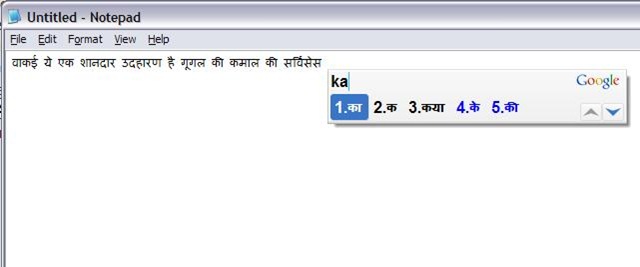
Google has also launched an amazing offline tool based on the same technology but without using internet at all, named Google Input Method: IME. I have used it and it works in really really cool way. Check out the following snapshot

transliterate

You just need to type phonetically and it will keep on translating it in Indian Language, you might have selected, just in way, you were using the same service online. Do you really think that regional typing will ever be burden again? 🙂

New Orkut for everyone without invite

“ Dec 17, 2009, from today Orkut has opened its new interface for everyone. Till now, it was available by invitation only basis, later they increased the number of invitations per users and now removing the need of invitations at all. ”

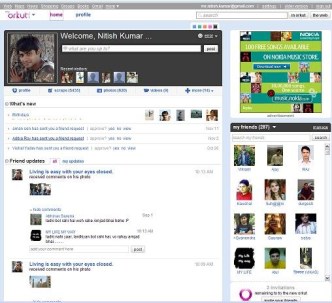
So, now no need for waiting for invitations, just click the button “Try New Orkut” on top of your profile and enjoy the new faster face of Orkut.

“Just wondering when the same going to be started for Google Voice and Google Wave :P”

photo of Nitish KumarNitish Kumar

Google Wave – need invites?

Look like I am again late about Google Wave. May be the reason is there are lesser known people inside and not many online on wave to talk to for the same reason. People like me might not be logging into their Google wave account just because they feel that they might get disappointed again by not getting more names in their friend list. After logging into it today, I found the situation been changed a little. Google wave has been opened up more.

wave_thumb

“ Since Dec 07, 2009, Google has not only given one more million Google Wave account to people requesting for them, but also has increased the number of invitations, one could send out for others. Although the exact count is not specified, but I think it must be 17 more invites added in your box, where it was 8 initially. ”


wave

Anyone, who is yet out of luck with Google Wave Account could get it from me by making a nice critic comment here on this post. Obviously, not everyone will get invites, but I have 24 invites in my bag to give out. May be your words get lucky.

Get organized with Google Sync

Here comes, I am to discuss about its another feature, Google Sync; which has been launch since long back in Feb 09, but as I myself was not using the same, so wasn’t that aware of.


 google-logo  sync

“ How many times, you take backup of your phone contacts in fear of loosing your phone some day? How many times, you think that you should start taking backup of your calendar entries as well? How many times you been in a situation that you were not sure about that in which cell-phone you saved new friend’s number? How many times, you missed someone’s anniversary or some urgent appointment, just because your cell was switched off and you were much busy on internet and forgot? ”

The situations might be plenty, but the solution is the plain and basic one (probably everyone of us might have imagined): A single place to sync your contacts and calendar entries from your each cell-phone. Moreover, as per ideal Backup conception, that ‘single place’ should be far enough from your actual data like Internet itself means a place, where you could upload your contacts safely and which may be in two way sync with your phone all the time, so that any changes made at any side could be preserved and replicated to all in sync. Sure, there is such a place and such a service now: Google Sync.


Google Sync allows you to get your Gmail contacts and Google Calendar events on your phone. The sync works in two-way means any changes you make to your calendar or contacts from browser or phone will be reflected on all other devices sync with same Google account. For all these devices, synchronization happens automatically over the air without having to manually sync your phone. With the setting, Connection is always ON, your information is always up-to-date, no matter where you are and what you’re doing.

“ Sync of calendar also adds one more angle in remembering important events as from your phone, you could set it to give you alarm in every 10 mins and from your Google Calendar, you could set it to send you email in every 10 mins. Means you important event details (anniversaries, birthdays, meetings etc.) is always online with you, whether your phone is with you or not. Not to mention, the two way sync will allows any changes you make either side, get replicated on all the devices. ”


Getting started is easy. You can configure Google Sync directly from your device. The instructions and capabilities vary for different phones, so better check out for Help Center for device-specific information. Also, please keep in mind that Google Sync will replace all existing contacts and calendar information on your phone, so make sure to back up any important data before you get stated. To try Sync, visit m.google.com/sync.

“ If you have an always on GPRS connection with unlimited usages or working somewhere having wi-fi internet enabled freely for your phone, then don’t miss this feature. Its really kind of much have addition to someone’s tech life. You will never loose your contacts, your management of events will improve, you would be able to use all your phones without worrying that someone’s contact is saved in it or not, moreover, Google contacts will be available with you with their Gtalk snaps.”

Note: For Nokia S60 mobiles, you are needed to download and install an application named Mail for Exchange, which is of 1Mb around. For other devices, visit m.google.com/sync and find the instructions.


“ My blog is being updated with Google things only in now days. May be the reason, I am part of that poor community that don’t own an iPhone yet, not even a Black Berry, neither much involved with Twitter buzz. So, Layman’s Technical buzz is being centered around only Google now days and it really seems true that Google is kind of taking over the internet. At least at this point, Google really deserves. ”

Google: The Mission 2009

Although still the year not over yet and who knows that if Google still has many things in its bag, but as my recent many articles have gone in updates from Google, I was really serious about compiling a list that what made news for Google in year 2009, but look like, I was not needed to take that pain as Lifehacker already has compiled the list for me early on.

Google’s 2009 Product Release Calendar

This has been a pretty busy year for Google and back-to-back announcement from Google really came to our life better and better. Take a ride through the last four seasons at Google in this list of 2009 product releases and updates, listed in chronological order, month by month.


January

February

March

April

May

June

July

August

September

October

November

December


All credits for this post goes to Life Hacker. I am just taking article from them to convey the info to readers.