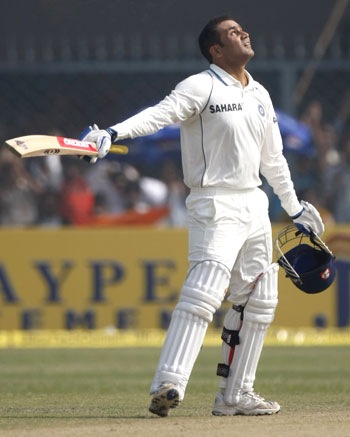
Sehwag on edge of three triple centuries

Can you believe it? What just happened on Third and final Test between India and Sri Lanka!

Playing against a big score of 393 from Sri Lanka, somewhere a pressure in mind that winning this last test could make India on top of ICC Test Ranking and here comes the answer from India 443/1 in just 79 overs on a run rate of 5.61 (This is also their top score for a day by the way).  Indians took control of third test on day 2by outplaying Sri Lankans in almost every department. First they wiped out rest of two wickets on a cost of just 27 more runs in just half an hour and then three brilliant innings including the leading face of ruthless Cricket on its own days: Virender Sehwag with a score of 284* in just 239 deliveries.

Virender Sehwag


Sehwag has really got something in him. Once upon a time, there were many people out there making questions over his class and batting techniques. It was said that such a ‘mindless’ batting style will not take him much far and for the ‘sincere’ Test Matches, he was thought to be out of league.

But today, after hitting fastest 250* (207 deliveries) and the second fastest double century (fastest is of Nathan Astle) in this match with only 168 balls used, he is also on edge of about to be the first person in the world, who will make three test triple centuries in his career (Till now, he stands with Bradman and Lara, who share two triple centuries each). Its already been his sixth 200+ score (Could he break the record of Bradman of hitting 12 double centuries?) and 17th Test Century out of 72 test matches he played, with an impressive batting average 52.86. He has crossed Dravid today in front of him as Dravid has scored five double centuries, while Gavaskar and Sachin has scored four each.

A very interesting thing to watch is the fact that he is included in the list of top 10 fastest double centuries five times, while he scored six till now, which is sufficient to tell that what thrill his big innings have and why he is known as one of the most dangerous player out there.

He smashed the bowling on a Brabourne Stadium pitch that offered a pretty bounce. His inning included 40 fours and 7 sixes, sufficient to tell us that what the match was. First Murli Vijay, a new face opened with Sehwag (only due to unavailability of Gambhir due to his sister marriage) scored 87 runs in 121 deliveries with 10 fours and 1 six and held an opening partnership of 221 with Sehwag. After his departure, Sehwag had another long partnership of 222 runs with Dravid (62*) and really floored Sri Lanka all the way.

I am really really looking for his next 16 runs with holding my breaths as I know early morning sessions has taken many dreams shattered. I along with all Indian out there, wanna scream loud,

“Sehwag!! this is the chance, make it”

Sarg-The Layman Reporting Tool For Squid

So, you got your Squid Proxy Server up and running, got your management impressed and moved into a controlled scenario. But is that really make full sense, if you still don’t know what exactly going on under Squid? I mean who is accessing what and for how much time and in what way etc. etc. Only after this knowledge, you would be able to know what to block next or what to allow!

Yes! the basic way is to go through /etc/squid/access.log, but considering the huge size of this access log file, its not convenient at all, neither the format of access.log itself that pretty to read or present. What we require is a tool that could tell us things like who’s accessing what and how much traffic has been passed through squid like stuffs? Here is our simplest solution: SARG – Squid Analysis Report Generation

Here are a few screenshots to give you an idea that what it can do for you

Report link over a period

Users statistics

What users are downloading

Which sites are being accessed

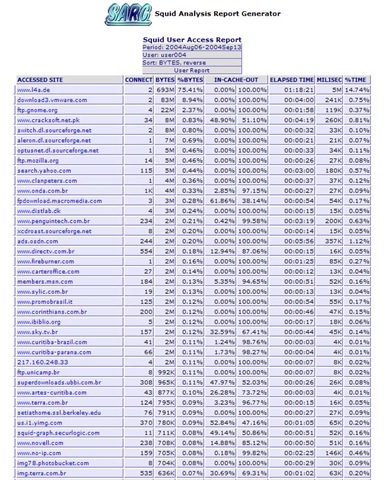
The last screenshot tells us that which sites a particular user/ IP address is accessing and the first-n-second screenshots tells us that how much traffic is passing through Squid and what is the distribution? Probably much of what we actually wanna know.


Here it comes that how to get it in action in layman’s way:

Getting SARG Installed: First you need your apache running means you must be able to get your apache page on hitting http://localhost and then proceed to get the RPM for SARG first. As I am taking the case of CentOS, so the way is to do

wget http://dag.wieers.com/rpm/packages/sarg/sarg-2.2.1-1.el4.rf.i386.rpm

This will download this 306 kb rpm to your current directory and then you just need to do

rpm –i sarg-2.2.1-1.el4.rf.i386.rpm


Configuring SARG: It places a sarg.conf in /etc/httpd/conf.d to take care of sarg-reports web form, while the other sarg.conf places itself in /etc/squid, where you need to edit it and commenting the line deny from all, which actually enabling only localhost to see the reports and denying all others. After that you can either place allow from all or write lines for providing report access to certain defined IP addresses only. After that just type the below and you are ready to go:

service httpd restart


Running SARG: SARG automatically places its scripts in /etc/cron.daily,  /etc/cron.weekly, /etc/cron.monthly, which will keep on performing its job without any intervention required. You need not to do anything for it. Although if you want to generate a one-shot SARG report, then you can always use

sarg -ix


Hope you will like the way, it does the job of Squid reporting for you in most simplest yet most effective way. In next, I will try that how can these reports could be customized to make most of it.

photo of Nitish KumarNitish Kumar

I’ll Skype you – Gtalk Me

One of my friend Amit Sinha asked me to laid a few words over this and here I am.

“ In those days, when chatting was meant to sending text to others across the globe for free, many of us always imagined that when will the day come, when we will free from the burden of these high charges for voice calling with our online buddies across the globe? “

Time passed and it didn’t took much longer, when we now see Voice/ Video Calling over internet (for free) integrated in almost all leading IMs like Gtalk, MSN or Yahoo. There were days, when we were hooked with our Yahoo Messengers or MSN ones, but due to its light weight communication and its integrity with other already established services from Google (Gmail, Orkut etc), Gtalk moving a step ahead of its competitors.

Sure a question arises that is it worth for new users, who haven’t used Skype yet to go for it, if they are already on Gtalk? I thought to discuss the same. Here is what I found.

talk_logoonline


Skype; a name which is impossible to be ignored by people using any means of internet communication. Even if you are not using it, then sure would have heard of it, after all more than 20 million people are over skype at the same time. That’s a big thing, a real big thing. The biggest name of VOIP communication has recently been in news for its being sold to EBay, then over conflict about shares and then joining of Co-Author of SIP itself as its Chief Technology Strategist.


Gtalk; Google’s approach to IM adds Internet Calls, File sharing, notifications, voice mailbox, video calls and lots more to make most richest experience of over the internet communication. Gtalk got a good start due to its efficient use of XMPP and then its always growing with addition of Gtalk in Gmail, Orkut etc. The latest addition of Google Voice will make a more interesting package as it would allow users to forward calls to their other numbers and in case of not picking up to voice mailbox.


We know what Gtalk is, lets start with Skype.

What is Skype?

Although known for being giant of Internet Voice Communication, Skype is not just only that. It’s both software and bundle of services (like the way Google talk is having Google sites, Docs etc along with it). What makes it different from other VOIP offerings is its being P2P based like Kazaa means that it runs over a mesh of interconnected PCs spread across the world, which assures that it would never run out of resources.

In recent times, it got a threat from biggest innovative Giant of internet industry; Google. GTalk now features with Video\ Audio calling and sure less bandwidth consuming than the earlier one. Many people say that there is no competition in these two applications and both of them are in their own league, but let me list the features common to both the application:

  1. IM and Group Chat
  2. Knowing online status of other users
  3. PC-to-PC Calls (VOIP)
  4. One-to-One Video Conference
  5. Transferring files
  6. Voice mail


Features exclusive to Skype are:

  1. Search into a Worldwide Skype User Directory
  2. Conference call up to 25 users (Although its not official, but Gtalk also could do it, check the link)
  3. Calling to Landlines and phones worldwide at a cost
  4. Send SMS at a cost
  5. Call Forwarding


Features exclusive to Gtalk are:

  1. Integration with Google Apps like Google Docs, Calender etc.
  2. Consumes less bandwidth
  3. Client is not limited to just an application, but there are many other options like web client, badges, integration in other services


Here is what I think, for a free user, Skype has only a special thing that you can make calls even if you don’t have a PC as this service has number of phones which don’t require a computer, but for all other users, Gtalk is much light weight and consume lesser bandwidth than Skype.


Although one friend of mine Amjad Ali, still assuring me about Call Quality of Skype, due to which, I will give a few days to Skype with my Skype ID mr.nitish.kumar

For downloading any of these application, just click over respective logos and downloading interesting books over Skype, use following links:

Skype For Dummies
Skype Me: Single User to Enterprise and Beyond
Skype Hacks: Tips and Tools (change the extension from pdf to chm)

Movienizer-Organize your movie collection

After working over E-Book management with Calibre and Pictures management with Google’s Picasa, here I am to discussion about managing and cataloging a large movie collection with another open source solution: Movienizer.

There are many usage for a movie organizer like keeping tracks of all your DVDs, CDs, Blue Rays, Cassatas etc, but here my intention was to find a software, which could scan through physical movie files and then could arrange the related info like actors, release date, snip set of story and ranking etc. So, that we could find the movies on the basis of actors, companies, ranking or genre based and that too without lots of manual efforts.


Not only free software, but Movienizer has a smooth-n-simple interface and on top of that its so simple to use.

movienizer movienizer1


With Movienizer you can easily find and collect information about your favourite movies. Do you like some actor/ actress? Want to find out where he or she is also starring? No problem, just launch Movienizer, select the actor/actress and click “download” button, you will get the complete list of movies with the given actor/actress, plus important information and photos. In the same way, if you want to learn more about some particular movie in the list? Again, you just need to click and “download”.

Movienizer will help you keep track on everything concerning movies. Even this has a loan manager, which can keep track that whom you lending movies. Your personal rating system could advise you for watching some movie on some holiday. Not only this, but you could define movies that you want to see next, inform yourself about future projects of your favourite directors.

There are lots of feature lying under hood of this open source software, which you will be exposed only on the basis of what you do with this. Personally, I found this one a great aid for me like Movie Maniac.


Confused?? Is this of any use for you?

Give it a try, if you have a large collection of English movies (as it fetch information with IMDB, so I guess not that helpful for Hindi movies) and a so so internet connection.

photo of Nitish KumarNitish Kumar
http://nitishkumarsays.blogspot.com
http://scifireviews.wordpress.com


New blog over movies

Today 29th November 2009, I am taking the space to announce my another blog exclusively over movies only, which will separate my next movie reviews from this blog.

I was lucky to get the name from wordpress.com

http://scifireviews.wordpress.com/

Hoping that people will love to read.


Google’s Picasa 3.5-Now with Face Detection

The last article was about managing your e-books and now here comes the management of pictures and videos all around scattered all around over PCs. We attend parties, roam around places and have fun moments in schools, colleges n offices and with sophisticated mobile cameras and cheap digital cameras available all over make us end up number of images growing up in our PCs all the time.

We go after the collection, sometimes saving by dates, sometimes saving by occasions, sometimes saving by people’s name and sometimes in the name of places. When we get finished of this all work, there is still remain lots of work of visiting them, editing them, using them in various ways and need of lots of different tools like Photoshop etc. Ever wondered if it was easier? I am sure that you must have heard the name of Google’s Picasa somewhere even if not used yourself.

ss2

Firstly introduced to world in October 2002 by Idealab and then owned by Google in July 2004, Picasa now has become one-stop-solution of all your general image collection, editing, distribution and archiving needs. It may be used to arrange the photos to various ways and then provide ways to touch ups, edits and enhancements. Once the images are ready, there are many options for output like traditional slideshows, posters, collages, web albums, blogs and email.


Firstly introduced through Picasa Web Albums (its web version), name tabs (means the face detection technology) is now part of the latest Picasa build as well and you can’t feel how exciting it is without actually going through it.

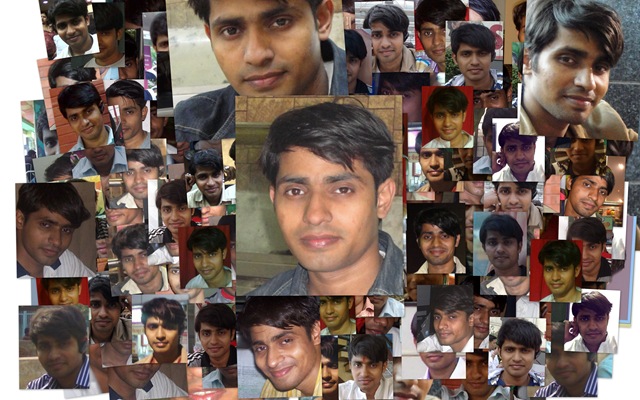
Picasa scans your computer for photos and videos of almost all the formats and start arranging them automatically. With the latest version now, it also scan all the pics for the faces (obviously takes time and resources) and ask you to name tag them. Once you tagged, it also search all the similar faces and start sending you suggestions to add them under the appropriate names. I was really amazed that how much speedy the process is. On my own PC, in a matter of 2 hours, it got more than 2000 faces under my own name and more than 4000 faces under other people’s name.

The algorithm was good enough to group siblings with similar faces under one group suggestions, if we have not named them separately and once named separately, it was not confusing them next time again like it’s learning things very fast.

Nitish Kumar

As about features, then there are number of features in picasa, which could be categorized as follows:

  1. Organizing Photos and Videos. Using name tags, geo tags.
  2. Face detection technology now makes it simple to organize the photo collection by what matters most in those photos; the people.
  3. Integrity of Google Maps makes it simple to geo tag photos over map.
  4. Creativity unlimited through lots of editing options
  5. Sharing made simple through blogs, Picasa Web Album Upload/Sync and emails

If I go through number of features and details about what Picasa has and what it can do for you, then it will take books, but if you just download it to your PC and start living with it, then it would be a tremendous experience for yourself. I really thank to Google and the technology world, we are living in. 🙂

Other links:

http://googleblog.blogspot.com/search/label/photos

Making an E-Library and Content Server with Calibre

“ I know the name Calibre is a complex-n-typical one and lengthy details about the product might bore you out before you even think about downloading and using it. But I bet, you are missing all the fun of E-Books word, if you are not using it. If you like read/ collect e-books over different interest to your hard drive or more better using Sony E-Book Reader, Amazon’s Kindley or Arnoid, then introduction with this simple yet amazing piece of software going to be a life turning experience for you.”

Many times you must have come across websites having lots of e-books and been impressed with the way, you could search and find e-books of your interests. By collecting from Campus LAN or over own searching efforts from Internet, we could soon obtain Gb of PDF, CHMs and other format e-books, but the part of managing this always growing collection has always been a tedious task (to me at least). Ever wondered, if you would be having such an E-Library of your own? 


Here is an Open Source Solution for the same, a product named Calibre. The simplest use of the software is searching and adding or manually adding books to it and then obtaining a list to navigate and search through. In the process, it takes a folder and saves all the e-book files in it according to its own hierarchy of author name/ owner name etc. As output, it returns us a simple, yet sophisticated enough interface to deal with.

calibre

Calibre is primarily an open source e-book cataloging program, which is designed around the concept of logical book, where a single database entry may correspond to a variety of formats. It stores your book catalog as a database entry with easily editable metadata.

The exciting features of calibre could be categorized into six categories:


Library Management: It could sort your e-book collection by Title, Author, Date-Added, Date Published, Size, Rating, Series etc. In addition, it could work out extra searchable metadata like Tags and Comments. You can even export selected subsets of your collection to your hard disk or any external device in a fully customized folder structure.

convert


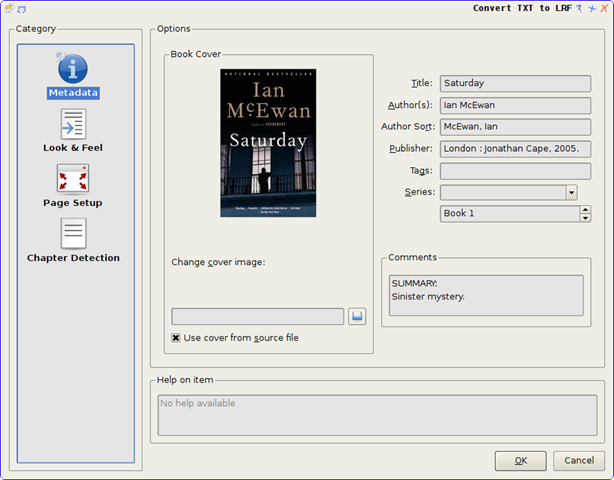
E-Book Conversion: Calibre supports conversion of lots of E-Book formats to one- another and has supoprt to almost all known e-book formats, which makes it very special for collectors. The full list of supported formats could be found here. The conversion engine itself has many powerful features like generating table of contents, scaling fonts and creating book structures/ chapters etc.


E-book Reader Devices Support: Calibre has a modular device driver design that makes adding support for different e-reader devices easy. It has support for a large number of devices. It supports synching of metadata of the device with the metadata of library. While sending to device, calibre either automatically chooses the best format available or convert the e-book to a format suitable for the device.


Converting News and Blog Entries into E-Book Form: Calibre can automatically fetch news from websites or RSS feeds, format that into an e-book and upload to a connected device.


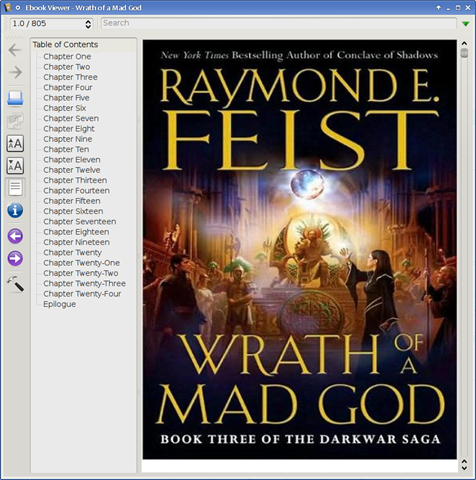
Comprehensive E-Book Viewer: Calibre has a built-in e-book viewer that can display all the major ebook formats. It has full support for Table of Contents, Bookmarks, CSS, a reference mode, printing, searching, copying etc.

 viewer


and last but my favourite feature

Content Server for online access to your E-Library: Calibre has a built-in web server that enables others to access your e-book collection using a simple browser from any computer anywhere in the world. It can also email your books and download the news to you automatically. With support for mobile devices, you can always browse and download books from your smartphones and readers like Sony, Arnoid or Kindle etc.

server2

Just think once, how exciting it would be sharing your all –ebook collection over the LAN and even over the internet (if you are making your PC a web server over internet).


So, what are you waiting for? Make a move to manage your digital habits effectively. Its sure going to be your one-stop solution for all your e-book management needs.