It seems that like the last year went, Google still keeping itself well in news.
| Got to read one tweet @ claymill “The Google /China incident feels ominously profound; it’s an ending and a beginning but nobody knows exactly what ended or began.” |

Google; A name always found in support of Open Internet and even recently made a precise statement over definition of Open and has a philosophy that believe that “open systems win”. They lead to more innovation, value, and freedom of choice for consumers, and a vibrant, profitable, and competitive ecosystem for businesses. 
China; A nation, who leads in methods of censorship. Internet censorship in China is conducted under a wide variety of laws and administrative regulations. In accordance with these laws, more than sixty Internet regulations have been made by the People’s Republic of China (PRC) government, and censorship systems are vigorously implemented by provincial branches of state-owned ISPs, business companies, and organizations.
Internet Censorship and Google: The History
 For the first time, Google found to have started to censor its search results in 2002 in compliance with United States’ DMCA legislation. Although even in that time, this move was taken in innovative ways as banned results were replaced by corresponding DMCA complaint. Later on the similar phenomenon was noticed with other countries like United Kingdom (Since September 2006), Germany & France (Since October 2002) and most importantly with China (Since December 2005) in adherence with their corresponding country policies.
With China, Google’s journey been with troubles since the beginning due to huge difference in philosophy. In fact, there was a time when popular search engines such as Altavista, Yahoo!, and Google were completely banned from use in China, although later the ban was lifted, but filtering remained continued.
Google officially announced its adherence with China’s policy in January 2006 and launched a Chinese-language service that will be stripped of content deemed offensive or subversive. Google somehow managed to devise an interesting solution (must read link) for this technically big problem. Later on other Internet giants including Yahoo and Microsoft’s MSN have also censored material "in exchange" for being allowed to tap a market comprising 110 million Internet users, the world’s second-largest market.
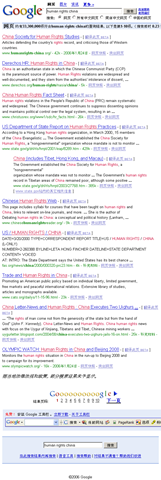
An Example of Censorship could be cited as below:
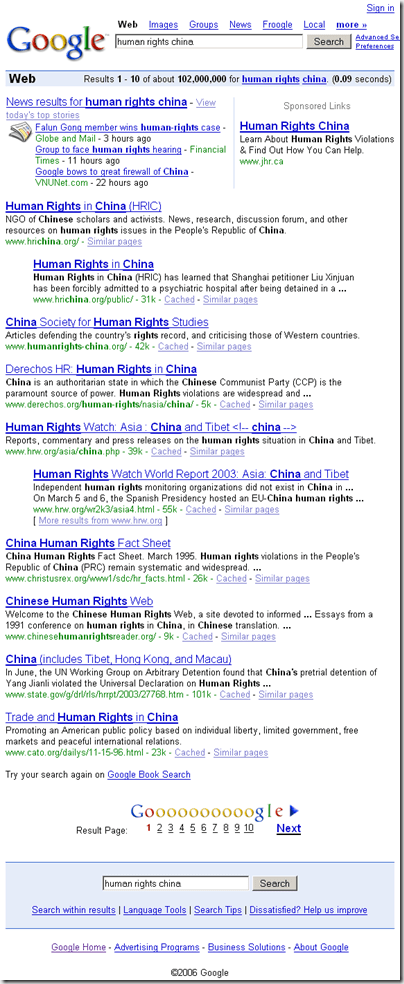

Amnesty International and Human Rights Watch strongly condemned Google’s compliance with China’s Golden Shield Project, calling it a form of self-censorship. According to Amnesty,
“ These forms of censorships seem to contradict the very principles that Google — whose unofficial motto is "don’t be evil" — was founded upon. Until January 2006, Google’s Support Center claimed that it "does not censor results for any search term", but removed this claim after reaching its deal with China. ”
By 12th January 2010, Google finally decided to stand against China’s Censorship
The sensational news was uncovered by Google itself by their blog post on 12th January 2010, in which they wrote that they faced a sophisticated attack in mid Dec 2009, where the hackers targeted Google’s corporate infrastructure originating from China that resulted in the theft of intellectual property from Google. Google claimed that a primary goal of the attackers was accessing the Gmail accounts of Chinese human rights activists.
Google said
We launched Google.cn in January 2006 in the belief that the benefits of increased access to information for people in China and a more open Internet outweighed our discomfort in agreeing to censor some results. At the time we made clear that "we will carefully monitor conditions in China, including new laws and other restrictions on our services. If we determine that we are unable to achieve the objectives outlined we will not hesitate to reconsider our approach to China."
These attacks and the surveillance they have uncovered–combined with the attempts over the past year to further limit free speech on the web–have led us to conclude that we should review the feasibility of our business operations in China. We have decided we are no longer willing to continue censoring our results on Google.cn, and so over the next few weeks we will be discussing with the Chinese government the basis on which we could operate an unfiltered search engine within the law, if at all. We recognize that this may well mean having to shut down Google.cn, and potentially our offices in China.
After attacks over RockYou and Twitter, this was a news which would have caused a stir among people for security concerns of cloud with headlines like “Now even Google got compromised”, like one tweet @vicsingh said “google has balls for potential china pullout, but the positive externality is that no one is talking about the vulnerability of their cloud”, but the matter went much more twisted and interesting as Google shared this information with the world saying …
“We have taken the unusual step of sharing information about these attacks with a broad audience not just because of the security and human rights implications of what we have unearthed, but also because this information goes to the heart of a much bigger global debate about freedom of speech.”
 More interesting were their next two decisions;
-
One was a somewhat not that noticed move by Google after around 6 hours of their blog post about attacks, where they made their Gmail and other services using https access by default.
-
The other one came with the same blog post itself saying “We have decided we are no longer willing to continue censoring our results on Google.cn”
Why Google suddenly became ready to even leave China?

As per information revealed by Google itself, the attack was mere phishing attacks “These accounts have not been accessed through any security breach at Google, but most likely via phishing scams or malware placed on the users’ computers.”
Now, the million dollars question to be asked is, such attacks been common to whole community of internet users and all leading companies since decades and Google itself said (if true) that only two of the accounts were compromised up to an extent (not even completely) then what became the reason of this huge decision, which could impact many things all around the globe in many ways?
 Its true that for years, Google faced withering criticism for what activists and lawmakers said was a willingness to abandon social responsibility in return for greater wealth. Its true that Google co-founder Sergey Brin shared many of the critics’ concerns about Google’s presence in China (but he publicly maintained that even a censored version of the company’s search engine was better than none at all). Its also true that recent move invited world wide praises for Google.
But still it will be a question to ask that why now after four years? Is the biggest market (around 20% of whole world) became less lucrative suddenly for which many compromises were made? Is performance troubles due to excessive filtering seems to nail down Google’s cloud strategies?
Note that even now Google is filtering its search results and its operation in China is under a review as per Google itself, not opted out. Google officials said that they will be discussing with the Chinese government the basis on which they could operate an unfiltered search engine within the law, if at all. So, wait and watch.
This link sites Testimony of Google Inc. about China from their blog post in 2006. Have a read. I would also like to invite you all to comment upon what you think about this news.
 Nitish Kumar


 for all system administrators out there, due to its simplicity, flexibility and promising nature about lots of aspects.







 Nitish Kumar's Blog