Now LinkedIn got the makeover for better

As technology and ajax changing most of the sites for better, after crossing the legendary 50 billion+ users mark, Business Social Networking Giant LinkedIn also made the same move as reflected through their blog post on Dec 09, 2009. Yes! LinkedIn’s new face got live from Dec 09, 2009 to make its appearance more smooth and more productive.

home 


It seems that December is not the busy month for only Google, but LinkedIn been in news for keeping its growth rate at 5.68%, while the same is flattening now days with Facebook and Twitter, in fact, last billion took only 12 days to be added, which is sure to show that how its getting pace into organizations and businesses.

To keep up with the pace, LinkedIn also moved into some deals like integration with twitter and outlook, launching its developer platform and now this makeover. It may be that after logging into LinkedIn from December 09, many of the users wont be surprised as changes are already rolling out since Nov 06, 2009 with a portion of users, Dec 09, 2009 is special as from today, LinkedIn officially rolling the same interface for all the LinkedIn users.


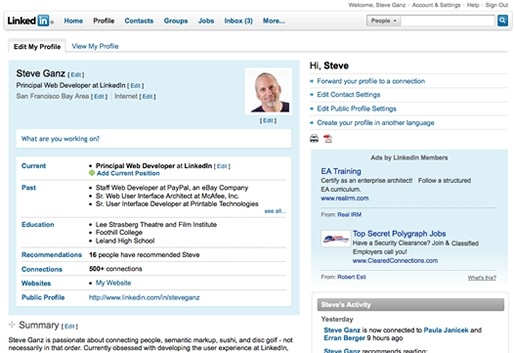
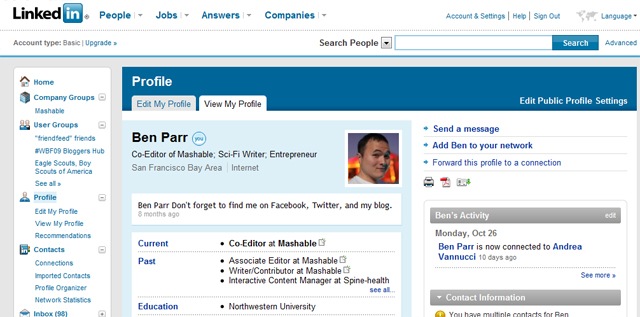
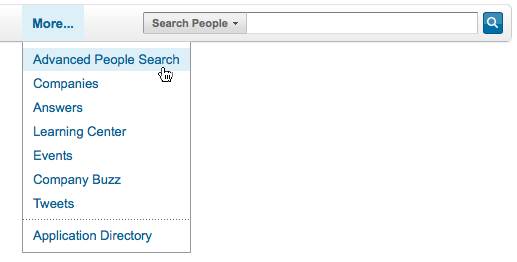
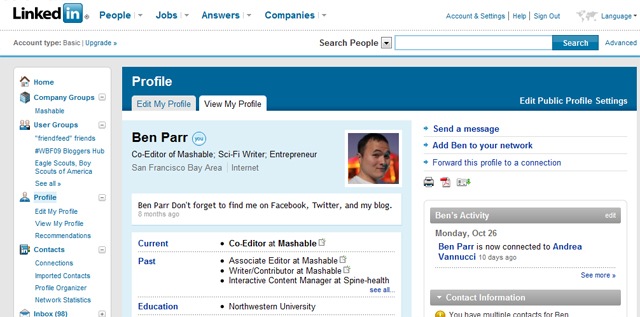
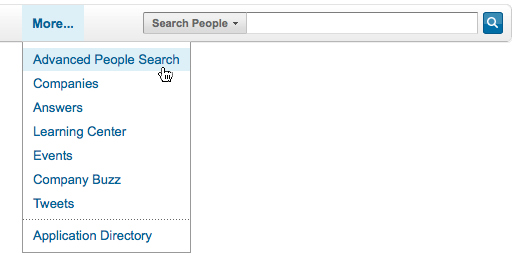
For rest of the details for UI, you may check the official announcement, while I am putting some screenshots to give you a feel about the change (although you already might have got the taste since last few weeks, if been in those lucky users).

linkedin-profile

linked in profile

linkedin groups

linked in searcgh  linkedin global

Windows 2000 and XP SP2 Support ending on July 2010

So finally the bad news is about to arrive.


As per Microsoft Lifecycle of the product, mainstream support for Windows 2000 was already ended on June 30, 2005 and now the extended support is also about to expire on July 13, 2010. The same is for Windows XP SP2 which will end on the same day (although support for Windows XP SP3 will remain continued till April 8, 2014).


 win2000advserv SP2

XP Users could relax for a little longer as XP SP3 support will remain continued till April 8, 2014 and only the support for XP SP2 is ending by July 13, 2010. If any more service comes then it will be continued to 24 months more.

windows-xp-services-pakc-3-logo

Before the headline starts a panic, let us know about how Microsoft Support Life Cycle Policy works and what is going to change with the same date.

Microsoft Support consists of three phases:

  1. Extended Support (5 More Years)

With Microsoft Products, once your Mainstream Support expires, you will not be able for claim for warranty support, design changes or new feature requests. Non security hot fixes support will be available via a separate Extended Hot-fix Support Agreement only. Obviously, no more service pack, neither any new license purchase would be available.


Once, your extended support expires, you will not receive security updates or non security related hot-fixes and although the support knowledge base will remain available on site for self help, but one should not expect the content to be updated any more or MVPs to reply queries related to that product in official forums.


Its time to get into migration work for those IT managers (although I guess there must be only few), who might not yet migrated their Database Server/ File Servers/ Domain Controllers etc from Windows 2000 to Windows 2003 or Windows 2008 as having a server without updates security fixes meant to lots of vulnerabilities and is also against security compliances of audit requirements. Check the link in above text and also the migration checklist for the migration related information.

Moreover, it might be a hard time to spend more for those companies, which are yet relying on their older machines with 256MB RAMs and their IT managers are managing the support by keeping the machines with SP2 only for performance reasons.


Now, about our Windows XP Users, who resisted whole heartedly against Windows Vista and still resistance remained against Windows 7 in some way to keep Windows XP Professional continued, it might be their time to think, as even if away, the time will come when they will be forced to do the switch and sure, there are some good reasons to switch over Windows 7 as well.

Moreover, one must get used to the product before be forced to do so. Technology changes for better and you cant expect a manufacturer getting programmers new generation involved with the technology that passed on.

So, the tagline is “Don’t panic right now, but take a step for next future.”

Offline Gmail – Are you still not using it?

“ Have you ever been tired of switching to html mode in Gmail, due to your slow internet connection? Have you ever been waited for opening some mail in feature rich ajax based standard version  of Gmail? Have you ever been wished that you would have some email client in same way as Gmail is in its web version? Here is the solution from Gmail side; Offline Feature.

“ Officially introduced in January 27, 2009 as an experimental Gmail Labs Offline Features, came up to change the capabilities of web-based mail, is now a regular part of Gmail from December 07, 2009. ”

P.S.: its for good of your personal PC only, not any public one like Office or cafe. 

Google_Labs_logo gmail-logo


Google is already making itself as a center of whole Internet World and making the world ready for Cloud Computing. Look like now in place of choosing to develop some email client of its own, and making many of users preferring web version of Gmail over any email client, now has came up with solution of enabling Gmail to work in offline mode. Its expected to work in the same way as their other service Google Reader is already working for Offline mode from long (since May 31, 2007).

gears

Web-based emails are great as one could access them from anywhere, but catch is; it’s limited by the internet connection itself. So, Gmail provided the solution to cache the mails to local PC through Gears. As long you are connected to Internet, the local cache keeps itself in sync with Gmail’s Servers and when you loose your connection, it automatically switches to Offline mode and uses the data stored on your computer’s hard rive instead of the information set across the network.


“ With Offline mode, you can still read messages, star and label them and do most of the things you’re used to doing while reading your webmail online and that too with blazing fast performance (I felt it even more faster than normal Outlook Express or Windows Live Mail, just touch a mail to go). Any messages you send while offline will be placed in your outbox and automatically sent the next time Gmail detects a connection. ”

Not only this but with now this matured feature, two more in-demand options has been added to Offline Gmail: an option to choose which messages get downloaded for offline use and the ability to send attachments while offline.

“ Now, it may even replace Outlook express (or any other mail client) for a few users so that they could keep on using Gmail Offline all day long and could connect to internet once or twice a day. ”


So, what are you waiting for? Start with Offline Gmail. First of all, you would be needed to keep Google Gears ON and obviously the browser you might be using must supports Gears (like Internet Explorer 7.0+, Firefox 2.0+, Safari 3.0+ and Google Chrome) and then follow the instructions as given below:

  1. Click the “Settings”  link in the top-right corner of Gmail.
  2. Click the “Offline” tab.
  3. Select “Enable Offline Mail for this computer”.
  4. Click “Save Changes” and follow the directions from here.

After the browser reloads, you’ll see a new “Offline” link in the upper right hand corner of your account, next to your username. Click this link to start the offline setup process and download Gears, if you don’t already use it.

I am also putting some screen shots to let you know it more closely.
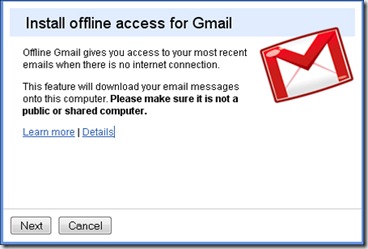
Installing Offline Access

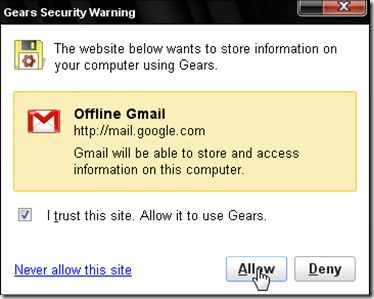
Google Gears will show a Security Warning

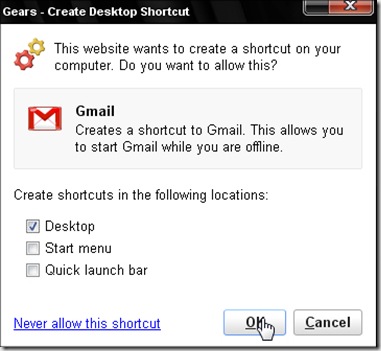
Creating a desktop shortcut for Access Gmail


With all the excitements out there, I would also like to remind the differences between normal Email Clients like Outlook express, Thunderbird, Windows Live Mail etc and web-based Offline Solution of Gmail.

First of all, I am not yet sure about procedures related backing up and exporting data of Google Gears for we like administrators that whether they even exists or not. With a few known issues, Offline Gmail still doesn’t support accessing Contact Manager (although auto-complete feature works), Complete Search Results (for obvious reasons), Access to conversations in Spam and Trash (as they were considered to be less required) and some Gmail Labs features.


Also those users, who might have using Gmail in https mode always, will feel many glitches with Offline Gmail (although I do think that its not a product for that much security conscious users and I recommend it for home users and personal laptops only)

But still for most of the Gmail Users Community, its a very welcome feature for already feature-rich Gmail. I am sure that many would like to use it.


Do you know, many other things could also be used for Offline through Google Gears and other services? Yeah you can use any of website  for reading it offline. Check webnol’s Article.


photo of Nitish KumarNitish Kumar

Google Dictionary – some announcements come silently

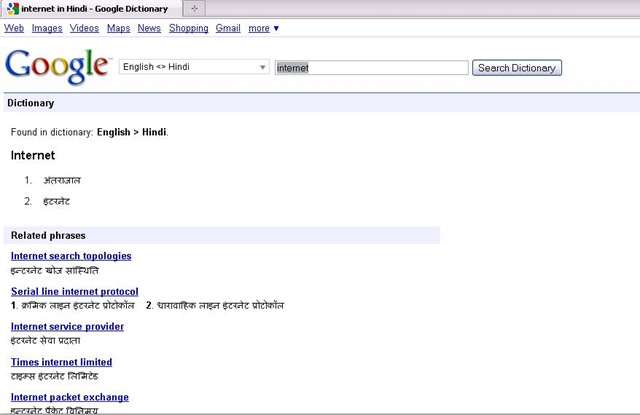
“ Dec 4, 2009, Google very much unlike to its other product offerings,  ‘silently’ added one more service is its service catalog named Google Dictionary with a very clean and simple yet powerful interface offering meaning of words from 28 different languages and also translate terms from or into English. May be it was not announced as it was already part of Google Translate and now it just came out to be an independent product.

Interesting na? Once a misspelled word Google (actual spelling was Googol) first got included in Oxford English Dictionary in July 2006 and now coming up with its own dictionary. 🙂

Google Dictionary


Now, something about Google Dictionary; even if you might not have started using Google Translate, have you ever noticed that if your query includes a single word or it’s an expression, Google links to the definition in the blue bar that mentions the number of results. Check the pics attached for reference.

Google dic


Google used to offer “define:word” parameter to get definitions, and now the dictionary as an independent product, is the natural extension of that.

Its a welcome move for normal users, who are addicted to Google and wish to straight answers for their definition searches with synonyms, but advanced users might be missing answers.com as earlier Google was picking definitions from there, which was extracting information from encyclopedias and aggregating information from various sources.

Google Dictionary displays synonyms, definitions, related phrases for the word and also web definitions from other places. You can star the words you searched using using the star before the word. You can later see starred words for your reference.


Ohh!!! are you asking that why to use Google Dictionary or how to use it? Just think once have you ever needed to press any help button for using any newly launched Google, like products from other companies like Microsoft 😛

photo of Nitish KumarNitish Kumar
 

Change to Google Public DNS – it rocks

Dec 03, 2009 – As an effort to make web browsing more better, the internet Giant Google is coming with its brand new service Google Public DNS: An experimental Public DNS Resolver. Thanks a lot to Devil’s Workshop and the article of Aditya Kane to get me introduced to the news today on Dec 06, 2009. I really think that I should take some time out of my schedules and should increase my awareness a little more.

google-logo


DNS for sure plays a major part of you browsing experience as its kind of an Internet Phone Book or an Address Book, which makes you reach to the exact page you are looking for once you typed or clicked a URL. Obviously, as much faster you can find the exact number (IP Address here), you could dial or as much faster, you could find the address from address book, you can reach to the address. So, sure its a great move on basis of the level of services that Google has provided yet.

If an ISP’s DNS is down or facing issue, then it doesn’t get that much attention as much it will if Google’s go down. Its under high scrutiny once announced. So, sure we could rely on it on the basis of our past experiences.


Its not been the first attempt to bring any Public DNS Service (Non-ISP) into play. OpenDNS, Level3, Scrubit and many more players are already out there, which are providing faster DNS resolution than your ISP itself and you could test yourself for fastest DNS Servers around you using the following link. But when you get a name like Google in the race, then you get assured that you web experience is going to better and better due to the level of quality and competition it will bring in. 

Personally, I have not used DNS Servers other than my ISPs or other than OpenDNS, so I could compare this service with these two only, but my experiences always found OpenDNS better than any of the ISPs. Till now, whatever I got to test, I found Google DNS is outperforming OpenDNS and Level3 in all the way, check the technical reference


Results shows that we have a very very good reason to switch over Google Public DNS (8.8.8.8, 8.8.4.4), but what might be concerning many of the people is the motive behind it. Why Google brining it in? Will this not gonna to enable Google to keep more close check on everyday users internet habits and so improving its Ads system more by that? Will this bring power to Google to show Ads on even mistyped URL pages, which were in hands of ISPs only till now? Is not many privacy concerns out there?

Google has partially dispelled both of the concerns saying that its not gonna to store the data tied to particular user for long and will save the data only if agreed from the users itself and that too will be only anonymized ones.


opendns_logo_300 level3_logo

Personally, I am not much concerned about these privacy things as already Internet Explorer, Firefox, Chrome or Google Searches (when we logged in with Gmail) are gathering all of our internet habits, whether a normal user knows or don’t know about it. But what I am really looking for, is that “When Google is going to provide us the control over this Public DNS System like the way OpenDNS does?”. With OpenDNS free account, you can customize your redirection search page with your own logo etc, could watch over internet habits of your users yourself, have your own filtering system or typo correction. Once that will be done, Google Public DNS is sure gonna to outrun OpenDNS and others.

So, why waiting for, start using Google Public DNS for a better web browsing.

photo of Nitish KumarNitish Kumar

Sehwag missed it

As I feared in last paragraph of the articlel. Sehwag missed the chance to be the first one to score triple centuries three times in test as he got out on 293.

I guess, he is behind Bradman now, who missed the chance to score three triple centuries. Bradman missed chance on a score of 299*, when he runs out his partner while going for the last run. Not sure about the status of Lara that what was Lara’s near 300 score.

I am feeling very sorry for him and his fans all over the world, but still hoping that he will get the chance again as he just played 72 tests till now and many many more has to come yet.

“He will make it”

Sehwag on edge of three triple centuries

Can you believe it? What just happened on Third and final Test between India and Sri Lanka!

Playing against a big score of 393 from Sri Lanka, somewhere a pressure in mind that winning this last test could make India on top of ICC Test Ranking and here comes the answer from India 443/1 in just 79 overs on a run rate of 5.61 (This is also their top score for a day by the way).  Indians took control of third test on day 2by outplaying Sri Lankans in almost every department. First they wiped out rest of two wickets on a cost of just 27 more runs in just half an hour and then three brilliant innings including the leading face of ruthless Cricket on its own days: Virender Sehwag with a score of 284* in just 239 deliveries.

Virender Sehwag


Sehwag has really got something in him. Once upon a time, there were many people out there making questions over his class and batting techniques. It was said that such a ‘mindless’ batting style will not take him much far and for the ‘sincere’ Test Matches, he was thought to be out of league.

But today, after hitting fastest 250* (207 deliveries) and the second fastest double century (fastest is of Nathan Astle) in this match with only 168 balls used, he is also on edge of about to be the first person in the world, who will make three test triple centuries in his career (Till now, he stands with Bradman and Lara, who share two triple centuries each). Its already been his sixth 200+ score (Could he break the record of Bradman of hitting 12 double centuries?) and 17th Test Century out of 72 test matches he played, with an impressive batting average 52.86. He has crossed Dravid today in front of him as Dravid has scored five double centuries, while Gavaskar and Sachin has scored four each.

A very interesting thing to watch is the fact that he is included in the list of top 10 fastest double centuries five times, while he scored six till now, which is sufficient to tell that what thrill his big innings have and why he is known as one of the most dangerous player out there.

He smashed the bowling on a Brabourne Stadium pitch that offered a pretty bounce. His inning included 40 fours and 7 sixes, sufficient to tell us that what the match was. First Murli Vijay, a new face opened with Sehwag (only due to unavailability of Gambhir due to his sister marriage) scored 87 runs in 121 deliveries with 10 fours and 1 six and held an opening partnership of 221 with Sehwag. After his departure, Sehwag had another long partnership of 222 runs with Dravid (62*) and really floored Sri Lanka all the way.

I am really really looking for his next 16 runs with holding my breaths as I know early morning sessions has taken many dreams shattered. I along with all Indian out there, wanna scream loud,

“Sehwag!! this is the chance, make it”