Missed deal hints new plans-Google for music

google-audio-music-logo“ It seems that the Cloud technology opening its wings one by one, Google’s try to acquire one silicon valley startup La La Media Inc. even after loosing the turf to Apple kind of made a clear announcement in a way, that what might be the next milestone for Google: A Full fledge service like Google Books to cater music only for free (running over ads). ”

It might be one of the good guess only, but Google has already launched such a service in China with partnering with 110.cn to offer legal MP3 streaming/ download with a large MP3 collection and this shows that its very likely that after getting right deals (like it got in case of Google books with various publishers), Google might move into music as well like iTune.


If you think that what one uses while using computers, except internet, chatting and searching web, then its editing photos, documents, presentations, watching movies and hearing music etc. Google had already covered many of the points like Picasa for Photos, Google Docs for Documents/ Presentations and YouTube for watching media. What just remains is Music.

Although there is a YouTube category for music videos, a very limited music search engine, an online music player and a media server for Google Desktop, but currently Google doesn’t has any full-fledged music related service product.


With Google Chrome, Google wants to start an era, where your every need will be online and will go along with you, no matter where you are or what you are using for your connection, your desktop, your docs, your bookmarks, your web history, your videos, your books and everything else will follow you.

So before the launch of Google Chrome OS, we could sure expect Google to fill up this gap by acquiring some company in similar domain and in next probably its gonna to be Google online games service. Sure, due to copyrights, its not gonna to be as open and simple like Picasa webs but you may sure hope for products having capabilities like Google Books (limited preview/ full).

What’s your opinion? please write to me.

Google making its search result Real-time now

“ In today’s running world, many a times, the delay in reaching to the information by a fraction of minutes could cause you loose the gears. After Bing and Google both partnered with Twitter and Facebook, the world was waiting for the concept of real time search to appear in ‘real’ and here Google finally joining the race again (with in-depth preparations), by moving into real time search while Bing was already started with it by Twitter Searches since July 01, 2009. ”

googlelogo_thumb1 bing-logo


As the phenomenon of Twitter risen up, it given strength to concept of real time information search. In early days, any news before getting pitched up in print or television media was hitting the web first via blogs with sometimes more details than other media, but even then there was a delay of hours/ days in getting the information live. Now, the birth of Twitter changed the scenario and now days, whatever happens around the globe, first hits Twitter, Facebook and Orkut updates first then anything else and people were looking for information there than any of news results or blogs.

The real time information search for headlines is moving towards Twitter, Facebook and Orkut updates now days and it’s been inviting the searching giant to move into the race sooner or later. Microsoft became the first to hit the chord by Partnering with Twitter and Facebook by Oct 22, 2009, while Google announced on Dec 07, 2009 its collaboration with Facebook, MySpace, FriendFeed, Jaiku, Identi.ca and most importantly with Twitter.


So, you might be getting the idea that what the real time search is; its the concept of searching for and finding information online as it is produced or in other words it’s the advancements in web search technology coupled with growing use of social media enabled online activities to be queried as they occur.


Let us know that how to use it:

Google’s Real Time Search

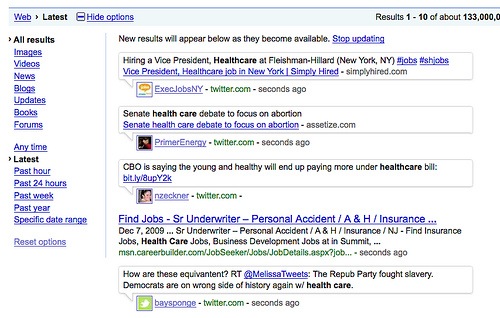
For reaching to Google’s Real Time Search, You have to go to normal Google Search, after searching some query press Show Options button (its there at left top of the search results) and then press latest as shown in image given below. You could see results are coming up with time given next to them in seconds, minutes. 🙂

google-bing-search_original1

Note that as per Google’s usual practice in past, this feature is release as a beta feature only and suggestions are always invited to make more improvements in it.


Bing’s Real Time Search

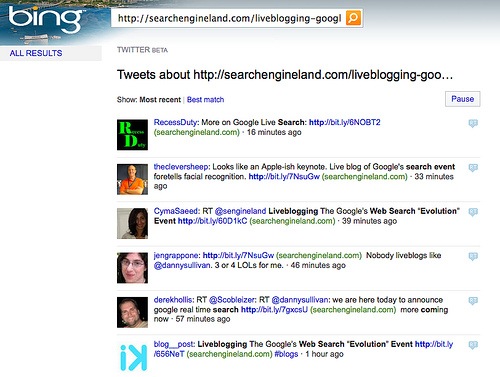
For search through Bing, you need to go on http://www.bing.com/twitter and then you could make your search within Twitter, while I am not able to figure out yet that how its working with Facebook.

bing real time search


Now, there are reasons that why Google Real Time Search is better than Microsoft’s Bing (courtesy CRN) and even if its declared as war between the two, many of us already have declared Google a Winner.

“ Not only Google has a much better and proven search technology than Bing could have, but also Google has designed its search results more better in visuals than Bing and as a final reason, you can see that sure Microsoft hit the chord first by integrating with Facebook and Twitter, but it couldn’t match the breadth and depth Google’s real time search is going to provide by partnering with wide and diverse range of Social Network Sites. ”

So, finally we sure has many reasons to look forward that how much more innovation is about to come from this rivalry between Microsoft and Google.

Offline Gmail – Are you still not using it?

“ Have you ever been tired of switching to html mode in Gmail, due to your slow internet connection? Have you ever been waited for opening some mail in feature rich ajax based standard version  of Gmail? Have you ever been wished that you would have some email client in same way as Gmail is in its web version? Here is the solution from Gmail side; Offline Feature.

“ Officially introduced in January 27, 2009 as an experimental Gmail Labs Offline Features, came up to change the capabilities of web-based mail, is now a regular part of Gmail from December 07, 2009. ”

P.S.: its for good of your personal PC only, not any public one like Office or cafe. 

Google_Labs_logo gmail-logo


Google is already making itself as a center of whole Internet World and making the world ready for Cloud Computing. Look like now in place of choosing to develop some email client of its own, and making many of users preferring web version of Gmail over any email client, now has came up with solution of enabling Gmail to work in offline mode. Its expected to work in the same way as their other service Google Reader is already working for Offline mode from long (since May 31, 2007).

gears

Web-based emails are great as one could access them from anywhere, but catch is; it’s limited by the internet connection itself. So, Gmail provided the solution to cache the mails to local PC through Gears. As long you are connected to Internet, the local cache keeps itself in sync with Gmail’s Servers and when you loose your connection, it automatically switches to Offline mode and uses the data stored on your computer’s hard rive instead of the information set across the network.


“ With Offline mode, you can still read messages, star and label them and do most of the things you’re used to doing while reading your webmail online and that too with blazing fast performance (I felt it even more faster than normal Outlook Express or Windows Live Mail, just touch a mail to go). Any messages you send while offline will be placed in your outbox and automatically sent the next time Gmail detects a connection. ”

Not only this but with now this matured feature, two more in-demand options has been added to Offline Gmail: an option to choose which messages get downloaded for offline use and the ability to send attachments while offline.

“ Now, it may even replace Outlook express (or any other mail client) for a few users so that they could keep on using Gmail Offline all day long and could connect to internet once or twice a day. ”


So, what are you waiting for? Start with Offline Gmail. First of all, you would be needed to keep Google Gears ON and obviously the browser you might be using must supports Gears (like Internet Explorer 7.0+, Firefox 2.0+, Safari 3.0+ and Google Chrome) and then follow the instructions as given below:

  1. Click the “Settings”  link in the top-right corner of Gmail.
  2. Click the “Offline” tab.
  3. Select “Enable Offline Mail for this computer”.
  4. Click “Save Changes” and follow the directions from here.

After the browser reloads, you’ll see a new “Offline” link in the upper right hand corner of your account, next to your username. Click this link to start the offline setup process and download Gears, if you don’t already use it.

I am also putting some screen shots to let you know it more closely.

Installing Offline Access

Google Gears will show a Security Warning

Creating a desktop shortcut for Access Gmail


With all the excitements out there, I would also like to remind the differences between normal Email Clients like Outlook express, Thunderbird, Windows Live Mail etc and web-based Offline Solution of Gmail.

First of all, I am not yet sure about procedures related backing up and exporting data of Google Gears for we like administrators that whether they even exists or not. With a few known issues, Offline Gmail still doesn’t support accessing Contact Manager (although auto-complete feature works), Complete Search Results (for obvious reasons), Access to conversations in Spam and Trash (as they were considered to be less required) and some Gmail Labs features.


Also those users, who might have using Gmail in https mode always, will feel many glitches with Offline Gmail (although I do think that its not a product for that much security conscious users and I recommend it for home users and personal laptops only)

But still for most of the Gmail Users Community, its a very welcome feature for already feature-rich Gmail. I am sure that many would like to use it.


Do you know, many other things could also be used for Offline through Google Gears and other services? Yeah you can use any of website  for reading it offline. Check webnol’s Article.


photo of Nitish KumarNitish Kumar

Google Dictionary – some announcements come silently

“ Dec 4, 2009, Google very much unlike to its other product offerings,  ‘silently’ added one more service is its service catalog named Google Dictionary with a very clean and simple yet powerful interface offering meaning of words from 28 different languages and also translate terms from or into English. May be it was not announced as it was already part of Google Translate and now it just came out to be an independent product.

Interesting na? Once a misspelled word Google (actual spelling was Googol) first got included in Oxford English Dictionary in July 2006 and now coming up with its own dictionary. 🙂

Google Dictionary


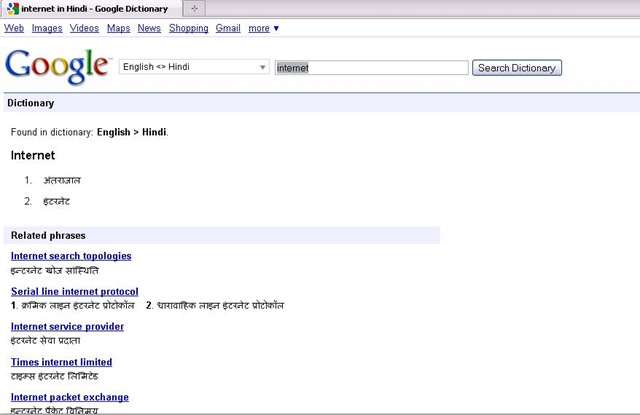
Now, something about Google Dictionary; even if you might not have started using Google Translate, have you ever noticed that if your query includes a single word or it’s an expression, Google links to the definition in the blue bar that mentions the number of results. Check the pics attached for reference.

Google dic


Google used to offer “define:word” parameter to get definitions, and now the dictionary as an independent product, is the natural extension of that.

Its a welcome move for normal users, who are addicted to Google and wish to straight answers for their definition searches with synonyms, but advanced users might be missing answers.com as earlier Google was picking definitions from there, which was extracting information from encyclopedias and aggregating information from various sources.

Google Dictionary displays synonyms, definitions, related phrases for the word and also web definitions from other places. You can star the words you searched using using the star before the word. You can later see starred words for your reference.


Ohh!!! are you asking that why to use Google Dictionary or how to use it? Just think once have you ever needed to press any help button for using any newly launched Google, like products from other companies like Microsoft 😛

photo of Nitish KumarNitish Kumar
 

Change to Google Public DNS – it rocks

Dec 03, 2009 – As an effort to make web browsing more better, the internet Giant Google is coming with its brand new service Google Public DNS: An experimental Public DNS Resolver. Thanks a lot to Devil’s Workshop and the article of Aditya Kane to get me introduced to the news today on Dec 06, 2009. I really think that I should take some time out of my schedules and should increase my awareness a little more.

google-logo


DNS for sure plays a major part of you browsing experience as its kind of an Internet Phone Book or an Address Book, which makes you reach to the exact page you are looking for once you typed or clicked a URL. Obviously, as much faster you can find the exact number (IP Address here), you could dial or as much faster, you could find the address from address book, you can reach to the address. So, sure its a great move on basis of the level of services that Google has provided yet.

If an ISP’s DNS is down or facing issue, then it doesn’t get that much attention as much it will if Google’s go down. Its under high scrutiny once announced. So, sure we could rely on it on the basis of our past experiences.


Its not been the first attempt to bring any Public DNS Service (Non-ISP) into play. OpenDNS, Level3, Scrubit and many more players are already out there, which are providing faster DNS resolution than your ISP itself and you could test yourself for fastest DNS Servers around you using the following link. But when you get a name like Google in the race, then you get assured that you web experience is going to better and better due to the level of quality and competition it will bring in. 

Personally, I have not used DNS Servers other than my ISPs or other than OpenDNS, so I could compare this service with these two only, but my experiences always found OpenDNS better than any of the ISPs. Till now, whatever I got to test, I found Google DNS is outperforming OpenDNS and Level3 in all the way, check the technical reference


Results shows that we have a very very good reason to switch over Google Public DNS (8.8.8.8, 8.8.4.4), but what might be concerning many of the people is the motive behind it. Why Google brining it in? Will this not gonna to enable Google to keep more close check on everyday users internet habits and so improving its Ads system more by that? Will this bring power to Google to show Ads on even mistyped URL pages, which were in hands of ISPs only till now? Is not many privacy concerns out there?

Google has partially dispelled both of the concerns saying that its not gonna to store the data tied to particular user for long and will save the data only if agreed from the users itself and that too will be only anonymized ones.


opendns_logo_300 level3_logo

Personally, I am not much concerned about these privacy things as already Internet Explorer, Firefox, Chrome or Google Searches (when we logged in with Gmail) are gathering all of our internet habits, whether a normal user knows or don’t know about it. But what I am really looking for, is that “When Google is going to provide us the control over this Public DNS System like the way OpenDNS does?”. With OpenDNS free account, you can customize your redirection search page with your own logo etc, could watch over internet habits of your users yourself, have your own filtering system or typo correction. Once that will be done, Google Public DNS is sure gonna to outrun OpenDNS and others.

So, why waiting for, start using Google Public DNS for a better web browsing.

photo of Nitish KumarNitish Kumar

Google’s Picasa 3.5-Now with Face Detection

The last article was about managing your e-books and now here comes the management of pictures and videos all around scattered all around over PCs. We attend parties, roam around places and have fun moments in schools, colleges n offices and with sophisticated mobile cameras and cheap digital cameras available all over make us end up number of images growing up in our PCs all the time.

We go after the collection, sometimes saving by dates, sometimes saving by occasions, sometimes saving by people’s name and sometimes in the name of places. When we get finished of this all work, there is still remain lots of work of visiting them, editing them, using them in various ways and need of lots of different tools like Photoshop etc. Ever wondered if it was easier? I am sure that you must have heard the name of Google’s Picasa somewhere even if not used yourself.

ss2

Firstly introduced to world in October 2002 by Idealab and then owned by Google in July 2004, Picasa now has become one-stop-solution of all your general image collection, editing, distribution and archiving needs. It may be used to arrange the photos to various ways and then provide ways to touch ups, edits and enhancements. Once the images are ready, there are many options for output like traditional slideshows, posters, collages, web albums, blogs and email.


Firstly introduced through Picasa Web Albums (its web version), name tabs (means the face detection technology) is now part of the latest Picasa build as well and you can’t feel how exciting it is without actually going through it.

Picasa scans your computer for photos and videos of almost all the formats and start arranging them automatically. With the latest version now, it also scan all the pics for the faces (obviously takes time and resources) and ask you to name tag them. Once you tagged, it also search all the similar faces and start sending you suggestions to add them under the appropriate names. I was really amazed that how much speedy the process is. On my own PC, in a matter of 2 hours, it got more than 2000 faces under my own name and more than 4000 faces under other people’s name.

The algorithm was good enough to group siblings with similar faces under one group suggestions, if we have not named them separately and once named separately, it was not confusing them next time again like it’s learning things very fast.

Nitish Kumar

As about features, then there are number of features in picasa, which could be categorized as follows:

  1. Organizing Photos and Videos. Using name tags, geo tags.
  2. Face detection technology now makes it simple to organize the photo collection by what matters most in those photos; the people.
  3. Integrity of Google Maps makes it simple to geo tag photos over map.
  4. Creativity unlimited through lots of editing options
  5. Sharing made simple through blogs, Picasa Web Album Upload/Sync and emails

If I go through number of features and details about what Picasa has and what it can do for you, then it will take books, but if you just download it to your PC and start living with it, then it would be a tremendous experience for yourself. I really thank to Google and the technology world, we are living in. 🙂

Other links:

http://googleblog.blogspot.com/search/label/photos

Google Chrome Browser: What’s this and why special?

Few days back at 19th November 2009, we got the final news about Google Chrome OS that this project is being open-sourced and the OS will actually come to market by end of 2010. The related video are given below:

The same news ignited me to collect some info around Chrome and special things about it. Before the OS itself, in this article I thought to limit myself to Google Chrome Browser only this time.

You have many browser choices out there, if you have Windows then you see the world from the eyes of Internet Explorer, if its MacOS, then your world get flashlights in face of Safari , if its any flavour of Linux, then you are most likely to get the wing from Firefox and if its mobile then you must have seen Opera.

Due to constant updating features and blazing fast performance than other browsers, we already see Firefox racing in front of the giant Internet Explorer in the market share. I really wonder if there is any place left for a new browser and yet the innovator Giant Google announces a new browser, then there must be some means and strong backing behind the same. The core of this concept is around Web 2.0, Chrome was build up from the ground up for Web 2.0 and the focus always remained on speed, security and reliability throughout the visionary design process.

Basically, Internet apps now days takes more than what we known from long as simple HTML. All the other browser started from simple keeping that HTML in mind and then adding on capabilities and so over the time, browsers were sure bulky and slow as first apps has to load then the browser. You must have noticed that how much time Internet Explorer, Firefox or Safari takes in opening just the first blank page.


“ This all has gone under a big change with, what we calling the Google Chrome Browser. Chrome takes advantage of new technology from ground up, which runs most of these advance features without using as much memory as old browsers do now. It means that Chrome Browser opens up quickly when you clicked it and so for the tabs. You will fee the performance, when you open up Internet Apps designed for Web 2.0, like Google’s sites and services. ”

So, here we know, why its attractive to pick up. Let’s see more deeper. It got best all, Tabs, Speed Dials with screenshots, Security Features, themes and yet the simplest interface to compete from any other rivals.


The Omnibox (New address bar): Its unique feature (although Firefox also have it in a way) is its Omnibox, which we know as Address Bar. In Omnibox, Google Chrome has combined the address bar, the search bar, the search from other sites and a little more. Let’s put the points over some of the features:

1- Link Navigation: The most basic thing of browser to type in address in address bar, has got more wing with added help and suggestions from web, from your history and making to type much lesser keys then ever with its real time suggestions.

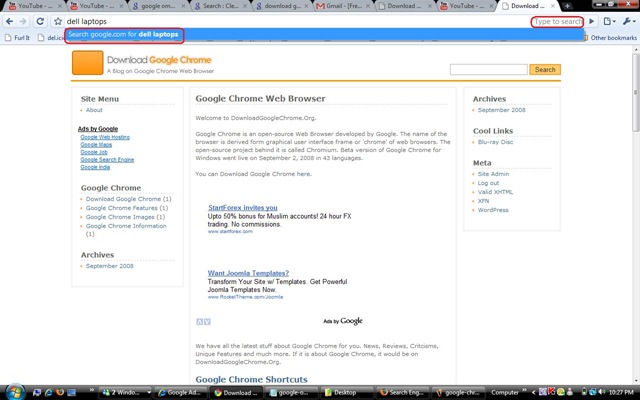
2- Web Search: You could type anything to search for in the Omnibox and you get will to the search results of any search provider (Google is default one).
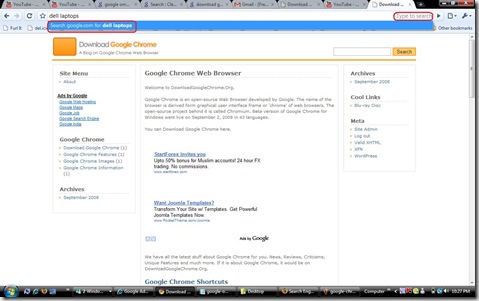
search

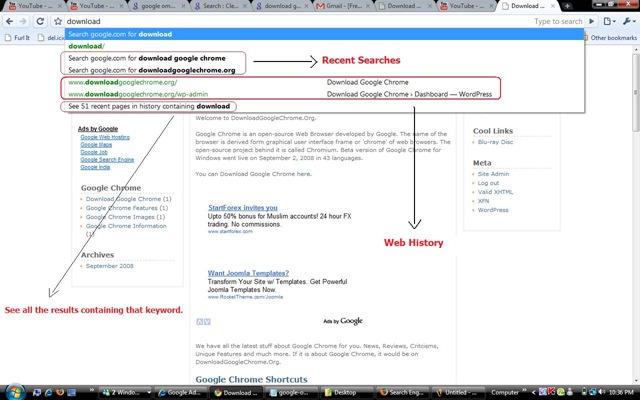
3- Web-History Search: It makes it much easier to search within pages, you already visited. Just type a keywords from middle and it will pick up whole link you visited. Isn’t this cool for most of us?

history

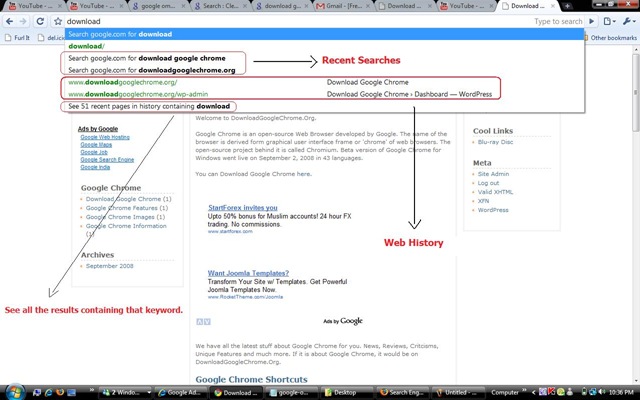
4- Bookmarks: Google now have provided Bookmark sync through Google Account itself, which enables user to have their bookmarks everywhere they logged in, but even if you are not using that it combines local and google’s bookmarks of yours and provide real time suggestions, while you type in the Omnibox, aiding you at its best to reach out your site.

history

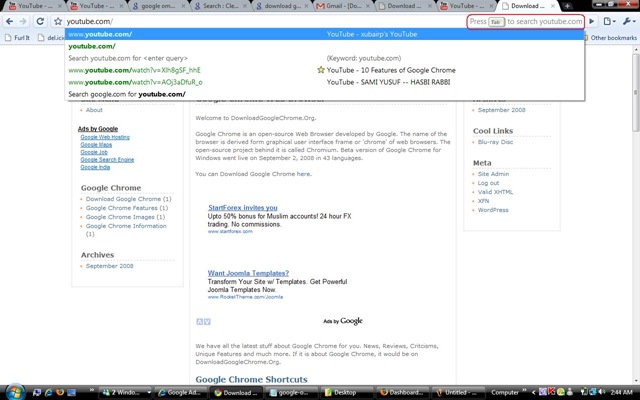
5- Search out of search engines: This is a feature, right now lesser people know about. You want to search something in YouTube, type in YouTube.com in Omnibox and it will display message like “Press TAB to search YouTube.com”, press tab and you will get “Search Youtube.com: ” written in Omnibox and then type in any word after the colon and here you go.
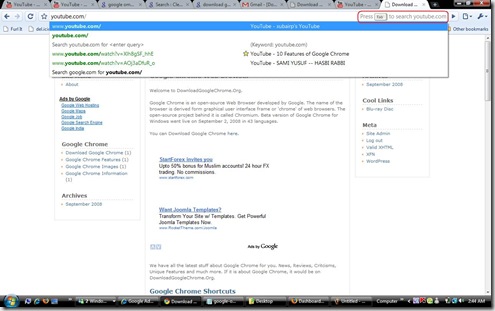
tab searchtab search2

For the people caring about their privacy concerns from these above mention features, there are option to control most of the features, even could have separate profiles with little tweaking. And above all, you have option of incognito windows, opened by Ctrl+Shift+N, in which whatever you do, don’t get recorded in history. Unlike Firefox’s Private browsing, it doesn’t shut off the other opened windows means you could work in normal windows and incognito windows at the same time :).

I am dammn sure that this Omnibox has started changing the way we see browsing for the people, who has started using it. Just give it a few mins and it starts learning your preferences on its own. You open Chrome again and it shows your frequently visited pages with their snapshots within 60 seconds to choose upon like speed dial.


Playing with the TABs: TABs became an integral part of browsing experience with all browsers, even then Chrome found new ways to improve them. With easy drag and drop, you can change the order of TABs and even pull them out for become a new chrome window. Moreover, technically each TAB runs in a separate process, so even if one page crashes, other TABs are safe and in most of the cases, your whole browser doesn’t crashes.


The simplest toolbar: Forget the days, having a tool/menu bar having menus like File, Edit, View, Favourites, Tools etc. You got just easiest thing, the browser. There is an Start Button for easy Bookmarks, Refresh Button, Navigation for Back-n-Forward and a triangular Go button with Page Menu and Settings Men next to it, that’s it.


Page / Settings/ Options Menu: There is just two menu, having it including option to Text Zoom. You have options to make applications shortcut like for Google Docs, Google Sites, Gmail, Google Maps etc (Thanks to built in Google Gears).


Bookmark Bar: Chrome claims to having most happening bookmark system in browsing world right now. Just click on star button and you get easiest options for this one click bookmark. In rest of the things, it got all that arranging in folder and whenever you want to see bookmark bar, then just press Ctrl+B. When your bookmarks grow in hundreds then search is always inbuilt.


Security, sandboxing and safe browsing: Malware and phishing are two main problems that affect users conviction and assurance on the Internet. In the present time, malware is a very important aspect as it is related to stealing passwords and other documents. With SANDBOXING – a new feature prevents malware from installing itself on your computer. Your passwords and documents are at a safer hand – so, why worry.


Google chrome’s task manager: Just like your own CPU, you can now monitor sites that are using most of the memory, downloading the most bytes and interrupting in browsing sites you are working on – so, just eliminate them and work efficiently without any mess. In addition, you can also see plugins that are associated with the tab.


Although there are much to discuss about in world of advanced features with plugins, hidden features etc but that will lengthen this article much more. So, ending just here with the request that if you haven’t tried Google Chrome, then just give it a try and that’s it.


Saving time with keyboard shortcuts

Use these keyboard shortcuts to take some stress off your mouse. Here are a few mostly used shortcut keys for a quick reference (Full list is here).

Ctrl+T Open a new tab.
Ctrl+W Close the current tab.
Ctrl+Tab Cycle through current tabs.
Ctrl+N Open a new window.
Ctrl+Shift+N Open a new incognito window.
Ctrl+Shift+T Open the last tab you closed.
Alt+Home Open your Home page.
Ctrl+L Jump to the Omnibox.
Ctrl+K Search for a word in the
Omnibox.
Ctrl+F Find text in an open page.
Ctrl++ Increase the font size.
Ctrl+- Decrease the font size.
Ctrl+0 Restore the normal font size.
Ctrl+B Always show the Bookmarks bar.
Ctrl+H Open your browsing history.
Ctrl+J Load your Downloads page.
Ctrl+X Cut.
Ctrl+C Copy.
Ctrl+V Paste.
Ctrl+P Print the current tab.
Shift+Esc Open the Tab Task Manager.

And at the end for knowing Google’s vision over Chrome, the famous comics is always here. For more interested people, I will recommend reading the book Google Sites and Chrome for Dummies.


Technorati Tags: ,,,,,,,,,,,
Windows Live Tags: ,,,,,,,,,,,