Nokia E72 Diary-Day 5-Nokia Messaging

[tweetmeme source=”mrnitishkumar” only_single=”false”]

Starting from the same first paragraph, where I left in last post, what more you wanted from your Smartphone? A wireless phone, a music device, a gaming device or all of these? Is something remained? Do all Smartphone buyers see their  phone as fun devices only? Don’t they ask for some more?

Mobile Emails! Many of you like me loved the simplicity of Gmail’s naive Mobile Email client and many other mobile clients like the same, but still felt troubles with handling of HTML, Attachments and data/ battery usages. Sure! they brought convenience but a few limitations too like how much crucial your mails are for you? How many times you check for your mail in an hour? Does it look good when you find yourself checking mails while in some important conversation with some client subordinates? Will a non-HTML mail could serves the purpose for you all the time?

There were different set of challenges while making a business device than normal users. Your customers were bound to be very demanding, very calculating and asking for things that might be little bit hard over current stage of technology.

Push Mail! This was first introduced by Research In Motion (RIM) and even if little slow in start, later caught huge attention from corporate. Push e-mail is used to describe e-mail systems that provide an always-on capability, in which new e-mail is actively transferred (pushed) as it arrives by the mail delivery agent (MDA) (commonly called mail server) to the mail user agent (MUA), also called the e-mail client.

Wiki reference explains more Post Office Protocol (POP3) is an example of a polling email delivery protocol. At login and later at intervals, the mail user agent (client) polls the mail delivery agent (server) to see if there is new mail, and if so downloads it to a mailbox on the user’s computer. However, outgoing mail is generally pushed directly from the sender to the final mail delivery agent. Extending this push to the last delivery step is what distinguishes push e-mail from polling e-mail systems.

The next problems was with rendering of HTML content and handling of attachments for which different vendors kept on coming with different solutions. This time I am here for discussing Nokia Messaging Solutions on Nokia E72.


Nokia E72 Diary – Day 5 – May 07, 2010

Initially started as a trial beta product, Nokia Messaging comes as in-built and ready-to-go on Nokia E72. I already installed and tried the same on My Nokia N82, Nokia 5800 and Nokia N97 Mini earlier, but all of them were for limited period and having only the full fledge product in your hands was the real time to evaluate the features. Getting your mails delivered almost instantly on your handset like some SMS is an awesome experience. Definitely I am loving it and counting it as the top three profits of having a Nokia E72 in your hands.

Not only it allows you to connect a total of 10 Email accounts with Push mail, but also provide compatibility with 99% mail providers around the world with inclusion of Lotus Traveler and Microsoft Exchange support. Not only this, you are provided an effective and intuitive interface to deal with, which works very efficiently in background to deliver the best mobile experience for you. As you will see in next screenshots, you will get an effective rendering of HTML and for people, who don’t get please by even this, there would be a link on the top to open the same mail directly in web browser. Great intuitiveness.

Much has been written about the technology and how it works. I will keep it simple and will present the screenshots only that how it go and how it feels for the people, who still haven’t experienced the glow.


Configuring and customizing Email Accounts in Nokia Messaging

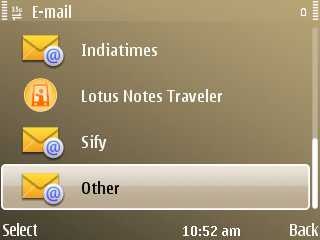
Welcome screen for configuring MailAvailable options 1

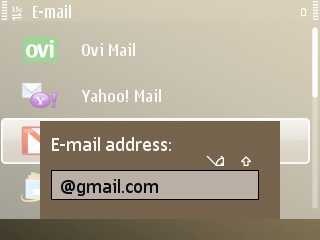
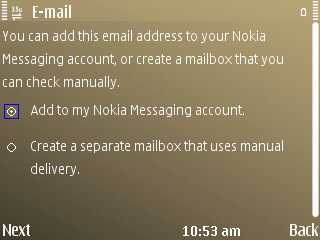
Available options 2Available options 3

For known mails only Email ID/ password is enoughYou can add 10 of accounts and additional too but that wont be Nokia Messaging

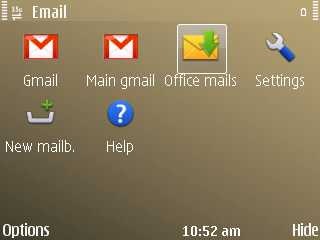
All mailboxes at one place.Settings

How you want the inbox look likeI like popping up of message list when I hover on link of home screen

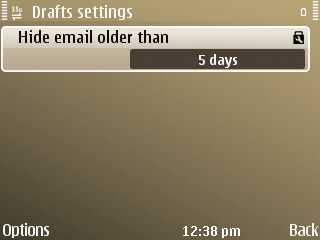
Gmail has options to show mails of only two weeksDrafts could be accessed only if they are within 5 days

The last few in above are settings for my Gmail Account, while the below screen shots are for office account that doesn’t support IMAP or Active Sync.

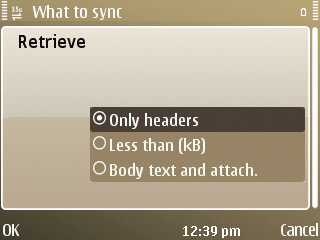
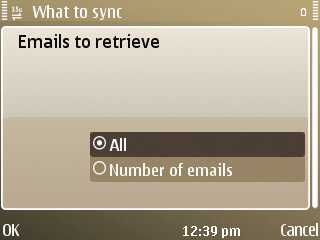
Corporate Mail 1Corporate Mail 2

How many emails?Its only about mails that are non Exchange or Lotus. My case is SmartMail

Market might be fighting over one click-two click configurations, but its always about making the process of configuring an account as simple as it could be. I don’t think any need left here for messing up with advance settings of configurations except your corporate environment has some specific alteration with settings.

I don’t think anyone should be having any complaint with configuration steps of Nokia Messaging at least. 🙂


Intuitive Interface of Nokia Messaging

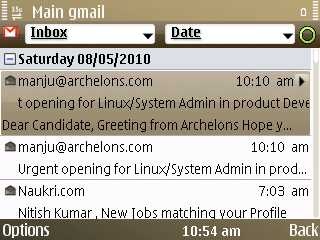
Folded mails by dateInbox View

Available options 1Available options 2

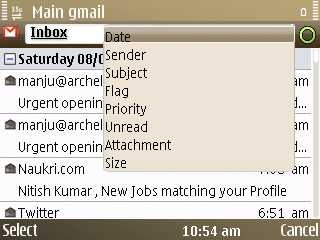
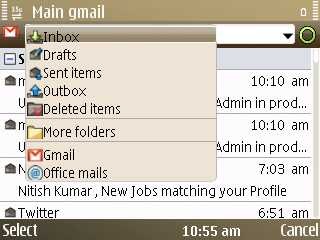
Soft by any of the attributeNavigation from one place

Reply/ Forward like option in same way as some SMSUnread Message size whenhover over them

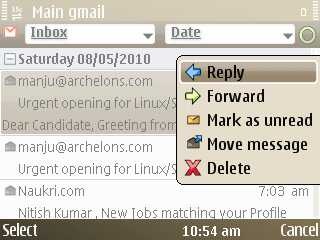
As the screenshot 1 shows the folded view, while the screenshot 5,6 show how you can sort mails based on various attributes or could navigate through folders. Moreover, last two screenshots show that how its shows the size for unread mails and also has option for replying, farward etc without even opening the mail. Moreover auto scrolling for long subject lines just like SMS previews on S40 device make it perfect inbox view.


Rendering of mails in Nokia Messaging
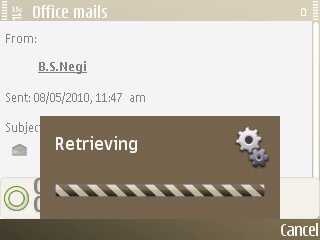
Yes!! things take time for big attachmentsView HTML LInk

Got a number, save itContacts are always accessible  

Hmm.. space to get improved for sureHTML view seems natural

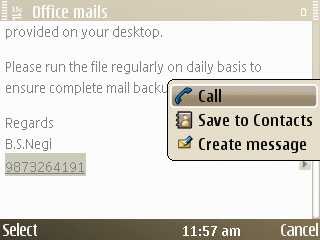
Ok! here comes the mail reading experience. There are little tweaks like direct options for saving any number to contacts or calling the same or even going through any email id and using it for Email/ SMS/ Call or saving to contacts.

Some might still complaint about rendering of HTML as it seems to try for showing HTML links only, not HTML format itself. But as a technical person, I understand that delivering the full HTML experience needs high data usages and Nokia came up with another way out by providing the View HTML message link, which opens the mail in browser as shown in last screenshot. Clever Nokia!!! But still I think some customized and trimmed down technique could be devised to show a minimal HTML experience (if not fonts etc then at least Bold/ Itlic/ Underline etc.)


So, are you still complaining about terrible build of some Blackberry or confusing icons on your mobile home screen, failed trackball of your current QWERTY? You are missing a Nokia E72.

Now you could download the app for this blog on your Nokia (Symbian5) via  this link or widget via this link.

Digg This

Concept Application for Nokia N8-Contacts Redefined

[tweetmeme source=”mrnitishkumar” only_single=”false”]

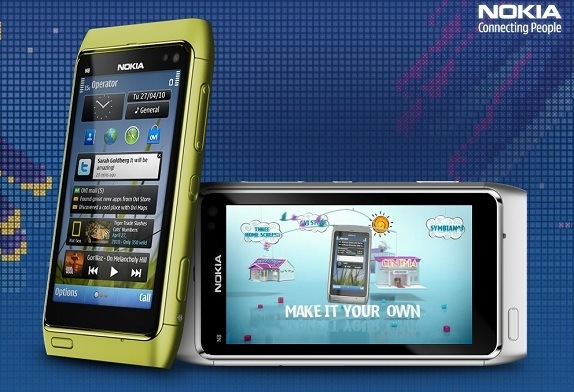
Recently I wrote about next coming Nokia Flagship, Nokia N8, the crown bearer of all Camera Phones in the world. There still remains a lot to talk about the same, but real thing will be when it reaches to our hands. Admirations, amazement and long wait to explore it.

Wait must be making you crazy!!!! now you can do more than waiting, to make the jewel your own. A chance to make the next coming Symbian^3 experience even better, a chance to take things to another level. Give your idea about a new app and if it sounds cool then you could win a Nokia N8.

All the details are here. That’s is what keeping Nokia on the top since all those years. First the Device from Community Ideas and then the future Nokia device, then create your app and now this. Must say, you are heading right Nokia!!! Winning or loosing is on another side, you belong to hearts.

So, what you are waiting for? Its your chance to make it, go for it. An idea could change the life.

nokia-n8-launch


Like the last competition about Future Nokia, in place of taking part into competition only, my idea is to take the opportunity to present some of my thoughts, which will be very basic, very possible, just Layman’s Take, but still worth thinking for. so here I am presenting one of my ideas here that I don’t think will get voted much there (I am not popular like CJ or AAS :jealous)


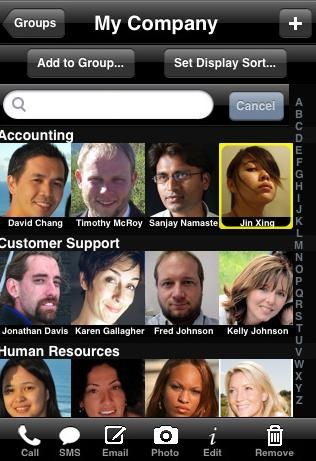
Before you you read further, let me tell you that this app is not real till now like I seen this post referenced as somewhere. This was my own concept that how contacts could be improved on Nokia N8. The screenshot is obviously from an iPhone.

Contacts Redefined (Social / Geo)

The idea is not entirely new. There is already an app named Hermes on Maemo fetching info like display contacts picture, numbers, webpage, birthdays etc from your social contacts and putting into contacts and calendar. I just wanted to add some more and bring it to already much social Nokia N8 in a big way.

Think about a future, where you need not to ask/ tell your friends about their numbers, birthday etc or update them about changes, because its always updated right into your phone without any manual efforts. You don’t even needed to create a phone book, when get a new phone. No one misses birthdays anymore, if not logged into social connections for a while as their phones will automatically going to remind them about upcoming birthdays or events.

Facebook, Twitter, MySpace, Orkut etc. all are open with their APIs and depending on privacy level user chooses, practically its not big deal to fetch such profile information from your social connections. Though Hermes doesn’t do that but the same application could be extended to add geo info as well from Ovi Maps or Google Lattitude etc.

Think tomorrow is your friend’s birthday and at 11:45 PM, your phone rings a bell about that and after greeting him/ her in night, when you woke up in morning, at 9:00 AM, you get driving instructions to reach him/ her, if practically near.

I don’t talk about cheesy things, but for me its a very practical, basic and very possible idea to go with. If you fear about battery, then updates could be manual/ optional or of longer durations or in place of replacing/ adding info, it could be chosen to pop up as suggestions kind of (Google Buzz way). Obviously customizations possible from performance point of view or to avoid cluttering on user’s preferences, but practically unlimited contacts space needs something like this for very sure.

Not sure that Ovi will pick this idea today, but it will come to smart phones very soon, from here or there. If you think phones as your personal assistant, friend or companion, then you want this.


If you think this idea is cool then vote for it or promote it in your own ways. Its there (search for Nitish).


Nokia N8 bringing class to mass- Nokia N8 Vs iPhone 4G?

[tweetmeme source=”mrnitishkumar” only_single=”false”]

Add to Google Buzz

In our Hindu Mythology, there’s a saying that whenever the nature starts loosing the balance, the God arrives to make sure that nature may regain the balance. May not be exactly the same, but probably Nokia’s next product lineup seems to be doing something sort of that 😉

For me technology designs two kind of products; for mass or for class and the actual growth of the society comes with a proper balance of these two. Unfortunately, in recent past, we seen the balance going much of disarray kind of. Apple iPhone 3G not less than 30k, Nokia N900, probably around 34k and similar were the case with HD Mini or others.

Many questioned from my circle over the price and I guess many others also might be wishing to voice their concerns. A price over Rs. 30, 000/- for smart phones? I mean however advance they might be, whatever the technology might have topped, but its a phone man!!! You could get a Netbook in the same price easily with bigger screen, then why spending this much over a phone only? I dreamed for not only better equipped but a better priced smart phone.

Yes! technology is good, the convenience it brings is good, understand that what it takes to bring the same in hands of people, but still it needs to reasonable and affordable to call it “buying a phone”. Were people thinking to buy computers, when they were of house like sizes and prices like even businesses can’t afford? Were ACs made their places in every third home before prices went low?

There was a race between Smart phones not only about features and bigger processors, but about prices as well like who can place a more higher priced phone than other. It really seemed to have lost focus about actual buyers. Being the biggest cell phone manufacturer in the world, it was sure a call for Nokia first and I am glad that they finally took it. Nokia seems to all set for bringing class to mass (C3, C6, E5 and now N8).


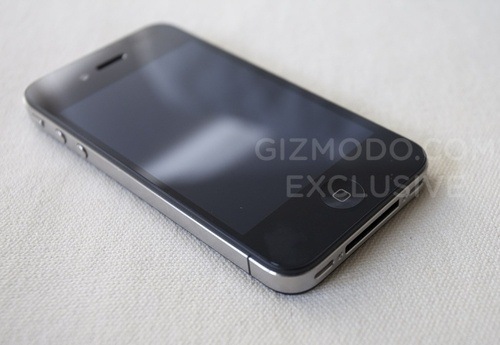
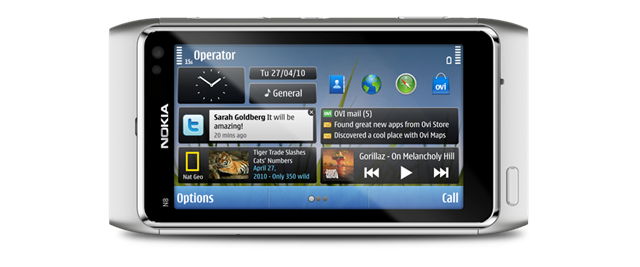
Two leaked flagship phones, the lost Apple iPhone 4G prototype and then mysteriously leaked Nokia N8 prototype and it was clear that Market is all set to see another battle even before a MeeGo device could actually arrive (only that should have been actually compared with an iPhone for real). Nokia kept it reputation of being a company for community and made the official announcement for the next Camera Flagship for whole industry, Nokia N8 (probably there was no option left).

500x_iphone4_01n8-2

While still a long wait before we will be able to actually see these two flagship model from two different “cultures” (expected to be released almost at the same time), its sure going to be a hot topic for blogs to compare both of them. Being different price segment device, it wouldn’t be fare to compare them, but still mentioning a 10 points comparison between Nokia N8 and iPhone 4G for people exactly looking for it…

1. Connectivity: When it comes to connectivity, then on papers, it seems to be a tie as most of the advance connectivity options seems to have became a standard now (except HDMI port in Nokia N8). What seems new to Apple’s iPhone 4G is introduction of Micro-SIM in place of standard SIM (it was already there in Apple’s iPad). Still its not clear that what it might be offering in terms of functioning, but as the manufacturing company ETSI (European Telecommunications Standards Institute) has been offering increased control and security features in its chips, many might be expecting that in place of being some ground breaking technology for connectivity, its more about the compactness, control and security. Apple! why cant you be open?
 
I don’t think that Apple would have thought about providing HDMI port (till now at least), definitely it would be a selling point for Nokia and more convenience for users.
 
2. A-GPS: I tried, but still unable to find that if Nokia N8 is going to sport Digital Compass built-in, most probably, it will not. Here we find Apple better as iPhone 4G has no reasons to go below than 3G version. Digital Compass technology might be a little tough or costly to implement, but people who have used it, know that its a blessing.
 
Apple get marks over this one, but still Apple’s GPS software doesn’t matches Nokia’s and Google not ready to give voice guided navigation to iPhone. Yes! Apple’s attempt to improve its own map software seems to be right step in the road ahead. But still I didn’t seen anyone enjoying navigation over iPhone that much, as we see people with even cheaper Nokia sets.
 
3. Display: Nokia is bringing 3.5” multi-touch capacitive screen in a flagship model finally (I don’t call the others as flagship ones). While its a matter of excitement, but its true that like in case of GPS, Nokia’s experience win, with multi-touch and capacitive screen, iPhone OS4 and its apps are expected to win the battle. More of it, Apple completely dominates due to fact that its expected to sport a much higher resolution than we ever might had seen.
 
Higher resolution does wonder that we had already seen with Nokia N900, even then I could understand Nokia’s concern of keeping price low. Probably that became the reason for lower resolution, but still I will say Kudos to Nokia!!! I am with you.
 
4. Sound: Dolby surround sound!!! are we really talking about smart phones. Technology changes a lot and making many things affordable. Apple’s products always known for their sound quality and as both of them going to sport second microphone for noise cancellation, we are all set to move into dream world of music soon. Expecting it to be a tie.
 
5. Camera: Forget it Apple, you are not even going to get even proper mention in this segment. Nice if you added flash, nice if you added a better camera, but you can’t even dream to tally with a Camera like Nokia N8. 12 MP Camera with HD Recording and Xenon Flash!!! Are you insane? Any iPhone including 4G can’t even think of competing even my beloved Nokia N82, leave Nokia N8 aside. Not mentioning much about Camera as there is no fight at any level.
 
You may check AAS article to go into a little more details, Nokia N82 been a king and the successor is going to make even hard core cameras envy 😉
 
Apple!! You need to move up till 7 generations at least to get par with Nokia N8’s Camera.
 
6. Processor: iPhone 3G supposed to have a 620  MHz processor under the hood and iPhone 4G probably coming with a Dual Core processor. People are wondering if the same would have 1GHz or more. A lot of expectations are here with iPhone and same has to compete with 1GHz processor of Google’s one, Apple sure could not afford to go low. But still Nokia really making me smile by introducing Nokia N8 at this point, in place of introducing some big successor for Nokia N900. Its already been hard for Apple to sell their phones in Asian market and now …. Apple is on double axes.
 
Definitely a better processor makes you capable of doing much more thing and providing developers a better platform to think more, but at the same point its about being reasonable as well. Nokia does an excellent job with Multi tasking all the time and Apple just seems to be introducing a mediocre multi tasking at this point. Why can’t you achieve that level of multi tasking that Nokia seems to have with even early 300 MHz processors? Many might have seen Nokia N82 running more than 60 apps at a time and they will sure be asking that what’s important? what you do or how you do?
 
Definitely, Apple seems to have a better processor with iPhone 4G, but still it doesn’t seem that Apple will make use of the same for real things. Nokia has ruled with multi-tasking and I think Apple will take one more generation to understand that.
 
7. Memory support: 16GB eMMC mass memory + micro SD card slot (support up to 32GB memory cards), 135MB internal memory, 256 MB RAM and 512 MB ROM, Nokia seems not leaving a place for complaint. I am sure, Apple going to do better with RAM and Application memory, but still there seems to be no place for a memory card slot even now. Being a close technology didn’t served better in past, still Apple seems to chose being worse than Microsoft.
 
Apple!! definitely, till you don’t reconsider this, you will be loosing points. Include MicroSD Card support please. Nokia rules in this department like always.
 
By the way, why I am missing USB-on-the-Go? You can completely travel without PC and transfer files to open drives or external hard disks. I have to see the maximum support though, may be I will be able to connect with my 1TB External USB HDD and watch any movie while travelling.
 
8: iPhone OS4 Vs Symbian^3: There has been big talks around iPhone OS, a number of developers are running after their lives for designing apps day and night for “The most advance mobile OS of planet”. Still openness of Android and Maemo shown the way that what could a more flexible and attractive platform for mass rather than serving profit needs of some company.
 
It nothing like I hate iPhone OS, in fact, I love the innovations it does and understand the Enthusiasm with which developer die for it, but still I hope much more from a Symbian.
 
Only obstacles in Nokia’s way ahead is obsession with backward compatibility. The same probably been biggest reason behind Windows Vista under the hood and fear is if the same happening with Symbian. Sometimes complete overhauling may be required than sticking with older rules only (We have seen in case of Maemo), issue is that overhauling should not be half baked like Nokia N900 missed Ovi Maps and Ovi Store miserably.
 
A MeeGo would be more suiting to stand in league of Android or iPhone OS, but still I believe Symbian^3 will stand tall even if doesn’t win against iPhone OS4.
 
9. Openness and Easy updates: I loved the way Nokia releases firmware updates for their smart phones ‘frequently’. Yes!! they are not that frequent like Microsoft does or like Maemo started doing, but still having free updates over the air is something so amazing for me and others out there for the convenience it brings to users.
 
Apple!!! people hate you for creating the term “Paid updates”. Nokia will be beloved for the same always as I don’t seem that Apple will bow down to remove its arrogance.
 
10. Battery Life: Nokia N8 going to sport a lesser battery (1200 mAh) than Apple, but its replaceable. Definitely Apple and Nokia get their advantages in terms for that.
 
I wonder if Nokia could produce a separate more power battery on additional cost. Why can’t the same device had two different kind of batteries in same shape? Would be a more flexible option for people asking for more.

Update: After observing Q&A session of Nokia, feeling a little disappointed to know the fact that for keeping the slim looks, Nokia did the biggest compromise ever, Integrated battery with the device that could not be replaced by users themselves. Not happy with this fact at least. Not able to digest as it was deal breaker to many. Nokia goes Apple way in this case. 


A lot could be talked about and would be talked about these two device in next days. I am just doing my bit. 🙂
 

Add to FacebookAdd to DiggAdd to Del.icio.usAdd to StumbleuponAdd to RedditAdd to BlinklistAdd to TwitterAdd to TechnoratiAdd to Yahoo BuzzAdd to Newsvine

SpiceWorks IT Desktop: IT Management for Dummies

[tweetmeme source=”mrnitishkumar” only_single=”false”]

Add to Google Buzz

While managing IT infrastructure for any organization, over the time, things grow up a lot, only to make you feel that you can’t be everywhere, can’t keep eyes over everything, specially when management seems to squeezing human resources all the time. In place of delegation of things, responsibilities seem to get centralized over few and one just find frustrated with the tiny details he needs to care about all the time. Is it time to be negative about the responsibilities or come up with a new and positive approach? Do some more hard work or keep yourself updated with cleaver work? Really being an “IT Guy” sounds tasteless … here comes SpiceWorks … spicing up IT as it says.

What is SpiceWorks?

Spiceworks provides a free systems management, inventory, and helpdesk software application, Spiceworks IT Desktop, designed for network administrators working in small- to medium-sized businesses.

Spiceworks IT Desktop is used to inventory, monitor, manage and report on software and hardware assets. It also includes an integrated help desk system. Spiceworks runs on Microsoft Windows and discovers Windows, Unix, Linux and Mac OS X machines along with other IP-addressable devices such as routers, VOIP phones, printers, etc.

An adware and is written in Ruby on Rails, Its not a complete and detailed Monitoring Solution like Zabbix (I already wrote about), but for me it covers another other aspects of your IT management that Zabbix left, in a powerful way like Inventory, events reporting like installations/ updates and complete out-of-the-box-Helpdesk segment.

Login Page


Here is feature list:

  • Scan SNMP Devices
  • Linux Scanning via an SSH login
  • Scan Windows Devices via WMI
  • Ability to manage your software licenses
  • Alerts on customizable definitions (eg machines with no anti-virus or low printer toner)
  • Software automatically categorizes machines into groups. eg Laptops, servers, routers etc
  • Ability to define custom devices
  • Ability to compare one machine with another
  • Ability to manage services on remote machines
  • Plugins
  • Reports
  • Network Map (Beta)
  • Helpdesk with user portal

Having Inventory of all your hardware’s and Software’s is something as important as having control over each aspect of your servers. An Inventory not only helps IT staff, but could be a key document for management as well. But the most tedious part is to keep it updated and you always wish that there is some solution that might be doing the job for you without any manual intervention. SpiceWorks does the same job very well, lovable because it doesn’t requires any client side installation and still keep you updated about any changes done in your infrastructure.

Customized report

The other important aspect of SpiceWorks in my scenario is Out-of-Box ready to roll Helpdesk solution. A helpdesk keeps your support efficient and ensure resolution of issues within time frame. Not only evaluate individual’s skill sets, but also provide a complete view for IT Staff and management that how well or worse they are providing support. Not only that it may also reduce common calls that requires little IT interventions and could be dealt by non-IT Staff because, it grows up with an open database of resolved calls with causes and comments about the resolution.


Enough with dry talk, now let’s engage ourselves in some real things

Installing SpiceWorks IT Desktop:

A 23.3 MB Download from the link, the spiceworks.com web site claims the software is an IT manager’s dream – asset management and help desk, all from a simple Windows PC. As the site mentions

Spiceworks IT Desktop is designed for

  • IT Pros who have admin rights on their network.
  • Organizations with less than 1,000 devices on their network. It will work with more but it won’t be as fast.
  • Running on a PC. It discovers Windows, OS X, Linux and Unix but you need to run it from a PC on your network.

System Requirements

  • Windows XP Pro SP2, Windows Vista, Windows 7, Windows 2003 Server SP1, SP2 and R2, & Windows 2008 Server
  • 1.0 GHz Pentium III class processor
  • 1.0 GB RAM (Notice that this one is trickier as it has to cover a lot of aspects)

Browser Requirements

  • Firefox 3.0 – 3.5
  • Internet Explorer 7.0 – 8.0
  • Google Chrome 2.0

As its not always the case that you get a fresh server to install a new application, one should worry about two things with installing any of the web solution, first if its going to take the default http port 80 and if the database its going to use already exists on the same server, you are going to install SpiceWorks IT Desktop. Thankfully, SpiceWorks goes well about both the cases. It takes port 9675 (Of course, choice is yours) for HTTP and the database used is not MySQL, but is a SQLite database.

End of worries. Could go for installation now…

~24 M of installation take a little while to install and greet you with a couple of questions about your network like range of IP Addresses to scan, various Windows username/ passwords details possibly across your network, ssh credentials and you are ready to scan your network for finding devices. Yeah! As the very first step, it asks you to get registered with Spiceworks, which would be your one point help system and integration of your account with web resources.

There are also services related requirements on client side like WMI related services should be in running mode and firewall should not be blocking SpiceWorks access. I am not sure that Remote Registry Service is required or not, but possibly that is also in set of requirements on client side.

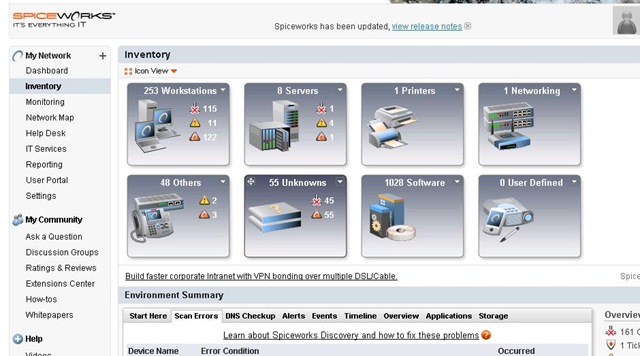
typical dashboard

Go for a complete network scan and in just few minutes, you should start getting discovery, monitoring, and alerting items from all over your connected network.


Inventory

I think it would take a few days for you to manage all of the devices showing up in Inventory Dashboard of SpiceWorks. After the same, one could go for the first amazing part.

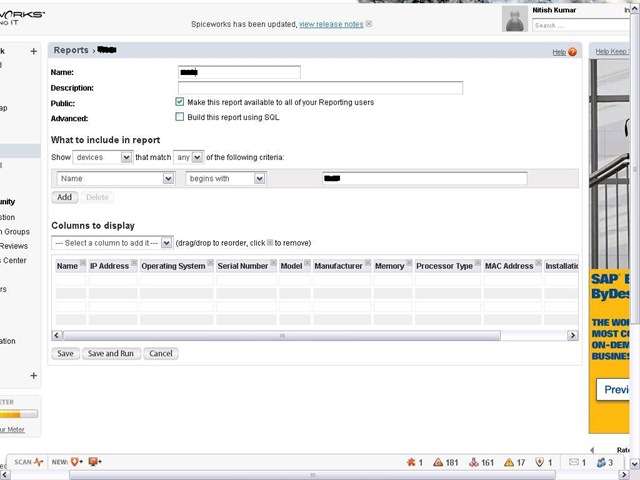
Click on reporting (http://localhost:9675/reports)

Reports page

Create a new report, name it and add columns as per your requirement or even add conditions for making inventory for some specific group of devices/ workstations like I went for all workstations, whose names might be starting with “IT-“. Columns added in my case were Name, IP Address, Operating System, Serial Number, Model, Manufacturer, Memory, Processor Type, MAC Address and Installation Product Key

Customized report

Click on Save and Run and few minutes more will present you a perfectly made, Excel/ PDF/ CSV exportable inventory of your network. More of it, this report will be saved with you to re-run later on for finding more current status of devices.


Helpdesk

Adding a new face to your IT Support, profits of a fully equipped Helpdesk really could amaze you and your clients, if you never worked before with any kind of IT Helpdesk. Many even might be running their home made CRM to keep it flexible for meeting their needs. This might come to surprise many in the fact that its totally free of cost and still works like a charm.

HelpdeskTicket

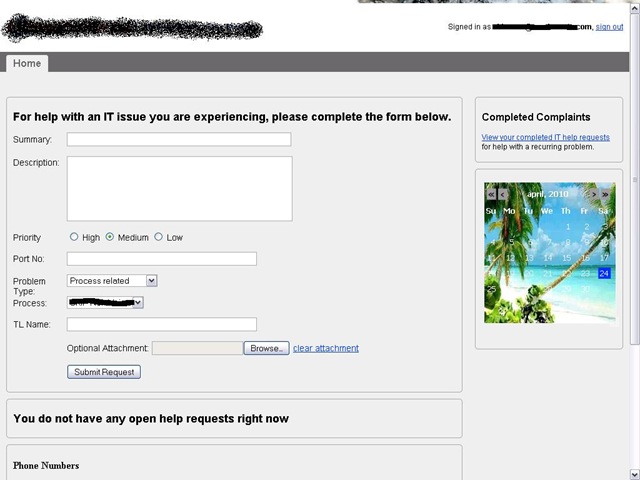
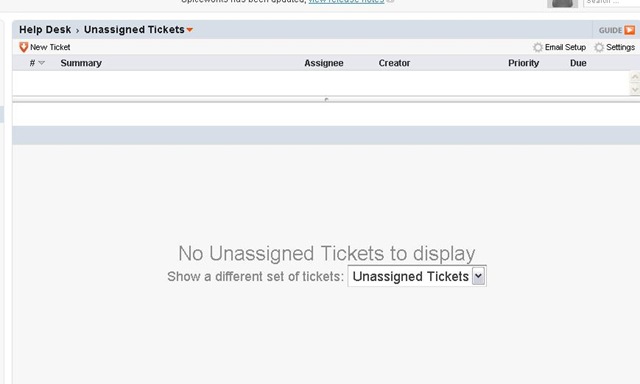
Just click over Helpdesk to find the tickets (http://localhost:9675/tickets) being displayed there with filters like Open Tickets, Closed Tickets, Unassigned Ticket etc. Now you have two ways; either let IT Staff lock the complaints themselves with details or even pass the responsibility to actual users themselves via portal (http://localhost:9675/portal) that could be flexibly customized through (http://localhost:9675/user_portal) like let me show you mine one..

Helpdesk view

There are many details left to be explained in this article, much left for even me to understand and learn through, still waiting for some book (SpiceWorks community seems to be working on the same http://bit.ly/antjqa) … even then like Zabbix, I find SpiceWorks IT Desktop kind of must recommend for any IT Administrator.

SpiceWorks official Twitter page has introduced me with their few free training and demonstration videos, which you can go through to know that what this could do for you.

Videos | Events

Let’s spice up IT a little (in fact a lot).

Add to FacebookAdd to DiggAdd to Del.icio.usAdd to StumbleuponAdd to RedditAdd to BlinklistAdd to TwitterAdd to TechnoratiAdd to Yahoo BuzzAdd to Newsvine

Digg This

Zabbix Monitoring-Simplest becomes more simpler

[tweetmeme source=”mrnitishkumar” only_single=”false”]

Add to Google Buzz

Remember that IT guy from the movie “Hello” based on Chetan’s One Night @ Call Center? So many USBs hanging around neck, some screw drivers in the pocket, some wires here and there … and don’t know what else. A funny sight to laugh about, but little does you realize that life of us, we ‘IT guys’ somewhat really become the same.

Month by month reduced manpower and day by day getting complex infrastructure really make we IT people, (even if equipped with most powerful and expensive hardware on our side) running every moment of each day. Even sometimes, we find ourselves fed up of our own jobs and issues popping around from all over, try to come up with new energy at every next day and tired at the end of day thinking that will ever we going to get some productive time to block issues before rising rather than facing issues which most of the time arise due to the fact that even after knowing rules, we can’t keep an eye over each and everything by own.

Monitoring solutions do the job for you. You know that problems come due to grown logs, low disk spaces or any such parameter, which could be monitored easily if individual, but monitoring all at one place is what these monitoring solutions are all about.


I already have recommended Zabbix as complete monitoring solution and even wrote a dummies manual about deployment of the same on your Windows/ Linux workstations and Servers. Once I even been complaining about the complexity and confusions around simple yet very complex in nature Zabbix Solution.

Genuinely, having a cool product in your hands solve many things, but it frustrates you a lot, when you get lots of questions hitting your mind and no authentic solution over the same other than random answers in forums or hit-n-trial experiences of other users. You wanted to have command over what’s going on in your infrastructure and you not confident about the product itself?

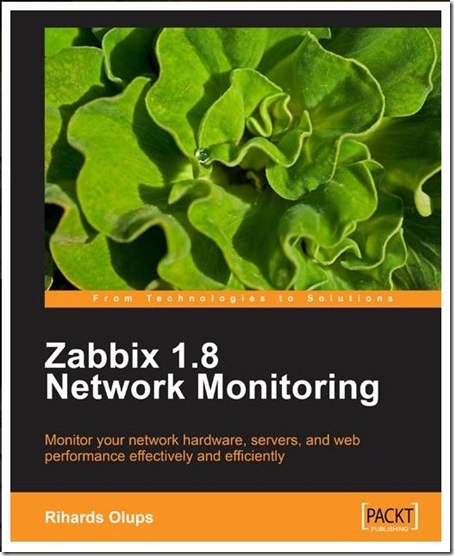
After receiving and reading the Packt Publications book over Zabbix written by Rihards Olups, I really feel getting the same confidence I always wished for. The book really clears around tiny details of Zabbix. As I promised in my last introduction post about the book, allow me to share detailed summery about the book now…


Zabbix 1.8 Network Monitoring
Language :
English
Paperback : 428 pages [ 235mm x 191mm ]
Release Date : March 2010
ISBN : 184719768X
ISBN 13 : 978-1-847197-68-9
Author(s) : Rihards Olups

428 pages are like nothing, when you talk about something that covers really a lot, but the step by step and Layman’s approach make each of the page of real worth.

Chapter 1: Getting Started with Zabbix

This chapter covers almost all what in first place, you may come to know after installing not one, but a few Zabbix servers. It starts from what Zabbix is, what are the features, how it will look like and then how to install and configure. Yes!! even the first chapter leaves you with completed installation and web frontend with brief explanation of each step and command you went through while installation.

Chapter 2: Getting your first notification

Zabbix is much bigger thing than just the installation. by looking at the default provided graphs and monitored data of the server itself already gives you an idea that what Zabbix is going to do for you, but knowing the details like creating a host, items to monitor, defining triggers, email notifications, creating actions etc are what concerns this chapter. It explains in details that how we can monitor some particular element of consideration in Zabbix terms.

An experienced learner could gather the details at his own pace, but having the correct manual about each and everything makes your life easier about the product and enables you to concentrate more on your scenario itself.

By the way, this chapter could be downloaded as sample chapter from here

Chapter 3: Monitoring with Zabbix Agents and Basic Protocols

Zabbix usages client-server way to bring the most from the monitored host. You are needed to install Agents on client side (already discussed in earlier chapter). This chapter deals with more finer elements of Zabbix Agents and show the way to use them all over the Zabbix frontend.

Chapter 4: Monitoring SNMP and IPMI Devices

Once I mentioned that it requires installation on client side, few of you might have started to think that not each device will be like that you could install something up on like your DSL, your UPS, your EPBX etc… what about that? Don’t get worried, Zabbix isn’t only for typical specialist Server Administrators, but it does the job for more complex scenario as well, where the infrastructure to be monitor includes more variety of devices.

This chapter deals with how to monitor SNMP devices and how to get along with other monitoring interfaces and real worth reading for people, who wanted to extend their capabilities/ responsibilities at another level.

Chapter 5: Managing Hosts, Users and Permissions

This chapter is about the instructions that how to behave with frontend about managing hosts, users and permissions as the name hints. It also shows that how you can create different groups for different monitoring responsibilities and in this way delegating the works and rights that might be more suiting to your environment.

Chapter 6: Acting Upon Monitored Conditions

A monitoring solution is not only about knowing whats going on, but also doing corrective measures at first place, if harmless. This chapter deals about the same like how to create triggers on specific scenarios, putting human readable constants and using scripts/ remote commands to deal with situation in first place with human intervention. One of most worthy chapter of this book.

Chapter 7: Simplifying Complex Configurations with Templates

Templates are like standards or tailor made copies for scenario and having lots of customizable ones make your life more easier. This chapter deals with various templates available with Zabbix and also how to use them.

Chapter 8: Visualizing the Data & Chapter 9: Creating Reports

These two chapters deals about the presentation part, which would be actual impression when people other than administrators go through them.

Chapter 10 to Chapter 13

These four chapters dig deeper into advanced item configurations, scenarios, later included proxy method for monitoring remote locations and database itself. Worth reading for administrators, who feel themselves comfortable with day to day tasks with Zabbix and want to go geeks with it now.

Chapter 14: Upgrading Zabbix

This chapter deals with one of the most important aspect. Zabbix is a constantly growing application and sure we find ourselves in front of another version with new features in short intervals. Knowing exactly that how to make the transitions without loosing data is what concerns this portion of the book.

Chapter 15: Taking Care of Zabbix

My experience says that even beginners should read this chapter for sure otherwise they are bound to pass through un-necessary worries like I went. Having a good thing is good, but best is to keep it good. This chapter not only talks about performance and efficiency cautions, but also give good instructions about backing up and restoring data.


There are two Appendix A & B after these all chapters, which deals a little with troubleshooting in a few scenarios and things like Global support through online documentations, forums, wikis, IRCs.


If you know the worth of a monitoring solution like Zabbix, then more than anything else, this book makes the place in your closest book self for any free time reading more than anything. Its not about impressing others with some tricks around Zabbix, but its about real living with it.

Add to FacebookAdd to DiggAdd to Del.icio.usAdd to StumbleuponAdd to RedditAdd to BlinklistAdd to TwitterAdd to TechnoratiAdd to Yahoo BuzzAdd to Newsvine

WomWorld-Influencing the world from behind the curtain

[tweetmeme source=”mrnitishkumar” only_single=”false”]

Add to Google Buzz

Update: Much happy to see many WomWorldian joining here. I know that most of you love to do things rather than saying and we find you people silent most of the times only giving voice to our words. Many like me still wish to get list here grow more to know more about you people.

Twitter accounts and pics …. wish to add more name … 🙂

May be the title seem a bit over … but that just prompted me when I thought to put some lines for today’s post. Will try to introduce a team here, whom I just started to know since last few months (in a way), but knowing more of them still fascinates …

1000heads …. WomWorld … heard of these names?

Chris illman Director of Engagement Strategy  James Whatley Joel Diamond Katie Buntingarto JoensuuMike DavisonAnssi Mäkelä

Lydia Millett Paul Coombes Relationship director  Donna Suffling Riccardo Webb Tom HallJussi-Pekka ErkkolaDaniel Goodall

ShiraFrank Grindrod Account Director@1000HeadsAdam Woodley

May be even the pictures above don’t strike something in your mind, but let me tell you, this is the team, now we know as WomWorld/ Nokia. Each image posted above, when clicked will take you personal twitter page of each of them.


Ok!! tell me, how many of you make decisions about buying products? Either it be phones, electronics, house hold or anything?

TV Ads? Print Media? Friends?

Earlier our opinions were based on what shop owners or sales persons tell you, then it shifted to TVs/ Ads. That’s what companies were doing to reach potential and existing customers. But there was always one thing that never changed, opinions of people like you, opinion of your friends, opinion of people, who might have nothing to with brand or promotion itself, opinions based on personal experiences.

Here came the independent internet reviews …

Internet reviews really have became a big influencing factor for buyers now and cnet reviews, mouthshut.com etc have made big places in buyer’s mind. This is called World of Mouth, publicity from mouth-to-mouth. After using Mouthshut.com so long for my purchase decisions, recently I entered a new world about my very trusted Nokia through WomWorld.


Honestly, now I feel ashamed of myself that I wasn’t aware of existence of WomWorld till recent until Paul mailed me about my Nokia 5800 post. With a few words of praise, he also mentioned that he could send a few Nokia devices to me for trial. Not knowing anything about WomWorld or any similar thing like that it was a surprise to me, surprise in that much big way that I didn’t even given a thought to search about WomWorld … later on after a few days, when Paul asked me to fill some details so that he could send me Nokia N900, then it sounded some real to me. But really neither me, my room partner or any of my colleague were convinced that such a costly device coming to me like common man for trial, neither did I shared the excitement with many people.

In place of waiting for Nokia N900 in real, then I started searching web about WomWorld and Paul… then the journey started. I received Nokia N900 soon and written a couple of reviews over it, later on the other device that came to my door step was Nokia N97 Mini… I even started following them on twitter and soon won first few entries price from @ovibynokia

Just a short journey, but still big impressions for the products and the way, the team is making them reach to the market.

One could feel the impression as last many post of mine centered around Nokia Products .. in no means for any kind of promotion, but from the heart. Increased hits, a different recognition and a feeling of warmth that’s what I shared and hope to share more with WomWorld.


Oh!! Sorry.. I should put a few lines about what WomWorld/ Nokia is.

WomWorld/ Nokia is a Nokia sponsored resource providing latest news, comment and feedback on all things related to Nokia from the world of social media and beyons. A wing of 1000heads.com that is the largest dedicated global Word of Mouth agency in the world, which is based in London, with staff in New York, Vancouver, Paris and the lovelier parts of the Oxfordshire countryside.

They help brands to listen to people, and people talk about brands.

How to do that? They do this by understanding conversations, and using the insight they gain to build and nurture immersive relationships between brands and people. This inspires Word of Mouth, builds advocacy and ultimately increases revenues for their clients.

They do like door to door advertising by contacting bloggers directly and offer trial devices through most simplest procedures (taking each and every cost related thing on their own part). More of it, unlike any other PR agencies in the world, I found them much shy in talking about themselves. You hardly hear anything about the biggest name in PR industry that’s because they do it and leave the part of talking to others only. Probably that’s the soul of World of Mouth is.


A short journey, but still I thought that there should be a post from WomWorld itself introducing its members in details. That’s why posting this… may be it will kick off a detailed post from WomWorld/Nokia itself.

I went through blogs of a few WomWorldians and find that some of them have a separate identity as bloggers as well. It’s really intriguing me to know more about the process of building the team and workplace.. let’s see… what we will hear from them in reply of this post.

Other online marketing professionals out there needs to took note of it, there is a lot of things to learn from these people.

Add to FacebookAdd to DiggAdd to Del.icio.usAdd to StumbleuponAdd to RedditAdd to BlinklistAdd to TwitterAdd to TechnoratiAdd to Yahoo BuzzAdd to Newsvine

Digg This

Nokia C3, C6, E5-Reality check

[tweetmeme source=”mrnitishkumar” only_single=”false”]

Add to Google Buzz

Nokia C3 Unique S40 device with 2MP Camera, qwerty keypad, 3.5 mm connector, 55 MB internal memory, supports up to 8GB Memory card, WLAN support,  Inbuilt support for ‘Game changing’ Nokia Messaging for mails and IMs. and price? just RS. 5, 500/- to Rs. 6, 000/- as announced. May be even more lowered down after production.

Nokia C6 A device that seems to fare even more better than Nokia N97 Mini (Rs. 19, 500/-) and even if not, then passing the very popular Nokia 5800 (Rs. 13, 000/-) for sure. Same Symbian OS as Nokia N97 Mini, same processor as Nokia N97 Mini, same 128 MB RAM, 5 MP Camera with LED Flash, secondary camera, sliding qwerty keypad, 3.2” resistive touch TFT screen with nHD 16:9, 640x 360, Free Ovi Maps voice navigation with A-GPS support, WLAN, 3G, Inbuilt support for Game changing Nokia Messaging for mails and IMs and same battery as Nokia N97 Mini… price? just Rs. 14, 000/- – Rs. 15, 000/- at max.

Nokia E5 Top class business device fairing even better than even Nokia E72 (Rs. 18, 500/-) due to many email supports, Lotus/ Exchange support, same 600 MHz processor, 256 MB RAM, 250 internal memory, 5 MP camera, Free Ovi Maps voice navigation obviously, HSPDA/ HSUPA, WLAN, same sleek looks as featured by E72 or E63 and battery life said to be  18.5 hours on GSM…  price? Rs. 12, 500/- or Rs. 13, 000/-

nokiac5c6e5

Enough excitement naa??? Get a read over David Gilson post about detailed comparison of these devices with ones, they going to replace. With excitement, Its also a good question to think up on that where are the hidden compromises to present such mouth watering prices? Coz on specification sheets, it seems to bringing the best elements of successful Nokia Smart Phones, but how much we should actually expect coming for us ????


Well.. if we talk about Nokia C3, then if you really think then only addition is WLAN and qwerty keypad or you could add up support for bigger memory card into it as well. Internal Memory boosts up from 30MB as was similar priced Nokia 5310, shouldn’t be that much of price concern as launch dates have years between them. I don’t count Nokia messaging integration on costlier side.

What’s on costlier side is QWERTY and WLAN. but Nokia, Apple already shown that they  could sport WLAN on cheaper rates with their E63 and iPad respectively.

Nokia C3 is a great device for lower end market and might be a big success like old sets like 3300, 3310 and 1600 been. So far, I guess no compromises made as prices are reasonable with a little brave push. Hope as it looks in pictures, Nokia coming with metallic body for C3.


Next is Nokia E5 … those who might have missed from specification sheet, let me remind you neither its coming with Carl Zeiss lenses nor I am expecting it to sport that metallic tough looks as E72 had. More of it, what made Nokia E72 standing out of crowd, the Optical Pad is also missing from Nokia E5. At the end, what’s most wrong part is, its loss about battery, in place of BP-4L (1500mAh) we are going to get BL-4D (1200mAh). Even if its being shown with more talk time, it can easily be expected that battery performance might get crucially lower than its competitor. Current price of E72 has been lowered to 299 Euro and Nokia E5 is being launched on around 190 euro. Less battery and missing optical pad seems to justifying the lesser price.

Also I am thinking about the compromises made around functioning, as increased battery life on lower battery means there are some energy saving techniques applied within and as it happens usually it going to cost over performance from somewhere. Yet to see.. and if Nokia really have found some special technique, then why not it’s there with other two? Future will reveal.

Sure, there are compromises and I am okay with them as its going to allow a broader audience to receive the business series with full feature. Though one shouldn’t expect it going to be great on Camera (provided the Non-Carl Zeiss and No Auto Focus), which is bad as many times a business person uses camera for taking scan like images of documents. Don’t know without Auto Focus and Carl Zeiss, how that would fare. Just could hope that they don’t get plasticy in the  way, as the body of Nokia 5800 was and they will sure get an additional sale from my side .

For me, still E72 after next firmware updates (might include this Nokia Messaging into that) fares better due to better battery as Business users tend to use WiFi and 3G than GSM.


People always said that Nokia N97 and even N97 Mini are overpriced in a way and it was sure evident then one looks over the other successful one Nokia 5800. Nokia C6 seems to giving answers to all those people. Disappointment is on air for few, who expected at least 256 MB RAM and 600 MHz from the successor of Nokia N97 Mini, but let me tell you all of these devices are never meant to be successor of any. Neither E5 nor C6. They are in league of their own and an attempt of Nokia to show that still they rule on the scale they have defined.

The  highest priced among the three, Nokia C6 sure reasons the price due to addition of QWERTY and OS capability of Nokia N97 in Nokia 5800. We have lost tilt slider and 82 MB internal memory, when compared to Nokia N97 Mini. Charging got powered by Micro USB, which is nextGen but still… as I have seen that if we use 3G connection at full force on Laptop via Smart Phone, then it drain battery faster than it charges. I am not sure that should call it a positive addition or not, but its sure convenient for majority.

What are we going to miss most with Nokia C6 is again Carl Ziess and dual LED flash, which will sure make the Camera go completely ordinary. I was not even happy with Nokia 5800 and don’t know how C6 will fare in Camera side that way. I never come to know that why Nokia used lesser battery in N97 Mini and higher in 5800 and same question hits back here as well.

Yes!! there are compromises and some are even painful like camera and battery. 128 MB RAM is not going to take it very far the way it seized sale of N97 Mini and if it lacked anything in A-GPS in comparison to N97 (compass already not there), then it would sure be lesser popular than other two models. The only place where it fares better than other two devices is screen size, which facilitate comfortable browsing and navigation experience.

The only touch screen device of the three model sure would be crucial as still many people wants touch devices. But don’t know why I am feeling that it has less brighter future than other devices and upcoming devices (To be frank)…


So, as a conclusion, I think ‘inclusion’ of Nokia Messaging and Chat (that was already there  in Beta Labs from 8199_h some time available for few select models) sure ground breaking for NextGen communications and a sign of the shift that how seriously various businesses taking social networking. Nokia really went aggressive by including WLAN and all comprehensive features at such mouth watering prices coz sometimes we don’t consider worth of some good things till don’t use them due to price. These devices will bring the power of QWERTY, multitasking, heavy storage support and strong connectivity to mass.

I once said that there are so many features in advance Smart Phones, like we could send co-ordinates that where are we or could upload pictures or could communicate with international friends so easily but that doesn’t make effective appearance till we get such smart phones reaching to all your friends. It was always hard to convince any friend of yours to buy a handset of Rs 20, 000/- as you will always be asked that what’s point of buying a smart phone in such a price, when could buy whole Netbook in same price easily?

You check your Ovi Contacts and find only a few online. You check Google Maps Lattitude and find only two three friends have updated their locations (coz they don’t have smart phones with GPS) You left being lonely many times. I am sure that these new device gonna change the same experience. But sure, we need to keep the expectations realistic as its not gonna be a biggest Multimedia experience for sure. Should wait for next move from Nokia.

Just got more updates today

Check out the video showing C3, C5, C6, E5


Few observations ….

C6 It’s good to see that there is no tilt slider in C6 as for me, I was always susceptible about the same in Nokia N97 Mini and loved the smooth slider experience of Nokia N900. Hope this would be the same. There are physical buttons for receiving and rejecting calls, but the whole body seems to be similar to that Nokia 5800 means no metal in this one at least.

C3 and E5 It seems that I shouldn’t be that worried about the build of these two as both of them seem to sport metallic back and build. Sorry I doubted in first place.

Waiting that when I would be able to take my hands on them….


More updates

Got to see flicker stream of RS77 and view of E5 and C6 there. Interface-wise not much seems to be changed, but I am happy to see the solid looks of E5. Wait continues …

e5-1 e5-2

photo of Nitish KumarNitish Kumar
https://nitishkumar.wordpress.com
http://scifireviews.wordpress.com
http://nitishkumarsays.blogspot.com


Add to FacebookAdd to DiggAdd to Del.icio.usAdd to StumbleuponAdd to RedditAdd to BlinklistAdd to TwitterAdd to TechnoratiAdd to Yahoo BuzzAdd to Newsvine