Nokia N900 – Things you never seen before anywhere else

I am back to Delhi. Right now in the train. You may find it funny that I am leaving my hometown on the same day as Holi, but it is and let it be, I am already sad about it.
The fact is I am travelling and have passed more than 8 hours without even noticing, without getting bored, without even talking to strangers, co-passengers. Bad!!! Isn’t it??? A man is supposed to be a social animal, right??? But this thing is addictive, really addictive!!! I’ve to own it or have to own it’s successor ‘MeeGo’ or whatever they are calling it. Just wish that they remove those annoying absences and they’ll win me.

Here I am using MaStory again to post my views, when just finished watching ‘9’, ‘Dark Night’, ‘The Last Legion’ and ‘Visions’ over the same ‘kmplayer’ with my Nokia N900. Yes! It’s batteries are not almighty to last longer than 6 hours movie play over it, but even then 6 hours movie play!!! Isn’t it amazing? I sound like advertising the trial device, I got… Right??? I swear I don’t wanna sound so, but …

Here I am to summarize a few apps and conveniences, I found with only Nokia N900 and will be missing in all device, I will be buying next before I buy this one (or a better version of it based on Maemo or MeeGo.)


1. Qwerty keypad: I read someone out there ranting about keypad that they should have kept the spacebar in middle of all. Spare me plz!!! Suggesting something is different thing and actually putting it to work for most of users is other.

I am literally loving the way, it’s keypad is and kudos to Nokia that they are pushing most of their latest devices with qwerty keypads. Smart phones gonna be like they never before. Earlier you heard that you could do all the things of world with your smart phone, just need to learn a few things about it and now…. You don’t even need to learn, just do the way you were doing with your lappy or PC. Do someone needs Netbook here or that genre will die in same way as Pagers did against cell-phones?


2. 3.5" screen, 16M colors and 800×480 resolution: I thought about such a day when watching movies and browsing web over cells would be that much easier, cell-phone companies thought that soon enough the market of Value Added Services will see a boom, but nothing worked out that much faster as is supposed to happen now with such high resolution/ size devices out there in market (affordable for pocket as well). Watching full movies over it with aid its powerful batteries is so unreal.


3. MaStory: My bad!! Might be the case that I never used any other Blogging apps on smart-phones, but I never had this much bigger and clear screen device is in my hand with a perfect qwerty keypad ever. I really became so much comfortable with its keypad in shortest period of time that now even hours don’t hurt me. I never posted from phones before and even the idea was tiring enough, but this one changed all, really did.


4. KMplayer: Don’t know it’s Mplayer being called as KMplayer here or some entire different movie player, but it works like the same. Those linux freaks out there know much about this player and even some windows enthusiastic too. The VLC player been GOD for many of us movie watchers and when we get a capable phone like this, we always googled if something like VLC out there for it.

Here is your answer. Work like just perfect, no laggings in video and simple enough to catch up with things. I presume that all shortcuts with the linux version are right here like arrow key for forwarding or reversing the play and space for pause/ play meanwhile Ctrl+Back Space to switch across applications in faster ways. I placed .srt and .sub files with the movies in same name and it worked the way it should. The resolution of 800 x 480 makes it actually readable than pulling your eyeballs out only. You must have seen snapshots of move ‘9’ over it, but I’ll post you back some of mine to show that how real it is.


5. Sketch: Again my bad that I don’t play enough with default apps that come with the device itself, but like many other things with device, it was an entire different scenario, when I came across the amazing app named Sketch. I created one sketch through it for time-pass while travelling in train and it didn’t came out that bad. I seen people sketching through paint brush of windows os, but sketching in digital was never a thing of my kind even if I know basics of sketching some ways. With Sketch app starting from the name aided with the resolution/ size of the screen+responsiveness of touch. I really never thought of doing this with a phone. Sure!!! I suggest you to have screen guard ON, but in all, it would be a favourite time-pass to many.


6. Conversations, Gtalk, Skype, IMs: This is something truely about communication. You would find it unparallel in the way it removes the differences between typing on laptop and cell-phone, but also the way it removes the differences between SMSs and IMs. A true communication device in deed. It really has it all without third party apps. I salute you Nokia!! Hats off.


7. The openness: Its been long when we were looking for the ways to go beneath of phones. Lots of ways to hack your smart-phone is available on net, but here came the true control, where hacking is legal and many times even encouraged. With such a true open platform, possibilities are literally countless. May be Android come with a better processor and fully integrated with Google services, but it wont excite you as a platform, as much Maemo does. Its a start of new era in the same way Linux, Solaris or Java was. I really want it grow.


Many things more could be written over my unique experiences with this device, but I am about to reach office and sure I wont look good enough with both hands engaged in typing on cell, so ending the post here. Will love to have your comments about your experiences.


When was finishing my article from Live Writer, I came across an article via twitter, which seems more broader in coverage, I would like to share here. Take a read, it boldly shows how impressive and unique Nokia N900 is as a device.

Nokia N900 – Not only for geeks but for mass as well

“Be it early impressions once it arrived to me, be it my first detailed article mentioning it as definitely geek, be it my article revolving around MaStory or be my criticism about it, I guess most of the time, I sounded like Nokia N900 has everything Geek about it. Is it really so?”


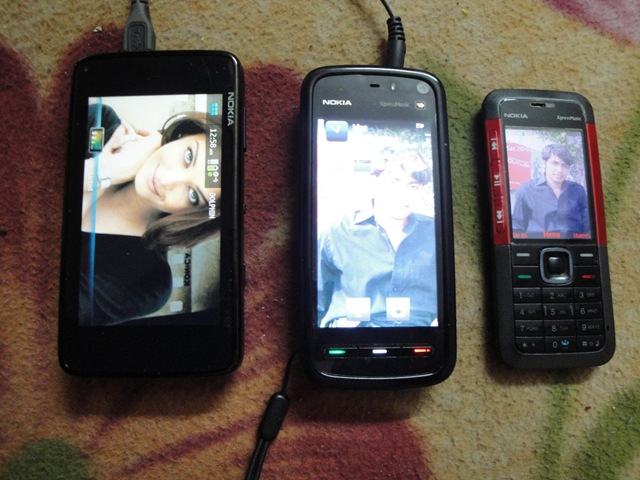
Size comparisonWhy Nokia N900 going to appeal regular mass more than other phones (not just Geeks)?

Let me be honest about it, after loosing my Nokia 5800, being aware of Non-Repairable condition of my Nokia N82, giving my simple yet effectively main Nokia 5310 XpressMusic to home and last few days with trial device Nokia N900, my quest is set between Nokia N900, Nokia N97 and Nokia 5800 XpressMusic and my choice is again Nokia 5800 XpressMusic for the same reasons, I stated earlier.

But I tell you, I am resisting urge of buying Nokia N900 just somehow and the reasons for going Nokia 5800 XpressMusic will be solely because of amazing price tag and inclusion of all the features I require (you cant get this much with that price anywhere else, just Rs. 13,200/-), otherwise Nokia N900 has a lot to market it for mass. Let me discuss a few here.


  1. Powerful like a dream: Insanely powerful ARM Cortex A8 600 MHz, more than enough 256 MBpower RAM, separate PowerVR SGX graphics (can run games like never before and run HD Videos like a charm), 3.5 inches screen with unbelievable resolution of 800×480 (I literally enjoying watching movies all the way in train and web experience, you just can’t match), gigantic internal storage of 32 Gb and still place of MicroSD Card slot to accommodate a max of 16 Gb more (can you believe?). Have you heard of something like this?

  2. Loaded Multimedia device: With XpressMusic series, Nokia seems to be all out for war to take onmultimedia_site music market. Such a powerful device and a full 24 Hrs 30 Minutes Music Play just matches the specifications so well. A perfect fitting 5 MP camera (2576×1936) equipped with Video recordings capability, dual LED Flash, video light, Geo-tagging and not to be forgotten cover over lens. A revamped interface for music player, possibility of playing all available formats videos due to availability of various open source codec and mplayer etc (I am playing all my movie collection that is divx, xvid or wmv and that too with normal srt’s subtitles. Isn’t a VLC player, you always looking for you smart phone?). Top of all, you even have a FM Transmitter means you could stream music from your cell to other devices.

  3. Amazingly sound UI: While the resistive touch screen performs much better than anyone’snokia_n900_ui_2 expectations and widgets enabled desktop can fit into anyone’s requirements, but the show stopper is superb multi tasking of the device. I don’t think that anyone might be thinking to define some “Out of memory” error for this device due to 256 MB of RAM and 700 MB+ Application memory in addition. With such an enormous power, one could really think about so many possibilities.  

  4. Connections that any smart-phone is all about: 2G (GSM 850 / 900 / 1800 / 1900), 3G (HSDPA, 10Mbps; HSUPA, 2Mbps), class 32 GPRS/ EDGE, Wi-Fi 802.11 b/g DLNA, Bluetooth v2.1 with A2DP, Infrared, microUSB v2.0 and A-GPS; look like Nokia decided not to say NO for anything. I guess only remained was a normal USB port or normal LAN Port.. just kidding.

  5. Integration of Gtalk/ Skype and unification of SMS/ IMs: Generations changing and skype technologies adopting the same. Our smart-phones have became as integrated to our lives as social networks and IMs on internet. Integration of Skype and Gtalk opens just another dimension. Provided extremely fast Internet Connections, you never gonna needing headfone for calling from your Laptop, when Gtalk and Skype already there for you. Conversation view of SMS/ IMs might seem a new thing to many, but its gonna be a rule in near future.

  6. Open nature of the device and OS: Are you still thinking about possibilities with Android or openness_sky_sea iPhone OS? Do you still think it would ever gonna take that long to fix some app? Gone those days, with a truly open source OS, you could really expect fast updates and quicker fixes like nothing before. Many a times, you wont be needed to wait for official apps even. Moreover, existing large pool of debian applications is already there that could be ported to your Nokia N900 with some serious efforts. Limit is only where your imagination might took some time to reach.

Its such a capable device that every techie around the globe knows that its still much below its own potential. Still Ovi Support Pending, still Google Apps waiting to join the party, still  some here and there improvements for UI could be thought, but do you think that anything could challenge this device in its capability/ possibilities and openness?

I am still waiting for inclusion of Google Apps, release of this device to India and some amazing price tag like best ever Nokia 5800 has, but even then this device stands as best dream of anyone out there.

Update: Just came across a much detailed article about it


Nokia N900 -Things I don’t like

Visitng home is fun all the times. Azamgarh is not so small city for Uttar Pradesh (been declared as ‘Mandal’), but still it’s disappointing to have such an absurd schedule of power cut. First one is 11.30 AM-4.30 PM and second one after 11.00 PM for whole night. really… No space for me to do anything. Adding the misery, Inverter of home also seems to asking for complete replacement of batteries. Hard time for me like Computer Maniac for sure!!!! Thanks to N900, sure helping me out a lot in this boredum.

Many days had been passed with Trial Device Nokia N900 and I am really feeling something inside, when it will leave me. It’s been a real perfect cellfone for me till now, but still there are quite a many things that still holding me from buying it. Trying to pen down a few, hoping that Maemo could improve in near future:

1. No support for Google Apps: It’s no hidden fact that I like Google’s innovativegoogle and strongly integrated apps a lot. Following the recent incidents, I really don’t want to compromise without Google Maps and Gmail’s native apps in any case.

I hear Nokia’s claims that they are already maintening two-three platforms: series 40, symbian and Maemo nad it would be hard to them to look into one more that is java.

I understand that Google already providing apps for all other platforms and it would be one thing more for them, which is complicated due to no support of Java in Maemo. May be Google holding their hands due to direct threat from Maemo, but still it’s not acceptable situation for me. I want Maemo to grow, I want Google too.

This is sure big holding for me till now about Nokia N900 and Maemo.


2. Some more improvements as a phone itself: There are still many annoyingphone things as a phone itself, though many settled till now, but still … A way to go for sure.

Like USSD number issue!!! I really feel surprised that why Maemo developers take this issue lightly like just a bug only and that too seems to be mentioned as closed. Yes!! A USSD-widget is there for download (which is a pure debian package only) but those who might have started using the same sure think its annoying to keep a widget just for that, which is expected to be native features for a phone.

Same with MMS, we have an apps FMMS for that, but like ussd-widget, it’s also not part of official default repositories. I could understand that for a tablet kind of device that’s expected to be live most of the time should sure feel MMS something kind of outdated technology, but still what’s so hard in keeping the support on?

One more thing, which I specially liked about Nokia N900 is coversations style uniting all IM communications and SMS united at the same place…. Truely qualifying it as an advanced communication device. But somewhere I think that there should have been some optional setting or package to provide traditional ways to look over SMS only. Sometimes its hard to change the habits.


3. Improve Ovi Maps: Yes … I do like Google Maps, but still Ovi Maps were havingovi a few advantages as I mentioned before. But now with current app with Nokia N900, honestly speaking I am not happy. Not many days left, when Google will start offering voice guided navigation and offline maps, till then you really need to improve otherwise forget it ….

Still I’ve to say that it’s a great phone in deed and the above criticism is meant to improvise the naive platform only. There are really a lot of things with it that you wont find in any other phone even in the leading ones and this really makes your life cool than just showing off. Nokia really moved a lot to lead the world again.


4. No Ovi Suit Support: Its really disappoints you about vision of Nokia, when they are ready to launch a device as capable like Nokia N900, which really could make iPhone and others run for their money, but still not accomplished the other marks, which seems obvious now. Ovi Suit and its sync getting well in mass and you launch your best set without any suit at all (Yes! it works with PC Suit, but its just compatibility, not made for it.)? I don’t find it strategically a good step. Are you really serious about Nokia N900? Are you still in hang over of your beloved Symbian? I tell you.. you are making big mistake, if not backing up this device whole heartedly. Its quite a shock!!!


My message: I really wanna to buy this phone, but please improve about these as it’s not that hard practically.

I also found a similar article from Nokia Guide few mins back, which voices the similar concern in a little better words than me, get a read here.

Sorry for not that neat article, just wrote as was getting bored in power cut.

Nokia N900 – here comes my first sketch ever from cell

Don’t laugh over the ill looking sketch, after all its my just first attempt to draw some sketch from Nokia N900’s paintbrush, otherwise I make quite good ones as per my view at least.
 

On womworld, I had seen someone posted many of sketches and I thought to give it a try from my side as well. currently I am in a long 1000 km journey by train, about to reach in half an hour I guess. It’s really great being with a Nokia N900, isn’t it?

Lost my Nokia 5800 by today morning

Update: The all info has been updated and I was wrong at some points, read the updates in below part of the post.


Again felt that how helpless you might be … The same story happened as once with my Laptop. Lost my beloved Nokia 5800.
Really feeling helpless that technologies don’t work in the way you wish they should. Fault is ours that we should have been much more aware and careful. I always left Google Lattitude on over my cell sharing my location all the time, but look like that’s not sufficient as its showing only my location from some 30 days back, might be the day, when I might have pushed my location button in Google Maps on my cell. wasn’t that supposed to keep on updating my location all the time? If not so, then why does it ask every time I close Google Map that you wish to keep on sharing or not? Same with ovi maps. Useless!!!
Still just one hour back, when I lost it. Going to office. Will try more things from there, but I already try a few things in hurry at my room. No luck, so not much hope as my connection is prepaid and India is pathetic about such matters. There should be some way out for such cases….
 
Now, while I am extremely careful about the trial device Nokia N900, I found the flaw horrible, about which I wrote article just by last night. Google doesn’t provide Google map application for maemo and maemo haven’t made a workaround, thanks to no support for traditional Java. price is this, it wasn’t easy to find Lattitude over this cell, neither in hurry I found a way to see Lattitude on web. Will try, but not much hope left, getting late for office. In evening, was to go home to meet parents on occassion of Holi, wished to show them the new set. But …..


Update: I might had been kind of panic when posted the post above. After calming down, I tried to re-look my options again and sure Lattitude was working and sharing my location till last two hours (after that the person who has got the same has switched off the cell). I am placing the location live on the board, so that if he will put his phone on then could be tracked. As of now, I could summarize that the same person must have picked Metro from either Yamuna Bank, Metro Station or Laxmi Nagar, Metro station and switched off the cell at Mayur Vihar, Phase I, Extension Metro Station. The next metro station is New Ashok Nagar, Metro Station as you can see from the Google Map. The Map is available with my  Blogger’s Blog (WordPress is blocking the script as usual due to presence of frames I guess)

Note that the above mentioned map is live and showing the actual location of the person through Lattitude, if cellfone is switched on.

The following steps taken by me till now:

  1. I am not deactivating my number as of now though its a security risk, but security risk is already there due to my contacts on phone, which are in sync with Google Account. Although sync will stop once I change the passwords, but with that change also the tracking will be off.
  2. I have enabled history and other settings from Google Latitude settings here. Enabled SMS and Email alerts.

Google maps Vs Nokia Ovi Maps

This is the second post, I am typing from MaStory of Nokia N900. Sure, typing from Windows Live Writer is a much better and comfortable thing to do, but I really want to explore this beast Nokia N900 and really enjoying typing from its qwerty keypad.


Something I am kind of hating about Maemo is unavailability of Java Support with it as of now, although their wiki page for java suggest a lot of things, but still I find it frustating for a majority of users. Gmail and Google Maps client is something that people really gonna miss here and unavailability of these gonna be deal breaker even when OS has much potential, but ……


Nokia already provide their implementation of Maps and its free as well, then why one look for Google Maps?

There are many features that Google Maps offer you better than Nokia Maps. listing some of them below:

1. Quicker Locking of location: There might be arguments over this, but by personal experiences still gps find Google Maps quicker about this. Call it quicker and robust servers of Google of something else, but it is. May be the reason is that Google Maps get assisted by a service My Location from Google, which helps you out in finding your location even if your cellfone might not be having a GPS chip at all using your cellular network id. Sure, not exact though (diameter of 300-500 meters depending on nearest tower location). Although there is a my location icon in Nokia Maps, but I dont think it works that way. Working without GPS is sure something great (though not accurate)

2. Imagery of Google Maps is so much richer than Nokia Maps:street
Although Nokia still provides you satelite view, but I still dont see actual imaginary with it like the way Google Maps does. Moreover, recent additions of Street view makes it invincible in a kind. You get a real look over thing in place of looking over just pre-designed maps. Things like
street view could make you go crazy about the way Google Map put it.

3. Integration with other Google services like Lattitude and Buzz now:buzz1
Although it depends on you that what you use, but sure Buzz is here to stay and so Google Maps get one more reason. Lattitude gives you the way to share your location, so that your friends and your circle may find that where are you. Sure, Ovi maps have started the same, if I am right, but still …. Call it my own preference or I lived a lot with Google Maps.

I am not sure that there is any, but should be applications that which might be utilizing your location on more than one account like on Lattitude and Ovi, so that one would be able to see that where their friends are whether they are using Lattitude or Ovi Maps. This is highly crucial as one could find it by my instance.

4. Synchronization with desktop version of Google Maps:starred
If I am right then recently Nokia had tried to cover this issue by providing syncing the starred locations via their ovi accounts implementations, but still it can,t be compared with the level Google has brought it by My Maps. Here in India, we already started getting marriage invitations with routes defined in Google Map. Much convenient is to have the same into your cell.


So, this all was about Google Maps, but Ovi Maps have some dominating advantages and some solid reasons to be with it, specially after covering many flaws with ovi maps now. Let’s see how ….

1. Accurate locking:
Yes!! I said that Google Map seems to locking position quickly that too sometimes without availabilty of GPS signal, but how this actually work? It gets your nearest cellular tower and reports your destination with a good precision. While for actual locking through Satelites requires at least signal from two-three satelites. Nokia Maps might seem late in locking, but they lock you accurately in the same time or better than Google does.

2. What’s you care? Fancy imaginary or efficient navigation:
You might be confused that I am taking whose side? But I am talking about some facts here. Have you noticed the data usages by both the applications? Nokia does it offline and Google rely on live dynamic imaginary, sure fancy and detailed but ten times more costly than Nokia’s kind of offline ways. Checking your location that how it look like from satelite to show off is another thing and daily cost efficient navigation is something else.

3. Voice guided turn by turn navigation:
This is real deal breaker with Nokia Maps. Google’s voice guided navigation still not available for devices other than Android, while Nokia made it free for many of its devices which are sure in pocket of common man. More of that its so accurate and rich that you can imagine only on using the same. A perfect replacement for old GPS base navigation devices. Just put your phone on deck of your car and keep on driving or keep your headphones on and take a walk enjoying turn by turn witty navigation. While Google could provide you data-consuming text kind of navigation only not real time yet (even though directions and alternative routes might be innovative and dynamic, but all comes for a price in terms of data usages that too without any voice). Do one expect to look into cell all the time while driving?

4. Social side:
As I said, I dont see it a distant reality when sharing location could be unified means it’ll of no matter that you are using ovi or lattitude to share your location. If Google shares location live with lattitude then so does ovi with its own implementation and even with recent changes it provides option to share your location with Facebook. So, as Om Malik mentioned, “co-ordinates itself are of no means, but what matters with them is their social context.”

5. Synchronization:
After overhauling of their Nokia map, Nokia really faired enough about covering up many things. One was sync of things like Map locations. So, Nokia too have a solution with an ovi account of yours. Sure, till now No Buzz for ovi map, but who knows there might be apps out there to share your tweets with ovi maps someday.

6. More features are being added:
Though not of that mention, but Ovi stated adding other features like weather reports as per your location, finding nearest happening places etc. I am really looking for a twitter layer for Ovi Maps, it will put some spice in the game.

Conclusion:
So, I think I discuss enough basic points here. What I think Google Map has enough features for people having Unlimited data plans, but if you are asking about accurate and cost effective solution for navigation use then Nokia Map sure a choice. Note that google is not providing you offline maps means if you are low on balance for GPRS use, then forget navigation.

I wish to have more points, if you could offer about this comparison and would love to hear about moments you might have spent with both of these great apps.


photo of Nitish KumarNitish Kumar


Nokia N900 – Thought to post from MaStory

[tweetmeme source=”mrnitishkumar” only_single=”false”]
Note: This whole review is typed and posted from MaStory app in Nokia N900 (An app to make blog post from your Nokia N900 directly), although later on some adjustments done to modify the same, but originally posted by MaStory with its current formatting.


Anyway, till then I am try to post a short review about MaStory itself. Its a quite capable one with lots of basic options that would come handy, if you are not in position to get some laptop or PC in your hands for posting something. Its keyboard make it really great to type on even longest articles in one go.
 
Posting images:
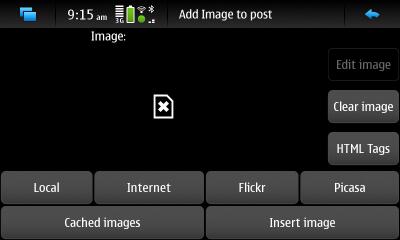
Probably the best use of blogging through some mobile device is blogging with photos. Although while writing this, I am trying to figure out if there is some way to post videos through MaStory, but when it comes to post images, then MaStory and N900 provides you excellent options like given below (I am writting live from MaStory and posting images from the same by print screen Ctrl+Shift+P)


You can see that as of now, there are four options about source of image; local (from your device with 5mp or screenshot or just stored ones), from internet (required full path which you will be needed to find from browser, like footer of this post has), from Flicker (I already using flicker with this as its available in sharing default options) and from our beloved picasa.

Not even that, you could edit the images before posting in some ways as well. Cooolll!!!!

Adding link and paragraphs:
The button in the bottom, gives you options to add some link like
My Blog. Its using the things in raw, but still works for even laymans. Similarly the third button provides the option for adding a new paragraph.

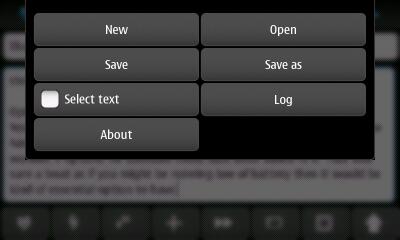
Option to save posts in your device for editing later on:
Yes!! While this was kind of obvious feature to have, I found that it also has options for advanced posting methods like scheduled post (the fifth button). Still I wonder, if options for autosave could have been added in it. That was sure a treat as if you might be running low of battery then it would be kind of essential option to have.  I was kind of blind that didn’t got to see that there is already an option for Auto Save. Minimum time for Auto save is one minute and it warns you about battery usages as auto save will take your battery for sure.

All the advanced editing options with the fourth button:
Yup!! Here I got the thing, which I wished. Sorry that I posted that you require to know HTML only then you could post rich contents. With this button, this beast got it all. Check out the screenshot, the button explains themselves

You could do it all like making laters bold, italic, left-right-center or paragraph justification everything.

Preview your post before publishing:
The second last button serves this feature to preview the post. I am just loving it. Nokia rules ….


Note: A few things, which I noticed in my this first post from MaStory, one should keep caution about.

Resize your images for sure as inserting will make them in full size, which might be out of proportion in many cases.

Really so amazing. I guess, I would be posting reviews from my next journey rather than watching movies or surfing internet only.

Nitish Kumar
https://nitishkumar.wordpress.com
http://scifireviews.wordpress.com
http://nitishkumarsays.blogspot.com