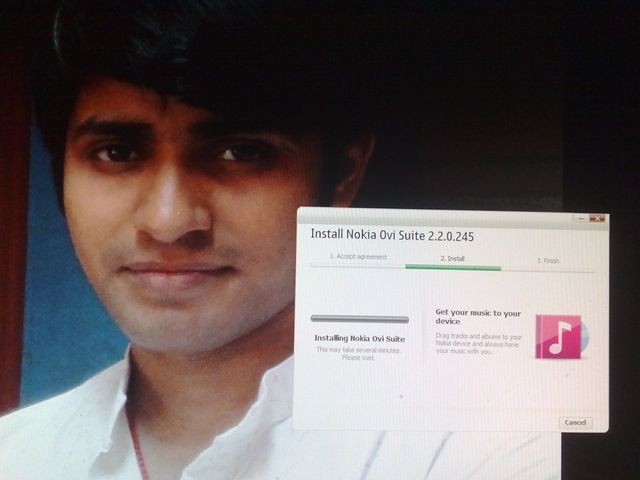
Ovi Suit updated to 2.2.0.245

[tweetmeme source=”mrnitishkumar” only_single=”false”]

Even if we don’t go as much investigative about such updates like All About Symbian do, but still we all love getting updates for devices, software’s everything. Isn’t it?

Being with a Nokia N82 going kind of boring now days in this regards at least. While we kept on hearing each week about some other Nokia device getting some updates, didn’t heard about any Nokia N82 firmware update since December 21, 2009. Good to hear about Ovi Suit at least 😉

06072010406

Though SymbianTweet spotted it first and I got a notice of it by Siraj’s tweet, but strange was the fact that it wasn’t visible in my Ovi Suit and I wasn’t alone with this. Anyway, I went for the official link and downloaded the Ovi Suit from there. Wasn’t sure that if it was going to be an updated one as downloaded the same few days back as well with the same file name, but yes… it was 2.2.0.245.. great…

06072010407

Have you ever thought that we always accept the user agreements without even reading? Dammn… I think iPhone 4 buyers should check their agreements as well if Steave might have already told them to hold the phone in certain way way very much since start 😉 lol .. poor they even updates not fixing their issues.

06072010408

I am not sure that installation asked for a reboot as while installation my disk ran out of space (it was too little due to some big download residing in C:\ drive only) and it failed for the first time and asked for reboot. I rebooted and installed the new updated version and it didn’t asked reboot after the same, so I guess it must not ask you too.

Well!! I should say All About Symbian like resources have made us lazy about investigations, but I tried to do some with my sleepy eyes and guessing by last modification date that the update was ready by July 2, 2010.

Not sure but probably there is something written inside WhatsNew.dll like “Qt plugin data 4.6.1”. Qt was here in Ovi earlier or not? Me dumbo.. don’t know.. but best guess is Ovi suit must be getting armed for Nokia N8 support. After all, Symbian^3 is functionally complete and only Anssi’s Go pending for the final device, so they should be updating Ovi Suit and services to get best exploited by their much anticipated toy. That’s seems a possibility due to the reason that I found none of the help file updated with this version, not a single one, means the updates are more of the inside nature or something that will be revealed later on.. for today, its just performance update or what AAS will report later on…

So, post me.. if you found something new and note that if you are not getting update in Ovi suit, then don’t forget to check from official site.

Nokia N900 or Nokia N9, who got better looks?

[tweetmeme source=”mrnitishkumar” only_single=”false”]

4742063918_4233dcdca1_b

4758644774_e8bf6c9118_b

Layman’s take on possibly Nokia N9

[tweetmeme source=”mrnitishkumar” only_single=”false”]

Whole world seems to discussing whether Nokia N8 is worth waiting for or why not to wait for Nokia N8 or how much true signal problems of iPhone 4 is and if that was not enough then Symbian or MeeGo kind of caused a bit of stir in mobile freak blogger community. In the meanwhile something old surfaces with real wings this time and surprisingly we are not that much discussing about it, coz we don’t even know the name… Is it real? Are they really waiting for Nokia World 2010 or something else might be a possibility?

n9-19[1]

For me Nokia N82, Nokia E52, Nokia E72 and Nokia N900 been the best shots from Nokia in their respective areas till date and now much of the expectations are being mounted on next coming Nokia N8, a complete touch screen phone with 12 MP Camera, 3.5” Capacitive screen and a brand new sleek look of Nokia for touch devices that were meant to bulky only from Nokia till now. But what happened to the device with 4” Capacitive screen and 4-row keypad that been rumored since long???


After the exclusive leak from Negri Electronics Blog, I am sure that most of the blogging community is waiting for this giant to be announced in Nokia World 2010, but perhaps I have a different opinion here and I think that it might be less likely that it would be announced in Nokia World 2010, at least with this specs. Let’s see why …


It was made to be Nokia N98 not N8-1 as being said: The presence of just 8MP camera without Carl Zeiss, existence of old OS in prototype, name in firmware as N-Series and not being announced even after being rumored since long when no one had even a slightest idea about Nokia N8, sure hints that it started before N8 or even since when the new naming conventions started.

The theory get supported by the fact that whenever a series get elevated in model numbers, then the specs been always upgraded almost without exception.. we got no Xenon in case of Nokia N86 but it was a better 8MP camera with Geo-tagging support, though here in this case, we find a different pattern, which kind of convince me that we are not going to get this beast with current specs displayed.


It has a look like N8, it has a marvelously built keypad, it has bigger 4” screen, it has capacitive touch, it has nHD Display (640 X 360), it has front LEDs, it has HDMI Out.. means everything either equal or better than coming Nokia N8, so qualifies for being Nokia N9… right?? But wait… no signs of Dolby Audio, 8 MP non-Xenon Camera sure hints that it can’t be a Nokia N9 for sure. Then what it is?

Things suggest that it was a successor to Nokia N97 and was expected to be launched just after Nokia N900 with probably Symbian^1 at that time, but continuous and unexpectedly harsh comments over Nokia N97 kept Nokia on back foot and scared about launching this one.

Nokia took its time to find issues with Nokia N97 and figured out that it wont be a good thing to release such a powerful thing (it would have been Nokia’s first capacitive screen otherwise) with a much criticized OS. That explains the surprisingly long delay before launching any actual flagship model after their Nokia N97 Classic. They wanted to launch this, but were forced to take a U-turn as they didn’t expected Nokia N97 to fail this much miserably and that came to disrupt all the plans.


Why I am saying that they can’t release it in current specs?

Reason is the same as I explained in above paras. It doesn’t fit into naming scheme of Nokia. Its not one of the X-series that showing up with frustrate looking bulky model, neither it can be a C-Series that it being expected as Cheap series. Even video in the firmware suggest that it was a N-Series (Don’t go over printed C-0, all protos get mentioned like this), but lack of megapixels in camera mark it as not more than a N7, but then that should not have a 4” Capacitive screen neither a better OS (Nokia already said that next N-Series Symbian might be only Symbian^4 or MeeGo).

So, for sake of consistency, I am expecting them to upgrade the camera, place the Xenon inside and then working over MeeGo inside, only then it makes sense to call it a Nokia N9 as I doubt if the current version with Negri, has Bluetooth 3.0 inside, I say its not there (let Negri confirm that), but before that there seems no chance of this set to see official limelight.


That would be another question that geeks will wish Nokia N8 or this one with a bigger screen and keypad? For me, its awesome and bound to attract more geeks than Nokia N900… sure much of beauty than bulky Nokia N900 with the same amazing keypad. What do you think? Tell me…

Symbian or MeeGo? What’s been wrong with Nokia and what should be done?

[tweetmeme source=”mrnitishkumar” only_single=”false”]

Even after shaky start and complaints about reception issues (even admittance now), big figures from Apple were already a pinch, then rise of Android backed by today’s God Google, Bada from Samsung riding up on some really beautiful pieces like Galaxy-S, had really got us thinking, if Nokia and Symbian lost the battle of making a truly amazingly Advanced OS and attracting developers around. Many hopes are on next coming Symbian^3, MeeGo, Nokia N8 and Nokia N9, E7 etc .. but will Nokia really be able to match the needs this time?

The question I have asked in first para of this post, Ricky Cadden sure thought the answer in negative and decided to express disappointment with Nokia rather than Symbain itself. We should say that besides the bashing from Edlar when we weren’t expecting this (?). Symbian-Guru.com Is Over … that really has came up as a big blow to many of us, who strongly wish to stand on the side of Nokia. I am really left with thinking that …

Are late releases and escalated expectations over Symbian^3, MeeGo, Nokia N8, Nokia N9, E7 etc gonna be fatal for Nokia?


First of all, why there is this much frustration about Symbian and Nokia, when they seems to doing every best thing for consumers? Are you really given up over Nokia or wishing to bargain more?

Let me count a few  issues …

What’s been the biggest damage to Nokia and Symbian? N97?

Not only Symbian-Guru, but there will be thousands around, which will come up with only one name… Nokia N97 Classic. The most infamous part of Nokia legacy perhaps destroyed the years goodwill for Nokia and as much they tried to cover it up, things went worse and its getting worsen now due to only the fact that even today, Nokia N97 making the top of the shelf for Nokia. It might be harsh to say, but somewhere everyone of even Nokia fan now understand that each sold piece of Nokia N97 becoming a nail to coffin for Nokia-Symbian.

The much over priced phone (even now) was seriously underpowered and frustrated hell out of users. Consumers kept on crying for some firmware update to fix the issues, while Nokia’s probably worse understanding of RAM requirements, had already insured that it will never be repaired. 

If Nokia really survived the blow of Nokia N97, then it was Nokia N900… only that bring back the hopes that Nokia could do anything right. Nokia N900 still stands as the best resistive screen of whole planet and it does each and everything right… either it be experience, which was unbelievably natural out of the box, either it be integration with existing services like flicker, skype, Gtalk, Yahoo, MSN etc. or it be hardware design and support. Some think that best choice for Nokia was to exchange all Nokia N97 out there for Nokia N900 in free.


What’s kept developers disappointed with Nokia? Nokia knew that they been terribly late in touch phone segment (that’s being touted as Smartphone segment now days) and Symbian was only trying to adopt the touch, never seemed really built for the same. Some think that best choice would have been for Nokia, if they could have joined hands with Google (they couldn’t as both of them are of Giant and dominating nature) rather than joining hands with Intel, but that’s business and you can’t really blame them for that.

But what about Developers? Aren’t you making them nuts? For what they should program? Symbian? In a mid level language C/C++? Are you real? Symbian^3, Symbian^4, Maemo, MeeGo? Should they get back to college to learn all these?

I really can’t blame them much, Nokia probably got impression from Microsoft vs Apple Vs Linux that its hard to remove impression of something that you been grown up with. They thought if they leave Symbian from here, then they would be needed to start-a-fresh and the fight would be on turf of their opponents and they know that would not be something easy. To complicate things more, there been strong supporters for Symbian itself and legacy of Symbian was kind of unforgettable for even worst rivals, how could Nokia had think of leaving Symbian so easily?

If we talk about reasons, then Nokia was a manufacturer first and still they provide the best of hardware in best of price (leave alone Nokia N97 and Booklet 3G). They were making Good OS for non-touch phones (nothing could be more productive than a Nokia E72 or Nokia E52) and they were adding super excellent things like Ovi Maps and all. They were in a league of their own and been the best for “Phone” market and they are even now.

Then it came the competition with HTC and Apple, when they entered the market with touch phones and same time with RIM, when they grabbed Business with their QWERTY. Note that Nokia didn’t lead, they adopted and reacted. They reacted to RIM with their E-Series/ Nokia Messaging and to Apple with N97, 5800 and all… Like my Boss often said, proactive work make you win and reactive work will only keep you on toe. Nokia seems to be on toe.

You already doing a lot, releasing new handsets back to back, coping up with new technologies being introduced each day and entering new fields every next month, then it happens sometimes that you can’t come up with the tag of being best for everything you do. Nokia winning over RIM in many senses, but touch seems to be sloppy turf to them since start (Nokia N900 is exception) and Apple a hard contender than others.

Its not that Apple is doing great .. high figures of sold iPhone4 handsets involve mostly earlier iPhone3GS users, who are just upgrading their phones for a nominal cost from their provider, obviously in hope that it would get something better than earlier. They obviously have no other choice after living up with Apple till now. The part to worry about is, number of developers being attracted and number of apps being made for them.

Developers making apps for Apple are on smooth turf as even if thing evolve then they have to update themselves in minor ways like VB people evolved for VB .Net, more over, they have to keep only two or at most three devices in mind but with Nokia.. its been complicated due to its wide catalogue and rather tougher development with Symbian and now its seems to be a real nightmare after ‘debacle’ of Symbian.


Is Nokia not aware of this OS dilemma?”

Its not that Nokia has gone under panic completely and just trying out here and there. Its just…  not easy to leave the things which kept you on top over the years and even now. It was hard for them to realize that Symbian might be efficient, could be improved and polished well, but it wont be able lure developers due to its inherent difficulties in developing apps with it, specially due to a larger range of products people expect a Symbian App to support.

The announcement that Nokia N8 is last Symbian based N-Series had its strong reasons and indications, which if would have taken in right sense, then there were not that disappointment all around that someone would be needing to say that they lost hopes with Nokia. Why Nokia?? Your disappointment been with Symbian, isn’t it?

Symbian^3 was announced to be based upon Qt and reasons behind the same were to provide a smooth transfer of existing Symbian developers over Qt, which will be compatible with MeeGo and all…they engineered a brilliant hardware in superb cost (in fact a bit cheaper than they could have afforded), so that more and more people could be attracted to the same and so developers might have their reasons for developing on Symbian^3 due to popularity of N8. That was better to them in longer sense even if they get much lesser margin on Nokia N8 handsets. Later on Nokia N9 and E7 like devices were aligned to be launched with MeeGo, which will already be having as many apps as people might have developed for Nokia N8 already.

You can understand that a Smartphone with superb hardware is of no use till you don’t get developers from all the globe giving nights over developing apps for the same. It really frustrates when now days, we see every second big app saying its available for Android and iOS only (not symbian) take even basic WordPress app for example.

If Nokia haven’t sensed the disappointment about Symbian, then they were not doing it  this way that release Nokia N8 with Symbian^3, advertise it big, create sensations all around and then switch all other high end Smartphones over MeeGo all of sudden. They are not that big fools if you think of it in their shoes. Unfortunately, this was only way to do what we wanted them to do.


What frustrates? Why some of us thought that no hopes left?

Definitely many questions will be raised after closing of Symbian-Guru and World of Nokia as these two been staying on top for long and also were among the few fans in subsidized markets like UK/ USA. Closing of these two really shakes your faith that if really something left here with Nokia.

When someone releases and handles these many products as Nokia does, then you are bound to frustrate if starts making mistakes with even one or two. There is a rule that “Your two good things could be never heard, but one mistake will be known by whole world”. Same with Nokia.. but there are not just a few mistakes.. in fact kind of many..

Just for example, You got overwhelming response on Nokia N82 camera and performance of Nokia E72, but you never thought to make a device with a camera like N82 on E72 with Xenon of course.

I should say, we have seen best of Nokia in pieces. Their catalogue is full of efficient and effectively priced devices. Nothing on this planet could beat a E52 in T9 and same with Nokia E72 in QWERTY.. if you are giving up over Nokia, then either you haven’t seen these two devices or just wish to have fancy things rather than real.

Nokia N900 was something that was exactly the right thing to bet on and it is even now and will be even after release of Nokia N8, but that thing was never backed up by Nokia in the way, they foolishly kept on nailing themselves with promotions of Nokia N97.

N900 reached India by now with a price that would stand higher than upcoming Nokia N8 (without HDMI, without 12 MP, without Xenon, without Capacitive, without Bluetooth 3.0, without that sleek looks). Just thing like this frustrates and made us think if Nokia really understand what a consumer might want. 


Highly frustrating release schedules

No one in the world make as many handsets as Nokia make, but at the same time, no one make people wait for the right things as much long as Nokia does. Either it be N97 or N900 or N8, its always been the same story. We understand that its not Apple that you could keep on hiding something this much long, when your people inside are much excited about their new venture and accomplishments, but still it was better if the time difference announcement and release would have been at most 2 or 3 months.

I don’t accept the pressure due to a biased review, because its the same story with C3, C6 and E5 as well. We are still waiting for an E5 even if they aren’t from some another planet. They are made of just a bit polished things and for no reasons need to be kept away for this much long.

Moreover, what are you trying to achieve by confusing people? India gets an N900 when Nokia N8 around the corner in less price, then it will possibly Nokia N9 with MeeGo, 4” screen and HW keypad (already stunned us by design, check the video)


Now, you tell yourself that what one should buy? Its not a soap that you have to wash away in weeks, its hard earned money and though its true like chicks that there would always one more beautiful around, Nokia could have managed a better time schedule about their devices.

Somewhere I think Nokia being let down by its developers as Hardware of every Nokia either N8 or N9 or E7 seems to be right and perfectly in place, but wait is for developers and developers. Does this really take that long even after years of experience with hundreds of devices and many fan blogs showering opinions on good and bad?


What Nokia still holds as their best?

  1. Best of Hardware: Being technology leader since long, Nokia keeps the advantage of technology for best of the signals, best of the battery and best of the camera.
  2. Best of experience to fit things into pocket of common man: Probably this been their biggest asset and biggest loosing side. Except N97, they never tried hard over big bucks and always kept their prices reasonable. They didn’t made products for people having big money and bashing from top over things that didn’t matter for common man, Layman.
  3. Wide range of products: Either its be cellfone or smartphones, Nokia been synonym for them. Whatever your needs might been, you always looked for one name and it rarely disappointed.
  4. Best of PR: Perhaps even after long trust over Nokia devices, I wasn’t into that much writing over Nokia products, if Womworld/Nokia wasn’t here. They know to engage people, they know to interact, they know to adopt and they know to serve what people ask for. But they do it for mass, not for self acclaimed people asking for things for sake of a cream breed.

What could bring Nokia back again?

The biggest and most important question… and no one could answer exactly …. we just could give our views. Whatever others might be saying, but Nokia seems to be right on path now with N8 and later aligned sets like N9, C7 and E7, but they seriously needs the positive waves from our sides.

  1. The confidence of developers: They seriously need the confidence of developers back and needs to assure them that the market share of Nokia will be unrivaled.
  2. Disciplined releases even if few: Many times some of Nokia device just don’t make any sense like last two designs we seen with Nokia C7 probably and that X5 competing Samsung Corby in looks. I don’t even that much favor devices like X6.. they could have done better. And please either deliver products in short time or don’t let them out in wild for making videos of them.
  3. Choose a proper shape for a series: If designs of Nokia N8 and Nokia N9 are some patterns, then this makes a lot sense. Trying too many designs doesn’t show that you are catering all kind of audiences, but it shows that you lack in confidence to sweep people’s opinion your way. It would be great, if resemblance of Nokia N8 and Nokia N9 may really establish a pattern and I wont mind, if they keep the same looks for all touch devices. Nothing bulkier like X6 please.

Sure, there are personal views and could be added with your comments and conversations as even we don’t exactly know that what would be best for larger audience with contrast tastes.

Thinking to close the post here, but I really want Nokia to surprise us by releasing Nokia N8 with a Keypad variant on the same day .. may be that could make up for the delay and could save people like me from being frustrated.

Restricting Browsing with Mozilla Firefox for Business Scenario

[tweetmeme source=”mrnitishkumar” only_single=”false”]

Its been long that I kept on thinking over starting a series on System admin tips & tricks that will not only facilitate my colleagues on workplace, but also for people looking out for a systematic dummies\ scratch level info in the same era.  But as these technologies and the way most of the workplaces are, it remained a due always …. from my side..

I already have written a number of dummies posts about some of the important elements related to System administration in corporate scenario like Windows Deployment Services, robust, systematic yet simplest approach over Squid Proxy Server and it reporting and Zabbix Mentoring Server.


Today I am here to share some tips that I learned through a very knowledgeable resource; Locking down Mozilla Firefox Browser …

Why lock down? What are the dangers?

Some might question that why I am talking about locking down Firefox. but my friends in corporate scenario might well understand that some security domains require you to lock things down up to a level that may enable you only to function as much required, not more than that.

Probably a reason that corporate love Microsoft technologies, is giving the administrator proper and well documented controls over the behavior of every aspect of systems throughout the organization via one or a few centralized servers. The method used is group policy; a set of rules which control the working environment of user accounts and computer accounts. Group Policy provides the centralized management and configuration of operating systems, applications and users’ settings in an Active Directory environment.

browser-wars

But as you all know, this is not same with third party apps like Firefox, Chrome or Opera. In fact, Chrome and Opera could be ruled out on Business scenario due to some very know issues and that leaves with Mozilla Firefox that been very stable about speed and various ASP .Net based CRMs (very specially for Linux based dialers). If you have a Dialer Scenario on your workplace (BPOs, IPOs), then sure its a read for you as you know that why to lock down Firefox.

danger

Now, coming over dangers …

You don’t want that the agent sitting with an opened CRM may be able to copy-paste something over somewhere. You might have restricted Notepad, WordPad, Office etc and might have restricted Internet as well, but there will always be ways, as you can’t control elements of Mozilla Firefox like you been able to manage Internet Explorer.

Flaws are many for business scenario .. I am taking count of just three …

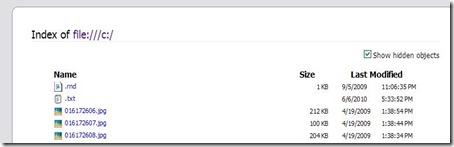
  1. If you type c:\ in Firefox’s address bar, then it redirects you to file:///c:/ and displays all the content of C:\ drive. No matters you restricted the drive access from your Domain’s Group policy. It might be scary news for any security admin, but let me tell you, its the same with Opera and Chrome as well.
    Files
  2. You can’t control history setting, auto complete in forms and minor things like that.
  3. You can’t control opening source code of some page as that doesn’t open up in Notepad or something that could have been blocked and opens up in Firefox’s own reader.

What can you do about it? How to start? What practices to be followed?

Before starting, let me tell you one thing. Its not going to be some centralized management like you have in case of Internet Explorer, but you can have your ways, only if you use standard build all over and restrict user rights for installing and even updating anything.

You will create a standard build by installing updated Firefox with required add-ons and then distribute the same folder all over by replacing existing Install folder in program files.


The steps to restricting Access to Local Drives

First install updated Mozilla Firefox somewhere and then perform the following over the same.

  1. Open "c:\program files\mozilla firefox\chrome\browser.jar" in a zip program
  2. Browse to "content\browser" and extract "browser.js"
  3. Open "browser.js" in a text editor
    ( Note Notepad loses the formating, so open "browser.js" in firefox, select all, copy to notepad. >right click on .jar file > open with 7zip)
  4. Go to browser.js and drag it to the desktop. then drag the file from the desktop into firefox to edit (because notepad is crap and screws up the spacings). In Firefox select all and copy the text into notepad, to retain the correct spacing. Edit the file and save the file in notepad as browser.js Now drag that file back into 7zip (the overwrite the browser.js) and click close.
  5. Locate the line "var location = aLocationURI ? aLocationURI.spec : "";" (Applicable to v3.6 only)

    Save "browser.js" and copy back into "browser.jar" in the zip program and save "browser.jar"

    Add (below the above line):

if (location.match(/^file:/) || 
location.match(/^\//) || 
location.match(/^resource:/) ||
(!location.match(/^about:blank/) &&
location.match(/^about:/))) {
loadURI("about:blank");
}

This should now load a blank page when you try to go to a "about:" page, try opening "file/ / /c/" and also "c:"

You can just copy the firefox directory (c:\program files\mozilla firefox) to the machine you want to run it on and create a shortcut it. Also set permissions on the "Mozilla Firefox" directory for students as allow "Read & Execute", "List Folder contents" and "Read" only.

Note: There are options to control Firefox more closely via C:\program Files\Mozilla Firefox\defaults\profile\chrome\userChrome.css, but as I am not able to get them working exactly in way I want to, so not posting about that right now. Will post sometimes later on.


Programming ASP .Pages or other web pages in secure ways

So, you have solved the biggest trouble, access to local drives, now what about copy paste and viewing Source Code?

Might cause some frustration among end users, but if you are really that serious about security then the option is to restrict usages on Ctrl, Right Click keys on page and also Copy/Cut/ Paste options.

Two ways to do the same..

ASP .Net way – Use the following code on your ASP Page to restrict copy/ cut/paste/ right click

<asp:TextBox ID="TextBox1" runat="server"

oncopy="return false"

onpaste="return false"

oncut="return false"

oncontextmenu="return false;">

</asp:TextBox>

JavaScript way – For people familiar with JavaScript, this is the another way and this also gives the user a pop-up message if he\she did pressed the restricted keys\ key combination.

<head runat="server"> <title>Untitled Page</title>

<script language="javascript"> function DisableRightClick(event){

//For mouse right click

if (event.button==2){ alert("Right Clicking not allowed!"); }}

function DisableCtrlKey(e){ var code = (document.all) ? event.keyCode:e.which;

var message = "Ctrl key functionality is disabled!";

// look for CTRL key press

if (parseInt(code)==17){ alert(message); window.event.returnValue = false; }}

</script></head>

Note: you can place this function to MASTER PAGE, if we want this into many different pages. Now we have to call this function into our pages, using this coding

<body><form id="form1" runat="server">

<div><strong>Right click disabled</strong> textbox<br />

<asp:TextBox ID="TextBoxCopy" runat="server"

onMouseDown="DisableRightClick(event)"> </asp:TextBox><br />

<br /> <strong>Ctrl key </strong>disabled<br />

<asp:TextBox ID="TextBox2" runat="server"

onKeyDown="return DisableCtrlKey(event)">

</asp:TextBox><br /><br />


So, this was for now.. I will be updating more, once I test more methods to restrict the Firefox security options. Note that any update to Firefox will wipe of any changes you made to browser.jar, so its dead essential that you ensure that user might not have permissions to update Firefox. Watch out for security rights as well.

photo of Nitish KumarNitish Kumar

Now you can read updates from this blog delivered directly to your Nokia Smart Phone, download it here

Digg This

Smile Nokia Fan Bloggers – Nokia Now is here

[tweetmeme source=”mrnitishkumar” only_single=”false”]

Just got a a mail from Katie of Womworld/Nokia, about a new feature that is going to be added to Nokia site very soon. This new feature will be under the name “Nokia Now”. Nokia Now is being put in place to pull together Nokia-related content from all across the social web into one place where Nokia friends, fans and customers can find and access it easily.

nokia_logo2


This is the mail she wrote to many of bloggers like me..

Hi,
There’s a new feature being added to the Nokia site later this week under the name ‘Nokia Now’. Nokia Now is being put in place to pull together Nokia-related content from all across the social web into one place where Nokia friends, fans and customers can find and access it easily.

We’re hoping your site can be one of the places it pulls content from. In return, it should also send traffic your way so will hopefully have some benefits for you too. If you prefer that we didn’t use content from your site on Nokia Now then you can let us know at any time.

The site will be going live in beta for Nokia Ireland later this week, and we will of course send you the link once it’s up and running 🙂
Hope this finds you well,

Katie


Well!! soon we will see and hear many things about this new service, but this is sure gonna a happening place for people wishing to know about Nokia at one place. Till now, WomWorld/ Nokia been such a place, but bringing all their efforts from all social services like Twitter, Facebook, Buzz and various blog posts, will be an amazing phenomenon to watch out for.

Keep tuned in to know more about this service, look like with revamped Ovi Store, we are about to get many other surprises as well.

Update: Its live now on http://beta.nokia.ie/ | Date July 04, 2010

Now you can read updates from this blog delivered directly to your Nokia Smart Phone, download it here

Installing WordPress-Website for Dummies

[tweetmeme source=”mrnitishkumar” only_single=”false”]

I have already written over this once, but even that time, I mentioned that “I am not expecting anyone to learn from this article that “How to make A Website out of WordPress” by this website, as my approach was kind of naïve and nursery kid’s learning”, but this topic was something that kept on tempting me and today I am back.

In fact, I was to design a website for my workplace for internal requirements, so I thought to revisit the instructions and pen them down for once, so that people wishing to do something like that could get the job done in one shot without much R & D.


Why a WordPress?

Reasons might be plenty.. from a Company to even a Coffee shop now days wanna have a site and their wordpressopinions on it. Yes!! blogs are here and they get recognition too, but a site is a little different thing look-wise and even bloggers wish to have their full control over their blogs, which online hosting like WordPress and Blogger couldn’t afford to provide for their right reasons.

Reasons are plenty for a WordPress based website. You may want to have a website to show off between your friends on the same LAN in some college like MNNIT, IIT, IIIT or some IIM or you may want to bring a community or even official platform for company insiders.

WordPress because, it seems to be the best solution against its competitors for Installation, Management, controls, scaling and even backup/ migration. In just few mins, even a Layman get a strongest of website running and he wonders that he never knew a single line of HTML.

Simplicity is power” That’s why WordPress. Otherwise technically speaking ..

WordPress is an open source CMS, often used as a blog publishing application powered by PHP and MySQL. It has many features including plugin architecture and a templating system (supports various themes that way). Used by over 300 of the 10,000 biggest websites, WordPress is the most popular blog software in use today.


My requirements this time ..

The purpose was be to build a one-stop website to provide a common platform for sharing information, internal news and more importantly a mean to interact with groups and individuals across the company (via group/ private chat solutions). The additional scope of the website was integrating all of our web modules running for different purposes mostly via web links only (easy way).

Additional features asked for were …

  1. All of the content needs to be secured via passwords and login would be required for access any of the content on website.
  2. Different pages required for different department/ groups, which will host posts from their side only (though all of the content would be subjected to moderation).
  3. Different levels and roles would be required to post/ modify the content like Administrator, Editor, Author, Contributor and reader with their controlled set of privileges.
  4. Intranet Chat facility requires having group/ private messaging support.
  5. Email facility would be limited to contact form that one could use to submit some query to any department and it will be mailed to designate email ID directly without being post on Website. (provided Internet facility available on server).
  6. News flash system that will show significant information scrolling on sidebars all the time.
  7. Integration with our other services (mostly via hyperlinks opening in tab or new windows) like Ticketing system, Training Modules, Monitoring System etc. The target would be to implement a single-sign-on for the similar web services like Training, Helpdesk etc.
  8. There might be possibly different sites for different networks that would be kept in sync5 by end of day or twice a week (based on feasibility).
  9. Optional Documents hosting that could allow viewing Doc, XLS and PDF documents online without converting them into HTML This feature could be utilized for hosting various policy documents or similar things.

I guess very generic yet professional kind of requirements these are, though one can always find what they want with a WordPress.


Installation requirements

You know that installation requirements always vary around what you need and what you could put in. In itself, WordPress isn’t a huge software package that you might be thinking about this side, but yes.. what platform you are going to use, matter more. You can make use of XAMP installation to bring Apache, MySQL and PHP at a place on Windows or you may like to use the natural Linux Platform.

Here I am going to use WordPress MU (separate project build for multi user environment) in place of normal WordPress though requirements and instructions would be the same.

Hardware requirements

RAM Required: Minimum 512 MB (In favour of OS nto WordPress)
Disk space: Installation doesn’t take even 50 MB, but it’s suggested to keep 1-2 GB space at least.

Software Requirements

Operating System: Linux\ Windows (We are using CentOS here)
System Software: Apache with Mod_Rewrite, PHP , MySQL and related components.
WordPress-MU: WordPress-MU package from http://mu.wordpress.org/latest.zip

Note: Internet required for easy Installation of packages and plug-ins, though all the packages could be installed and managed offline as well.

The Basic Installation

halo_wordpress

The way is as simplest as it could be, but still sometimes, people unknown from Linux terms bring mess for them, so even if longer list of steps, I am trying to bring a completely detailed set of instructions .. (obviously assuming though that you got your OS installed right ways)

  1. Type on console yum install httpd php mysql mysql-server mysql-devel php-gd php-mysql
  2. Start the web service, if not started. On server console type service httpd start followed by chkconfig httpd on
  3. Start MySQL service, if not started. On server console type service mysqld start followed by chkconfig mysqld on
  4. Edit /etc/httpd/conf/httpd.conf and search for AllowOverride None and replace the second occurrence of the same with AllowOverride All (essential step for Permalink structure, you will know later on). Restart the httpd service by service httpd restart.
  5. On Server Console type mysql and then on MySQL prompt type create database wordpress to create a blank database to host WordPress database in next steps. You can chose any other name than wordpress as well.
  6. Install FTP by command yum install vsftpd, then chkconfig vsftd on followed by service vsftpd start
  7. Edit /etc/vsftp/ftpusers and /etc/vsftp/user_list to comment out root entry in both. By default root is not allowed to login into ftp.
  8. Download the zip file from http://mu.wordpress.org/latest.zip
  9. Extract the same and rename the folder wordpress-mu to something suitable to the name you wish to have in url (e.g. We have atstoday in our case). We also could install the same in web root but in that case, it might have issues in other web app installations.
  10. Copy the same folder in web root directory /var/www/html and provide appropriate modifications rights the same folder and /tmp folder. (Hint: use WinSCP)
  11. Open http://IP_Address/Folder_Name in any browser, where IP_Address is IP Address of the server, you are installing and Folder_Name is name of the folder, you copied into web root.
  12. If everything is fine, then it will provide you the installation page and will ask for Database Connection details. First select radio button for Sub-directories in Blog Addresses option, then in next keep Database Name as wordpress as we given the same in step 4, User Name will be root, password would be blank or if any password you given for MySQL user named root, Database Host would be localhost, Server Address would be the IP_Address, Site Title would be the text you want to be displayed on title bar and then it requires to give an email id essential for password recovery.
  13. If everything goes fine, then it will show success message and will provide a generated33 password for admin user. Note down the password or copy it.
  14. Press the login button, login into the site, go to users in left pane, edit the user and then change the password as per your convenience.

Customizations – Themes and Plug-ins

The above procedure creates the basic install of WordPress-MU. For customization as per needs, you have to go through themes and various plug-ins available for WordPress.

Theme: If online, then we could use the search facility under Appearance->Theme to search, preview and download themes available on WordPress Database. Once downloaded, it will be available in offline install. There is option for uploading themes as well that could be used if Server not connected to Internet. We are using theme named Atahualpa with a few advanced customizations in code here and there.

Plug-ins: Plug-ins provides extension of capabilities for basic WordPress Install though depends on many factors. Currently we are using a few crucial plug-in like: My Category Order, Announcement ticker highlighter scroller, WP-UserOnline, Dagon Design Form Mailer, WP Customized Login, Members Only, PHPFreeChat, WordPress Database Backup and User Access Manager.

Backup and Restore

wordpress-must-dos

Post/ Categories/ Tags/ Comments Backup/ Restore: For taking backup of these contents, there is option to export all these in form of .xml file, in Tools->Export.

Similar way, Tools->Import could be used for importing the same.

Settings Backup/ Restore: Inclusion of WordPress Database Backup plugin makes the job little easy. As per settings, it could keep on mailing core database files in zipped format (*.bz2) to designated email ID (provided the server is on Internet) or there are options for taking manual backups by pressing button. For restoring from backup, you need to unzip the backup file first that would be some blog.bak.sql and then needed to restore it via command line in following manner.

mysql -h mysqlhostserver -u mysqlusername -p databasename < blog.bak.sql

Enter password: (enter your mysql password)


Migration from one server to another

That’s the toughest part of the work and not suggested to be performed by someone having not proper idea about MySQL, Apache, PHP etc. I am trying to put all the steps in some easy way here. Though there are better ways around to do this and its not suggested to follow these steps for some online site.. I am talking about local installs only. (In fact, only this part of instruction is something I think needs much enhancement as this way is prone to be buggy in complex environment)

Our assumptions are,

  • You have a completely configured and working WordPress based website at one server.
  • You got another server with fresh installation.

First of all, you need to perform the first six steps of basic installation as those are preparing steps. Now, you will have a blank database named wordpress ready in MySQL.

First use core backup file from original server and use the steps mentioned in Settings Backup/ Restore to place the same database (including settings/ post/ username/ passwords everything) in new server. In next, copy all the wordpress files that would be in /var/www/html/Folder_Name, in the similar location at new server.

After the same, you need to edit a few options in /var/www/html/Folder_Name/wp-config.php as per the new environment. Then, you need to manually update the new IP Address inside many tables of new database, provided you always used absolute links in your website all the time.

Here is a list of few crucial tables and values to edit.

  • siteurl value in wp_1_options table (provided you have only one blog under WordPress-MU otherwise change accordinly)
  • domain value in wp_blogs table
  • domain value in wp_site table

So, this is whole thing.. any further question.. you can always come up here and ask. I really miss that while studying, I wasn’t aware of this great thing, neither do I was in my starting job days.. hope many of you starting earlier than me.. good luck..

Now you can read updates from this blog delivered directly to your Nokia Smart Phone, download it here