Layman's take on travel, technology & everything | Doesn't need to have a super brain, Just do your bit
Category: Nitish Kumar
Nitish Kumar, Born at Azamgarh, Uttar Pradesh, India on 23rd September 1982. Serving as Sr. Server Administrator in New Delhi. Hobbies include Writing, Sketching, Photography, Movies, Travelling and still Computers on the top. Interesting in blogging started with Indian Idol 2, which later on matured with time and the blog converted to host kind of different movie reviews and tech comments.
He is the one, in the name of whom everyone writes and passes the verdict about something. He is the one, who might not be making buzz on web, but is exactly something that counts. He is the one, who puts his hard earned money into something to live with that for years later on.
Yes, I am talking about the common man/ the layman / the nob, who might not be having enough time to write blogs to show their experience about their phones, but when you ask them then speaks the truth, which might not be technically perfect but is the actual perception that counts.
The layman, who is not a fanboy of some product, who doesn’t loves all things about some brand blindly (none of us does, do we?) and who doesn’t make a purchase by what is the best out there, but go by that what is the best for him. The usually unheard common man, whose comments we actually watch out for, when reading someone’s tech review to know that how the real things going on about some device.
Whom you believe more? TV Ads, Buzz, long blog posts or the common people like you, me or similar people around us?
From today, I am starting a series of interviews, in which I will ask some of such people about them, their phones and what they think about them. As of now, the series will include people, who are apart from the usual blogger fellows, we know much about; the unheard common men passionate about their phones. I will ask things about them, their associations with the product they love and own and few tricky and personalized questions about their phones.
The aim is to bring the voice of common man on a public board to get heard in loud with their authentic and non-fabricated views about their beloved phones. I am trying to bring perspective of users from entirely different mobile platforms at one place in unedited raw form to know what they feel about their favourite ones.
In the first round, I will be covering the following names and their opinions ….
The next around of interviews will involve more experienced users, which might be having experience over close details of more than one mobile OS’s/ brands. Will not be exactly big tech experts, but better than normal users for sure.
While I am going to post all these interviews very soon on my this blog, I wish to invite all of you readers to be part of these interviews with your favourite device. Its the time to stand tall for your favourite phone, your voice will be all heard in loud.
Please drop a comment here or get connected to me on twitter via @nkumar_ if interested in getting interviewed. Even if not then spread the words in loud, you gonna see some interesting stuffs soon.
Its been really a while when I last wrote over System administration, my office job. Might be the reason that you don’t find it enough interesting to write on, if things are not changing much. But let me say it..if we think the small things around us are boring and complicated, then its because we are not thinking about them.
Technology is not a panacea, technology is not some magic, but sure could be magical, if we apply it for solving our cause in intuitive ways. As a popular brand says Its what we do with it.
I am listing some of the simplest troubling tasks on System administration and easiest understandable solutions on them via scripts. Note that all the solutions are just raw and sure better implementations could be found, but its just to push your imagination and then share the same with whole world.
Task 1: Monitoring network connection of some server or some link on hourly/30mins basis and log it too. Task 2: Taking system state backup of servers on Daily/ Weekly basis. Task 3: Taking event logs backup of servers on Daily/ Weekly basis.
Task 1: Monitoring network connection of some server or some link on hourly/30mins basis and log it too. Such scenarios are most common. You will asked to monitor some link on regular basis and obvious way to do the same is ping the same server. But in messy environments like sys admin usually get, its not possible for someone to sit in front of screen and MS DOS windows do not allow to check history of long back. What if one wanted to know that in whole day, when the link went down or might be some alert right then?
Yes there are softwares for doing the same, but why can’t you yourself think a simple solution? Check the script below..
echo off set Today=%date:~6,4%%date:~0,2%%date:~3,2% set Period=%time:~6,4%%time:~0,2%%time:~3,2% mkdir \\172.16.72.72\share\%Today% sc.exe config "Messenger" start= auto net start Messenger echo The time at which the check was done: %time% >>\\172.16.72.72\share\%Today%\log.txt Ping -n 2 172.16.66.66 | find "Reply" >>\\172.16.72.72\share\%Today%\log.txt if errorlevel 1 net send 172.16.100.100 failed %time%
Your PC IP here: 172.16.100.100 Monitored IP here: 172.16.66.66 Share location: \\172.16.72.72\share
You just need to save this as a batch file and then put it in Windows scheduled tasks to run in each 10 mins or 20 mins to take the status. It will create date wise folders in any given share location (each new day, a new folder with name like ddmmyyyy) and also will pop up a message on your system (172.16.100.100) via net send in case of failure. Logs will be created in a text file named log.txt, one in each of the date folder accordingly.
Note: you need to change the date/time format of system as DDMMYYYY otherwise, it will create the folders with weird names.
Task 2: Taking system state backup of servers on Daily/ Weekly basis
Yeah you will say that system state backup method doesn’t work most of the time in expected way, but that’s the case due to un-equal hardware configurations most of the time. Best practices always ask you for taking system state backup time to time.
In real world, we usually miss or ignore the task, which were never productive for us, so better scheduling the same via Windows scheduled tasks and your custom script.
REM – Create Date and Time strings set Today=%date:~6,4%%date:~0,2%%date:~3,2% net use X: /delete net use x: \\172.16.72.72\share mkdir x:\%Today% ntbackup backup systemstate /f x:\%Today%\AD.bkf cd C:\Program Files\Windows Resource Kits\Tools compress -Z x:\%Today%\AD.bkf x:\%Today%\AD.ZIP del x:\%Today%\AD.bkf
Share location: \\172.16.72.72\share
Like the last one, you just need to save the above as a batch file and put it in Windows scheduled task to run on weekly or daily basis (as your situations permit). Obviously the share location must be accessible\writeable and the script has to be placed in scheduled task of the same server, you want to backup. There should be sufficient disk space in the share to accommodate your needs. One day backup may be around 1-2 Gbs and after compressing (which the script does in last three lines) that will go sufficiently lesser. For using later on, you will be needed to expand the backup from compressed file via expand command in similar way.
Note: 1. you need to change the date/time format of system as DDMMYYYY 2. You need to install Windows Resource Toolkit in the same server for the compress tool.
Task 3: Taking event logs backup of servers on Daily/ Weekly basis
Well going through event logs might be irritating sometimes as Windows many times just skip to provide the info, we might be looking for. But as a compliance thing for Audit reviews or for security reasons, you always wishes to keep the logs for the longest period possible. So, what about backing up them on daily basis and removing them from the server?
The below is the VB script that I got from some forum.
Dim DestServer ‘ Put in the UNC path for where you want the logs to be stored DestServer = \\172.16.72.72\share\
‘Create the Time variables sDate=Right("0" & Month(Date),2) _ & "-" & Right("0" & Day(Date),2) _ & "-" & Right(Year(Date),2)
sTime = DatePart("h", Now) & DatePart("n", Now)
set oFSO = CreateObject("Scripting.FileSystemObject")
‘If correct folder doesn’t exist, make it if Not oFSO.FolderExists(DestServer & sDate) then set oFolder = oFSO.CreateFolder(DestServer & sDate ) end if
‘Gets the log files for this machine strComputer = "."
Set colLogFiles = objWMIService.ExecQuery _ ("Select * from Win32_NTEventLogFile")
‘This section goes out and gets the hostname this is run on for us.
Set objWMIService = GetObject("winmgmts:\\" & strComputer & "\root\cimv2")
Set colItems = objWMIService.ExecQuery("Select * from Win32_ComputerSystem",,48)
For Each objItem in colItems strHOSTNAME = objItem.Name NEXT
‘Now archive the logs and clear them if oFSO.FolderExists(DestServer & sDate) then For Each objLogfile in colLogFiles strBackupLog = objLogFile.BackupEventLog _ (DestServer & sDate & "\" & strHOSTNAME & "_" & objLogFile.LogFileName & "_" & sDate & "_" & sTime & ".evt") objLogFile.ClearEventLog() Next end if
Share location: \\172.16.72.72\share
This time, its not a batch file like last two tasks and you have to save the above text as a .vbs file and then same routine.. put in Windows scheduled tasks. Note that security logs might be huge like some 800 mb – 1GB, so slow down the servers up to almost non-responsive state for a few mins sometime. I have not found any work around over the same yet, but till now, its safe to run the same in a time, where the servers are not in full production.
Note: you need to change the date/time format of system as DDMMYYYY.
Just thought to post the same scripts here, so that other might be benefitted and also to bring awareness that Windows scripts are not something to be completely ignored or to be thought as geeky stuff only. Hope others also will share few of such tricks with me.
Hi All, so the journey with Layman take on Nokia N8 reached to its fifth part today. Thanks for all the support, you have shown till now. This is what that keeps me going. You can check back again, if you might have missed any of the four parts of the loooong review.
All of the above are pretty detailed in nature, so sure have some snacks and time, once you wish to read them. May be I have left some of the things here and there, but I tried to cover some of the points that might have missed from eyes of other bloggers. This is a layman take as you know it.
Playing engaging big games on mobiles might be yours choice or not, but no one could claim that they haven’t enjoyed the legendary Snake games, which was there on all Old Nokia. Later on some other games also started popping over Nokia and though people started enjoying them too, but J2ME based games were never a big fun, specially without those funky 3D graphics and hardware accelerations, which we were used to live with on our PCs now.
It was the flood of iPhone and iPod touch, which really changed the face of gaming. When Steve says that the world was changed, then the touch experience was first and gaming experience was making a big second to that. We seen Nokia N95 etc, Nokia tried to partner with N-Gaze etc, but touch screen gamming been a slippery side for Nokia till now.
Now, Symbian^3 has started with really big promises on gaming. With handsets like Nokia N8 and Nokia C7 on very reasonable prices, Symbian^3 seems to adding a new dimension to Nokia with excellent gaming potential and market growth, once people started to realize it.
Why one will buy an iPod touch in 16-18k, when you are getting world’s best signals and best navigation experience on just few thousands higher price? And yes .. that would be a phone rather than just a toy at home, so bound to be with you all the time.
Probably, all talking is useless, unless, I show you some real things. Its sad that people buying Nokia N8, will not find any games pre-installed on it and when they will go through Ovi Store, then will think twice before buying any game in price, due to experiences from older Nokia’s. Someone really need to convince them hard that it worth buying, as Nokia users are not used to purchasing apps like Apple ones.
Let me try… I am writing this specially for some of my readers who complained me about unavailability of games on Nokia N8. Yes! its not shipped with game, but there are many out there like you never might have seen yet.
Angry bird on Nokia N8
When you talk about gaming on Nokia N8 and Apple then Angry Bird comes to be a big name. While the price for the full game is around 2.99 Euro or around 180 Rs., you can get hold of lite version with a few levels from Ovi Store to just take the taste.
Butter smooth performance, almost instant startup and multi-touch pinch and zoom, if they would have make use of accelerometer as well, then Angry Bird was trying all the juice of hardware.
Probably what make a game addictive is its being so simple to play with and yet so hard to achieve the tasks which might seems so simple. Not sure about the replay value of the same, but when there are around 105 levels in the paid version and 45 more is coming soon, then sure it’s a fun of weeks. (I have completed only 21 till now).
Warning: This game is highly addictive and lite version may lead you to buying the full one very soon.
You should pardon me as I was my camera man myself, so was playing the game by one hand and was shooting with other, so couldn’t played well, but I hope the video is enough to show the potential. You will find it reasonable fast to load and then so smooth to play with. One fact which you will realize while watching the video that even the mono speakers of Nokia N8 are too loud and yet crisp clear.
There are games like NFS, Rally Master, GT Racing etc, but what I liked about Asphalt is, its being played by finger and touch only rather than accelerometer, obviously others will find that part more awesome, specially if you might have got some gaming wheels like Siraj @LoveMyNokia got. Its totally your choice, which kind of racing cars you prefer.
Remember those early study days, when we were used to enjoy ChessMaster Pro on our computers… war chess is here to bring similar experience for you with cool 3D animations. Don’t go by my missed touches on the screen as I was handling the camera by one hand, the game is butter smooth and so entertaining for the mind.
Its one of the free games on Nokia N8 that make full use of accelerometer and so I was again finding myself little uncomfortable, but that’s a mind blowing experience for sure.
When SIMS arrived to mobile platform then it was the big news of town and why not.. it was one of biggest name in 3D gaming. It’s still and addiction and another life for many. Deploying 3D animations and still keeping everything going so smooth needs a capable hardware and Nokia just did the same.
The game might be new and might not be that big name yet, but it really rocks. Use of accelerometer and rules of physics are so flawless that you really miss the fact that you are having a mobile in your hands. Though with free version there are only 10 levels, but sure you will wish for more. Though 5 Euro price for full 80 levels might seems on a little higher side as of now comparing prices of Angry Bird or Avtaar like games, but its sure a piece of art. Hope soon we will see some reasonable prices on it. Till then you could enjoy the free lite version.
Playing football, while your friend might be driving the car in the side, technology really has changed the way, people might have thought of their mobile few years back. I am yet a nob about the game, but details, graphics and smoothness are sure sure admirable. One must give it a try for sure.
Having an ancient battle in your pocket, oh… don’t race up your dirty mind, I am talking about Hero of Sparta here. Swords, magic and a price fighting its way out in kingdom, sounds interesting… watch it.. its even more.
It was that I loved most in my Nokia N82, Nokia E72 or Nokia E52. It was kind of default to me installing Gravity, Google Maps and T20 fever on each new mobile I get. I liked the non-touch version more, when I tried its lite version on Nokia 5800. But with Nokia N8, the story was entirely different. The graphics were too amazing and the experience was so so real. Suggestions that you missed the ball.. checking if a ball was really a no ball etc and of course the noise of viewers. Perfect.
When it comes to gaming on Symbian^3, then its a win for all the side.
Consumers They are getting full value of money as they are carrying only one device for all, which can do the best as phone as camera and even gaming. They are so occupied with it all the time and saving money on each of the genre. The same phone has value for each member of your family and with its robust build, you wont mind giving it in hands of your kids.
Symbian They are showing Symbian’s potential via these games that what can you do with your coding skills. Attracting more and more developers is probably the first and most important thing that Nokia and Symbian foundation might be looking for.
Game developers The biggest question for Symbianbeen that why should a developers spend his hours with C++ to design a game on Symbian when he has to fiddle with more than half a dozen OS platforms of different capabilities. S60 itself had many variant and all running on different capability hardware. With arrival of Qt, Symbian^3 and almost equal base hardware, Nokia seems to hit the nail finally, which Apple was enjoying till now.
For the developers writing games for Apple, a challenge was to reach masses, which they were able to do with iPod touch only as iPhone was sure out of reach for many (talking about Asia). iPod was still a thing of home as no one wishes to carry two devices with him. Symbian^3 and homogeneous hardware platform is like Nokia moving a step towards them and so are they coming back with so many amazing games.
What I love more about Nokia N8 gaming is the fact of having convenience of USB on the GO feature. It’s so easy for one to use their DSL connections to download these hundreds of MB for games and then easily transfer into their Nokia N8.
If you were thinking that Gaming is for only those rich lad.. then your Nokia is back again. This time it is Nokia: Connecting People to Gaming
Layman’s take on Nokia N8 been through three parts so far. This thing is too big to be handled in one at least in my ways. Thanks for all the support shown by readers out there writing to me. Feel great, when you say that it looked real and common man perspective. That’s what it always about.
Really wanted to say sorry to all readers as there has been insanely long delay due to some personal reasons though meanwhile I tried to fill in with short posts. But this was always in my mind as a guilt pending.
Check out if you might have missed last three, I hope they worth it.
While the earlier parts were kind of routine ones, here comes the fun part of Nokia N8, Multimedia, maps and gaming capabilities. In this part, I will take a look over Multimedia part.
Nokia N8-00: Music player
Every flagship speaks a language of its own and with every new device of yours, you need to find something big to show off. Something different from others, something that makes an instant connection. With Nokia N900, it was the integrated IM into contacts, while with Nokia N8, the show stopper is the awesome cover flow.
This cover flow on Symbian^3 runs so smooth that one can even ask iPhone or Android users that how easily it pushes theirs off the top. I bet if each and everything of Symbian may go this smooth and awesome looking, then no one wont even dare to say anything against it ever.
While people keep on looking over UI part only, they must also consider that how smooth it operates and how much types of media it supports. Being similar to those of earlier in looks doesn’t mean that its the same. There are hundreds of sorting algorithms available in programming world to give the same output, is that mean all are the same?
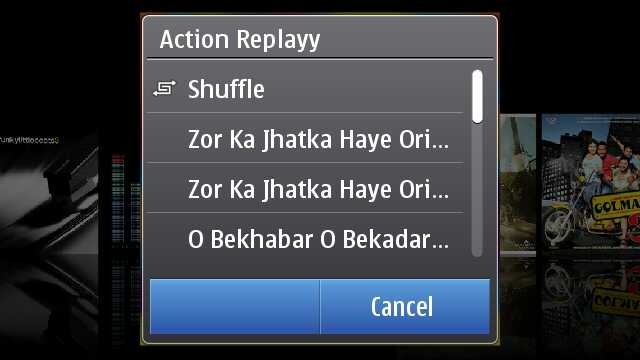
When in landscape mode, then the cover flow arrives by default or if someone might have messed with the settings, then you should choose Artists and Albums from options at bottom left after tapping the arrow key on the right top.
Touch any album and you will get a pop up in the middle of the screen with the choices of songs from that album or just shuffle the album songs to play.
Finding the cover flow in the portrait mode takes another route, where you have to go Artists and Albums and then touch any one album to get into the cover flow mode as shown above. You just slide and list of songs keep on updating in lower part, press on album and it starts playing from the first song. Isn’t portrait mode bit faster than Landscape?
One thing about Nokia that is not getting due credits is Ovi Music unlimited, downloading free music from Ovi Music Store might not be getting such trendy in India as of now, but it will be soon at least after launch of 3G services.
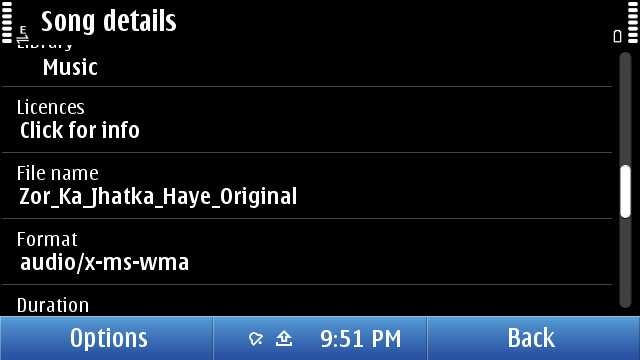
As usual, not only your can sort by genre, artist etc, you can get the details on the song as well. but sadly and strangely, there seems no way to search for some song. Might be a trouble, if someone has a huge collection inside their Nokia N8. I guess they will fix it by next firmware, they should.
Now over DRM, it may be annoying to few that they can not transfer their downloaded music through Ovi Unlimited to some other friend via Bluetooth, but that’s the way, Music Industry wish it to be. There been some confusions due to the post from Ovi Blog, but as much tested by myself, “MP3s downloaded from Ovi Music Unlimited is not DRM free”. May be sad news for some, but that’s the way it is.
Once running, Music player keep itself connected with Volume keys means whatever might be running in front, volume keys will serve only Music player e.g. Gallery.
Some readers specially asked me about the Equaliser thing, so putting it here. Though honestly speaking, I am not that advanced Music freak to fiddle much with it. There are some default presets only. Handy, but you can make a custom preset as of now.
Nokia N8-00: Movie player
Movie player on Nokia N8 was something that cleared my dilemma of buying or not buying Nokia N8 in a blink of eye.
Specs will say that it supports HD videos now and you say that one more addition. But hold it, do you know how big it is. See the above screenshot, check the resolution 1280×720, check the bit rate 2264 kbit/s, this is such a video that takes more than 50 mb for just 3 mins.
Do you really think that its just a simple addition? If so, then put a 2Gb BDrip file or VOB and try to forward by touch the progress bar. Its almost instant and now go to your PC with 2Gb or more RAM and then try the same on your VLC player with same video. Did you thought mobiles are always less performing that computers? Think again.
But HD video was not the part that won me, it was the support to multiple formats.
Even if it was not clearly mentioned on specs, it plays all your Xvid/ Divx/ Mkv/ mp4/ WMV/ 3GP/ H.264 formats, which covered almost 80% of my legendary collection of movies. What else would I wished for? Addition of USB on the GO means I could try any video instantly after borrowing some from PC of a friend.
Though true, its not a fool proof setup. There were some videos, special dual audio ones which will play without voice on it. There might be some strange or corrupted format that the video player of Nokia N8 cant deal with the way any VLC player of your PC does. There is no subtitles files support either (you can merge subtitles in movie file though via third party apps and play then), neither audio switcher if you are playing some dual audio file.
But hey!! are you talking about some media player on PC, its just a mobile. As of now, its a state of art best possible media support among the leading smart phones out of the box, not only Nokia. Yes! out of the box. You don’t need to install any core player, any smart movie player, you don’t need any converter on your PC to convert files for your Nokia N8. Just touch the file and it is.
That’s how it changes everything. I was in a train journey and the above was my complete setup for the theater experience. Movie files if not in your Nokia N8, then USB OTG cable and a flash drive.. then those stereo headphones that come shipped with Nokia N8. That’s it.
It was hard to take a snap of movie and forgive me for the blur here, but it was just crisp and clear as it can be.
May be its asking a little too much, but there are not many advanced controls like next video, increasing brightness etc. Just a tiny set of controls which hide them smoothly within secs, when you play a video and come back again once, you touch anywhere. But each of them works perfectly.
If you touch and hold forward/ reverse icons then it first goes by steps of 5 secs and then faster. Aspect ratio icon changes the video to fit the screen or 4:3 or usual 16:9. And yes the player will always run in Landscape and will remain full screen always.
I know it sounds weird, but I had a wild dream that what if they give a cover flow like Music player to it? I know its not practical, but I thought.
Though many would be excited, when VLC arrives on symbian finally, but I would say that will also face a great challenge to meet the level of performance with Nokia one. You could understand that how big praise it is. Thumbs up for the guys working for the core of Symbian. Next generation Nokia will sure will define new levels of Multimedia.
Nokia N8-00: Web TV
Sometimes you get hands on a few things that might be ahead of its time. I guess Web TV is something like that for Indian Customers at least as of now, when 3G services are yet to arrive and Indian TV channels not well prepared for Web Contents in the way they should have been.
When it comes to TV on mobile, then I remember my first handset ever. Reliance Moon Light in 2004 that was an entry level LG Handset that was bringing some B/W TV content over CDMA. Definitely, I was expecting to see something like that here. But phones have changes a lot till now.
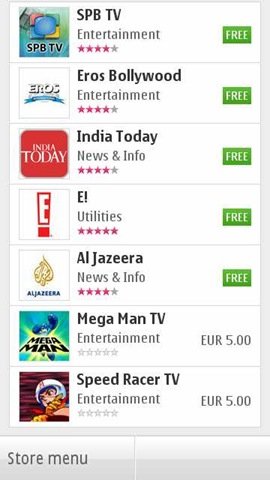
There is a Web TV Folder, which by default will carry above 6 icons representing 5 Web TV channels and one shortcut to Ovi Store. Unfortunately, some mismanagement here too. If you install a new one, then by default it seems to be going to Application folder rather than Web TV one or may be I might be messing up with something.
There are not much Web TV apps as of now. I seen two Indian names and downloaded them. Well.. I should say that they are not coping well. The apps are poorly made and neither are they service good quality video contents. And let me remind you, you better have a 3G or WiFi at least, if want an acceptable performance.
Like this EROS one. Shows promise in start and then end up show not so good quality videos. But again, its a perspective of someone, who is so used of watching DVD/ HD quality videos on his Nokia N8 now.
But with next app, I find that it was just a wrong apple. This time, its app from India today. Not a great navigation again, but sure, a better UI.
I noticed one thing that all of them not using the default player of Nokia, but emulating of their own. Kind of strange to me as I expected the player to be same throughout.
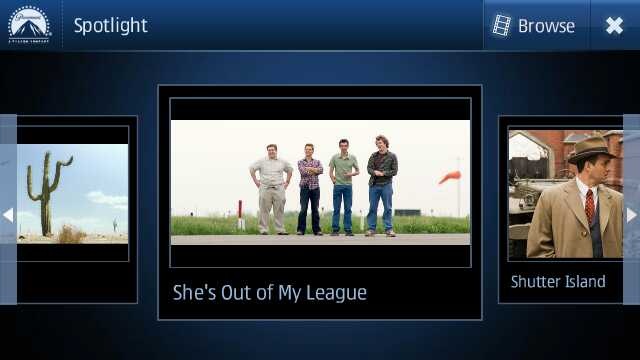
While Nat Geo, CNN etc had good quality video stuff with them (not sure how current the content was), the best UI I found with Movie Teaser app.
This sure seems to be designed for touch with Cover flow (that’s what I was talking about default Movie player). Not only UI is great but quality of videos too and this is one of those Web TV apps that like to play the videos in full screen with fit to screen mode.
Not only that but it brings some basic level info as well about the movie of course.
So, in all I must say, its a great move and wish that Indian channels and others may adopt it more quickly to make it worth rather than making people watching irrelevant contents from English channels only.
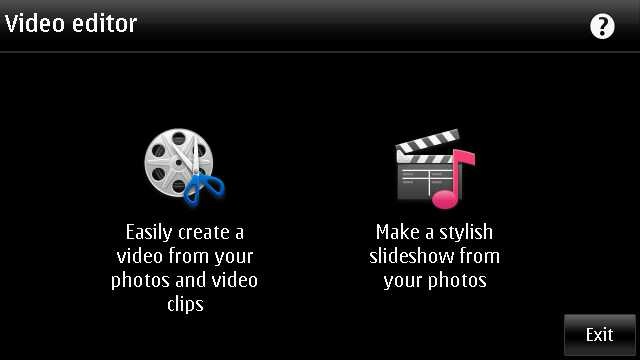
Nokia N8-00: Video Editor
The world changes from here. Big bloggers and experts will say that Nokia did just the same like iMovie of Apple, but its lot bigger than that. First its free of cost, second its shipping with Nokia N8 that still costing half of the price of iPhone 4G. Point is… its gonna reach much more hands than it ever would have with some pricy Apple.
Its gonna bring Video editing in hands of people, who would never experienced it ever before, not even on computers. And believe me, their start would be much more awesome than even the people who might consider themselves expert of movie editing now.
Let’s start with the simple option, creating a slideshow. You remember all the old Nokia phones were shipped with a Slideshow mode of showing pictures, we are not talking about just that. We are talking about creating a actual movie out of your chosen snaps and with different effects to choose from.
Sure its one of the most fun stuff on Nokia N8 and could keep you busy for hours if you had many awesome photos inside your Nokia N8 (who wont have) and its very pleasing that the design team behind this did a great job. Not stupid like you choose some pics and then choose some effect and then if not liked output then do whole thing again. You choose pics one and then could go for previewing it with each of the effect almost instantly.
Either selecting media or inserting pics or it might be adding movie title (overlay text), everything seems to be so perfect and I would say people should try it by their own hands to see how fast it is. Making full use of hardware acceleration and GPU, it sure will bring those Androids without GPU out of water on this.
Not only that the speed to saving the final video is awesomely impressive. Oh.. the output? Here it goes.
And one more
With Video editor, its the same awesomeness. Not only you can crop your videos in length, but could insert your own tracks and overlay effects in between when joining two videos. Most amazing part of it remains the speed. I never seen any of my phone going this much fast and even no desktop software handling video editing with this much ease let alone mobile aside. So intuitive .. so smooth ..
In the above video, I just added two videos in one. There is a lot more one could do with them like we seen in Slideshow.
This went long na.. I feel the same. Hope will be back soon with my review over Gaming part with big titles. Be tuned in and keep writing to me that what more you want me to write on. Nokia N8-00 still has more to write on… just I wish I would have had my hands on Nokia C7 as well to know that what’s more special: Nokia N8 or Symbian^3?
There are some of the shots that I taken on Diwaali night. Though I am not an expert on photographs, otherwise it would have been better as such lighting conditions as it takes a lot tweaking with settings like exposure conditions etc and I haven’t gone through that.
I really want to get in touch with some photographer experts to know that was it better if I would have kept the light exposure settings on low or high?
People across India celebrate this festival in their own ways, but soul of the festival is the same and so the joy is.
While in good lighting conditions, taking shots give you sharpness, in night, when you might be shooting without flash, all the points goes on the fact that how steady your hands were and what angle you chosen.
Wide angle shot on 9mp.
A simple Rangoli …
I am really thinking to read some books on lighting conditions and how to play with them.
I have not seen much shots from my fellow bloggers on Diwaali, so I thought to put a tradition #diwaaliN8
Without flash night Macro Shot in not so great light conditions.
Taken a lot of shots only these only.
The Hindu idols …
I am intentionally keeping Flash off all the time.
Check the difference between the flash and no flash shots. What about the above idea of lightening?
These fireworks shots are too difficult to take when you keep the camera on Automatic settings like I did with my Nokia N8.
In one shot, the focus was on one candle and in other, its on another.
Anaar shots. Too many sparkles to handle on automatic settings.
Fireworks and fumes …
So these were my Diwaali shots, how were yours and what you think I should have improved on? Please let me know.
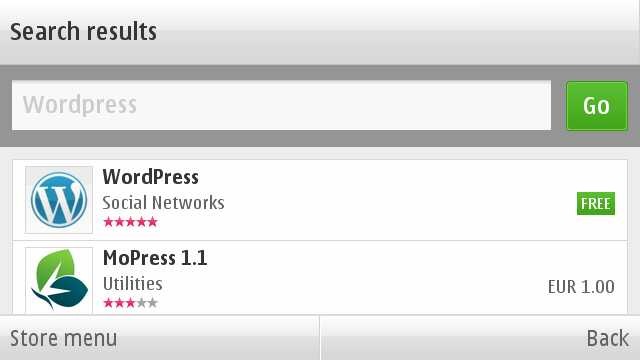
Finally the day has arrived and with arrival of official WordPress App, a long long wait ended for Symbian^3. Over those days, when after looking at names of Blackberry and iPhone on the home page of WordPress, you were feeling like hitting someone.
You must thank people at http://dev.nokia.wordpress.org/ for bringing this on and with this, one more point of my Nokia N900 vs Nokia N8 debate goes down. Now, not only we will be able to watch our movie collection on Nokia N8 without converting it, but also will be able to blog on the go like I did with MaStory on Nokia N900.
Lets know more on it.
Definitely when comes to look and functionality, this wordpress app is leaps ahead of the one I seen on Maemo and sure many will prefer it over MaStory, when very soon it will arrive on Maemo as well.
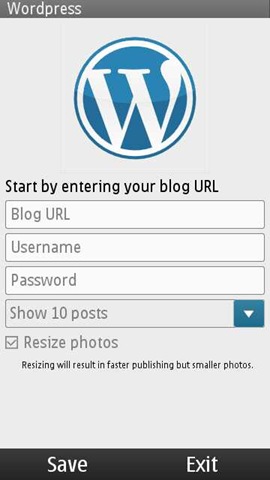
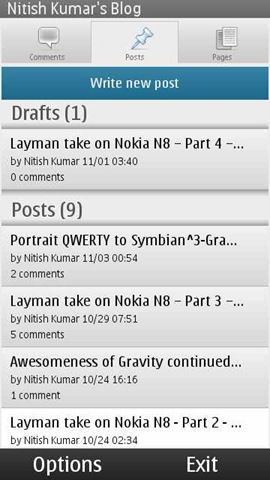
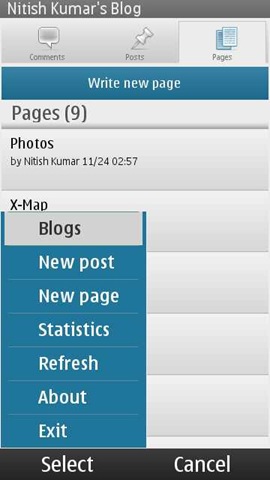
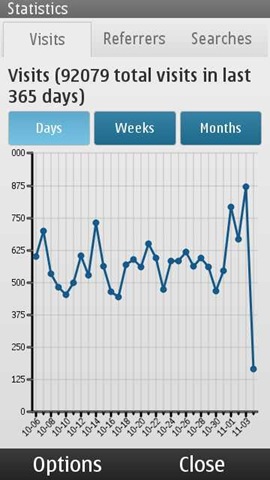
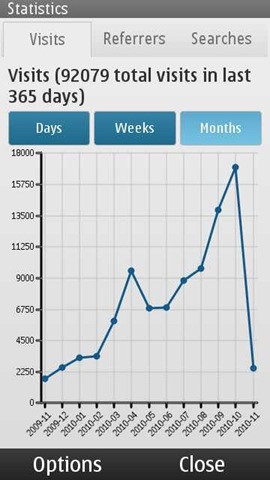
Just finish a few small details and you are ready for dealing with all the basics related to your wordpress.com or wordpress hosted blog. You can not only add new posts, pages or comments, but you can view even stats of your blog by some very easy and sleek looking interfaces.
If you want to reply some comment, then you can go from touch and hold on the comment and it will open up another page for posting the comment with some normal rich options like bold, italic, quote or link etc.
Though I do not find posting picture option here, but that also doesn’t exists in desktop version as well easily.
Starting a new post is also simple and with all the options like password protected, draft etc.
It hold all the options like adding tags, categories, photos and even videos.
But also note that typing on a mobile app with not so rich editor meant to the fact that you have to deal with some of the basic HTML tags like the give below
There is an option of adding location to the post, but I think its not implemented well till now as I was not able to add it by detecting automatically.
May be some fault from my handset side.
Stats are something that each of the blogger get obsessed about in early days like mine and so its really wonderful to have them always with you on the go.
I must say that the Qt based interface has everything that one needs to get impressed with it and quite handy, if they keep connection and minimal data requirement in mind.
Some big bugs that should have been fixed
Well I must say, I am also not happy about the ways it functions odd times. There are still many bugs that shouldn’t have been here in the real world, when an app officially hits the stores. I understand the eagerness of people to get it as soon as possible, but its part of the job from developer side to test it fully.
Some of the issues are like …
1. It wont open up if you are using WAP connection
I am wrong then someone please correct me, but I have not got it opened yet on WAP connection. May be the reason is, it tries to load last 10 posts in the system. I don’t think that is a good idea. More than a blog managing tool, it also must have been prepared as a blog posting and casual editing tool. That would have made more sense. Definitely for opening only, it must not go to web directly.
Update: It looks like this was the first time glitch, but still even if I am able to view the old cached content now. I am not yet been able to add/ edit. It seems to have removed my account completely though cached entries are still here.
2. I am not sure that if there is an auto save feature yet implemented in it
When you are talking about an app to post blog etc, then Draft feature becomes a must, specially much more big must, when you are talking about a mobile app.
Update:There is no settings for in it for the same at least. Checked that. MaStory has it and they should have taken some good things from there.
3. It freezes kind of too many times without giving a way out
As of now, the ovi store version doesn’t seem to forgive you, if you made some mistake at some point of time. I found the latest on the development blog a little better in this way. But see what happened with the official Ovi Store version.
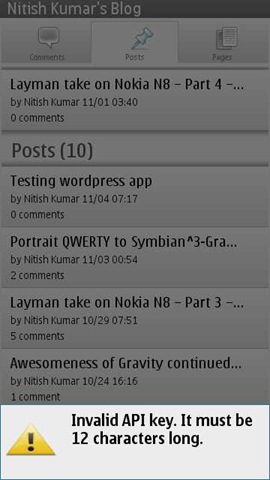
My only mistake was to put the wrong API key and it just freezes right there without giving any other option than going to task manager and kill it, which doesn’t promises that it will start fine in next.
Well!! is it the issue with whole touch UI, when some app go untested thoroughly?
4. To reply a comment, one should not need a whole post
That some kind of stupid design. Why the app needed to load the whole post again, when he has to reply just one of the readers comment? I guess the app is being tested in some environment with cool and strong wifi connections only. The world is bigger than that. Open up please.
5. No advanced editing options
Yes there are basic ones, but nothing like page justification etc. May be I will find out them like I got to see on MaStory on second day only, but as of now. I am not able to. Thanks to connection issues as I am using Vodafone WAP connection only.
So, these were a few early annoyances, I found in first shot. May be I will find some more or may be it will be lesser soon. But sure, there is always scope for improvement.
Please add up in comments, if anything I might have missed. Your tips are always welcome, lets make this place happening.
Its very easy to blame things and saying that Symbian is dead, but it takes genuine talent and vision to show that its not the technology, but its what you do with it. The transparent and split keypad design of Gravity that I was talking about in last post, finally arrives in Alpha stage and available for reviewing it, which stands for just another example that its not rocket science to fix the things.
If you might have given such a regarded name like Gravity, then it becomes difficult to exceed the expectations from himself and it janole, who always came up to raise the bar. Let’s see, what he doing with Symbian this time ..
What special about this custom keyboard?
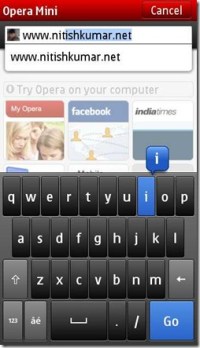
Not the very first time, when someone might have taken the task of creating a custom keyboard for some app only. If you are unable to recall, then let me remind you, you have seen the keypad of opera mobile.
But when it comes to design something like so native yet so important then usually developers feel out of innovation. While it doesn’t look so in first glance, there are too many minor details that could go bad, when designing a keyboard, like right size of keys (see smaller and almost unusable Opera Keys) or no mention of word count in native Non-QWERTY keypad on Symbian^3 as of now at least. Not only that, but even most basic things that people always taken for granted, when get designed from ground up, the suddenly become a challenge.
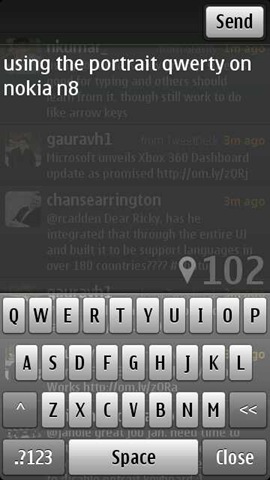
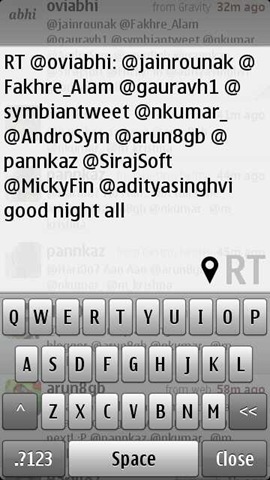
Though its only an Alpha build and still lots of things are missing here, but in the above screen shot, you find the following things special:
1. Transparent design, which don’t let you slip the context for which you were writing 2. A glossy touch in buttons and background behind them 3. Word count and that too in enough big fonts +1 from my side 4. An entire new, generic or Google map kind of Geo Tag sign, look more relevant than earlier now 5. Largest screen real state provided to the text in comparison to others 6. A big space bar in the middle of bottom 7. Send button on top means no accidental sending
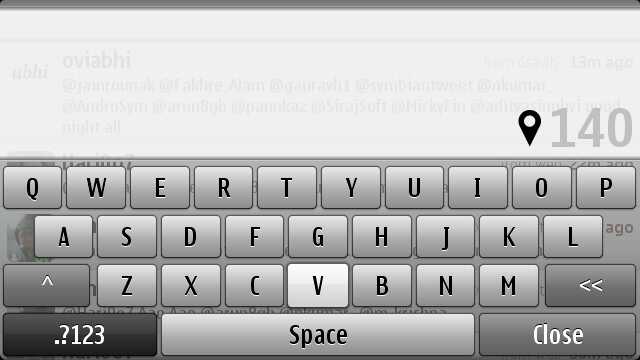
Well, the very first thing you will get comfortable with is gonna be the landscape mode due to bigger room and bigger keys, but for some strange reasons, the send button is missing here (obviously just got now).
In the first build that was 1.32 6670, there was a little space remaining on the top, which you can’t really notice easily but could have taken advantage by sliding the finger upside and the tweet was posted. Though it was a annoyance too as caused many accidental tweets by me, when I was trying to adjust some words. Anyway, janole removed the option with second build that is 1.32 6671.
On pressing the close button, then tweet will go in draft mode and then you can use the same old send from there, though same wont be the case when you will be sharing some pics from images section means you have to go to portrait after typing there.
The geo tag get a blue color here, in place of green earlier, dark grey when selected and trying to get a lock, faded grey, when not opted. Though I have not figured out that what color does it take when get a network based lock only, which was orange in case of earlier gravity build. Still I guess Green and Orange were better.
The up arrow icon in left side, works for caps lock and the double arrow in the right works for the backspace (though backspace doesn’t work like Swype for deleting whole world in once), but the most exciting thing is inside the second screenshot if you would have noticed the highlighted V letter. Yes! you guessed right, Janole has not only raised the bar by bringing the split keyboard kind of design, but also the multi-touch (at least for one option) to the keypad.
You also find the special character support here, like the one shown in first screen shot that appears when you press and hold ‘P’ and similar with some other keys which might bring some variants.
P.S. Forgive for that annoying sign of connection failed due to poor connection at my place.
Keeping the numeric keypad behind the press of bottom left button might be uncomfortable for people, who might have gotten much used to of Swype, but still I will call this a neat design.
Reply/ Send/ Retweet buttons appearing in portrait mode only as of now. Though, if your retweet exceeds 140 character limit, then you wont be able to see the button, even if touching at the same place will still work for sending off the tweet.
What’s still pending and could be expected in final build?
Not sure that Janole took this task as just an addon to Gravity or really thought since start that how big it could be, but I am sure that initial responses might have given a clue that people really wanted an alternative of default layout. But when we look closer then the smoothness of the design is still without some very basic things.
There is no scroll bar kind of thing, which is not a big thing as whole of text box system on symbian is designed that way, but still it may cause problems sometimes like you can see in above screen shot. Last line is just unreadable and you have to go by guesses only. I wonder, if the same has been reason behind the fact that Janole never tried to implement twitlonger inside Gravity as that feature was asking for a scrollbar implementation and hence weight over UI. This has been corrected by @janole with version 6671.
As of now, keyboard is not customizable. No vibration on keys or option to just disable it completely.
Absence of arrow keys is sure a big pain provided there is no predictive mode as well.
You can not select some portion of tweet to delete or copy, which come in contrary of the excitement due to availability of Ctrl + V option.
When Janole is designing this keyboard taking Gravity in mind, then ‘@’ must have been prominent and easily accessible.
As of now, it doesn’t look like Swype gonna integrated in it, while everyone will want so.
Besides, the above, there are something, which we kept on asking from Janole from quite a while like auto completion of names, which sure gonna be possible once the predictive tying and custom dictionary makes the way to here, which will be a toll over the performance as well. Not sure, if it would be an easy thing to do.
Here is the download link for the same Alpha Build of Gravity, give it a try and feel that its not the case that Symbian is dead, its the way its being handled by developers, who are probably confused in fragmentation.
So these are some of my observations and inputs about this Alpha build. Please comment, if you want some more or I missed something important here. Yours words will reach to Janole.





















































 Nitish Kumar's Blog