Google Dictionary – some announcements come silently

“ Dec 4, 2009, Google very much unlike to its other product offerings,  ‘silently’ added one more service is its service catalog named Google Dictionary with a very clean and simple yet powerful interface offering meaning of words from 28 different languages and also translate terms from or into English. May be it was not announced as it was already part of Google Translate and now it just came out to be an independent product.

Interesting na? Once a misspelled word Google (actual spelling was Googol) first got included in Oxford English Dictionary in July 2006 and now coming up with its own dictionary. 🙂

Google Dictionary


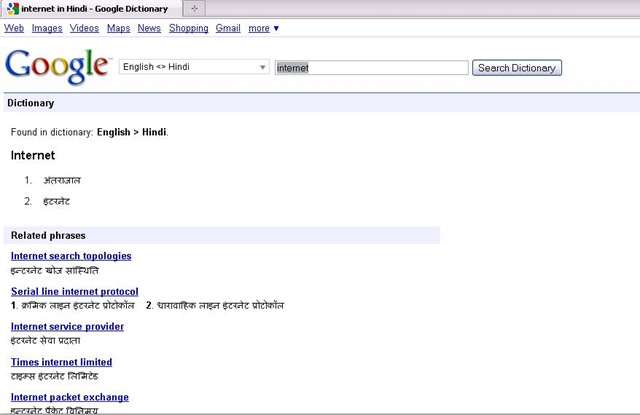
Now, something about Google Dictionary; even if you might not have started using Google Translate, have you ever noticed that if your query includes a single word or it’s an expression, Google links to the definition in the blue bar that mentions the number of results. Check the pics attached for reference.

Google dic


Google used to offer “define:word” parameter to get definitions, and now the dictionary as an independent product, is the natural extension of that.

Its a welcome move for normal users, who are addicted to Google and wish to straight answers for their definition searches with synonyms, but advanced users might be missing answers.com as earlier Google was picking definitions from there, which was extracting information from encyclopedias and aggregating information from various sources.

Google Dictionary displays synonyms, definitions, related phrases for the word and also web definitions from other places. You can star the words you searched using using the star before the word. You can later see starred words for your reference.


Ohh!!! are you asking that why to use Google Dictionary or how to use it? Just think once have you ever needed to press any help button for using any newly launched Google, like products from other companies like Microsoft 😛

photo of Nitish KumarNitish Kumar
 

Change to Google Public DNS – it rocks

Dec 03, 2009 – As an effort to make web browsing more better, the internet Giant Google is coming with its brand new service Google Public DNS: An experimental Public DNS Resolver. Thanks a lot to Devil’s Workshop and the article of Aditya Kane to get me introduced to the news today on Dec 06, 2009. I really think that I should take some time out of my schedules and should increase my awareness a little more.

google-logo


DNS for sure plays a major part of you browsing experience as its kind of an Internet Phone Book or an Address Book, which makes you reach to the exact page you are looking for once you typed or clicked a URL. Obviously, as much faster you can find the exact number (IP Address here), you could dial or as much faster, you could find the address from address book, you can reach to the address. So, sure its a great move on basis of the level of services that Google has provided yet.

If an ISP’s DNS is down or facing issue, then it doesn’t get that much attention as much it will if Google’s go down. Its under high scrutiny once announced. So, sure we could rely on it on the basis of our past experiences.


Its not been the first attempt to bring any Public DNS Service (Non-ISP) into play. OpenDNS, Level3, Scrubit and many more players are already out there, which are providing faster DNS resolution than your ISP itself and you could test yourself for fastest DNS Servers around you using the following link. But when you get a name like Google in the race, then you get assured that you web experience is going to better and better due to the level of quality and competition it will bring in. 

Personally, I have not used DNS Servers other than my ISPs or other than OpenDNS, so I could compare this service with these two only, but my experiences always found OpenDNS better than any of the ISPs. Till now, whatever I got to test, I found Google DNS is outperforming OpenDNS and Level3 in all the way, check the technical reference


Results shows that we have a very very good reason to switch over Google Public DNS (8.8.8.8, 8.8.4.4), but what might be concerning many of the people is the motive behind it. Why Google brining it in? Will this not gonna to enable Google to keep more close check on everyday users internet habits and so improving its Ads system more by that? Will this bring power to Google to show Ads on even mistyped URL pages, which were in hands of ISPs only till now? Is not many privacy concerns out there?

Google has partially dispelled both of the concerns saying that its not gonna to store the data tied to particular user for long and will save the data only if agreed from the users itself and that too will be only anonymized ones.


opendns_logo_300 level3_logo

Personally, I am not much concerned about these privacy things as already Internet Explorer, Firefox, Chrome or Google Searches (when we logged in with Gmail) are gathering all of our internet habits, whether a normal user knows or don’t know about it. But what I am really looking for, is that “When Google is going to provide us the control over this Public DNS System like the way OpenDNS does?”. With OpenDNS free account, you can customize your redirection search page with your own logo etc, could watch over internet habits of your users yourself, have your own filtering system or typo correction. Once that will be done, Google Public DNS is sure gonna to outrun OpenDNS and others.

So, why waiting for, start using Google Public DNS for a better web browsing.

photo of Nitish KumarNitish Kumar

Sehwag missed it

As I feared in last paragraph of the articlel. Sehwag missed the chance to be the first one to score triple centuries three times in test as he got out on 293.

I guess, he is behind Bradman now, who missed the chance to score three triple centuries. Bradman missed chance on a score of 299*, when he runs out his partner while going for the last run. Not sure about the status of Lara that what was Lara’s near 300 score.

I am feeling very sorry for him and his fans all over the world, but still hoping that he will get the chance again as he just played 72 tests till now and many many more has to come yet.

“He will make it”

Sehwag on edge of three triple centuries

Can you believe it? What just happened on Third and final Test between India and Sri Lanka!

Playing against a big score of 393 from Sri Lanka, somewhere a pressure in mind that winning this last test could make India on top of ICC Test Ranking and here comes the answer from India 443/1 in just 79 overs on a run rate of 5.61 (This is also their top score for a day by the way).  Indians took control of third test on day 2by outplaying Sri Lankans in almost every department. First they wiped out rest of two wickets on a cost of just 27 more runs in just half an hour and then three brilliant innings including the leading face of ruthless Cricket on its own days: Virender Sehwag with a score of 284* in just 239 deliveries.

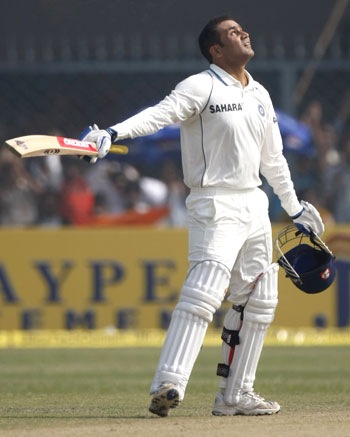
Virender Sehwag


Sehwag has really got something in him. Once upon a time, there were many people out there making questions over his class and batting techniques. It was said that such a ‘mindless’ batting style will not take him much far and for the ‘sincere’ Test Matches, he was thought to be out of league.

But today, after hitting fastest 250* (207 deliveries) and the second fastest double century (fastest is of Nathan Astle) in this match with only 168 balls used, he is also on edge of about to be the first person in the world, who will make three test triple centuries in his career (Till now, he stands with Bradman and Lara, who share two triple centuries each). Its already been his sixth 200+ score (Could he break the record of Bradman of hitting 12 double centuries?) and 17th Test Century out of 72 test matches he played, with an impressive batting average 52.86. He has crossed Dravid today in front of him as Dravid has scored five double centuries, while Gavaskar and Sachin has scored four each.

A very interesting thing to watch is the fact that he is included in the list of top 10 fastest double centuries five times, while he scored six till now, which is sufficient to tell that what thrill his big innings have and why he is known as one of the most dangerous player out there.

He smashed the bowling on a Brabourne Stadium pitch that offered a pretty bounce. His inning included 40 fours and 7 sixes, sufficient to tell us that what the match was. First Murli Vijay, a new face opened with Sehwag (only due to unavailability of Gambhir due to his sister marriage) scored 87 runs in 121 deliveries with 10 fours and 1 six and held an opening partnership of 221 with Sehwag. After his departure, Sehwag had another long partnership of 222 runs with Dravid (62*) and really floored Sri Lanka all the way.

I am really really looking for his next 16 runs with holding my breaths as I know early morning sessions has taken many dreams shattered. I along with all Indian out there, wanna scream loud,

“Sehwag!! this is the chance, make it”

Sarg-The Layman Reporting Tool For Squid

So, you got your Squid Proxy Server up and running, got your management impressed and moved into a controlled scenario. But is that really make full sense, if you still don’t know what exactly going on under Squid? I mean who is accessing what and for how much time and in what way etc. etc. Only after this knowledge, you would be able to know what to block next or what to allow!

Yes! the basic way is to go through /etc/squid/access.log, but considering the huge size of this access log file, its not convenient at all, neither the format of access.log itself that pretty to read or present. What we require is a tool that could tell us things like who’s accessing what and how much traffic has been passed through squid like stuffs? Here is our simplest solution: SARG – Squid Analysis Report Generation

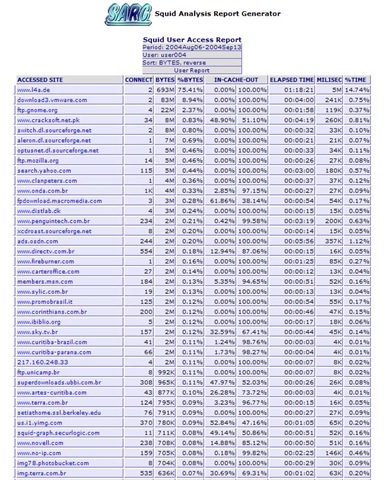
Here are a few screenshots to give you an idea that what it can do for you

Report link over a period

Users statistics

What users are downloading

Which sites are being accessed

The last screenshot tells us that which sites a particular user/ IP address is accessing and the first-n-second screenshots tells us that how much traffic is passing through Squid and what is the distribution? Probably much of what we actually wanna know.


Here it comes that how to get it in action in layman’s way:

Getting SARG Installed: First you need your apache running means you must be able to get your apache page on hitting http://localhost and then proceed to get the RPM for SARG first. As I am taking the case of CentOS, so the way is to do

wget http://dag.wieers.com/rpm/packages/sarg/sarg-2.2.1-1.el4.rf.i386.rpm

This will download this 306 kb rpm to your current directory and then you just need to do

rpm –i sarg-2.2.1-1.el4.rf.i386.rpm


Configuring SARG: It places a sarg.conf in /etc/httpd/conf.d to take care of sarg-reports web form, while the other sarg.conf places itself in /etc/squid, where you need to edit it and commenting the line deny from all, which actually enabling only localhost to see the reports and denying all others. After that you can either place allow from all or write lines for providing report access to certain defined IP addresses only. After that just type the below and you are ready to go:

service httpd restart


Running SARG: SARG automatically places its scripts in /etc/cron.daily,  /etc/cron.weekly, /etc/cron.monthly, which will keep on performing its job without any intervention required. You need not to do anything for it. Although if you want to generate a one-shot SARG report, then you can always use

sarg -ix


Hope you will like the way, it does the job of Squid reporting for you in most simplest yet most effective way. In next, I will try that how can these reports could be customized to make most of it.

photo of Nitish KumarNitish Kumar

I’ll Skype you – Gtalk Me

One of my friend Amit Sinha asked me to laid a few words over this and here I am.

“ In those days, when chatting was meant to sending text to others across the globe for free, many of us always imagined that when will the day come, when we will free from the burden of these high charges for voice calling with our online buddies across the globe? “

Time passed and it didn’t took much longer, when we now see Voice/ Video Calling over internet (for free) integrated in almost all leading IMs like Gtalk, MSN or Yahoo. There were days, when we were hooked with our Yahoo Messengers or MSN ones, but due to its light weight communication and its integrity with other already established services from Google (Gmail, Orkut etc), Gtalk moving a step ahead of its competitors.

Sure a question arises that is it worth for new users, who haven’t used Skype yet to go for it, if they are already on Gtalk? I thought to discuss the same. Here is what I found.


talk_logoonline


Skype; a name which is impossible to be ignored by people using any means of internet communication. Even if you are not using it, then sure would have heard of it, after all more than 20 million people are over skype at the same time. That’s a big thing, a real big thing. The biggest name of VOIP communication has recently been in news for its being sold to EBay, then over conflict about shares and then joining of Co-Author of SIP itself as its Chief Technology Strategist.


Gtalk; Google’s approach to IM adds Internet Calls, File sharing, notifications, voice mailbox, video calls and lots more to make most richest experience of over the internet communication. Gtalk got a good start due to its efficient use of XMPP and then its always growing with addition of Gtalk in Gmail, Orkut etc. The latest addition of Google Voice will make a more interesting package as it would allow users to forward calls to their other numbers and in case of not picking up to voice mailbox.


We know what Gtalk is, lets start with Skype.

What is Skype?

Although known for being giant of Internet Voice Communication, Skype is not just only that. It’s both software and bundle of services (like the way Google talk is having Google sites, Docs etc along with it). What makes it different from other VOIP offerings is its being P2P based like Kazaa means that it runs over a mesh of interconnected PCs spread across the world, which assures that it would never run out of resources.

In recent times, it got a threat from biggest innovative Giant of internet industry; Google. GTalk now features with Video\ Audio calling and sure less bandwidth consuming than the earlier one. Many people say that there is no competition in these two applications and both of them are in their own league, but let me list the features common to both the application:

  1. IM and Group Chat
  2. Knowing online status of other users
  3. PC-to-PC Calls (VOIP)
  4. One-to-One Video Conference
  5. Transferring files
  6. Voice mail


Features exclusive to Skype are:

  1. Search into a Worldwide Skype User Directory
  2. Conference call up to 25 users (Although its not official, but Gtalk also could do it, check the link)
  3. Calling to Landlines and phones worldwide at a cost
  4. Send SMS at a cost
  5. Call Forwarding


Features exclusive to Gtalk are:

  1. Integration with Google Apps like Google Docs, Calender etc.
  2. Consumes less bandwidth
  3. Client is not limited to just an application, but there are many other options like web client, badges, integration in other services


Here is what I think, for a free user, Skype has only a special thing that you can make calls even if you don’t have a PC as this service has number of phones which don’t require a computer, but for all other users, Gtalk is much light weight and consume lesser bandwidth than Skype.


Although one friend of mine Amjad Ali, still assuring me about Call Quality of Skype, due to which, I will give a few days to Skype with my Skype ID mr.nitish.kumar

For downloading any of these application, just click over respective logos and downloading interesting books over Skype, use following links:

Skype For Dummies
Skype Me: Single User to Enterprise and Beyond
Skype Hacks: Tips and Tools (change the extension from pdf to chm)

Movienizer-Organize your movie collection

After working over E-Book management with Calibre and Pictures management with Google’s Picasa, here I am to discussion about managing and cataloging a large movie collection with another open source solution: Movienizer.

There are many usage for a movie organizer like keeping tracks of all your DVDs, CDs, Blue Rays, Cassatas etc, but here my intention was to find a software, which could scan through physical movie files and then could arrange the related info like actors, release date, snip set of story and ranking etc. So, that we could find the movies on the basis of actors, companies, ranking or genre based and that too without lots of manual efforts.


Not only free software, but Movienizer has a smooth-n-simple interface and on top of that its so simple to use.

movienizer movienizer1


With Movienizer you can easily find and collect information about your favourite movies. Do you like some actor/ actress? Want to find out where he or she is also starring? No problem, just launch Movienizer, select the actor/actress and click “download” button, you will get the complete list of movies with the given actor/actress, plus important information and photos. In the same way, if you want to learn more about some particular movie in the list? Again, you just need to click and “download”.

Movienizer will help you keep track on everything concerning movies. Even this has a loan manager, which can keep track that whom you lending movies. Your personal rating system could advise you for watching some movie on some holiday. Not only this, but you could define movies that you want to see next, inform yourself about future projects of your favourite directors.

There are lots of feature lying under hood of this open source software, which you will be exposed only on the basis of what you do with this. Personally, I found this one a great aid for me like Movie Maniac.


Confused?? Is this of any use for you?

Give it a try, if you have a large collection of English movies (as it fetch information with IMDB, so I guess not that helpful for Hindi movies) and a so so internet connection.

photo of Nitish KumarNitish Kumar
http://nitishkumarsays.blogspot.com
http://scifireviews.wordpress.com